
How to fix Discord error "Unable to confirm payment method" in Windows?

Prefer to fix it yourself? The manual steps follow.
- 7methods
- 5 to 20 minutes, longer when the bank must act
- Easy
Applies to Discord on Windows 11 and Windows 10 (desktop app and browser), macOS and Linux; purchases of Nitro, Server Boosts and Shop items paid by card, PayPal or a local payment method
7 methods in this guide
I have been using Discord Nitro for several years and at the time of the renewal I noticed that I lost access to it. I then checked the payment history and Discord is not accepting my payments with an "Unable to confirm payment method" error.
Unable to confirm payment method means Discord could not get your card or account accepted while it was being added or charged. It is a billing error of the Discord service, not a Windows fault, and the words after the colon say who refused. Read that ending, enter the card details again once, and call your bank if it says declined.
Nothing is wrong with Windows or with the Discord app. Open User Settings > Billing and add the card again, with the number, expiry date, CVC and billing address exactly as your bank has them (Fix 1). If the message ends with a decline, only your bank can lift it (Fix 2). After several failed tries, stop and wait before one more attempt (Fix 3). Discord itself says its support team cannot assist further with a card the bank refuses.
| Error | Unable to confirm payment method, usually followed by a colon and a reason, for example "Your card has been declined" or "A processing error occurred". |
|---|---|
| Where it appears | In the Add Payment Method window and at checkout for Nitro, Server Boosts and Shop items, in the Discord desktop app and at discord.com. A failed renewal shows as Failed under Billing > Transaction History. |
| Main cause | The card form or your bank refused the card while Discord tried to save or verify it: mistyped details, a decline by the card issuer, or a bank check (3-D Secure) that was not completed. |
| Fastest fix | Add the payment method again with details that match the bank's records exactly (Fix 1). For a decline, call the bank before you try again (Fix 2). |
| Also written as | Unable to confirm payment method: Your card has been declined; Your card does not support this type of purchase; A processing error occurred. Related: This payment source is invalid (code 50048), Duplicate payment source, Payment Authentication Failed. |
| Affects | Every system that runs Discord. The error comes from the payment, so reinstalling Discord or repairing Windows does not change it. Subscriptions bought in the iPhone or Android app are billed by Apple or Google and fail with other messages. |
| Discord's status | Not a bug with a patch. Discord's help page says that if its card checks do not help, its support team "cannot provide further assistance" and recommends your bank or another payment method. |
| Time to fix | About 5 minutes to enter the card again. A call or chat with the bank for a decline. A wait of unknown length after too many attempts. |
| Where the cause is written | In the text after the colon, in User Settings > Billing > Transaction History (Pending, Failed, Canceled) and in your bank's app, which shows a declined or pending DISCORD* charge. |
Facts checked on 14 October 2026. Steps written for the Discord desktop app and discord.com in a browser (web client read on 14 October 2026); the steps are the same on Windows 11, Windows 10, macOS and Linux.
What "Unable to confirm payment method" means on Discord
The sentence is a fixed heading in the Discord app. We read the web client that discord.com serves today: the text Unable to confirm payment method is its default message for any failure while a payment method is created or confirmed. The app shows it when the card form, the bank check or the saving of the method does not finish.
The part that matters comes after it. When the card processor returns an error with a text of its own, the client joins the two with a colon. So "Unable to confirm payment method: Your card has been declined" is Discord's heading plus the processor's reason.
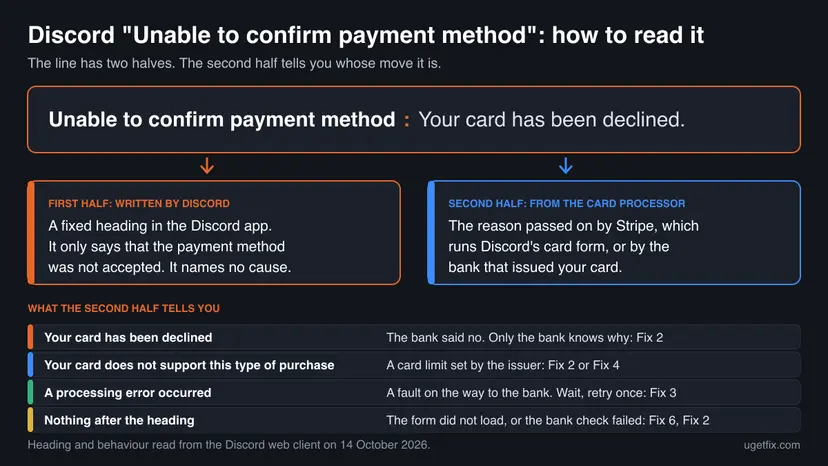
| What you see after the heading | What it means | Whose move |
|---|---|---|
| "Your card has been declined" | The bank that issued the card refused the request. Stripe, the processor, documents that most declines arrive as generic and that issuers discuss the reason only with the cardholder. | Your bank: Fix 2 |
| "Your card does not support this type of purchase" | The wording matches Stripe's decline code card_not_supported. The issuer does not allow this card for this kind of payment. | Your bank, or another method: Fix 2, Fix 4 |
| "A processing error occurred" | The wording matches Stripe's processing_error: an error while the card was processed. Stripe's advice is to try again, then to contact the issuer. | Wait and retry once: Fix 3 |
| A text about the number, the expiry date, the security code or the postal code | The card data did not pass the form's checks or did not match the bank's records. | You: Fix 1 |
| "The token has already been used" (a search readers make) | The wording matches Stripe's token_already_used: the one-time code for the entered card was sent twice. Start the form again from the beginning. | You: Fix 1, Fix 6 |
| Nothing after the heading | The form could not be loaded or returned nothing, or a payment that waited for your bank's confirmation failed. | Fix 6, then Fix 2 |
Discord's web client loads its card form from Stripe, a payment processor, and the page also carries keys for two more processors, Braintree and Adyen. Discord never decides whether your bank approves a card. That is why its own help article ends with the bank: "We recommend contacting your bank or using another payment method."
We matched the endings to Stripe's documented codes by their wording. Discord does not publish such a list, and we could not confirm which payment methods run through which processor.
This payment source is invalid, Duplicate payment source and other Discord billing messages
Readers reach this page with a dozen different messages. Most of them come from Discord's own servers, not from the card form, and each has a number behind it. The table lists the texts as they stand in the Discord client today, with the code that the client ties to each one.
| Message | Code in the client | What it means | Start with |
|---|---|---|---|
| This payment source is invalid. | 50048 (INVALID_PAYMENT_SOURCE) | Discord's server did not accept the payment method. In the client code, a captcha that is closed without being solved is filed under the same code. | Fix 1, then Fix 4 |
| This payment method was declined by issuer. Please try a different payment method. | 100054 (CARD_DECLINED) | Your bank refused the charge. This is the server's wording for the same event as "Your card has been declined". | Fix 2 |
| The card was declined due to insufficient funds. | 100107 | The balance or the credit limit did not cover the amount. | Fix 2 |
| Invalid payment source billing address. Please update your payment source or billing address and try again. | No number shown | The address does not match what the bank has on file. Discord's FAQ calls it "Billing address is invalid". | Fix 1 |
| You've attempted too many purchases too quickly. Please wait a bit and try again! | HTTP 429 | A rate limit after repeated attempts. More attempts keep it alive. | Fix 3 |
| Payment Authentication Failed, "We were unable to authenticate your payment. Please try updating your payment method." | No number shown | A payment that needed your bank's confirmation (3-D Secure) did not get it. | Fix 2 |
- Duplicate payment source. This text is not in the client's English strings or in Discord's help centre, so the server sends it. By its wording, the card or account is already saved. Check Billing > Payment Methods before you add it again.
- Unable to create payment source token. Also a server text. A token is the one-time code the card form creates from your card data, so the form did not deliver one. Start with Fix 1, then Fix 6.
- This payment method cannot be used and Sorry, this payment source cannot be used for redemption. Discord explains the second one: the method cannot cover a temporary hold, which prepaid methods such as GCash never can. Use another method: Fix 4.
- Address line 1.
line_1is the server's name for the first address field. An error that names it means the street line is missing or was not accepted.
Why Discord cannot confirm your payment method, from most to least common
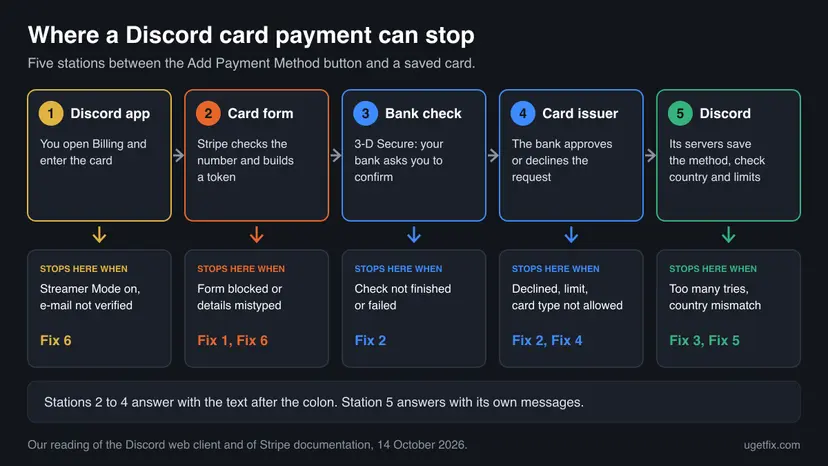
Most often the card data or the billing address does not match the bank's records, or the bank declines an online charge it did not expect. Less often the bank's confirmation step is skipped, or repeated attempts trip Discord's limit. Rarely the card form itself does not load. Nobody publishes how often each cause occurs, so the order follows Discord's own checklist.
| Cause | How to tell | Who fixes it | Fix |
|---|---|---|---|
| Card number, expiry date, CVC, name or billing address differ from the bank's records, or the card has expired. | A message about a field, "Billing address is invalid", or a generic decline right after you type the card. | You | Fix 1 |
| The issuer declined the charge: online or foreign payments switched off, a spending limit, a fraud rule, low funds. | "Your card has been declined", "declined by issuer", "insufficient funds". The bank's app may show a refused DISCORD* charge. | Your bank | Fix 2 |
| The bank's 3-D Secure check, or Discord's own e-mail authorization, was not completed. | Payment Authentication Failed, Action Required, a Pending line in Transaction History, or the bare heading after a bank window. | You and your bank | Fix 2 |
| Too many attempts in a short time. | "You've attempted too many purchases too quickly", or every new attempt fails at once. | Time | Fix 3 |
| The card type or the method is not accepted for this purchase or in your country. | "does not support this type of purchase", "cannot be used", a method missing at checkout. | You, with another method | Fix 4 |
| Your location, the billing address country and the account's Country/Region do not match, often because of a VPN or travel. | "You can only add payment methods matching your current Country/Region", a currency message, prices in an unexpected currency. | You | Fix 5 |
| The card form is blocked or the app is in a state that forbids payments. | The heading alone, an empty card form, Streamer Mode on, an unverified e-mail address. | You | Fix 6 |
| Discord's payment system has an incident, or it holds a saved method as Invalid. | The Payments component on discordstatus.com is not operational, or a saved method keeps the Invalid tag. | Discord | Fix 3, Fix 7 |
Clearing the browser cache, reinstalling Discord or repairing Windows does not change what a bank answers. Those steps belong to a form that does not load (Fix 6), and even there a restart and a browser test are enough.
How to fix "Unable to confirm payment method" on Discord
Fixes 1 and 2 cover most cases: the details you typed and the answer of your bank. Fix 3 is for the limit after repeated tries. Fixes 4 and 5 deal with methods and countries that Discord does not accept together. Fix 6 repairs a card form that does not load, and Fix 7 is the route to Discord's billing team.
| What you see or have | Start with |
|---|---|
| The message appears right after you type a new card, or names the address, the postal code or the security code. | Fix 1 |
| "Your card has been declined", "declined by issuer", "insufficient funds", or Payment Authentication Failed. | Fix 2 |
| You tried five or more times, or you see "You've attempted too many purchases too quickly". | Fix 3 |
| "Your card does not support this type of purchase", a prepaid or virtual card, or a method that is missing at checkout. | Fix 4 |
| You use a VPN, you are abroad, or the message mentions Country/Region or currency. | Fix 5 |
| Only the heading with no reason, an empty card form, or Streamer Mode is on. | Fix 6 |
| A saved method is tagged Invalid and still fails, or a pending charge stays longer than 10 business days. | Fix 7 |
| Nitro renewal failed and the subscription shows as past due. | Fix 1, then Fix 4 |
Fix 1. Add the payment method again with details that match your bank's records
5 minutesLow riskThe error appears while you add a card, after a card was replaced by the bank, or when a renewal fails on an old card.
Discord's own checklist for a failed payment starts here: the billing address must be current and match the information filed with your bank, the card details must be entered correctly and the card must not be expired. A saved card cannot be corrected in place, so a clean entry is the reliable way.
- In Discord, select the cogwheel next to your name to open User Settings, then select Billing.
- Under Payment Methods, look at the saved card. If it has expired or the bank sent you a new one, it has to be added as a new method.
- Select Add Payment Method, choose the card option and complete the prompts.
- Type the Card Number, the Expiration Date and the CVC by hand from the card. Do not let the browser or a password manager fill them in.
- Enter the name and the billing address as your bank has them: Address, City, State/Province/Region, Postal Code and Country. Compare them with a bank statement.
- Finish the prompts once. If the bank opens a confirmation window, complete it (Fix 2).
- If you pay a subscription, open User Settings > Subscriptions, find Pay for it With and select the new method.
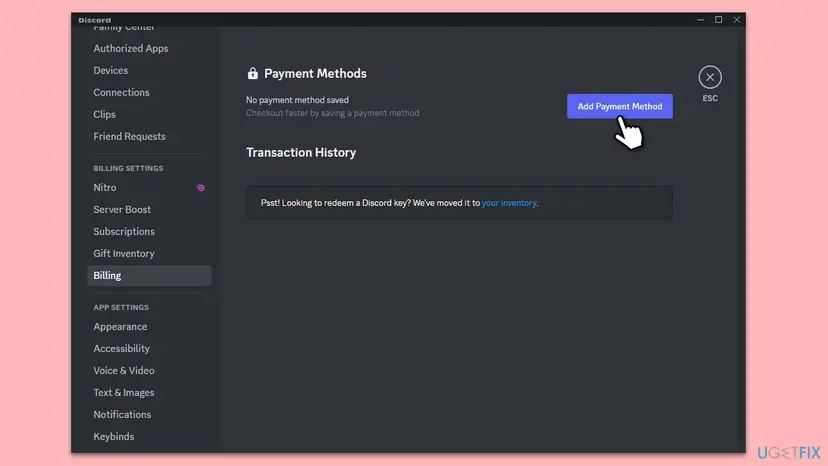
- Only the address is wrong: select Edit to the right of the saved method, correct the billing address and select Save. The edit window itself says that other card information is changed through Add Payment Method.
- Two settings: the default method is offered first for new purchases, and the subscription method pays Nitro and Server Boosts. A new card does not replace the old one in Pay for it With by itself.
- Removing the old card: select Edit, then Delete Payment Method. With an active subscription Discord requires at least one saved method, so add the new one first.
- On a phone: Discord's help notes that you cannot add a new payment method directly in the mobile app. Use a browser or a computer.
It worked if: The card appears under Payment Methods without an Invalid tag, and the purchase or the renewal goes through.
If not: If the message returns with a decline although every field is right, the refusal comes from the bank. Go to Fix 2.
Fix 2. Complete your bank's confirmation and ask the bank to lift the decline
10 to 20 minutesNo riskThe message ends with a decline, says the payment could not be authenticated, or the bank's confirmation window never appeared or timed out.
A decline is the card issuer's decision, and Stripe's documentation states that issuers discuss the specifics of a decline only with their cardholders. Neither Discord nor the processor can see or change the reason. The same holds for 3-D Secure: the bank asks you to prove that the purchase is yours.
- Start the purchase or the Add Payment Method prompts once more and keep the window open.
- Watch for a window or a message from your bank after you enter the card. Visa describes it this way: your issuer may ask for more information, for example a one-time passcode or biometrics.
- Approve it in the banking app or type the code, and wait until Discord continues. Do not close the window while it works.
- If Discord shows Action Required, open the mailbox of your Discord account and find the e-mail with the subject "Authorize Payments for Discord Client".
- Select Verify Purchase in that e-mail only if you started the purchase yourself, then go back to the app and make the purchase again.
- If the result is still a decline, stop and contact the bank through the number on the card or the chat in its app.
- Tell the bank the date, the amount and the name DISCORD*, and ask what refused the charge. Try again only after the bank says it is allowed.
| Ask the bank about | Why it matters for Discord |
|---|---|
| Online payments | Ask whether internet purchases are enabled for this card. |
| Payments to foreign merchants or in a foreign currency | Stripe notes that some issuers do not allow purchases from certain countries or outside their own. |
| Recurring payments and subscriptions | A renewal is charged while you are away. Stripe documents that such a payment can fail with authentication_required. |
| Daily or monthly spending limits | Discord names a pre-set spending limit as a cause of failed payments. |
| 3-D Secure enrolment (Visa Secure, Mastercard Identity Check) | Stripe documents that banks can decline payments that require 3-D Secure when it is not enabled for the card. |
| A fraud block on the card | Stripe says many transactions in a short time can make an issuer suspect fraud, and that you resolve it by confirming your identity with the issuer. |
Discord's help says: if you did not attempt the purchase, do not select Verify Purchase. It can mean that someone else is in your account. Change the password of the e-mail account and of Discord, and turn on two-factor authentication.
It worked if: The bank's window closes by itself, Discord shows the method as saved or the purchase as completed, and the bank's app lists a DISCORD* charge.
If not: If the bank says it sees no attempt at all, the request never reached it. Wait as in Fix 3, then check the form with Fix 6.
Fix 3. Stop retrying and wait out the purchase limit
1 minute now, then a waitNo riskYou have tried several times in a row, the message mentions too many purchases, or a processing error keeps coming back.
Discord's client turns an HTTP 429 answer from the billing server into "You've attempted too many purchases too quickly. Please wait a bit and try again!". Stripe adds that card issuers may treat additional retries as potential fraud, which increases declines for legitimate charges. Every extra click makes both worse.
- Close the payment window and do not press the button again today with the same card.
- Open User Settings > Billing and read Transaction History. A line marked Pending waits for your bank. Discord cancels it by itself within 3 days and then marks it Failed.
- Open discordstatus.com and look at the Payments component. If it reports a problem, the fault is Discord's and only waiting helps.
- Wait. If the same message is back after an hour, leave it until the next day.
- Make one careful attempt with Fix 1, with the bank's confirmation ready on your phone.
Discord does not publish the length of the purchase limit. Its developer documentation only says that a rate-limited request is answered with the number of seconds to wait, and the app does not show that number. The hour and the day in step 4 are our suggestion, not a figure from Discord.
- Several pending charges: when a renewal fails, Discord attempts it again. Once one payment succeeds, its system attempts to cancel the other pending ones.
- Money looks taken: a pending charge is not a completed payment. Discord says it should leave the bank statement within 5 to 10 business days.
- A temporary hold: Discord may place a hold when you make a purchase or start a trial, to confirm that the method works. It reverses the hold at once, and banks usually remove it within a few business days.
It worked if: After the wait, one attempt with correct details goes through, or it gives a clear reason after the colon that you can act on.
If not: If a single attempt after a full day still reports too many purchases, write to Discord's billing team with Fix 7.
Fix 4. Pay with a different method that Discord accepts in your country
5 to 10 minutesLow riskThe card does not support this type of purchase, it is a prepaid or virtual card that keeps failing, or the bank will not allow the charge.
For a card that the issuer restricts, Stripe's advice is that the customer contacts the issuer, and for low funds that the customer uses an alternative payment method. Discord gives the same advice in its help article. A second method takes the refusing bank out of the path.
| Where | Methods Discord lists as accepted |
|---|---|
| Everywhere | Credit or debit card, PayPal, Apple Pay, Google Pay |
| United States | Cash App Pay, Venmo |
| Austria, Belgium, Netherlands, Poland | EPS (Austria), Bancontact (Belgium), iDEAL (Netherlands), Przelewy24 (Poland) |
| Germany | Paysafecard. Discord states that it cannot refund purchases made with Paysafecard. |
| Brazil | Pix |
| Philippines, Indonesia, Malaysia, Vietnam, South Korea | GCash, GoPay, GrabPay, MoMo Wallet, KakaoPay |
- Open User Settings > Billing and select Add Payment Method.
- Choose a method from the list that your account offers. Methods that do not match your Country/Region are not shown.
- For PayPal, a browser window opens. Sign in there and approve, then return to Discord when the window says the account is authorized.
- For Google Pay or Apple Pay, Discord opens a browser window to check that your system supports it. Google Pay needs Chrome, Apple Pay needs Safari on a Mac or an iPhone.
- Open User Settings > Subscriptions and select the new method under Pay for it With, so that the next renewal uses it.
- Optional: select Edit next to the new method, tick Make this my default payment method and select Save.
- Prepaid and virtual cards. Discord publishes no general rule for them. Its one statement concerns temporary holds: prepaid methods such as GCash cannot cover them. We could not confirm whether a particular prepaid or virtual card is accepted.
- Card brands. Discord says JCB, Discover, Diners Club, UnionPay and American Express do not support localized pricing. Such a card is charged in US dollars, which the bank may treat as a foreign payment.
- Brazil. Discord confirms that some Brazilian banks do not process payments in BRL and suggests another payment method until it has a fix.
- Russia. The client states that payments and gift redemptions are temporarily suspended in Russia. No setting changes that.
A failed renewal does not end Nitro at once. Discord keeps the perks for 30 days from the renewal date on desktop and Google Play, and for 60 days on the App Store. Paying with the new method in that window keeps the subscription.
It worked if: The new method is listed under Payment Methods, carries the Subscription tag if you chose it for a subscription, and the purchase completes.
If not: If no method of your country can be added, compare your location, billing country and account region with Fix 5.
Fix 5. Make your location, billing country and Country/Region match
5 minutesLow riskYou are travelling, you use a VPN or a proxy, you moved to another country, or the message mentions Country/Region or currency.
Discord states that your Country/Region and the billing address country must always match to make purchases, and that only payment methods matching the Country/Region can be added. It also names a VPN as something that may affect proper recognition of your location.
- Turn off the VPN or the proxy, then close Discord completely and open it again.
- Open User Settings > Billing and look for Country/Region. Discord describes this setting as a desktop experiment for a limited number of users, so you may not have it.
- Compare three things: the country you are in now, the country in the billing address of the method, and the Country/Region shown.
- If the billing address shows the wrong country, correct it with Edit, or add the method again as in Fix 1.
- If you are abroad and have never bought anything on Discord, wait until you are home, or try the purchase in the mobile app. This is Discord's own advice for travellers.
- If you have moved for good, add a valid payment method from the new country and complete one purchase with it while you are there.
| Rule | What Discord says |
|---|---|
| How often it can change | Once every 90 days. |
| What a change requires | Being located in the new country, a valid payment method from that country and one successful purchase with it. |
| Existing subscriptions | They keep charging the original method. If it fails, you must update the method and may have to accept the new region's price. |
A VPN set to another country does not give you that country's prices: Discord ties local prices to a payment method issued there. The mismatch blocks payment methods, and a wrong region stays on the account for 90 days. Discord's terms also forbid abusing its payment systems.
It worked if: The payment methods of your country appear when you select Add Payment Method, and the price is shown in the currency you expect.
If not: If the three countries match and the error stays, the country is not the cause. Check the form itself with Fix 6.
Fix 6. Get the card form to load: restart Discord and try it in a browser
10 minutesLow riskYou see the heading alone with no reason, the card fields stay empty or do not react, or the same card works on another device.
In the client code, internal failures such as a card form that is not loaded produce the heading without any text after it. The form is served by Stripe, which says its script must always be loaded directly from js.stripe.com. Anything that blocks that address, or an outdated app, leaves Discord with nothing to send to the bank.
- Open User Settings > Streamer Mode and switch off Enable Streamer Mode if it is on. The client refuses new payment methods while it is active.
- Check that the e-mail address of your Discord account is verified. Without it the client answers that you need to verify your e-mail before you can make purchases.
- Close Discord completely and start it again, so that it loads its current version. An outdated app answers: "The purchase could not be validated. Please update your client."
- Try once. If the heading still comes alone, open
https://discord.com/appin Chrome or Edge and sign in to the same account. - In the browser, open User Settings > Billing and add the method there.
- If the card fields stay empty in the browser too, select More (the three dots), then Extensions, then Manage extensions.
- Switch off content blockers and script blockers for this test, reload the Discord tab and try again.
- Switch the extensions back on when the payment is done.
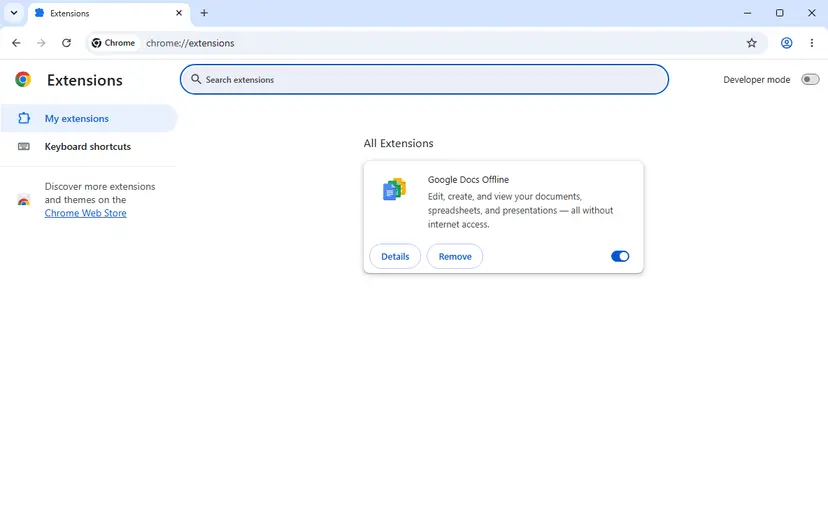
- Why a browser helps: the desktop app and the website show the same billing pages, so the browser is a second copy of the same form. A method saved there belongs to the account and works in the app.
- PayPal and the wallets: they open a separate browser window. If nothing opens, the browser blocked the window. Allow it for discord.com and start again.
No Discord help page names browser extensions as a cause. This fix follows from how the client is built: the card fields come from another address, and the heading without a reason is what the code shows when they are missing. It is a test of a few minutes, not a known cure.
It worked if: The card fields appear and accept typing, and the next message either confirms the method or names a reason after the colon.
If not: If the form works and a reason now appears, follow that reason: Fix 1 for details, Fix 2 for a decline.
Fix 7. Send Discord's billing team what it needs
10 minutesNo riskA saved method is tagged Invalid and still fails, the purchase limit does not clear, or a pending charge outlasts Discord's own time limits.
Discord's help draws the line itself: for a declined card its support cannot assist, but for a payment method that stays Invalid it asks you to reach its support team through the billing form. A complete first message saves a round of questions.
- Open
https://dis.gd/billing. It leads to the request form on support.discord.com and asks you to sign in first. - If the form asks What can we help you with?, select Refunds, Cancellations & Payments.
- Enter the e-mail address of the Discord account that has the problem.
- In the description, write the full message, word for word, with the part after the colon.
- Add the date and time of the last attempt, what you tried to buy and the type of payment method.
- Identify the method the way Discord asks: the last 4 digits of the card, or the PayPal invoice ID. Never send the full card number or the CVC.
- Attach a screenshot of Billing > Transaction History and, if money is held, of the DISCORD* line in your bank statement.
| Discord can help with | Discord cannot help with |
|---|---|
| A saved payment method that keeps the Invalid tag after a new attempt | A card that the bank declines: "Discord's Support team cannot provide further assistance" |
| A pending charge still visible after 10 business days | The reason for a decline, which only the bank can see |
| A temporary hold not released in the transaction history after 5 business days (through dis.gd/contact) | Subscriptions bought through the App Store: Discord says it is unable to assist with Apple subscription issues |
Discord asks that billing and refund questions go to its support team before the bank. Its Chargebacks FAQ says that filing a chargeback may lead to the suspension of the account. Asking the bank why a payment was declined is not a dispute and is safe.
It worked if: You receive a confirmation e-mail with a request number, and the answer names either a correction on Discord's side or the party that must act.
If not: If Discord answers that the bank declined the payment, the route is Fix 2 or another method with Fix 4.
If Discord still cannot confirm the payment method: find out who refuses
When the fixes did not help, stop changing things and collect what each side recorded. Three places hold the evidence, and together they show where the payment stopped.
| Where to look | What you find | What it tells you |
|---|---|---|
| User Settings > Billing > Transaction History | A line with the status Pending, Failed, Canceled or Completed, or no line at all | No line: the card never reached a charge, so the method itself was refused (Fix 1, Fix 6). Failed: the charge was tried and refused (Fix 2). Canceled: a temporary hold that Discord released. |
| Your bank's app or statement | A declined, pending or held charge named DISCORD*, or **PAYPAL* DISCORD** for PayPal | The bank saw the request. Its support can tell you the exact reason for the refusal. |
| User Settings > Subscriptions | A past due notice with the renewal date | The renewal failed. You have 30 days on desktop and Google Play, 60 days on the App Store, to pay before the subscription ends. |
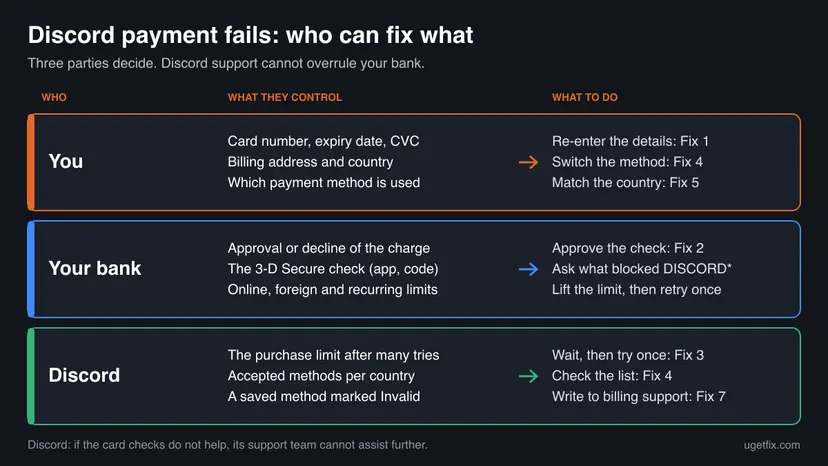
- It is the bank's side when the bank's app shows a refused DISCORD* charge, the same card fails on other foreign or online shops, or the message speaks of a decline, funds or authentication.
- It is Discord's side when the bank sees no attempt, the Payments component on discordstatus.com reports a problem, a saved method stays Invalid, or the purchase limit does not clear after a day.
- It is nobody's fault you can fix when the card type is not accepted for this purchase, your country's methods are not offered, or payments are suspended for your country. Use another accepted method.
- It is the mobile store's side when the subscription was bought in the iPhone or Android app. Apple or Google bills it, and Discord's settings cannot change that payment method.
Discord publishes neither the length of its purchase limit nor the reasons behind Invalid, and it has no statement on specific prepaid or virtual cards. For these, only Discord's billing team or the card's issuer can answer.
How to keep Discord payments from failing again
- Update the saved method in Billing as soon as the bank sends a new card, before the next renewal date.
- Set the same method in Pay for it With and as the default, so that renewals and new purchases use the card you expect.
- Keep the banking app at hand when you pay, and finish the bank's confirmation window.
- Pay from the country where the card was issued, with the VPN off.
- After one failure, read the text after the colon before you do anything else.
- Do not press the pay button again and again. Repeated attempts bring Discord's purchase limit and look like fraud to the bank.
- Do not use a VPN to get another country's price. A region mismatch blocks payment methods, and the region is locked for 90 days.
- Do not file a chargeback for a pending charge or a hold. Discord may suspend the account, and holds disappear by themselves.
- Do not reinstall Discord or repair Windows for this message. The refusal is made by a bank or a server, not by your PC.
Renewals fail most easily, because the charge is made when you are not there to confirm anything. Your renewal date is under User Settings > Subscriptions: check the saved card a few days before it.
Frequently asked questions
Why does Discord say Unable to confirm payment method?
Because the payment method could not be saved or verified. The sentence is a fixed heading in the Discord app, shown whenever the card form, the bank's confirmation or the saving of the method fails. The real reason is the text after the colon, which comes from the card processor or from your bank. A decline means the bank refused. A note about the postal code or the security code means the details did not match. Start by entering the card again with details that match your bank's records.
Is Unable to confirm payment method a Windows problem?
No. The message is the same in the Discord desktop app on Windows 11 and Windows 10, on a Mac and in any browser, because it describes the answer to a payment request and not the state of your PC. Reinstalling Discord or repairing system files does not change what a bank or Discord's billing server answers. The only local causes are small: Streamer Mode switched on, an app that needs a restart, or a browser extension that blocks the card form.
What does "This payment source is invalid" mean on Discord (code 50048)?
It means Discord's server rejected the payment method itself. In the client's code the text belongs to error 50048, named INVALID_PAYMENT_SOURCE. Discord's help page covers two forms of it. For an Invalid payment message during a purchase, review the information you provided and try again. For a saved method that carries an Invalid tag, attempt the purchase once more, and if the error stays, contact the support team through dis.gd/billing. Adding the method again with correct details solves most cases.
What does Duplicate payment source mean on Discord?
By its wording, the card or account you are adding is already saved. We could not confirm more: the text is not among the English strings of the Discord client and is not explained in Discord's help centre, so the server returns it. Open User Settings, then Billing, and look under Payment Methods. If the card is listed, select it at checkout or under Pay for it With and do not add it again. If it is not listed and the message stays, ask Discord's billing team.
Why does Discord decline my card when it works everywhere else?
Usually because the bank treats this charge differently from your everyday ones. A Discord payment is made online without the physical card, often to a merchant abroad, and for Nitro it repeats every month or year. Banks apply separate switches and limits to each of those. Stripe, which runs Discord's card form, notes that most declines reach the merchant as generic, so Discord cannot tell you the reason. Ask your bank why the DISCORD* charge was declined and whether online, foreign and recurring payments are enabled.
How long do I have to wait after "You've attempted too many purchases too quickly"?
Discord does not say. The message is the client's text for a rate limit on the billing server. Discord's developer documentation only states that a limited request is answered with a number of seconds to wait, and the app does not display that number. Further attempts do not help. Stop, wait at least an hour, and if the message returns, leave it until the next day. Then make one attempt with correct details and the bank's confirmation ready.
Can I use a prepaid or virtual card for Discord Nitro?
Discord gives no general answer. Its list of accepted methods names credit or debit cards, PayPal, Apple Pay, Google Pay and a set of local methods, and says nothing about prepaid or virtual cards as a group. The one clear statement concerns temporary holds: prepaid methods such as GCash cannot cover them, so trials and promotions that need a hold fail. If the message says the card does not support this type of purchase, the issuer does not allow it, and another method is the way out.
Does a VPN cause the Discord payment error, and can it get me a lower price?
A VPN can cause it and cannot get you a lower price. Discord says a VPN may affect proper recognition of your location, and that your Country/Region and billing address country must match to make purchases. Local prices are tied to a payment method issued in that country, so a different IP address changes nothing except that payment methods may stop matching. The Country/Region can change once every 90 days, and only with a real stay and a local payment method. Turn the VPN off and pay from your real location.
No es posible confirmar el metodo de pago: is that the same Discord error?
Yes. "No es posible confirmar el método de pago" and "No se puede confirmar el método de pago" are how Spanish-speaking readers search for the same Discord heading, Unable to confirm payment method. The cause and the fixes do not depend on the language of the app. The text after the colon is still the reason: a decline is answered by your bank, wrong card details by entering the card again under User Settings, Billing, and repeated attempts by waiting. This page is written in English only.
Sources
- Discord developer documentation: Rate Limits (HTTP 429 and retry_after) (github.com)
- Chrome Web Store Help: Install and manage extensions (support.google.com)
- Discord Support: Why is My Payment Showing as Failed or Invalid? (support.discord.com)
Did this fix work?
One click, no account. It tells the next reader which guides are worth their time.
Questions and experiences: fix Discord error "Unable to confirm payment method" in Windows
Still broken, or found a fix we did not cover? Ask here: members and our editors answer. Reading is open; writing needs a free account.
…