How to fix
Error code 0xe0000100
on Windows
Resolve error code 0xe0000100 on Windows 10 effortlessly with expert-tested solutions. Get your system running smoothly again—fixed in minutes!


What causes How to fix error code 0xe0000100 in Windows 10?
- Corrupted system files and configuration data
- Failing hardware
- Disk partition corruption
- Previously failed Windows update
Repairs Windows system files, removes malware, and restores a clean OS state — without reinstalling.
Hi, I can't update Windows for quite some time now. Instead, I always receive an error 0xe0000100. I tried to restart the computer and I also tried waiting but to no avail. Is there anything that could be done? Thanks in advance.
Windows errors can be particularly frustrating, especially if they impair certain vital functions of the operating system such as updates. 0xe0000100 is an error that users typically encounter when trying to update Windows - it shows up in the list of the installed and failed updates in the settings menu.
It is common knowledge that operating systems should be updated as soon as possible in order to mitigate possible software vulnerabilities,[ref en-3] fix bugs, and implement new features. While some updates might cause troubles to users, they are usually resolved quickly by Microsoft; in most cases, the issue lies within software and configuration settings.
Update errors are very common, and we already explained how to deal with them in our other articles, e.g., 0x800703e6, 0x8007371c, 0x800f0900, etc. In this case, 0xe0000100 does not differ much in the way it shows up or even when it comes to the message it delivers:
Error encountered
There were some problems installing updates, but we'll try again later. If you keep seeing this and want to search the web or contact support for information, this may help: (0xe0000100)
As evident, the message does not provide a whole lot to go on and is pretty generic. However, this is how all the other errors within the Windows system work; the technical information is too vast to include within the error, and many users would not understand it in the first place.
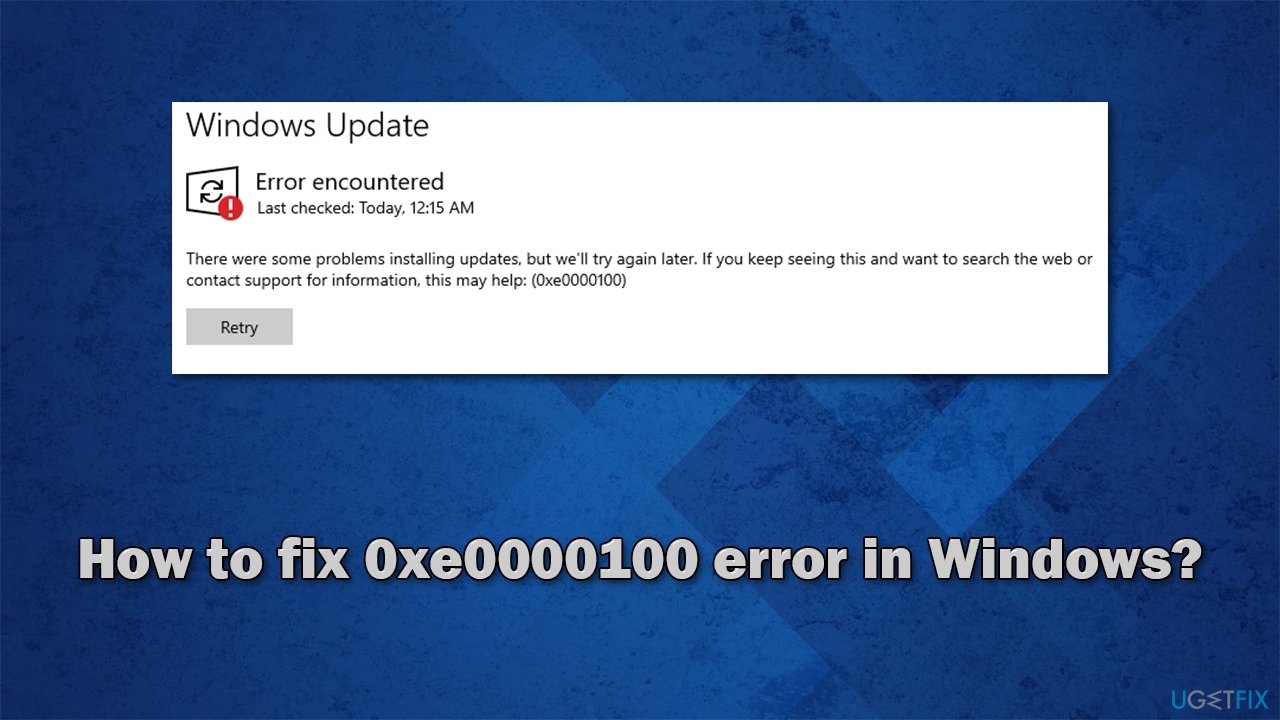
There could be multiple reasons why you encounter this error, for example:
- Corrupted system files and configuration data
- Failing hardware
- Disk partition corruption
- Previously failed Windows update (e.g., due to power cut), etc.
While most of the time users face 0xe0000100 error while downloading updates, it could show up when trying to install Windows itself. This can be fixed by using an ISO file from Microsoft and restarting the process altogether. At the bottom of this article, we will explain how to do just that.
Before you proceed with the below steps, we would like to offer you an automatic solution with a [d1]. This PC repair tool is ideal for dealing with difficult situations when it comes to Windows system file corruption, BSODs,[ref en-1] registry[ref en-2] errors, and much more.
Fix 1. Run DISM and SFC
One of the main reasons for the error is file corruption. This can be addressed by running SFC and DISM scans via an elevated Command Prompt.
- Type cmd in Windows search
- Right-click on Command Prompt and select Run as administrator
- When User account control shows up, click Yes
- Type sfc /scannow and press Enter
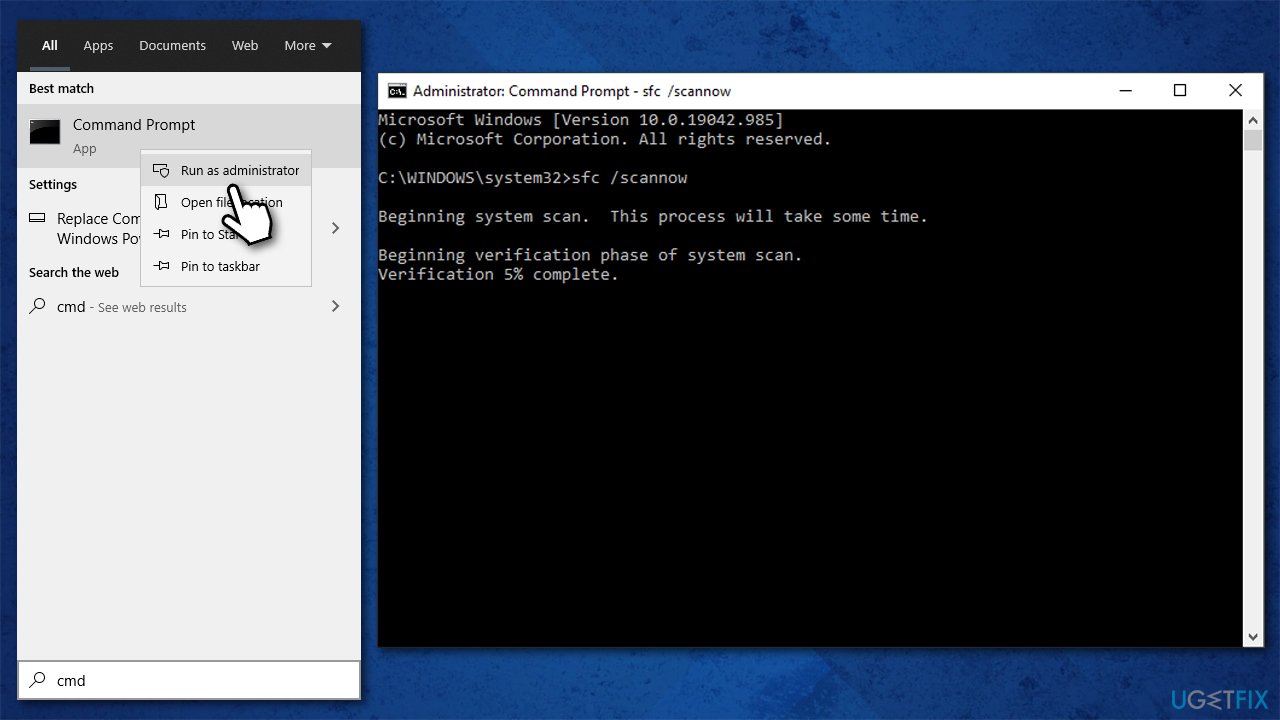
How to fix error code 0xe0000100 in windows 10 run sfc dism - Wait for the scan to be finished and then use the following commands (don't forget to press Enter and wait for the scan to finish every time):
DISM /Online /Cleanup-Image /CheckHealth
DISM /Online /Cleanup-Image /ScanHealth
DISM /Online /Cleanup-Image /RestoreHealth - When done, restart your computer and try updating the system again.
Note: some users might encounter error 0x800f081f at this point. Proceed with the next solutions steps in this case.
Fix 2. Run Windows Update Troubleshooter
Windows troubleshooters are built-in tools that can be used for basic error fixes and malfunctions. If you are having troubles with Windows updates, try the following:
- Type Troubleshoot in Windows search and hit Enter
- On the right side of the window, select Additional troubleshooters
- Pick Windows Update and click Run the troubleshooter
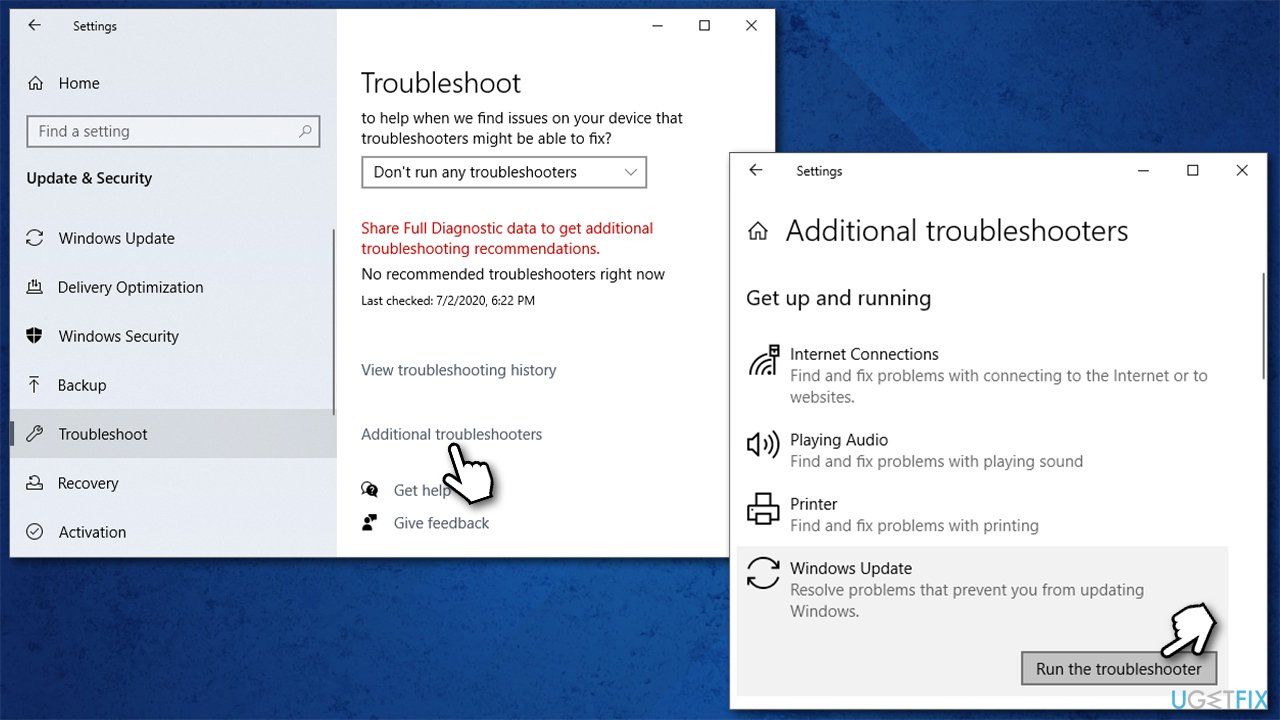
How to fix error code 0xe0000100 in windows 10 run windows update troubleshooter - Wait for the troubleshooter to show you the results and apply the suggested fixes.
Fix 3. Run chkdsk
If there are problems with your hard drive, you could run into a 0xe0000100 Windows update error. Use chkdsk command via Command Prompt as follows:
- Open Command Prompt as administrator as explained above
- In the new window, type in the following command and hit Enter:
chkdsk c: /f /r /x - If the check does not begin and an error is shown, type in Y on your keyboard and press Enter
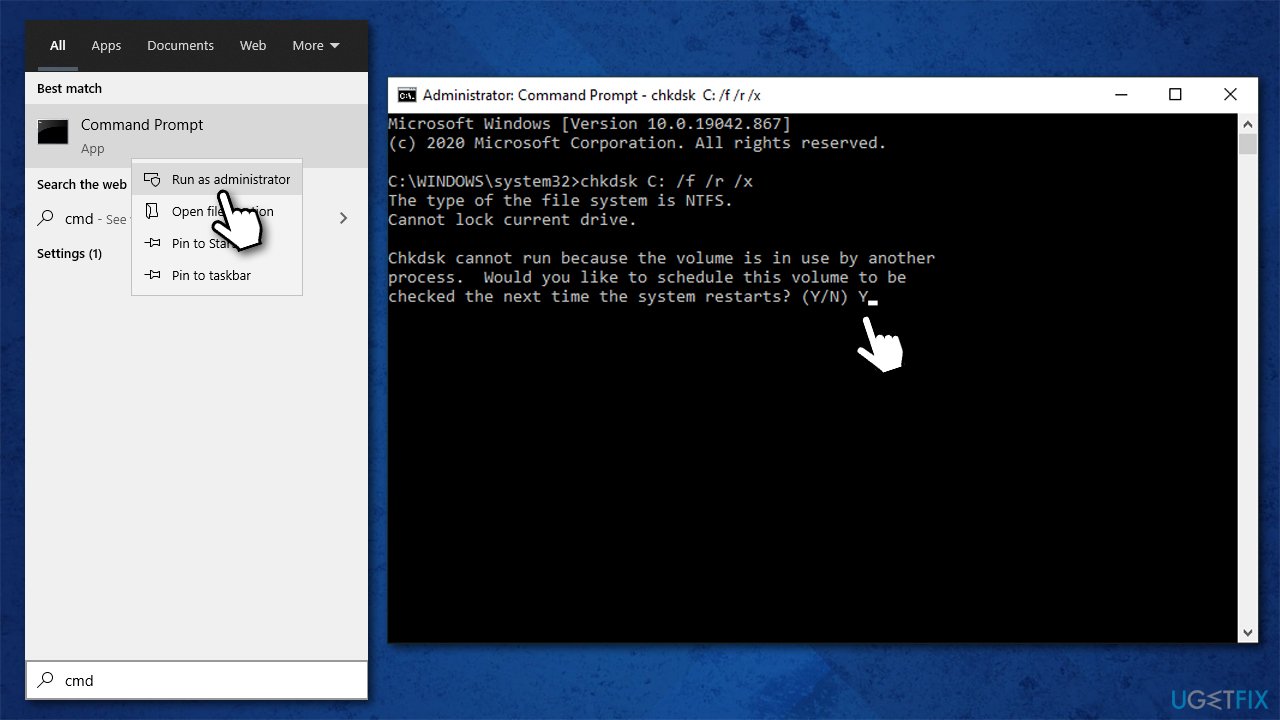
How to fix error code 0xe0000100 in windows 10 run check disk - Restart your PC to begin the check.
Fix 4. Install the update manually
- Type Updates in Windows search and hit Enter
- Click View update history
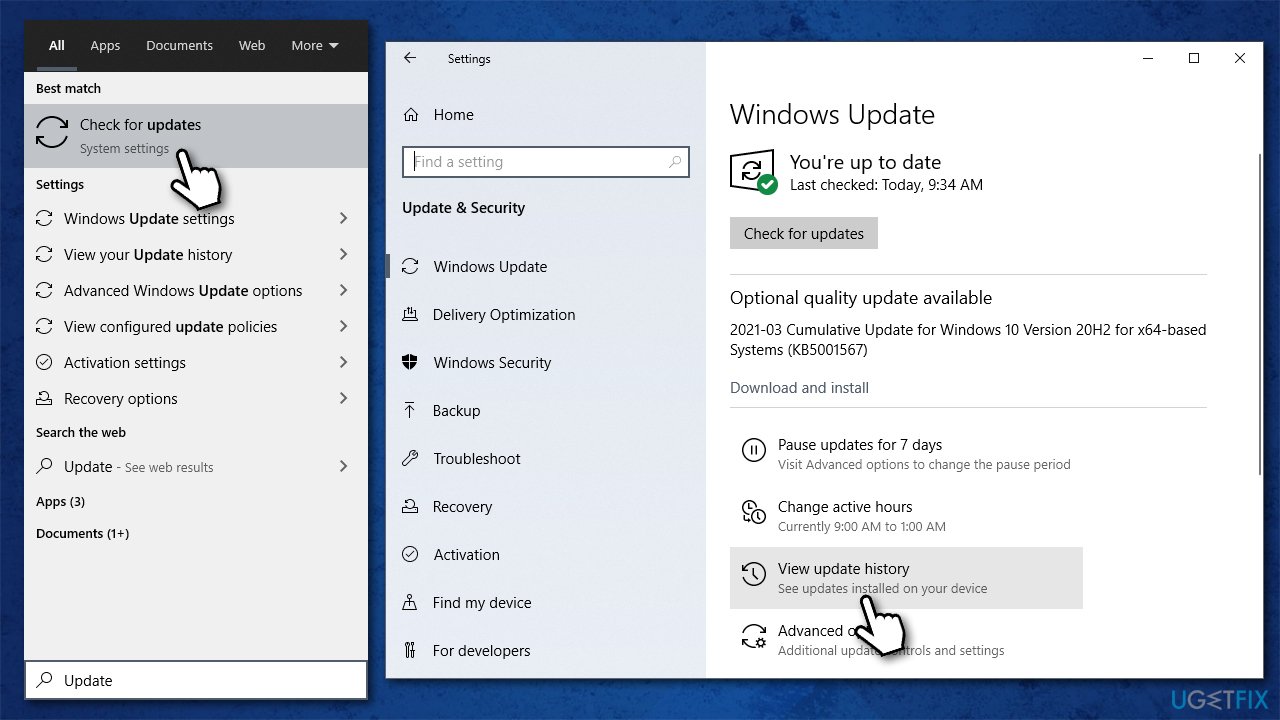
How to fix error code 0xe0000100 in windows 10 install updates manually - Here, note down the KB number which failed to be installed, for example, KB5004237
- Open your browser and visit the Microsoft Update Catalog website
- Type the KB number into the search bar and press Enter or click Search
- You will find many different versions on the update – you need to find the one that matches your PC specs and Windows version (as a home user, ignore Windows server versions)
- Click Download to download the update, double click the file once done
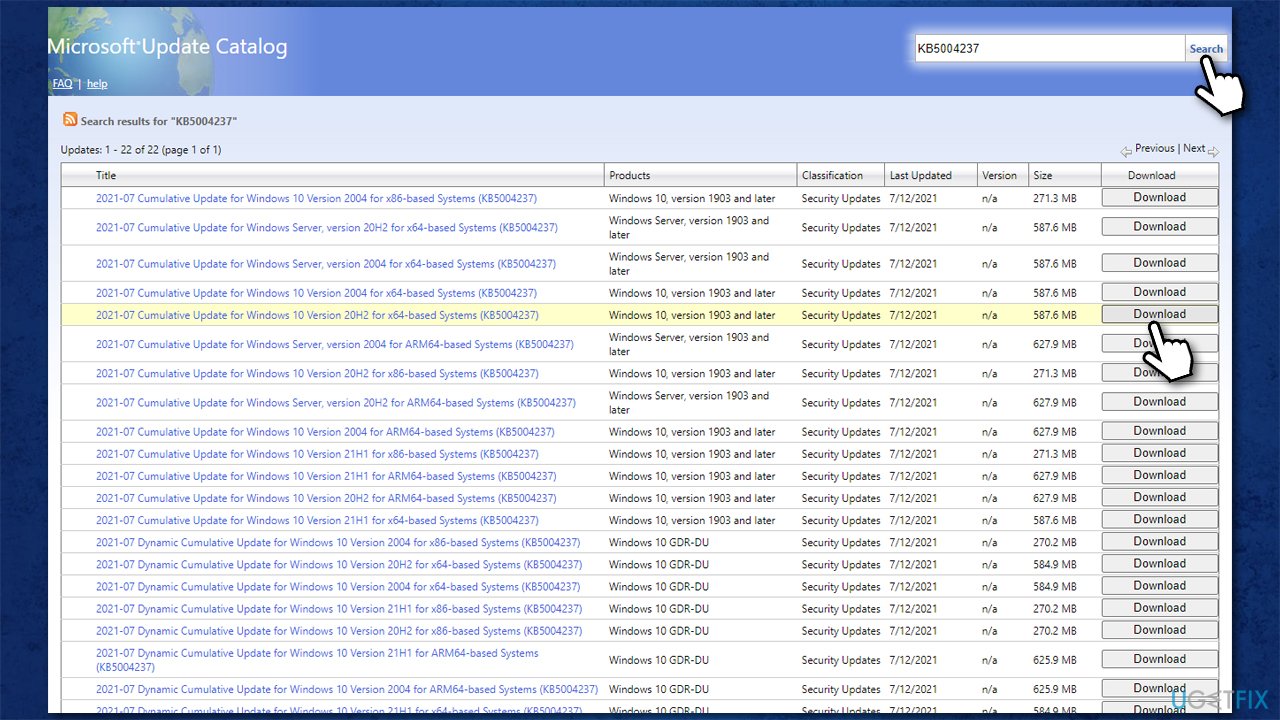
How to fix error code 0xe0000100 in windows 10 install updates manually2 - Restart your PC.
Fix 5. Use Media Creation tool for repair upgrade
- Go to the official Microsoft website and download Media Creation Tool
- Agree to terms and click Next
- Select Upgrade this PC now and click Next
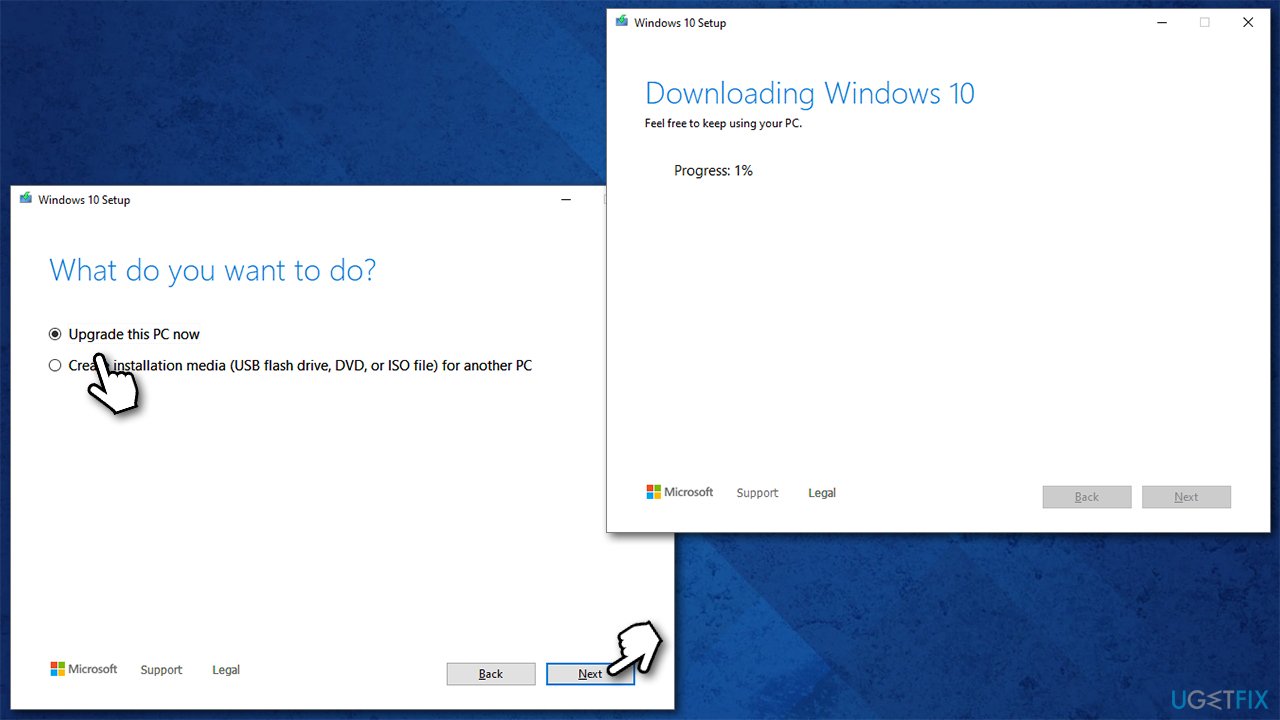
How to fix error code 0xe0000100 in windows 10 use media creation tool - Wait till Windows downloads all the necessary files
- Restart your PC once finished.
Fix 6. Reset your PC
Before you proceed, we recommend you disconnect all the external devices apart from the mouse and keyboard. Also, you should back up your most important files just in case.
- Right-click on the Start button and pick Settings > Update & Security
- Click on Recovery on the left side
- Under Reset this PC, click on Get started
- Pick Keep my files > Cloud download
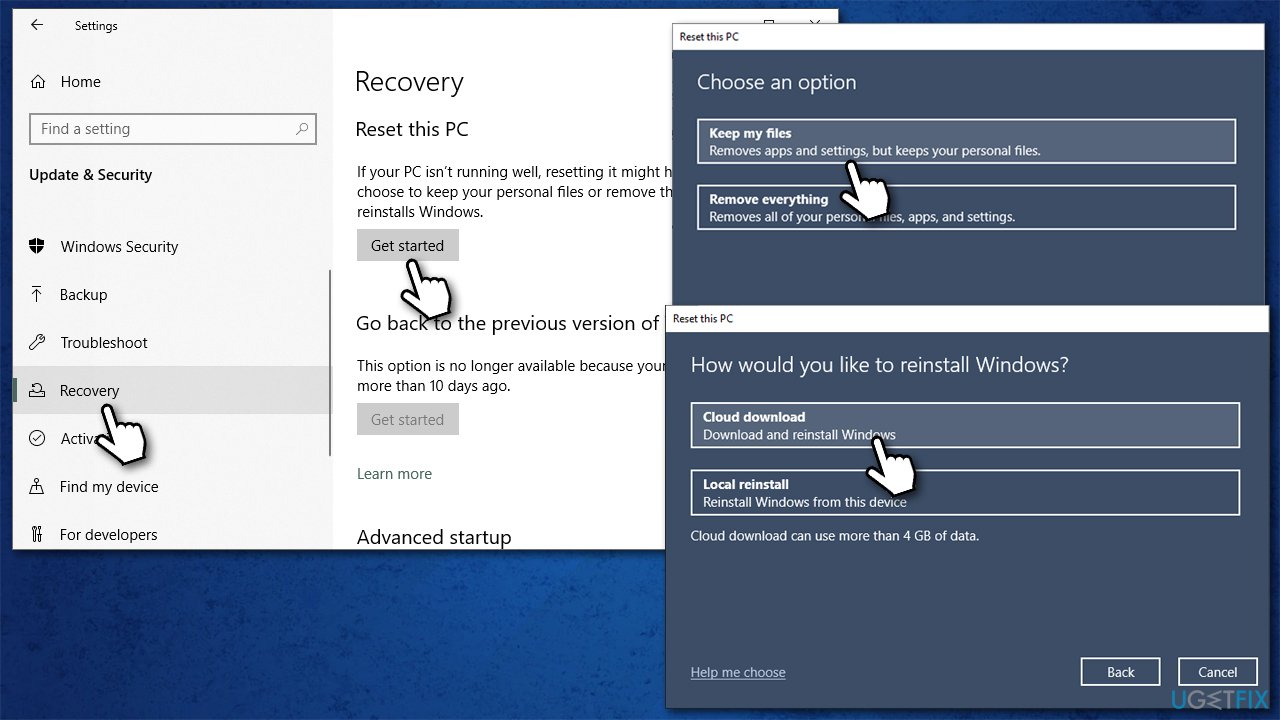
How to fix error code 0xe0000100 in windows 10 reset windows - Wait till the necessary files are downloaded and installed
- Your PC will restart.
Fix 0xe0000100 when installing Windows
If you are facing this error when trying to install Windows, you should start anew. Here are a few things you should try:
- If you are upgrading to Windows 10 from an older version, make sure your computer meets the minimum requirements for the operating system
- Use a different USB port when using the flash drive
- Unplug all external peripherals such as printers, cameras, etc.
- Temporarily uninstall your third-party antivirus
- Reset Windows to factory settings.
Bottom line
To fix the error code 0xe0000100, users can try using an ISO file from Microsoft to reinstall Windows or check for corrupted system files. If these solutions do not resolve the issue, it may be necessary to seek further assistance or contact support.
Frequently asked questions
Error code 0xe0000100 typically indicates a problem with your system's boot configuration or related files, preventing Windows 10 from starting properly.
To resolve error code 0xe0000100 in Windows 11, you can try using the Windows Recovery Environment to perform a Startup Repair or restore your system to an earlier point.
Yes, you can fix error code 0xe0000100 without reinstalling by accessing the Command Prompt through recovery options and using commands like 'bootrec /fixmbr' and 'bootrec /rebuildbcd'.




Report an issue
What's wrong with this guide? We review every report and update or remove content.
Report received — thank you. We'll review and fix it.
You need a free account to submit a report.
Be the first to comment