
How to fix ERROR_SXS_COMPONENT_STORE_CORRUPT error in Windows?
Prefer to fix it yourself? The manual steps follow.
5 methods in this guide
Hello. I have been trying to install the latest Windows updates, and it was failing with an error ERROR_SXS_COMPONENT_STORE_CORRUPT. Is there anything that could be done about this? Help is much appreciated.
ERROR_SXS_COMPONENT_STORE_CORRUPT is an error that users may encounter while trying to download Windows updates, install apps from Microsoft Store, or when trying to disable or enable certain Windows features. It also typically has an error code 0x80073712.
While the issue was seen as early as 2011, it still persists to this day, and users are commonly looking for ways to fix ERROR_SXS_COMPONENT_STORE_CORRUPT error on Windows 10 once and for all.
Errors related to Windows updates are very common, and they can negatively impact users' ability to receive new operating system features, bug fixes, as well as security patches. In other words, updates are crucial for every machine and should be applied as soon as available.
Unfortunately, users who receive Windows errors are left confused. The provided error code or other information does not really help them solve the problem, and neither does it explain why the ERROR_SXS_COMPONENT_STORE_CORRUPT error occurred in the first place.
The most common reason for the error to show up is related to system file corruption of Windows Component Store, located in the subfolder of WinSxS. It is used to install, update, and customize Windows operating system. This is why users receive the error when trying to update or customize Windows settings. While this reason might explain why the error occurs, there is also a reason for those files to be corrupted in the first place, and that could vary greatly.
In any case, below, you will find several methods on how to fix ERROR_SXS_COMPONENT_STORE_CORRUPT error. This software is perfect for instances when errors occur due to system file corruption. It can also find and fix problems related to missing DLLs, registry errors, malware-caused damage, and much more.
Fix 1. Run System File Checker
One of the easiest ways to solve the problem is by running the SFC scan. For that, you need to access Command Prompt with administrator's rights:
- Type in cmd in Windows search
- Right-click on Command Prompt and select Run as administrator
- Type in sfc /scannow and hit Enter
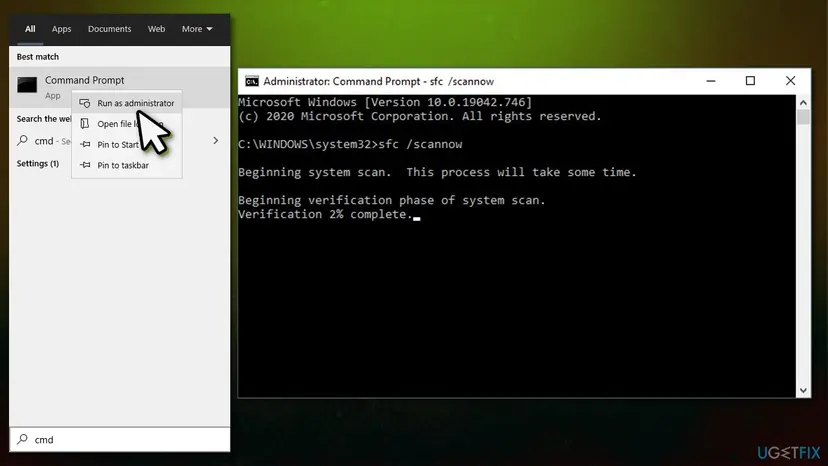
How to fix error sxs component store corrupt error in windows run sfc scan - The scan will begin - wait till it is complete
- Once finished, reboot your PC.
If the SFC scan could not fix the system file integrity violations, you can attempt to repair the Windows image with DISM:
- Open Command Prompt as administrator as explained above
- Copy and paste the following commands, pressing Enter each time:
Dism /Online /Cleanup-Image /CheckHealth
Dism /Online /Cleanup-Image /ScanHealth
Dism /Online /Cleanup-Image /RestoreHealth
Fix 2. Run Windows update troubleshooter
- Type in Troubleshoot in Windows search and press Enter
- If you cant see troubleshooters listed on the right, click Additional troubleshooters
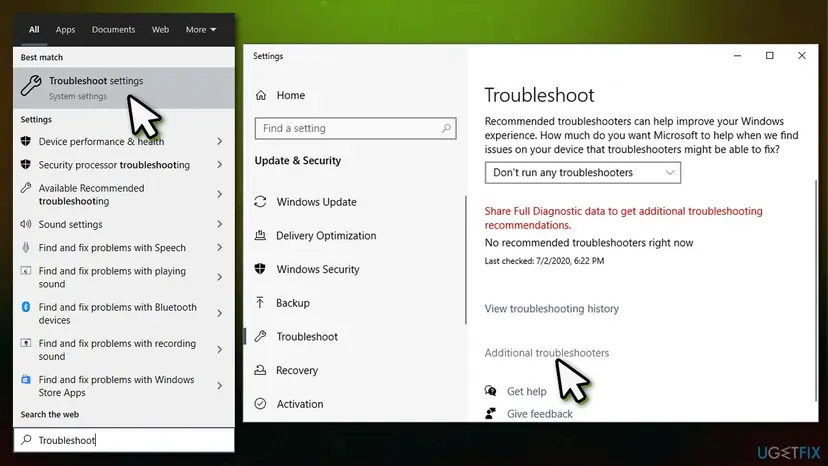
How to fix error sxs component store corrupt error in windows run windows update troubleshooter - Find Windows Update and click it
- Select Run the troubleshooter and wait till the scan is finished.
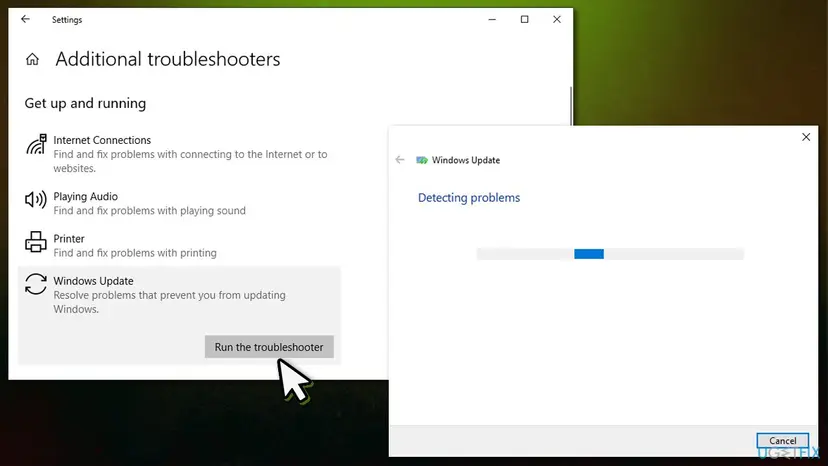
How to fix error sxs component store corrupt error in windows run windows update troubleshooter2
Fix 3. Check your memory
- Type in Memory into Windows search box
- Right-click on Windows Memory Diagnostic and select Run as administrator
- Pick Restart now and check for problems (recommended)
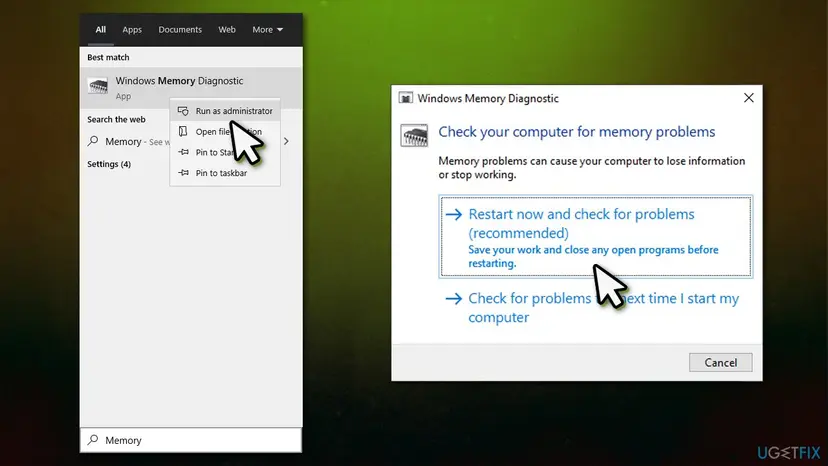
How to fix error sxs component store corrupt error in windows use memory diagnostic test - At this point, your PC will restart and begin the memory check - be patient as this process might take awhile.
Fix 4. Delete SoftwareDistribution and Catroot2 folders
If Windows update files are corrupted, you should delete the contents of SoftwareDistribution and Catroot2 folders. You need to stop some service before doing so, so it is easiest to use Command Prompt for this:
- Open Command Prompt as administrator as previously explained
- Copy and paste each of these commands (don't forget to press Enter every time):
net stop wuauserv
net stop cryptSvc
net stop bits
net stop msiserver
ren C:\\Windows\\SoftwareDistribution SoftwareDistribution.old
ren C:\\Windows\\System32\\catroot2 Catroot2.old
net start wuauserv
net start cryptSvc
net start bits
net start msiserver - Once done, restart your computer and see if that helped you fix the error.
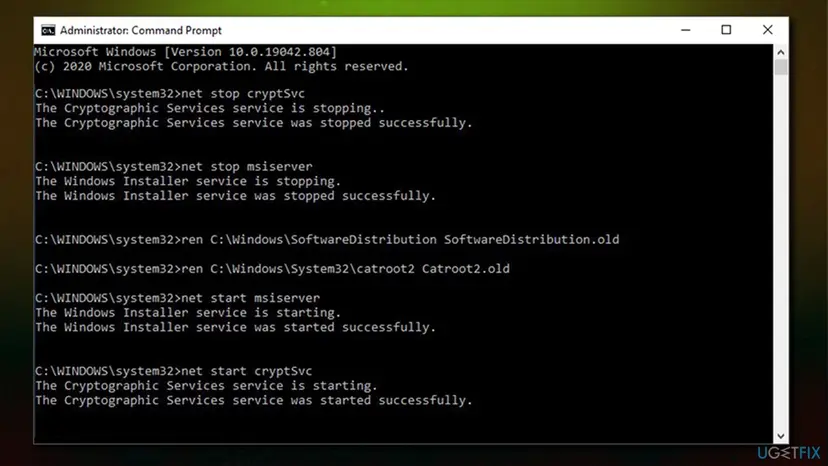
How to fix error sxs component store corrupt error in windows reset update components
Fix 5. Use Media Creation tool to update Windows
- Visit the official Microsoft website and download Windows 10 installation media
- Once the installer downloads, double-click to launch it
- Agree to Terms and click Next
- From the options available, pick Upgrade this PC now and click Next
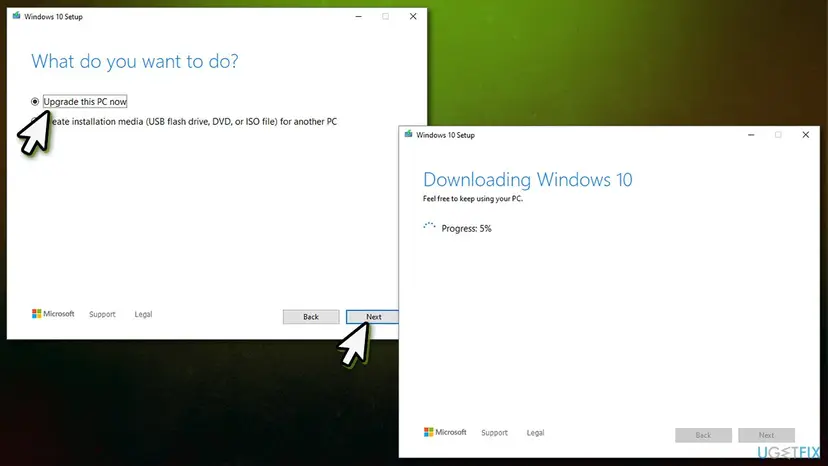
How to fix error sxs component store corrupt error in windows use media creation tool - Wait for Windows to download and install the necessary files
- Restart your PC.
Did this fix work?
One click, no account. It tells the next reader which guides are worth their time.
Questions and experiences: fix ERROR_SXS_COMPONENT_STORE_CORRUPT error in Windows
Still broken, or found a fix we did not cover? Ask here: members and our editors answer. Reading is open; writing needs a free account.
…