
How to fix Roblox error code 267?

Prefer to fix it yourself? The manual steps follow.
5 methods in this guide
Hello. I am a huge fan of world-builder games such as Minecraft, and I have recently been trying out Roblox as well. I loved the game, and I wanted to play even more. At one point, I suddenly got disconnected from Roblox, and error 267 showed up, saying that I have been kicked. I have not done anything that would justify this ban, so I am looking for ways to fix Roblox error code 267. Is this some type of a bug?
Online games can be extremely appealing to a large number of people coming from various backgrounds. Roblox is one of such games - it attracts more than 164 million monthly users. Unlike many other games that follow the scenario that was developed by the developers, Roblox takes a different approach, and allows players to create their own games - it can be used as a platform to create new worlds for others to enjoy.
While the game seems to be relatively unique, what is not uncommon is for users to run into problems. One of such issues is Roblox error code 267. On various community forums, users complained about suddenly being booted from the game, sometimes with and sometimes without any reason given.
There are several variants of the Roblox error code 267 - this is because it is generated via admin commands, not the game platform itself. Unlike errors in other games, code 267 is extremely common, and many users claimed to have experienced this rather frustrating issue at least once since they started playing Roblox.
Here are a few examples of the error code 267 in Roblox:
Disconnected
You have been kicked from the game (Error Code: 267)
Disconnected
You have been kicked from this game: You have been banned for: cheating suspicion (Error Code: 267)
Disconnected
You have been kicked from this game: Sorry! You're not allowed in this super top secret game yet. (Error Code: 267)
Regardless of which version of the issue you have encountered, it is in the best interest to fix Roblox error code 267 as soon as possible. Note that, in some cases, the reason for a kick or ban for a certain period of time might be justified, as game creators can make their own rules within the game and boot you for not meeting those requirements. In such a case, it might be best to contact the developer of the game and explain the situation, you might be unbanned very quickly.
Fix 1. Make sure you are using the latest browser version
There are several reasons why you should constantly keep your browsers updated - not only will this keep away cyber attackers who attempt to exploit browser vulnerabilities to infect you with malware, but it will also ensure the best compatibility with various websites and games.
Google Chrome
On Google Chrome, click on Menu, select Help and choose About Google Chrome. If your browser is not running the latest update, you can update it easily.
Mozilla Firefox
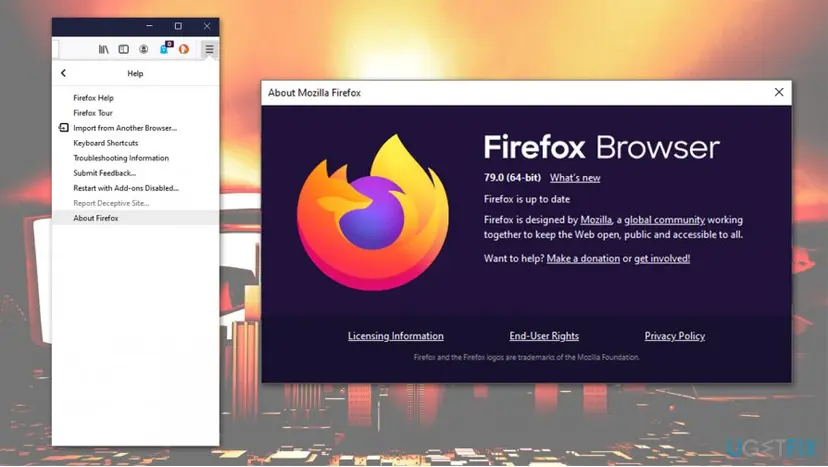
Click on Menu and then go to Help > About Firefox - this should prompt an automatic update.
MS Edge (Chromium)
Select Menu on the top-right, and pick Help and feedback > About Microsoft Edge - browser will update and you should restart it right after.
Fix 2. Disable ad-blockers and other extensions
While ad-blockers are a great way of keeping those pesky ads away and keep you secure from malicious ads, they might sometimes break the functionality of some websites, as well as online games, sometimes resulting in Roblox error code 267 or similar issues. Therefore, you should temperately suspend the extension and see if the automatic kicks from the servers persist.
Alternatively, you should also check for suspicious browser extensions, as they can also sometimes intercept a successful communication between you and Roblox servers.
Fix 3. Run Internet Connection troubleshooter
In some cases, you might get kicked from a Roblox game with an error code 267 due to unstable or interrupted connection. Therefore, you should make sure that your internet connection is working well - simply run Windows Internet Connection troubleshooter:
- Right-click on Start and select Settings
- Go to Update & Security
- On the left, select Troubleshoot
- Pick Internet Connections on the right and click Run the troubleshooter
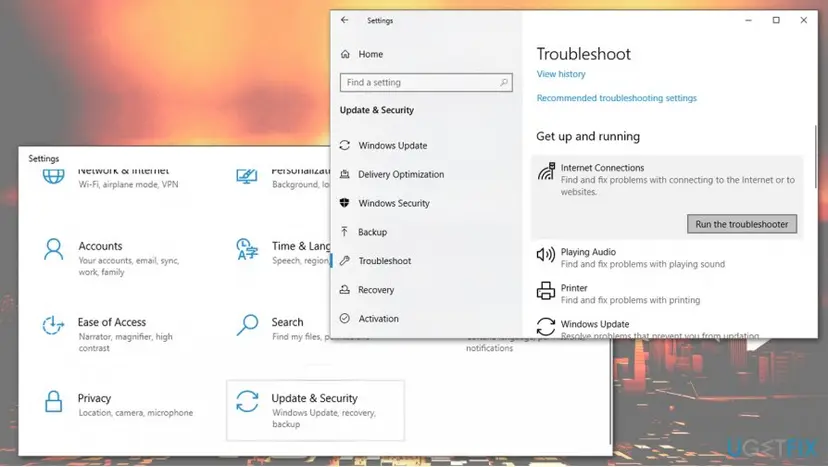
Windows will report if anything is wrong with your internet connection and will suggest ways of fixing related issues.
Fix 4. Wait till your account is 30 days old
Many users said that they were kept getting kicked from the game with the error code 267 since their account was created merely a few days ago. This is because some game developers might set up certain rules for games they create, and might not allow freshly-created accounts.
Thus, all you have to do is to wait 30 days and then attempt to join the game once again - the error 267 in Roblox should be gone.
Fix 5. Reinstall Roblox
One of the solutions to fix Roblox errors is by reinstalling it. Since the game is downloaded and managed via the Microsoft Store, you might wonder how to uninstall Roblox from Mac - we have a guide for that.
Otherwise, if you are using Windows, follow these steps:
- Right-click on Start and select Settings
- Go to Apps
- Scroll down to locate Roblox
- Select the entry and pick Uninstall
- Wait for the process to finish
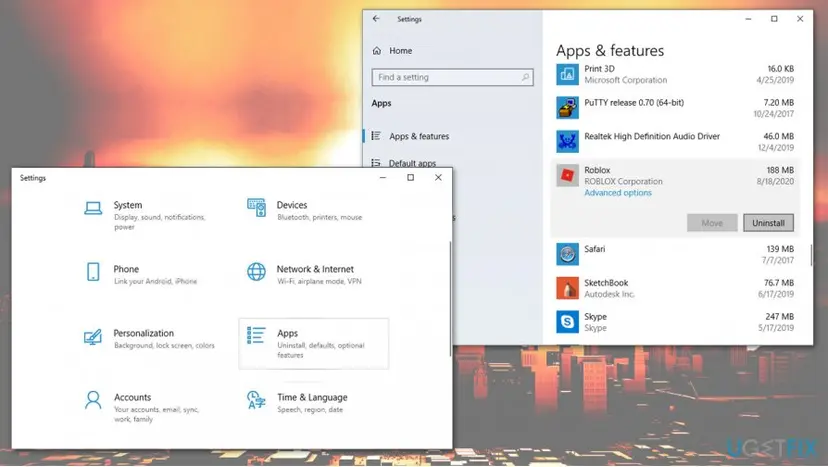
Now, go back to Microsoft Store and install the app once more. Hopefully this will help you fix Roblox error 267!
Did this fix work?
One click, no account. It tells the next reader which guides are worth their time.
Questions and experiences: fix Roblox error code 267
Still broken, or found a fix we did not cover? Ask here: members and our editors answer. Reading is open; writing needs a free account.
…