
How to fix Ticketmaster error code U521?

Prefer to fix it yourself? The manual steps follow.
- 7methods
- 5 to 30 minutes
- Easy
Applies to Ticketmaster app (Android, iPhone) and ticketmaster.com in a browser
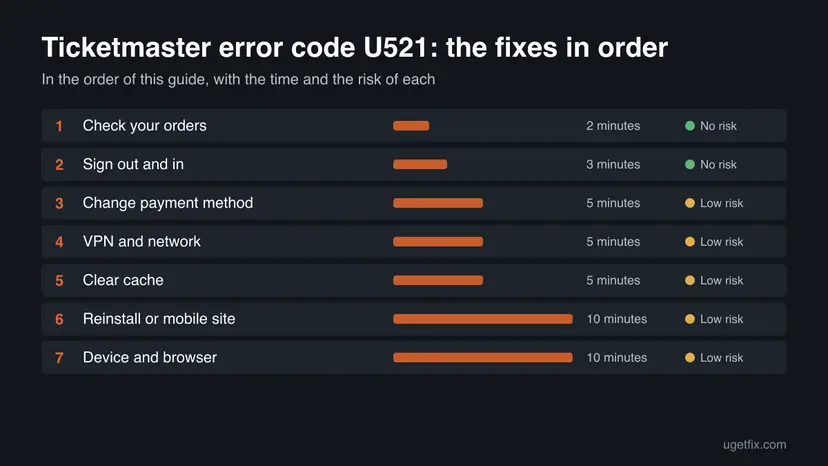
7 methods in this guide
Hello. I tried to purchase tickets from Ticketmaster but I got the U521 error code repeatedly. Any way to fix this?
Ticketmaster error code U521 is a message that appears at checkout and blocks the purchase. Ticketmaster does not publish what U521 means, so the fixes below follow its own help pages for purchase and session errors. Check your account for an order first, then work through the fixes from the quickest to the most thorough.
Ticketmaster does not document U521, so treat it as a failed checkout. First open your order history and make sure no order was placed. Then sign out of Ticketmaster, sign in again and retry (Fix 2). If the error returns, pay with PayPal or another card (Fix 3), turn off any VPN or switch to mobile data (Fix 4), and clear the app cache (Fix 5).
| Error | Error code: U521 (also written Ticketmaster error U521 or Ticketmaster code U521), shown while you pay for tickets. |
|---|---|
| Where it appears | At checkout in the Ticketmaster app or on the Ticketmaster website, on a first purchase and on resale tickets. |
| Main cause | Not published. Ticketmaster lists session, payment, network and app problems as the usual reasons a purchase fails. |
| Fastest fix | Check your order history, then sign out and back in and retry (Fix 1 and Fix 2). |
| Platform | The Ticketmaster app on Android and iPhone, and the website in a browser on any computer. |
| Vendor status | No Ticketmaster page names U521. The general help page for error messages is the closest official source. |
| Time to fix | About 5 minutes for the first fixes, up to 30 minutes if you reinstall the app. |
Facts checked on 16 October 2026. Steps written for Ticketmaster website and app, read against the Ticketmaster Help pages on 2026-10-16.
What Ticketmaster error code U521 means
Error code: U521 is a short code that Ticketmaster shows when it cannot finish your purchase. Ticketmaster error code U521 is not listed on any Ticketmaster help page, and no official source explains the letters or the number. We therefore do not claim a meaning for it. What we can say is where it appears: at checkout, after you have chosen seats and while you pay.
Ticketmaster's help page for error messages groups purchase problems into a few kinds. Some need a different card or payment method. Some need new seats. Some are about the site itself, such as an app error, a paused session, a busy network or a VPN. Because U521 has no entry of its own, the fixes on this page cover each of those kinds in turn, from the cheapest to try to the most thorough.
Ticketmaster asks you to look at your account before you try again. If an order was placed, its status shows on the page right after you sign in. Only buy again if you see no order and get no confirmation email. Otherwise you may pay twice.
What can cause the U521 error at Ticketmaster
Ticketmaster has not said what triggers U521, so this table lists the reasons its own help pages give for failed purchases and blocked sessions. It is a list of places to look, not a diagnosis. The order follows how cheap each fix is to try.
| Possible cause | What Ticketmaster says | Start with |
|---|---|---|
| The session could not be verified | Turn on cookies and JavaScript, refresh once, then sign out and in again. | Fix 2 |
| The payment was declined or failed | Retry the card details, try a different payment method or contact your bank. | Fix 3 |
| A VPN, Apple Private Relay or proxy | These can make you look like you use several IP addresses. Turn them off or use mobile data. | Fix 4 |
| Busy or shared network | Offices, schools and public wifi can look like bot traffic. Switch to a personal network. | Fix 4 |
| A damaged app state | For an app error, clear the app cache, reinstall the app or use the mobile site. | Fix 5 and Fix 6 |
| Unusual activity on the account | Repeated refreshes or clicks can pause the session. Wait, then avoid refreshing. | Fix 7 |
Users on Reddit report that the error appeared right at checkout, including on resale tickets, and that paying with PayPal got the purchase through for some of them. That is a user report, not a Ticketmaster statement, so we offer it as one fix among several (Fix 3).
The old advice that another buyer holding the same seat causes U521 is also unconfirmed. If seats do disappear, Ticketmaster's own message is usually Time's Up or Something Went Wrong, and the fix there is to pick new seats.
How to fix Ticketmaster error code U521
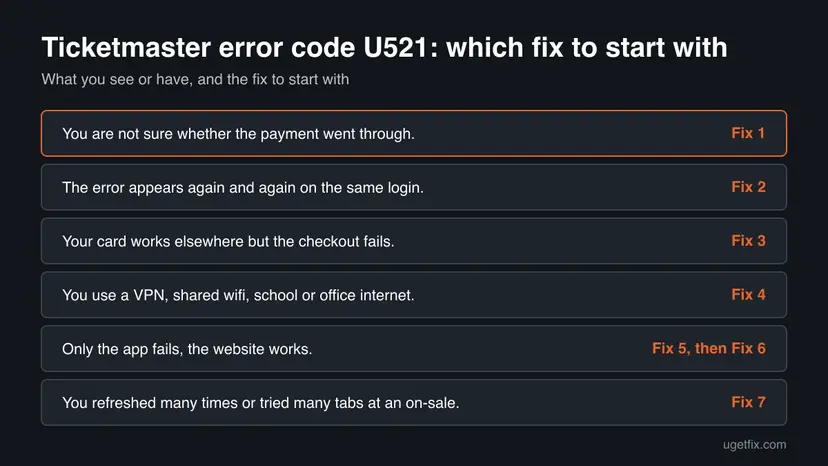
Fix 1 stops you from paying twice. Fixes 2 to 4 cover the session, the payment and the network, which are the most likely reasons. Fixes 5 and 6 repair the app. Fix 7 changes the device or browser.
| What you see or have | Start with |
|---|---|
| You are not sure whether the payment went through. | Fix 1 |
| The error appears again and again on the same login. | Fix 2 |
| Your card works elsewhere but the checkout fails. | Fix 3 |
| You use a VPN, shared wifi, school or office internet. | Fix 4 |
| Only the app fails, the website works. | Fix 5, then Fix 6 |
| You refreshed many times or tried many tabs at an on-sale. | Fix 7 |
Fix 1. Check whether an order was placed
2 minutesNo riskEveryone who saw U521, before any retry, especially if your bank shows a charge.
A failed screen does not always mean a failed payment. Ticketmaster tells you to check your account first, because a second attempt after a successful order can charge you twice.
- Open the Ticketmaster app or ticketmaster.com and sign in.
- Open your order history from the My Account menu.
- Look for an order for this event. Its status appears just after sign-in.
- Check your email inbox and spam folder for a confirmation email.
- If you see the order or the email, stop here. Do not buy again.
It worked if: You know for sure whether you already own the tickets, and you only continue if you do not.
If not: If there is no order and no email, go to Fix 2 and try the purchase again.
Fix 2. Sign out, sign in again and refresh once
3 minutesNo riskThe error repeats on the same login, or the page says the session needs to be verified.
Ticketmaster says a session that has expired or cannot be verified is solved by turning on cookies and JavaScript, refreshing once and signing out and back in. A fresh login gives checkout a clean session.
- Open My Account and select Sign Out.
- Close the Ticketmaster app or the browser tab completely.
- Open Ticketmaster again and log in with your account.
- Pick your tickets again and go to checkout.
- Refresh the page only once if it hangs. Repeated refreshes can pause your activity.
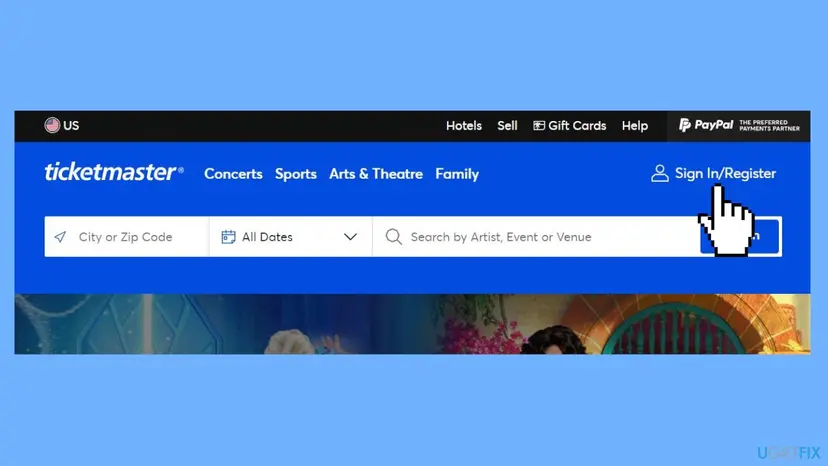
In a browser, make sure cookies and JavaScript are on for ticketmaster.com. Ticketmaster needs both to hold your ticket information during the purchase.
It worked if: The checkout opens without the U521 message and you reach the confirmation step.
If not: If U521 shows again after a clean login, go to Fix 3 and change how you pay.
Fix 3. Pay with PayPal or a different card
5 minutesLow riskYour card works elsewhere, or the error appears only when you press the final pay button.
Ticketmaster says to retry the card details, try a different payment method or contact your bank when a payment fails. Users report that PayPal let the same purchase through after U521 on a stored card.
- Open the Ticketmaster app or the website and choose your ticket, then select Next.
- Scroll down to Payments and select Back to Stored Cards.
- Under Or Pay With, choose PayPal.
- Sign in to your PayPal account. Add your card to PayPal first if you have not done so.
- Select Agree & Continue and finish the purchase.
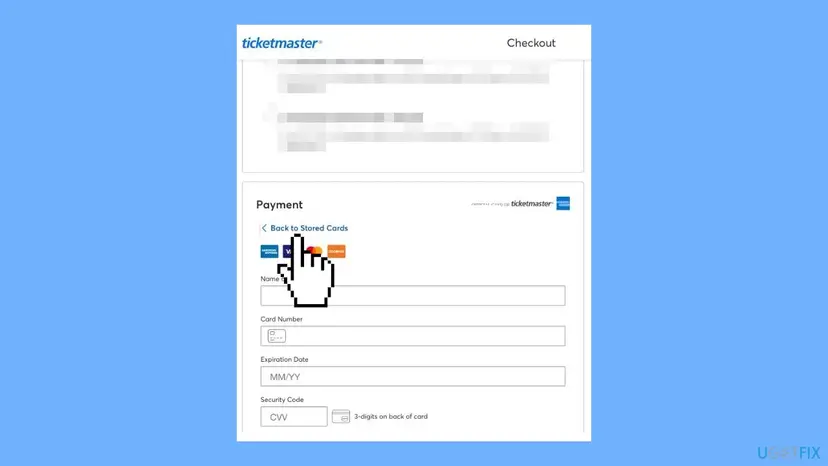
If you prefer to stay with a card, retype the card number, expiry date and security code by hand instead of using the stored card, and check that your billing address matches your bank's. If the card still fails, call your bank, since a bank can decline an online ticket payment without telling Ticketmaster why.
It worked if: The payment is accepted and Ticketmaster shows your order and sends a confirmation email.
If not: If PayPal and a second card both fail, the cause is probably not the payment. Go to Fix 4.
Fix 4. Turn off the VPN and switch networks
5 minutesLow riskYou use a VPN, Apple Private Relay, a proxy, or shared wifi at work, school or in public.
Ticketmaster states that a VPN, Apple Private Relay or proxy can look like several IP addresses, and that shared networks can look like bot activity. Both can block a purchase, and a personal connection removes the doubt.
- Turn off any VPN, Apple Private Relay or privacy tool on the device.
- Switch from office, school or public wifi to your mobile data, or to your home wifi.
- Wait a few minutes before you open Ticketmaster again, as Ticketmaster advises.
- Sign in and refresh the page once.
- Try the purchase again from the seat selection.
Only turn the VPN off for the purchase. You can turn it back on afterwards. If the error remains, Ticketmaster suggests a different network or device and a five minute wait.
It worked if: Checkout loads from the new connection and the payment goes through without U521.
If not: If the same error follows you to mobile data, go to Fix 5 and clear the app data.
Fix 5. Clear the app cache or the browser cookies
5 minutesLow riskThe error appears in the app only, or the page behaves oddly after many attempts.
For app errors that stop access, Ticketmaster lists clearing the app cache first. Old cached data can hold a broken session, and clearing it removes it without touching your account.
- On Android, go to Settings > Apps and select Manage Apps.
- Find and tap Ticketmaster.
- Tap Clear Data, then select Clear Cache.
- In a browser such as Chrome, open the three-dot menu, choose More tools and then Clear browsing data.
- Choose a time range, tick Cookies and other site data and Cached images and files, and select Clear Data.
- Open Ticketmaster and log in again before you retry.
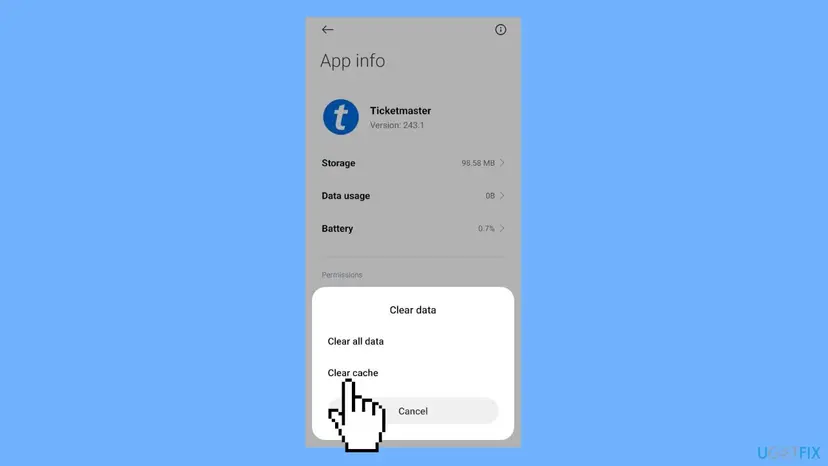
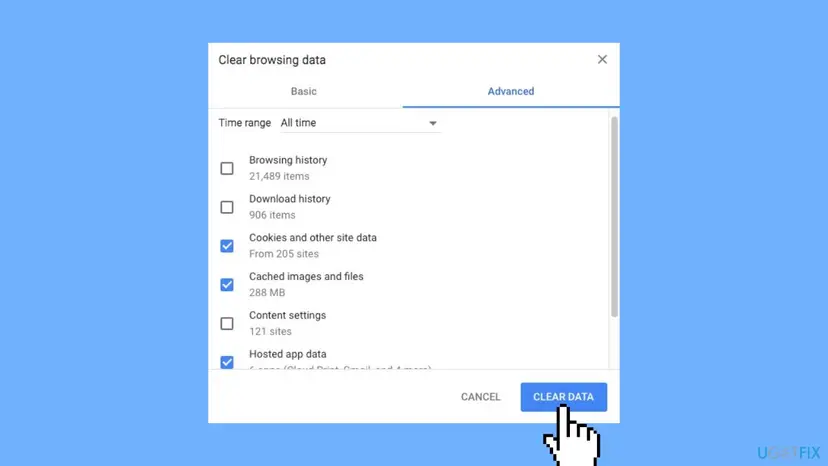
Menu names differ between phone makers and Android versions. On iPhone there is no separate Clear Cache button for apps, so use Fix 6 instead.
It worked if: Ticketmaster opens fresh and asks you to log in, and the purchase no longer shows U521.
If not: If the app still fails, go to Fix 6 and reinstall it or use the mobile site.
Fix 6. Reinstall the app or use the mobile site
10 minutesLow riskClearing the cache did not help and the website works while the app fails.
For app errors, Ticketmaster names uninstalling and reinstalling the app, and using its mobile site instead of the app. A fresh install replaces damaged app files, and the mobile site skips the app completely.
- Make sure you know your Ticketmaster email and password.
- Go to Settings > Apps and select Manage Apps.
- Find Ticketmaster and select Uninstall.
- Install the app again from the Play Store or the Apple App Store.
- Open it and log in to your account again, then check whether you can buy the tickets.
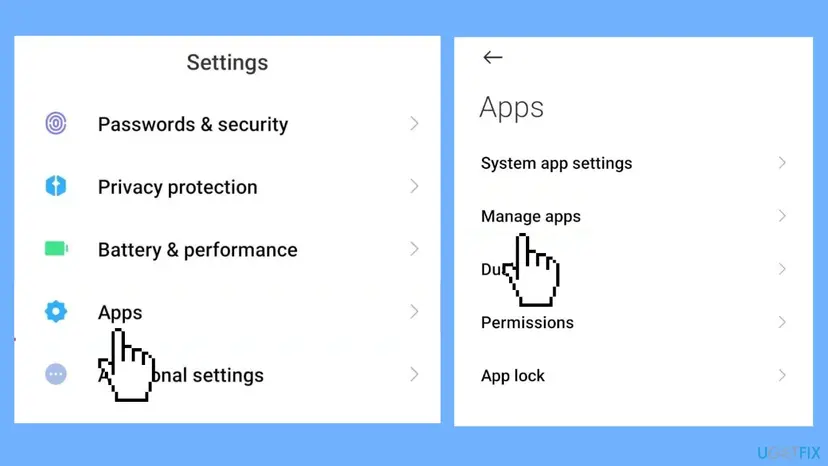
If you would rather not reinstall, open ticketmaster.com in the browser of your phone and sign in there. The mobile site is an official way around an app that keeps failing.
It worked if: The reinstalled app or the mobile site completes the checkout without the U521 message.
If not: If it fails on the website too, go to Fix 7 and change the device or browser.
Fix 7. Switch device, browser and reduce activity
10 minutesLow riskYou refreshed or clicked many times, or you shopped in several tabs during a busy on-sale.
Ticketmaster says repeated refreshes or clicks, extensions and several windows can pause a session. Staying in one window on one device, with extensions off, removes those triggers.
- Close every other Ticketmaster tab and window, and sign out on other devices.
- Turn off browser extensions and automated tools while you shop.
- Open a private window, for example Chrome Incognito, or use a different browser.
- Sign in and select your seats once, without refreshing again and again.
- If it still fails, try another device or another place.
It worked if: The purchase runs in a single clean window and ends with an order confirmation.
If not: If every device and network gives U521, use the steps under Still broken to contact Ticketmaster.
If error code U521 is still there: what to check and what to send
When U521 follows you to a second device and a second network, the problem is probably tied to your account or to the event, not to your phone. Ticketmaster support can see what a screen cannot show. Collect the details first so one message is enough.
| What to note | Where to find it | Why it helps |
|---|---|---|
| The exact message and time | A screenshot of the error with the clock visible | Support can match it to the attempt in their logs. |
| The event and seat section | The event page and your seat choice | Shows whether only this on-sale fails. |
| Device, app version and network | Phone settings, app store page, wifi or mobile data | Rules out the app and the connection. |
| Order status | Order history and your email inbox | Proves whether any charge or order exists. |
Use the Contact us link on the Ticketmaster Help site and send those four items together with the steps you already tried. Do not buy the same seats a third time until you know the first attempts left no order behind.
No tool, key or paid service can remove U521 for you. Ticketmaster's pages ask you only to check cookies, sessions, payment and network. Ignore any download or app that promises more.
How to avoid Ticketmaster error code U521 next time
- Sign in to your account before the on-sale starts.
- Keep cookies and JavaScript on for ticketmaster.com.
- Use one browser window on one device while you shop.
- Have PayPal or a second card ready in the Payments section.
- Use your own network or mobile data, not shared wifi.
- Do not refresh or click the same button many times in a row.
- Do not shop through a VPN or a proxy.
- Do not retry the payment before you check your order history.
- Do not use browser extensions that click or refresh for you.
Frequently asked questions
What does Ticketmaster error code U521 mean?
Ticketmaster does not publish a meaning for U521, and no official help page lists it. It appears at checkout and stops the purchase. The closest official source is the Ticketmaster page about error messages, which groups failed purchases into payment problems, unavailable seats, app errors, paused sessions, busy networks and VPN use. Because the code itself is undocumented, this guide treats it as a failed checkout and tests those groups in order.
Why do I keep getting U521 when I try to buy Ticketmaster tickets?
A repeated error usually means the same cause is hit each time. Ticketmaster names a few: a session that cannot be verified, a declined payment, a VPN or proxy that makes you look like several IP addresses, shared wifi that looks like bot traffic, and a damaged app. Changing one thing at a time, in the order of Fixes 2 to 6, shows which one applies to you without wasting more attempts.
Can I be charged even if I see U521?
Yes, it is possible, because an error screen does not always mean the payment failed. Ticketmaster tells you to check your account before another attempt. If an order was placed, its status shows just after sign-in, and you should also get a confirmation email. Only try again if you see neither. Your bank app can also show a pending charge, which may disappear if no order was created.
Does paying with PayPal fix U521?
For some people it does. Users on Reddit report that choosing PayPal let a purchase through after repeated U521 errors on a stored card. Ticketmaster itself says only that you can try a different payment method when a payment fails. PayPal is therefore worth one try, but it is not a guaranteed fix, and it will not help if the cause is a VPN, a blocked session or the app.
Is U521 caused by someone else buying the same seat?
That claim appears in older advice, but no official source confirms it. When seats become unavailable, Ticketmaster shows its own messages, such as Time's Up, Something Went Wrong or This Page Has Expired, and tells you to select new seats. If you think the seats are gone, go back, choose a different section and check out again, but do not assume that is what U521 means.
Should I turn off my VPN to buy tickets?
Yes, for the purchase. Ticketmaster states that a VPN, Apple Private Relay or other proxy can make it look as if you use several IP addresses, and that this may trigger an error. Turn it off, or switch to your mobile data, refresh the page and sign in again. If you are still blocked, Ticketmaster suggests another network or device and a wait of five minutes. You can turn the VPN on again afterwards.
Will clearing the cache delete my tickets?
No. Clearing the app cache or the browser cookies removes stored data on your device, and it signs you out, so you log in again afterwards. Your orders and tickets belong to your Ticketmaster account. Before you reinstall the app, make sure you know your email and password, and check that you can sign in on the website, so you can reach your order history if something looks wrong.
Is the U521 error the same on the app and the website?
The code is reported in both, and the fixes overlap, but they are not identical. Ticketmaster lists app errors separately and names clearing the app cache, reinstalling the app and using the mobile site. For the website it points to cookies, JavaScript, the session and extensions. If one fails, try the other, since a working website tells you the app is the problem.
How long should I wait before I try again after U521?
Ticketmaster gives a five minute wait only for a blocked network or VPN, after you switch to a different network or device. For a normal failed checkout, there is no stated wait, but do not refresh or click repeatedly, because Ticketmaster says that can pause your activity. A short break of a few minutes, a clean sign-in and one careful attempt is better than many fast ones.
When should I contact Ticketmaster about U521?
Contact Ticketmaster when the error follows you to a second device and a second network, or when you cannot tell whether you were charged. Use the Contact us link on the Ticketmaster Help site. Send the exact message, the time, the event, your device and app version, and your order status. Do not retry the payment while you wait, so you cannot end up with a double order.
Sources
- Ticketmaster Help: Why did I receive an error message? (help.ticketmaster.com)
- Ticketmaster Help: My activity has been paused or suspended, I'm a genuine fan. What should I do? (help.ticketmaster.com)
- Reddit r/TheCure: Ticketmaster U521 right at checkout (user reports, search excerpt) (reddit.com)
Did this fix work?
One click, no account. It tells the next reader which guides are worth their time.
Questions and experiences: fix Ticketmaster error code U521
Still broken, or found a fix we did not cover? Ask here: members and our editors answer. Reading is open; writing needs a free account.
…