
How to fix Windows 10 Error Code 0x80070103?

Prefer to fix it yourself? The manual steps follow.
5 methods in this guide
Hello. I have been trying to update Windows for couple of weeks now. Instead of everything going smoothly as usual, I receive the error 0x80070103. What does this error mean and can it be fixed?
For your software or hardware to work properly, you constantly need to update it because updates are crucial for eliminating various shortcomings and weaknesses which may result in malfunctions or performance failures. Besides, Windows updates are imperative for patching any software vulnerabilities that are present in the operating system. 0x80070103 is an error that may make you prevent downloading the driver, NET Framework,, as well as cumulative and security updates.
While some drivers upgrade automatically, others may need manual assistance. Windows Update or Microsoft Update Web are the official websites where you can download or update your drivers to the most recent ones. It is generally a very useful and convenient service because it stores numerous hardware updates in a single place.
Nevertheless, sometimes installing such software might get a bit problematic. Users report that after the download, the driver updates do not install, and instead, they receive the Error Code 0x80070103 message. What is the cause of this error?
Microsoft has already acknowledged this issue and has issued a support page in which they explain that the error may be due to a couple of reasons. First, Windows Update or Microsoft Update may be failing to install a driver which has already been installed for another piece of hardware.
Usually, this new hardware is identical to the previously installed one, so the later addition is simply not recognized. Another reason is that either of the Windows updaters is trying to update a current driver with some incompatible new version.
This clash of unsuitable drivers blocks the new driver from installing and may not allow the old one to run properly either. Obviously, it is important to fix 0x80070103 error as soon as possible. Below, you will find recommendations on how to do it. Besides, the app can also help your fix BSODs, missing DLLs, registry errors, and other issues on your Windows machine.
Fix 1. Use Windows update troubleshooter
- Right-click on Start and pick Settings
- Select Update & Security
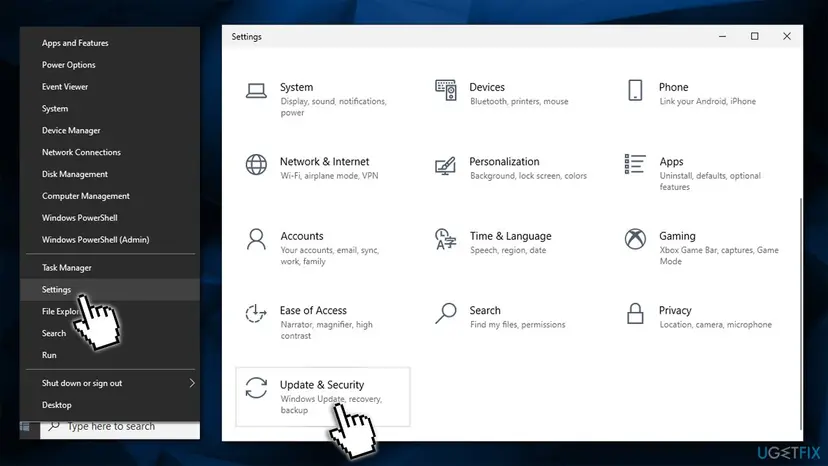
How to fix windows update error 0x80070103 go to settings - On the left, pick Troubleshoot
- If you can't see the troubleshooters listed on the right, click Additional troubleshooters
- In here, find Windows update click on it and select Run the troubleshooter.
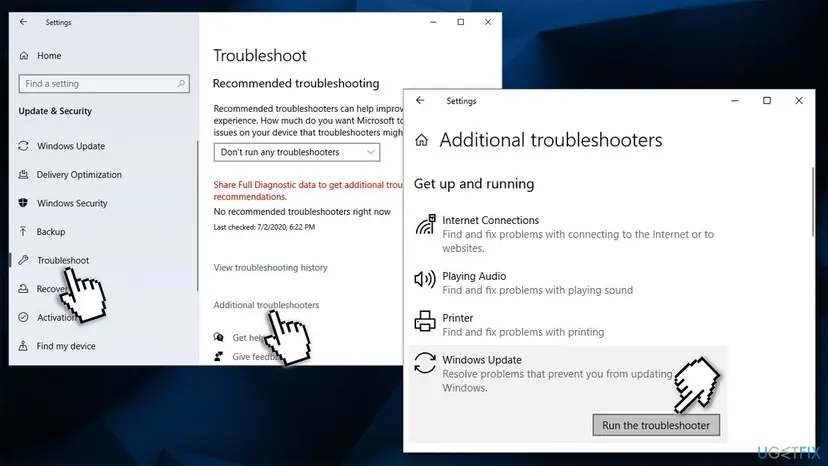
How to fix windows update error 0x80070103 run windows update troubleshooter
Fix 2. Download drivers from alternative sources
If you are unable to apply the latest driver updates via the Windows update, you can instead rely on other methods. You can download drivers via the Device Manager:
- Right-click on Start and pick Device Manager
- Expand the relevant section, e.g., Display Adapters
- Right-click on the device and select Update driver
- Now pick Search automatically for drivers and wait
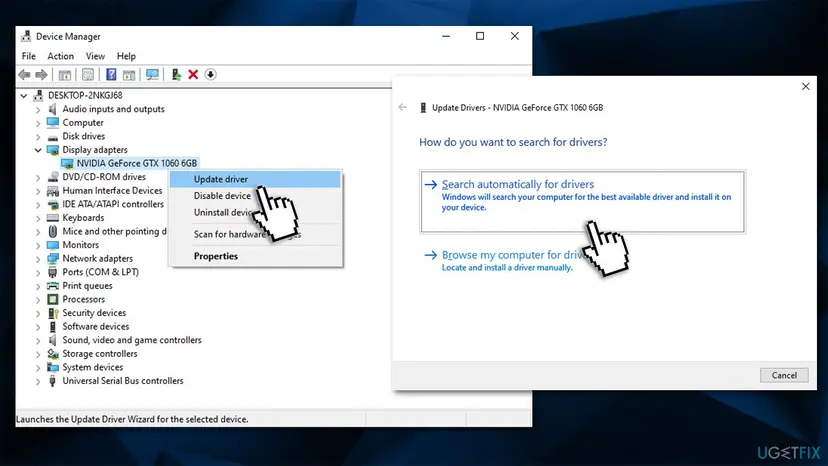
How to fix windows update error 0x80070103 update drivers via devive manager - Restart your computer.
An alternative and more effective method to download drivers is using the manufacturer's website, although you need to know the brand and the model of every hardware component you want to update drivers for. It can scan your device and automatically download and install the driver updates that are compatible with your computer, making the process easy and fast.
Fix 3. Download updates manually
Windows Update Catalog holds the database of all available Windows updates, which can be downloaded and installed manually. All you have to do is know which update you need - they are marked by a KB number. Here's how to do this correctly:
- Type in Update in Windows search and press Enter
- Click View Update History
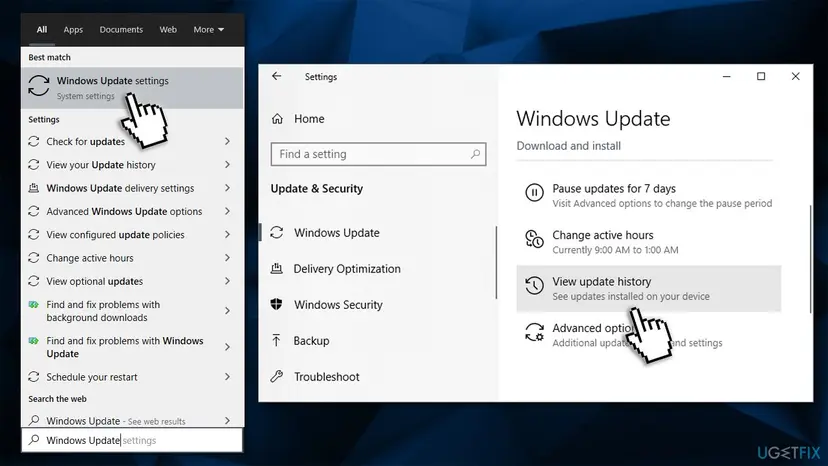
How to fix windows update error 0x80070103 view update history - Here, you will see all the recently installed and failed updates. Write down the KB number that returned the error 0x80070103
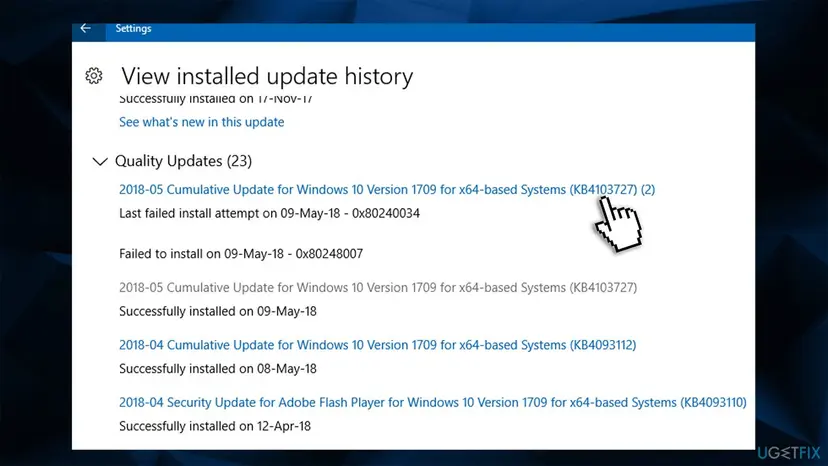
How to fix windows update error 0x80070103 write down the kb number - Now go to the Microsoft Update Catalog
- Paste the KB number into the search box and click Search
- Select the appropriate version of the update and click Download
- Click on the .msu file link and install the update
- Restart your computer.
Fix 4. Reset Windows update components
- Type in cmd in Windows search
- Right-click on Command Prompt and select Run as administrator
- If User Account Control shows up (UAC), click Yes
- Once Command Prompt opens, copy and paste the following commands, pressing Enter after each:
net stop wuauserv
net stop cryptSvc
net stop bits
net stop msiserver
ren C:\\Windows\\SoftwareDistribution SoftwareDistribution.old
ren C:\\Windows\\System32\\\\catroot2 Catroot2.old
net start wuauserv
net start cryptSvc
net start bits
net start msiserver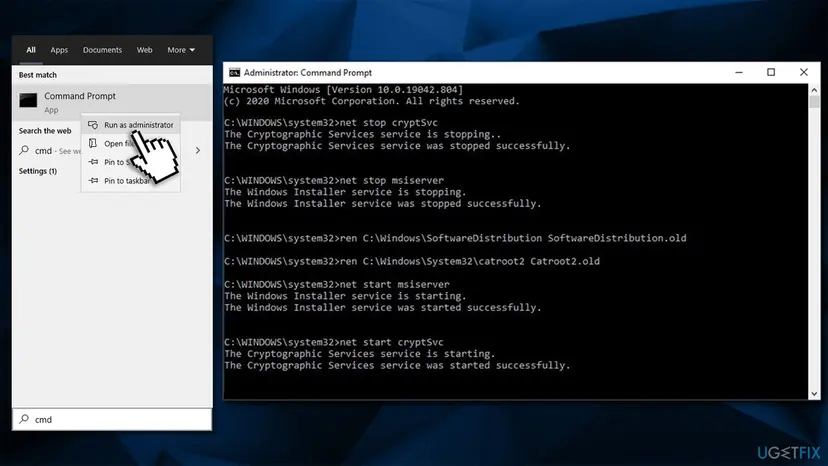
How to fix windows update error 0x80070103 reset windows update components
Fix 5. Use a clean boot
Many users said that they were able to download the updates after performing a clean boot.
- Type msconfig in Windows search and hit Enter
- Go to Services tab
- Tick Hide all Microsoft services and then click Disable all
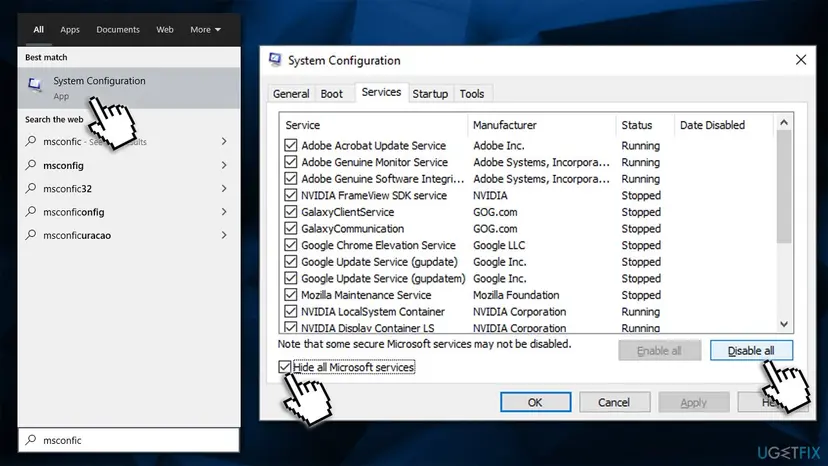
How to fix windows update error 0x80070103 disable all services - Go to Startup tab and click Open Task Manager
- Right-click on every entry there and select Disable
- Close the Task manager
- Go to boot tab within the System configuration window
- Mark the Safe boot checkbox and click Apply, then OK
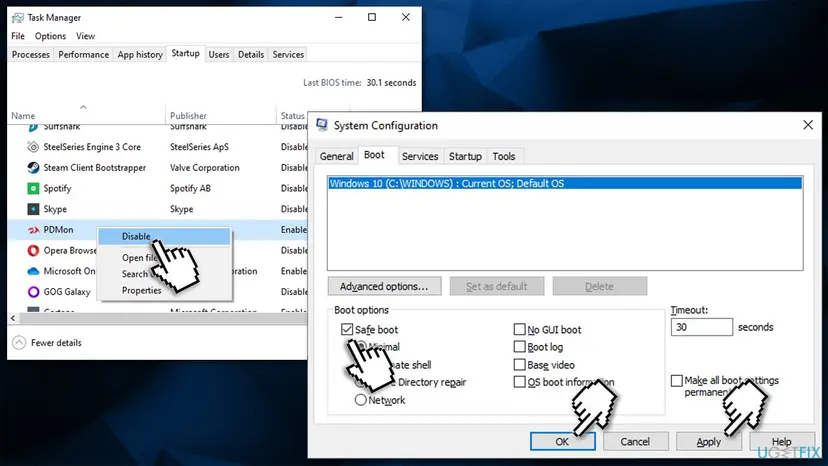
How to fix windows update error 0x80070103 perform a clean boot - Restart and try downloading updates once again.
Did this fix work?
One click, no account. It tells the next reader which guides are worth their time.
Questions and experiences: fix Windows 10 Error Code 0x80070103
Still broken, or found a fix we did not cover? Ask here: members and our editors answer. Reading is open; writing needs a free account.
…