
What is com.facebook.katana? Is it safe, should you remove it, and how to fix "has stopped"

Prefer to fix it yourself? The manual steps follow.
- 7methods
- 2 to 15 minutes
- Easy
Applies to Android phones and tablets with the Facebook app (Samsung Galaxy, Google Pixel and other makers)
7 methods in this guide
- What the name means
- katana.facebook.com
- Related Meta packages
- Virus, safety, privacy
- Why it stops
- The fixes
- 1. Restart and update
- 2. Clear the app cache
- 3. Reset the app data
- 4. Reinstall the app
- 5. Check it is genuine
- 6. Remove or disable it
- 7. Test in safe mode
- Bring Facebook back
- If it still stops
- Prevent it
- FAQ
Hello. I am seeing this com.facebook.katana all the time on my phone. What is it? Is that a piece of the Facebook application or a virus? Should I leave it or can I remove it? Maybe there is something wrong with my phone and I should fix it, because I encounter some pop-ups about this folder or file on the device?
com.facebook.katana is the package name of the Facebook app for Android, published on Google Play by Meta. It is not a virus and it is safe to keep. If you do not use Facebook you can uninstall it, or disable it when the phone maker preinstalled it, and a "has stopped" message usually goes away after you update the app and clear its cache.
It is the Facebook app. Android identifies every app by a package name, and Facebook's is com.facebook.katana. It is safe, it is not malware, and you do not have to remove it. If you never use Facebook, uninstall it, or tap Disable when Uninstall is missing. If you see "com.facebook.katana has stopped", start with Fix 1: restart the phone and update Facebook in Google Play. Then clear the app's cache (Fix 2).
| Error | com.facebook.katana has stopped or com.facebook.katana keeps stopping. On old versions such as Android 6: Unfortunately, the process com.facebook.katana has stopped. |
|---|---|
| Where it appears | In Android's crash pop-up. The same name also shows in app lists, in battery and data usage, as the folder Android/data/com.facebook.katana and in saved passwords. |
| Main cause | For the pop-up: an outdated or damaged copy of the Facebook app, or damaged temporary files. Everywhere else nothing is wrong: it is only the app's technical name. |
| Fastest fix | Restart the phone, update Facebook in the Google Play Store, then Clear cache in the app's storage settings. |
| What it is | The package name (application ID) of Facebook for Android. Developer on Google Play: Meta Platforms, Inc. |
| Is it a virus | No. A copy installed from Google Play or preinstalled by the phone maker is the genuine app. Only a copy installed from an APK file is worth checking (Fix 5). |
| Can you remove it | Yes, if you installed it: Uninstall. A preinstalled copy can often only be turned off with Disable. |
| Also written as | katana.facebook.com, facebook.katana, com facebook katana, facebook katana, fb katana. All mean the same package. |
| Affects | Android phones and tablets. Meta's Help Center lists Android 8.0 or greater as supported by the Facebook app. |
| Time to fix | 2 to 15 minutes. No computer, no root access and no extra app are needed. |
Facts checked on 14 October 2026. Steps written for Android 8.0 and later, read against Google's Android Help, Samsung's Galaxy support pages and Meta's Help Center. Menu names vary by phone maker.
What com.facebook.katana means and where you see it
Every Android app has an application ID, also called a package name. Google's developer documentation says it "looks like a Java or Kotlin package name" and "uniquely identifies your app on the device and in the Google Play Store". The ID of the Facebook app is com.facebook.katana. You can see it in the address of the app's Google Play page, which ends in id=com.facebook.katana.
The Google Play page behind that ID is named Facebook. Its developer is Meta Platforms, Inc., it shows more than 10 billion downloads, and on the day of our check it was last updated on 7 October 2026. So the name on your phone is not a separate program, a hidden add-on or a leftover. It is the Facebook app under its technical name.
| Where you see it | What it looks like | What it means |
|---|---|---|
| A pop-up in the middle of the screen | com.facebook.katana has stopped or keeps stopping | The Facebook app crashed. Start with Fix 1. |
| Settings, battery, data usage, a security or parental control app | com.facebook.katana, sometimes next to the word Facebook | Normal. The tool prints the package name and not the app's label. |
| A file manager | A folder named Android/data/com.facebook.katana | The app's own files on shared storage. Android removes them when the app is uninstalled. |
| Saved passwords | android:// followed by a long code and @com.facebook.katana/ | A password saved for the Facebook app. See the next section. |
| A link or a search result | play.google.com/store/apps/details?id=com.facebook.katana | The official Google Play page of Facebook. |
| A search or an address bar | katana.facebook.com | The package name turned around. It is not a website. |
The name is read from right to left, like a web address turned around: com, then the company, then the project. Meta has not published why the project is called katana, and we found no official explanation. What Google's documentation does explain is why the name never changed: "Don't change the application ID after you publish your app", because Google Play would treat the upload as a new app.
com.facebook.katana is a name, not a file you can delete on its own. It exists as long as the Facebook app is installed, and it disappears when the app is uninstalled. There is no way to keep Facebook and remove com.facebook.katana.
katana.facebook.com, facebook.katana and the android:// address in saved passwords
Many people search for the name turned around: katana.facebook.com, facebook.katana, katana facebook com. These are the same package name written in the order of a web address. There is no Facebook website at that address. In our check on 14 October 2026 the name katana.facebook.com returned no address at all, while m.facebook.com answered normally. The same was true for orca.facebook.com.
The second riddle is a long line such as android:// plus about 88 letters and digits, then @com.facebook.katana/. This is how the password manager built into Chrome names a password that belongs to an app and not to a website. The Chromium source code documents the format as android://<certificate_hash>@<package_name> and describes the first part as "the hash of the certificate used to sign the APK".
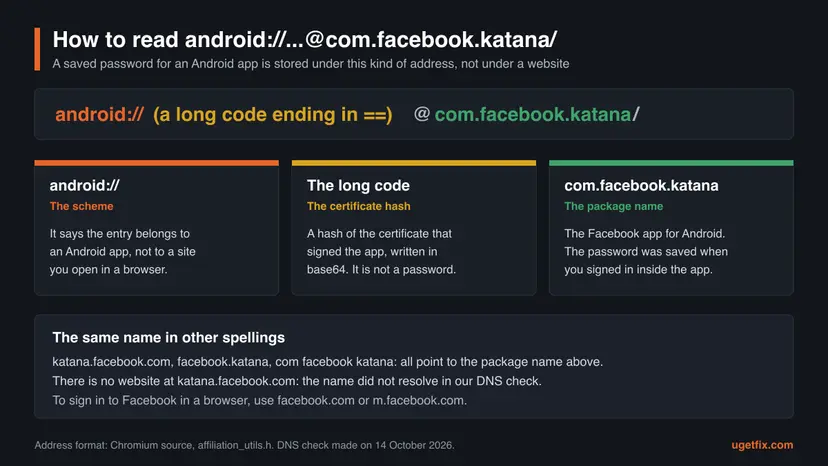
- It is not a virus and not a link. Nothing opens when you tap it in a browser, because it is not a web address.
- The long code is not your password. It is a fingerprint of the certificate that signed the app, so it describes the app's publisher and not you.
- The entry holds your Facebook sign-in. It was created when you signed in inside the app and agreed to save the password.
- Deleting the entry deletes only the saved password. The Facebook app and your account stay as they are.
- For a login page, use the real addresses. Sign in at
facebook.comorm.facebook.com, never at a page that calls itself katana.
We could not confirm on which screens each password manager prints this address in full. If you found it in an exported password file or in a list of saved logins, the explanation above applies.
com.facebook.orca, com.facebook.system and the other Meta packages next to it
Facebook is rarely alone. Meta publishes several apps, each with its own package name, and some phone makers preinstall helper apps from Meta that have no icon on the Home screen. We opened the Google Play address of each package on 14 October 2026 to see which ones are public apps.
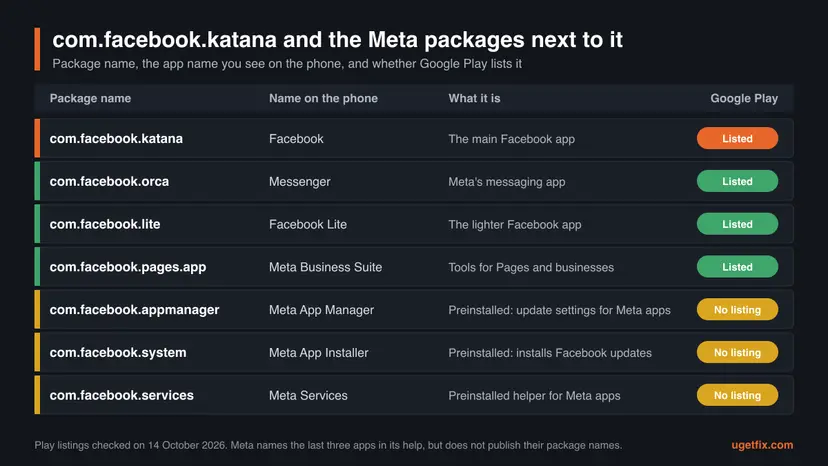
| Package name | Name on the phone | What we know |
|---|---|---|
com.facebook.katana | The main app. Listed on Google Play, developer Meta Platforms, Inc. | |
com.facebook.orca | Messenger | A separate app for messages and calls. Listed on Google Play. Removing Facebook does not remove it. |
com.facebook.lite | Facebook Lite | The lighter Facebook app. Listed on Google Play. |
com.facebook.pages.app | Meta Business Suite | Tools for Pages and business accounts. Listed on Google Play. |
com.facebook.appmanager | Meta App Manager | No Google Play listing. Meta's help says it holds the mobile data setting for updates of all Meta apps. |
com.facebook.system | Meta App Installer | No Google Play listing. Meta's help says that disabling it turns off all updates from Facebook. |
com.facebook.services | Meta Services | No Google Play listing. Meta's help does not describe it. |
Katana and orca are therefore two different apps: katana is Facebook, orca is Messenger. Each can stop, be updated, be cleared or be removed without the other. If your pop-up names com.facebook.orca, do the same fixes in this guide with Messenger in place of Facebook.
The three helper apps only exist on phones where the maker or the carrier preinstalled them. Meta's Help Center confirms their role in one sentence: its update switch "is only available on Android devices with the Meta App Manager installed". They are covered in Fix 6.
Is com.facebook.katana a virus? Safety, app permissions and privacy
No, com.facebook.katana is not a virus, spyware or a sign of a hacked phone. It is the ID of an app that Google Play lists under Meta's name, and that many phone makers ship with the phone. Seeing it in a list means only that Facebook is installed.
One caution is fair. The ID is written by the developer into the app, so it does not prove where your copy came from. A copy from Google Play or from the phone maker is the genuine one. A copy installed from an APK file from another site cannot be checked by its name. Fix 5 shows how to let Google Play Protect look at it.
| Privacy fact | What the Google Play Data safety page of Facebook says |
|---|---|
| Shared with other companies | Device or other IDs, for advertising or marketing. Name, email address, user IDs and phone number, for fraud prevention, security and compliance. |
| Collected | 14 groups of data, among them location, contacts, photos and videos, messages, app activity including installed apps, web browsing history, financial info and calendar events. |
| Optional items | Precise location, contacts, photos, videos, calendar events, health and fitness info and several others are marked Optional. |
| In transit | "Data is encrypted in transit." |
| Deletion | "You can request that data be deleted." |
Privacy is a different question from safety. The app is not malicious, but it asks for a lot. Meta's Help Center admits that "some of these permissions sound scary" and gives examples: contacts are read to import them, calendar access shows Facebook events in your calendar. You decide which permissions stay on.
- Open the Settings app of the phone.
- Tap Apps.
- Tap Facebook. If it is not in the short list, tap See all apps first.
- Tap Permissions.
- Tap a permission, for example Location or Contacts, and choose Don't allow or Allow only while using the app.
On the same App info screen, leave Pause app activity if unused turned on. Google's help says that for apps you have not used for a long time, Android then removes permissions, stops background activity and notifications, and deletes temporary files.
Why "com.facebook.katana has stopped" appears: the causes, ranked
The pop-up is Android's own crash dialog, not a message written by Facebook. In the Android source code its text is a pattern: a name, then "has stopped", or "keeps stopping" when the crashes repeat. Old versions such as Android 6 used a longer pattern: "Unfortunately, the process", the name, "has stopped."
Android fills in either the app's label (Facebook) or the process name (com.facebook.katana). The source code uses the process name when the crashed process holds more than one package or when the label cannot be read. So the technical name does not mean a different or more serious error. It is the same crash of the same app.
| How often | Cause | Start with |
|---|---|---|
| Most often | The installed Facebook version is old, or an update was interrupted. | Fix 1 |
| Often | Temporary files of the app are damaged. | Fix 2 |
| Less often | The app's stored data is damaged, for example after a restore or a phone transfer. | Fix 3 |
| Less often | The installed copy is damaged, or it came from an APK file and not from Google Play. | Fix 4 and Fix 5 |
| Less often | The Android version is behind. Meta lists Android 8.0 or greater as supported. | The system update in Fix 1 |
| Rarely | Another app you installed interferes with Facebook. | Fix 7 |
| Rarely | The phone is almost full. Google says a phone can start having issues when less than 10% of storage is free. | Free up space, then Fix 2 |
Nobody publishes crash numbers per cause. The order above follows Google's own troubleshooting article for apps that crash, and it puts first what costs you the least: no step in Fix 1 or Fix 2 signs you out.
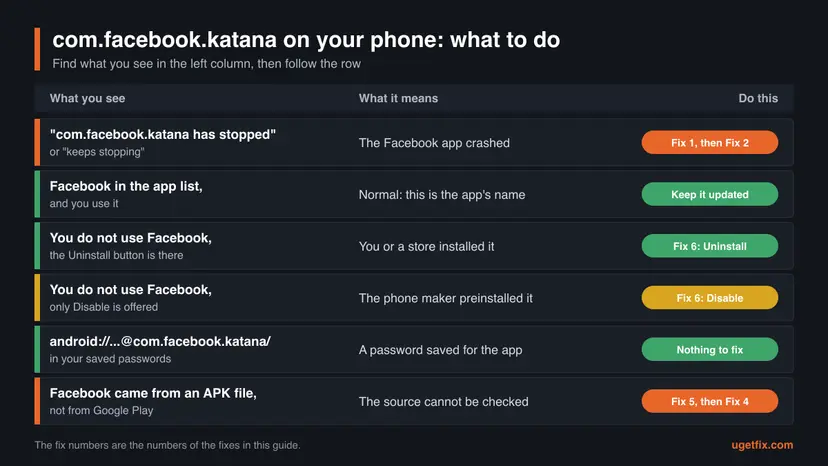
- "has stopped" once: tap Open app again. A single crash needs no repair.
- "keeps stopping": the crash repeats. Work through the fixes in order.
- "isn't responding" with a Wait button: the app is frozen, not crashed. Tap Wait once, and if it stays frozen, use Fix 2.
- The pop-up appears although you never open Facebook: the app also runs in the background. If you do not use it, go straight to Fix 6.
How to fix "com.facebook.katana has stopped", and how to remove or disable the app
Fixes 1 to 4 repair a Facebook app that crashes, from the step that costs nothing to a full reinstall. Fix 5 answers the virus question for a copy that did not come from Google Play. Fix 6 is for readers who do not want Facebook at all, and Fix 7 looks for another app that interferes. Menu names differ a little between phone makers, so each fix gives the names from Google's and Samsung's own help.
| What you see or want | Start with |
|---|---|
| The pop-up "com.facebook.katana has stopped" appeared once or twice. | Fix 1. |
| "com.facebook.katana keeps stopping" every time you open Facebook. | Fix 1, then Fix 2 and Fix 3. |
| The crashes began after a restore, a phone transfer or a failed update. | Fix 3, then Fix 4. |
| You installed Facebook from an APK file, or you doubt the copy is genuine. | Fix 5, then Fix 4. |
| You do not use Facebook and want it gone, or the pop-up appears although you never open it. | Fix 6. |
| The crashes began after you installed another app. | Fix 7. |
| You only saw the name in a list, a folder or your saved passwords. | Nothing to fix. Read the sections above. |
Fix 1. Restart the phone and update Facebook in Google Play
5 minutesNo riskThe pop-up is new, or you have not updated your apps for a while.
Google's troubleshooting article for a crashing app starts with exactly these two steps. A restart clears a stuck process, and a new version replaces program files that a broken update left behind. On the day of our check the Google Play page showed an update from 7 October 2026.
- Press and hold the Power button for about 30 seconds, or until the phone restarts. If a menu appears, tap Restart.
- Open the Google Play Store app.
- At the top right, tap the profile icon.
- Tap Manage apps & devices.
- Under Updates available, find Facebook and tap Update. Update all also works.
- Wait until the update is installed, then open Facebook.
If Facebook is not in the list of updates, it is already current as far as Google Play knows. Then check Android itself: open Settings, tap System, then Software update. On some phones the path is About phone, then Software update. Install what is offered and restart.
On phones with Meta's preinstalled helper apps, Facebook may also update outside Google Play. Meta's Help Center says that disabling Meta App Installer turns all updates from Facebook off. If you disabled it earlier, update through the Google Play Store as shown above.
It worked if: Facebook opens and stays open, and the pop-up does not come back during normal use.
If not: Go to Fix 2 and clear the temporary files of the app.
Fix 2. Force stop Facebook and clear its cache
2 minutesNo riskFacebook is up to date and still stops, opens to a blank screen or closes while loading.
The cache holds temporary files that Facebook downloads to open faster. When one of them is damaged, the app can crash at the same point every time. Google's help describes the button plainly: it "deletes temporary data", and the app may be slow the next time you open it. It does not reset the app.
- Open the Settings app of the phone.
- Tap Apps.
- Tap Facebook. If you do not see it, tap See all apps and pick it from the full list.
- Tap Force stop and confirm. This closes every part of the app that is still running.
- Tap Storage. On some phones this line has a slightly longer name that also mentions the cache.
- Tap Clear cache.
- Go back to the Home screen and open Facebook.
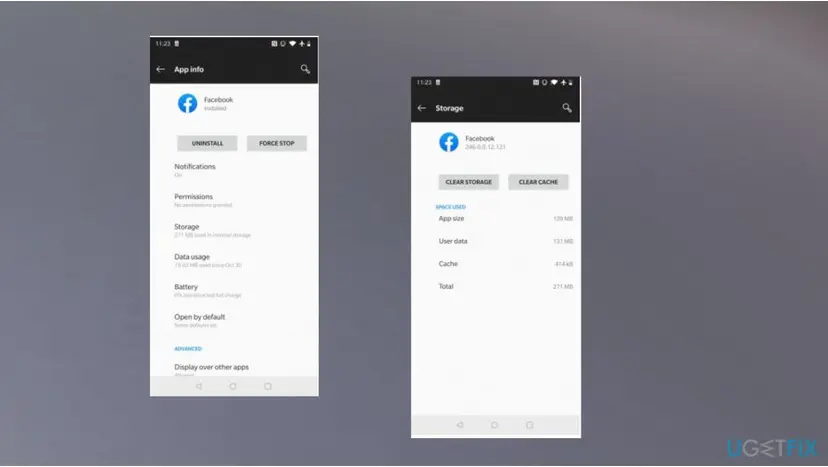
Do not tap Clear storage or Clear data on this screen yet. That button is Fix 3, and it signs you out. If the cache number on the screen was already close to zero, the cache was not the cause: move on.
It worked if: The cache size on the Storage screen drops to almost nothing, and Facebook opens without the pop-up. You are still signed in.
If not: Go to Fix 3 to reset the data of the app, after reading its warning.
Fix 3. Clear Facebook's storage to reset the app
5 minutesRead the warningClearing the cache did not help, or the crashes began after a restore or a move to a new phone.
The app keeps its settings, its sign-in and its local database in its own storage. If that data is damaged, a new version and an empty cache change nothing, because the app reads the same broken data again. Clearing storage puts the app back to the state of a fresh installation without removing it.
This removes everything the app stored on this phone: your sign-in, the app's settings, unsent drafts and content saved for offline use. Google's help says the button "permanently deletes all app data". Your account, friends, posts and photos are stored by Facebook and are not touched. Before you start, make sure you know your Facebook password and can receive your two-factor code.
- Open Settings and tap Apps.
- Tap Facebook.
- Tap Storage.
- Tap Clear storage. On Samsung Galaxy phones the button is Clear data.
- Confirm. On Samsung Galaxy phones tap Delete.
- Open Facebook and sign in again.
Samsung's support page gives the same order for an app that does not respond: Clear cache first, then Clear data, then Delete. It also warns that "some system apps cannot have their data cleared". If the button is grey for a preinstalled Facebook, skip to Fix 6 and use disable and enable.
It worked if: Facebook opens with its sign-in screen, like a new installation, and works after you sign in.
If not: The stored data was not the cause. Go to Fix 4 and replace the app itself.
Fix 4. Uninstall Facebook and install it again from Google Play
10 minutesRead the warningFixes 1 to 3 did not stop the crashes and your phone offers Uninstall for Facebook.
A reinstall replaces every program file of the app, which an update does not always do. It is also the way to swap a copy from an unknown source for the one Google Play serves. Meta's own Help Center describes the same two steps: uninstall in the application manager, then download it again from Google Play.
Uninstalling erases the data the app saved on the phone, exactly as in Fix 3: you will have to sign in again, and unsent drafts are lost. Google's help states it in bold: "Any data saved in this app will be erased." Your Facebook account is not deleted.
- Open the Google Play Store app.
- At the top right, tap the profile icon.
- Tap Manage apps & devices, then Manage.
- Tap Facebook.
- Tap Uninstall and confirm.
- Restart the phone.
- Open the Google Play Store, search for Facebook, check that the developer is Meta Platforms, Inc. and tap Install.
- Open Facebook and sign in.
If Google Play shows no Uninstall button for Facebook, the app came with the phone. Such a copy cannot be removed and installed again this way. Use Fixes 1 to 3 to repair it, or Fix 6 to turn it off.
It worked if: The app installs as a fresh copy, asks you to sign in and no longer shows the pop-up.
If not: Go to Fix 7 to test whether another app causes the crash, then read the section about what to do when it still stops.
Fix 5. Check that the copy on your phone is the genuine Facebook app
3 minutesNo riskYou installed Facebook from an APK file or a store other than Google Play, or you worry that the name hides malware.
The package name alone cannot tell a genuine copy from a repackaged one, because the developer of any APK file writes the name. Google Play Protect looks at the app itself. Google says it checks the device "for potentially harmful apps from other sources" and "may deactivate or remove harmful apps from your device".
- Open the Google Play Store app.
- At the top right, tap the profile icon.
- Tap Play Protect.
- Read what the screen reports. If Play Protect found a harmful app, it shows a warning or sends a notification: tap it, then tap Uninstall.
- Tap the Settings gear icon.
- Make sure Scan apps with Play Protect is turned on.
Play Protect is on by default, and Google recommends keeping it on. When it finds a harmful app it can send a notification, disable the app until you uninstall it, or remove it automatically.
- Facebook came from Google Play or with the phone, and Play Protect reports nothing: the copy is genuine. The name com.facebook.katana needs no further action.
- Facebook came from an APK file: do not wait for a scan result. Remove it and install the Google Play copy with Fix 4.
- A second Facebook icon appeared that you did not install: open its App info from the icon and uninstall it, then run the Play Protect steps again.
It worked if: Play Protect shows no harmful apps, and the only Facebook on the phone is the copy from Google Play or from the phone maker.
If not: If Play Protect keeps reporting an app you cannot remove, use the safe mode steps in Fix 7 and uninstall it there.
Fix 6. Uninstall or disable Facebook if you do not use it
3 minutesLow riskYou do not use the Facebook app, or the pop-up appears although you never open it.
An app that is not on the phone, or that is disabled, cannot crash. Google's help explains the two cases: apps you installed can be uninstalled, and for some system apps that came with the phone you can only turn them off. Samsung adds that a disabled app stops its functions and leaves the Home and Apps screens.
- Open Settings and tap Apps.
- Tap Facebook.
- If you see Uninstall, tap it and confirm. Facebook and its data are removed from the phone.
- If you see only Disable, tap it. On Samsung Galaxy phones confirm with Disable app.
- Go back to the list of apps and show all apps, including system apps.
- Look for Meta App Installer, Meta App Manager and Meta Services.
- Open each one that exists and tap Disable.
On a Samsung Galaxy there is a shortcut: touch and hold the Facebook icon on the Apps screen, then tap Uninstall or Disable. Samsung notes that not all preinstalled apps can be disabled. If neither button is active on your model, hide the icon with Hide apps on Home and Apps screens in the Home screen settings.
| Choice | What happens on the phone | Can you undo it |
|---|---|---|
| Uninstall | The app, its data and the folder Android/data/com.facebook.katana are removed. | Yes. Install Facebook again from Google Play. |
| Disable | The app stays in storage but does not run and has no icon on the Home and Apps screens. | Yes. Tap Enable on the same screen. |
| Hide (Samsung) | Only the icon disappears. The app still runs and can still show the pop-up. | Yes. Untick it in the same setting. |
| Leave it unused | Android pauses an app that is not used for a long time and removes its permissions. | Yes. Open the app. |
Removing or disabling the app does not delete or deactivate your Facebook account. The account stays reachable at facebook.com in any browser. Messenger is a separate app and keeps working.
It worked if: Facebook is no longer on the Apps screen, and no pop-up with com.facebook.katana appears after a restart.
If not: If the app comes back enabled after a system update, disable it again. If the Disable button is grey, hide the icon and leave the app unused.
Fix 7. Restart in safe mode to find an app that interferes
15 minutesLow riskThe crashes began soon after you installed another app, or Fixes 1 to 4 changed nothing.
Safe mode starts Android with all downloaded apps turned off for the moment. If the pop-up and other odd behaviour stop there, the cause is an app you installed and not the phone. Google's help uses this test for phones that crash or freeze.
- Take a screenshot of your Home screen. Google warns that safe mode removes some Home screen widgets.
- Restart the phone in safe mode. The button combination differs by maker, so follow the support site of your phone's manufacturer.
- Use the phone for a few minutes. If Facebook came with the phone, open it. A Facebook you installed yourself is turned off in safe mode.
- Restart the phone normally to leave safe mode.
- If the problem was gone in safe mode, uninstall the apps you installed most recently, one at a time.
- Restart after each removal and open Facebook to test.
- When the pop-up stops, put back the apps that were not the cause.
Watch the storage figure while you are in Settings. If less than a tenth of the phone's storage is free, delete or move files before you judge the result, because a full phone makes many apps unstable at once.
It worked if: After one particular app is removed, Facebook stays open in normal mode.
If not: If the problem is the same in safe mode, no downloaded app is the cause. Read the next section for what to send to the developer.
How to bring Facebook back after you disabled or removed it
Every change in this guide can be reversed, and none of them touches the account itself. What you cannot get back is data that existed only inside the app on this phone, such as an unsent draft, after Fix 3 or Fix 4.
| What you did | How to reverse it |
|---|---|
| Tapped Disable on Facebook. | Open Settings, tap Apps, select the disabled app and tap Enable. |
| Disabled Meta App Installer, Meta App Manager or Meta Services. | Show all apps including disabled and system apps, open each one and tap Enable. |
| Uninstalled Facebook. | Install it from Google Play on the phone, or at play.google.com on a computer: select Install, then your device. |
| Cleared the storage of the app. | Open Facebook and sign in. Settings inside the app must be set again. |
| Denied a permission. | Open Settings, Apps, Facebook, Permissions, tap the permission and choose Allow. |
| Hid the icon on a Samsung Galaxy. | Open the Home screen settings, tap Hide apps on Home and Apps screens and remove the app from the hidden list. |
After you enable a preinstalled Facebook again, open the Google Play Store and update it before the first start. A copy that sat disabled for months is as old as the day you turned it off.
If com.facebook.katana still stops: what to check and whom to tell
When a clean copy from Google Play crashes on an updated phone, the fault is usually in that release of the app or in the phone. You cannot repair either, but you can tell which one it is and report it to the right place.
| Check | What it tells you |
|---|---|
| Do other apps crash as well? | Yes: the phone is the problem. Free up storage, install system updates and follow your manufacturer's support pages. |
| Which Android version does the phone run? | Below 8.0: Meta no longer lists it as supported. Use Facebook in the browser. |
Does Facebook work at m.facebook.com in the phone's browser? | Yes: the account and the network are fine, the app is the problem. |
| Does it fail in the browser too, also on a computer? | The cause is the account or the connection, not com.facebook.katana. |
| Did the crashes start on the day of an app update? | Likely a faulty release. Wait for the next version in Google Play. |
- Send the crash report. When the pop-up appears, tap Send feedback if the button is offered. It sends feedback about the crash.
- Write to the developer. Google's advice for one app that fails while others work is to contact its developer. The Google Play page of Facebook lists the support address
[email protected]. - Say what matters. Give the phone model, the Android version, the Facebook version from the App info screen, the exact text of the pop-up and what you had tapped before it.
- Use a stand-in. Until a fixed version arrives, use
m.facebook.comin the browser or Facebook Lite, which is a separate app on Google Play.
A search for this error returns posts in Facebook groups that list phone numbers for "Facebook support". We saw several on 14 October 2026. They are not Meta's Help Center. Do not call them and do not give anyone your password or a login code. Meta's help is at facebook.com/help.
A factory reset is the last resort that Google's help mentions for a phone with problems, and it erases everything on the phone. It is not worth it for one app that crashes. Disabling the app and using the browser costs nothing and loses nothing.
How to keep the pop-up from coming back
The crash pop-up comes back for two reasons: the app falls behind, or the phone runs out of room. Both are easy to keep under control, and neither needs a cleaner app or a security tool.
- Keep automatic app updates on in the Google Play Store, or update Facebook by hand every few weeks.
- Install Android system updates when the phone offers them.
- Keep more than a tenth of the phone's storage free.
- Install Facebook only from Google Play, or keep the copy that came with the phone.
- Leave Scan apps with Play Protect turned on.
- Disable the app if you do not use it, so it cannot run or crash in the background.
- Do not install Facebook from an APK site to get an older or modified version.
- Do not delete the folder
Android/data/com.facebook.katanaby hand to fix a crash. Use Clear cache. - Do not install cleaner or booster apps that promise to repair com.facebook.katana.
- Do not root the phone only to remove a preinstalled Facebook. Disable stops it without that risk.
- Do not type your Facebook password into a page that calls itself katana.facebook.com.
If you want Facebook but with less of the app on the phone, the browser version at m.facebook.com needs no package at all. Facebook Lite is the smaller app from the same developer. Either way the name com.facebook.katana is gone from the phone once the main app is uninstalled or disabled.
Frequently asked questions
What is com.facebook.katana, and what is Facebook katana used for?
It is the package name of the Facebook app for Android, the ID by which Android and Google Play tell apps apart. It is used for nothing else: it is not a feature, a secret mode or a second app. Android's documentation says such an ID "uniquely identifies your app on the device and in the Google Play Store". Facebook katana, katana Facebook, fb katana and the Spanish search "que es facebook katana" all ask about the same thing. If you see the name in a list, Facebook is installed. If you see it in a pop-up, the Facebook app has crashed.
Is com.facebook.katana a virus or spyware?
No. It is the name of the genuine Facebook app, which Google Play lists under the developer Meta Platforms, Inc. with more than 10 billion downloads. A copy from Google Play or one that came with the phone is safe to keep. The only case worth a check is a copy installed from an APK file from another site, because a package name does not prove the source. Run Google Play Protect as in Fix 5, or replace the copy with the Google Play one. Privacy is a separate matter: the app's own Data safety page lists 14 groups of collected data.
Can I uninstall com.facebook.katana, or can I only disable it?
It depends on how Facebook got onto the phone. If you installed it, open Settings, Apps, Facebook and tap Uninstall. If the phone maker or the carrier preinstalled it, the button is often missing and you see Disable instead. Google's help says that some system apps cannot be deleted but can be turned off on some phones. A disabled app does not run and has no icon. Neither choice deletes your Facebook account, and both can be undone: install it again from Google Play, or tap Enable.
What does "com.facebook.katana has stopped" mean?
It means the Facebook app crashed and Android closed it. The text comes from Android itself. Android normally prints the app's label, so most people see "Facebook has stopped". When it prints the process name, you see "com.facebook.katana has stopped". "Keeps stopping" means the crash repeated. On old versions such as Android 6 the wording was "Unfortunately, the process com.facebook.katana has stopped." The cure is the same in every case: restart the phone, update Facebook in the Google Play Store, then clear the app's cache. If that fails, clear its storage or reinstall it.
What is katana.facebook.com, and is there a login page at that address?
There is no such website. katana.facebook.com is the package name com.facebook.katana written in the order of a web address, and tools that list apps sometimes print it that way. In our DNS check on 14 October 2026 the name returned no address, and the same was true for orca.facebook.com. The real mobile site is m.facebook.com, and the main site is facebook.com. To sign in, use one of those two or the Facebook app. Treat any page or message that asks for your password under a katana address as a fake.
What is the android:// address that ends in @com.facebook.katana/ in my saved passwords?
It is the label of a password that you saved for the Facebook app and not for a website. Chrome's password manager stores app logins under an address made of three parts: the word android, a long code and the package name. The Chromium source code describes the code as "the hash of the certificate used to sign the APK", written in base64. It identifies the app's publisher. It is not your password, it is not a link and it is not a sign of malware. Deleting the entry removes only the saved password from the password manager.
What is the difference between com.facebook.orca and com.facebook.katana?
They are two different apps from the same developer. com.facebook.katana is Facebook, the app with the feed, groups and Marketplace. com.facebook.orca is Messenger, the app for messages and calls. Both have their own page on Google Play, their own data and their own updates. One can crash, be cleared or be uninstalled while the other keeps working. A search such as "pname com facebook orca" refers to the Messenger package. If your pop-up says com.facebook.orca has stopped, follow the same fixes in this guide and choose Messenger in the list of apps.
Why is the Facebook app called katana? What does the name mean?
Meta has not published an explanation, and we found no official source for the name. A katana is a Japanese sword, and the word is the project part of the package name, in the same way that orca is the project part of Messenger's name. What can be confirmed is why it never changed. Android's documentation tells developers not to change the application ID after an app is published, because Google Play would then treat the next upload as a new app. A name chosen years ago therefore stays for the whole life of the app.
Does deleting the com.facebook.katana folder remove Facebook or fix the error?
No. The folder Android/data/com.facebook.katana holds files that the app saved on shared storage, not the app itself. If you delete it by hand, Facebook creates it again and may have to download the same files once more. Android's documentation says the files in these folders "are removed when your app is uninstalled", so there is nothing to clean up after a real uninstall. On current Android versions other apps cannot open these folders anyway. To repair a crash use Clear cache in the app's storage settings, which is the supported way to delete its temporary files.
Can I remove a preinstalled Facebook completely without rooting the phone?
Not through the phone's own menus: for a preinstalled copy they offer Disable at most. Android's developer tool adb documents a package command, pm uninstall with the option --user, which removes a package for one user of the device. It is a tool for developers and needs a computer and USB debugging. Phone makers do not offer it as a support step. We did not test it for this guide and do not give it as a fix. For everyday use Disable gives the same result: the app does not run and cannot show the pop-up.
Sources
- Google Play: Facebook (com.facebook.katana), listing by Meta Platforms, Inc., updated 7 October 2026 (play.google.com)
- Google Play: Facebook, Data safety (play.google.com)
- Android Help: Delete, disable & manage unused apps on Android (support.google.com)
Did this fix work?
One click, no account. It tells the next reader which guides are worth their time.
Questions and experiences: What is com.facebook.katana? Is it safe, should you remove it, and how to fix "has stopped"
Still broken, or found a fix we did not cover? Ask here: members and our editors answer. Reading is open; writing needs a free account.
…