How to fix
Application Load error 5:0000065434
on Windows
Resolve Application Load error 5:0000065434 on Windows 10 or 11 quickly and easily. Expert-tested solutions ensure a seamless gaming experience. Fixed i…


What causes How to fix Application Load error 5:0000065434?
- Mods applied to Steam games
- Bad mods breaking games
- Malware disguised as mod files
- Issues with standalone installed games
- Transaction failures during game purchases
Repairs Windows system files, removes malware, and restores a clean OS state — without reinstalling.
Hello. When I'm trying to launch Fallout via Steam, I receive an error Application Load error 5:0000065434. Is there anything that could be done? Thanks in advance.
Application Load error 5:0000065434 is a relatively common issue that prevents applications from loading, in particular, video games. While the error can be related to standalone installed games, it is also very common among Steam users. Steam is the most popular gaming platform released by Valve, hosting thousands of games - from large AAA releases to small indie titles. Players can also use it to add friends, chat with them, form parties, and perform many other actions.
Since Steam is immensely popular, its engineers are trying to do everything to keep the service running smoothly. Despite the efforts, complete avoidance of errors is almost impossible. Users previously reported that they are unable to complete a transaction when buying a new game or receive disk write errors. Application Load error 5:0000065434 is just another addition to the bunch, and we will try to explain how to fix it easily.
The causes of Application Load error 5:0000065434 can vary, although it has been observed that users who like to apply mods to their Steam games are the most affected. Mods are tiny files that can be downloaded via various third parties, which change the way games look, feel, or play.
The practice is relatively common, although it comes with several risks. For example, bad mods can break games, or malware can be disguised as a mod file. Finally, it could be the culprit of the Application Load error 5:0000065434. Thus, you should always ensure that the mod is working well and only download it from trusted sources that perform virus scans, such as Nexus Mods.
If you are looking for ways to fix Application Load error 5:0000065434, you can to the right place. In most cases, the issue can be fixed relatively easily, although other methods require a bit more digging. Therefore, it is important you follow the below-provided guide carefully.
Before you start, we would like to offer you [d1] repair software that is designed to fix various Windows issues automatically, help to recover from malware infections, and remediate critical errors such as Srttrail.txt BSOD,[ref en-1] DRIVER_OVERRAN_STACK_BUFFER, 0x00000028, and others.
Fix 1. Run Steam as administrator
Let's start from Application Load error 5:0000065434 fix that is the easiest to do - you simply need to try starting the application with administrator's rights. Here's how to do it:
- Find Steam shortcut on your desktop (if you can't find it, navigate to C:\\Program Files (x86)\\Steam)
- Right-click on it, and select Run as administrator
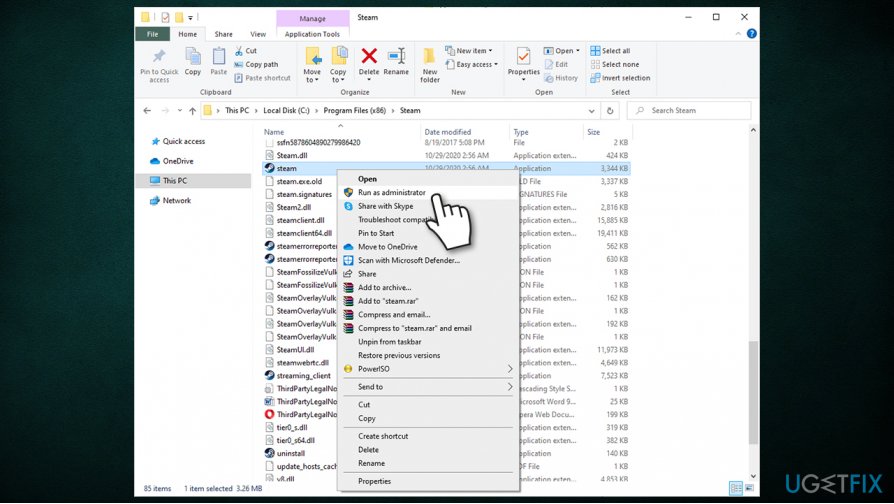
How to fix application load error 50000065434 run as administrator - If User Account Control Shows (UAC)[ref en-3] up, press Yes
- Check if you can launch the game once again.
Fix 2. Delete the "appcache" folder within Steam's directory
Cache is a place where all resources needed for particular applications' actions are stored. If this folder becomes buggy,[ref en-2] it might affect certain program's functions, such as preventing the launch. Thus, you should try to delete it and Steam will recreate it automatically:
- Navigate to C:\\Program Files (x86)\\Steam once again
- At the very top, you should find a folder called "appcache"
- Right-click on it and select Delete or press a keyboard combination Shift + Del to remove it quickly.
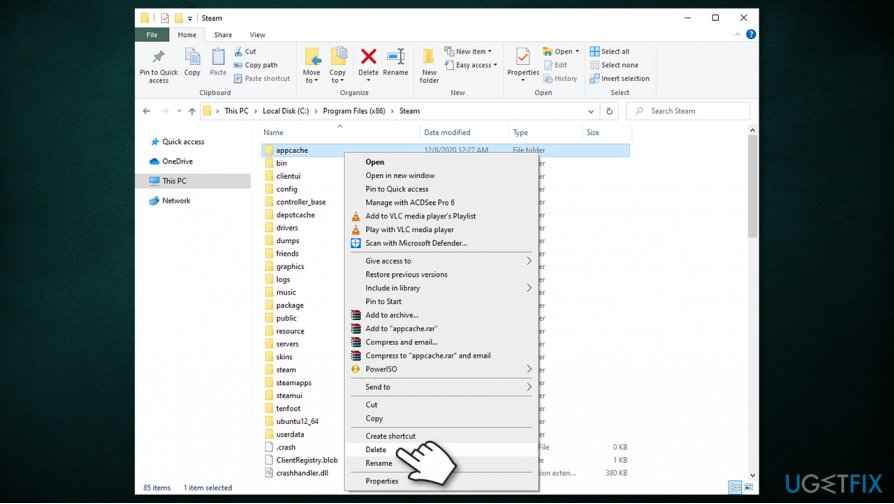
How to fix application load error 50000065434 delete appcache folder
Fix 3. Copy steam.exe into the main folder
- Navigate to C:\\Program Files (x86)\\Steam once again
- Locate steam.exe and click it once
- Press Ctrl + C on your keyboard
- Now you need to find the main folder of the game has been causing the Application Load error 5:0000065434. All the games are by default located in the C:\\Program Files (x86)\\Steam\\steamapps\\common folder, so go there by double-clicking the steamapps folder
- Open the game folder and press Ctrl + V on your keyboard - steam.exe should be copied over
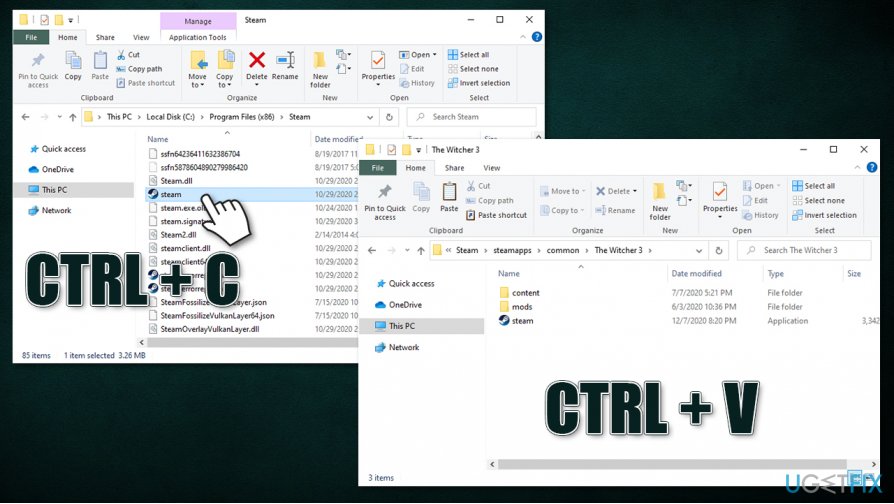
How to fix application load error 50000065434 copy steam exe to games folder - Try to launch the game once again.
Fix 4. Verify game file integrity
- Open Steam
- Go to your Library
- Select the game you are having troubles with and right-click it
- Pick Properties
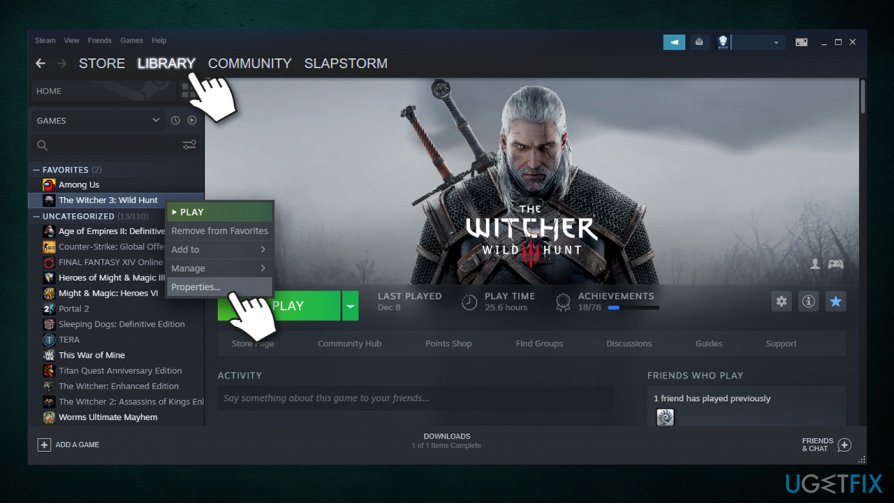
How to fix application load error 50000065434 go to games properties - In the new window, go to Local Files
- Click Verify Integrity of Game files...
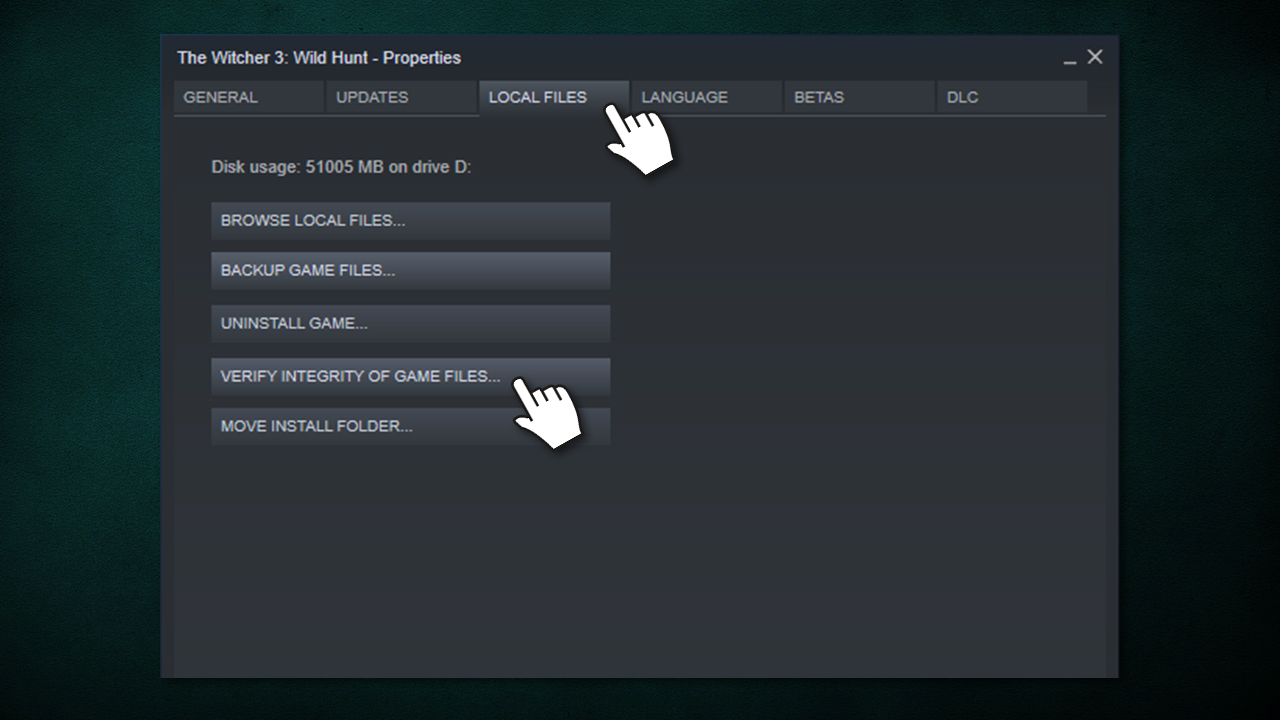
How to fix application load error 50000065434 verify integrity of game files - Wait till process is completed and try to launch the game.
Fix 5. Create a link between Steam and the OS
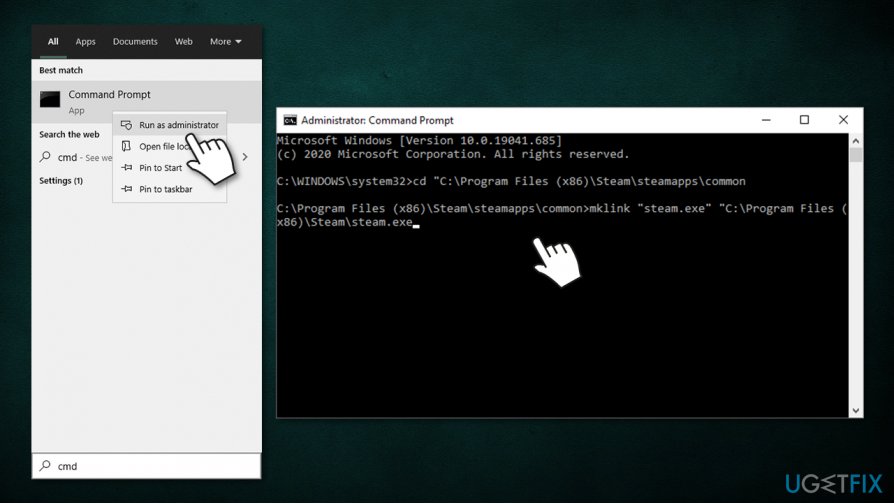
- Type in cmd in Windows search
- From the search results, right-click on Command Prompt and pick Run as administrator
- In here, type in the following commands, pressing Enter after each:
cd "C:\\Program Files (x86)\\Steam\\steamapps\\common
mklink "steam.exe" "C:\\Program Files (x86)\\Steam\\steam.exe
Bottom line
To fix Application Load error 5:0000065434, ensure that mods are from trusted sources and functioning correctly. If the issue persists, consider checking for disk write errors or reinstalling the game. If none of these solutions work, further investigation may be required.
Frequently asked questions
This error typically occurs due to issues with game files, missing dependencies, or corrupted installations. It can also happen if your Windows 10 is not fully updated.
You can try verifying the integrity of the game files through the game launcher, or reinstall the application to resolve the issue on Windows 11.
Ensure that your Windows 10 or Windows 11 has the latest updates, and check if any security software is blocking the application from launching.




Report an issue
What's wrong with this guide? We review every report and update or remove content.
Report received — thank you. We'll review and fix it.
You need a free account to submit a report.
Be the first to comment