
[Fix] Can't remove Work or School account from Windows

Prefer to fix it yourself? The manual steps follow.
- 5methods
- 5 minutes to 2 hours
- Easy to medium
Applies to Windows 11 and Windows 10, Home and Pro, with a work or school (Microsoft Entra ID) account connected
5 methods in this guide
The option to remove the "Work or School" account is missing in Windows for me. This happens when I log in to my Microsoft account. Any ideas on how to fix this?
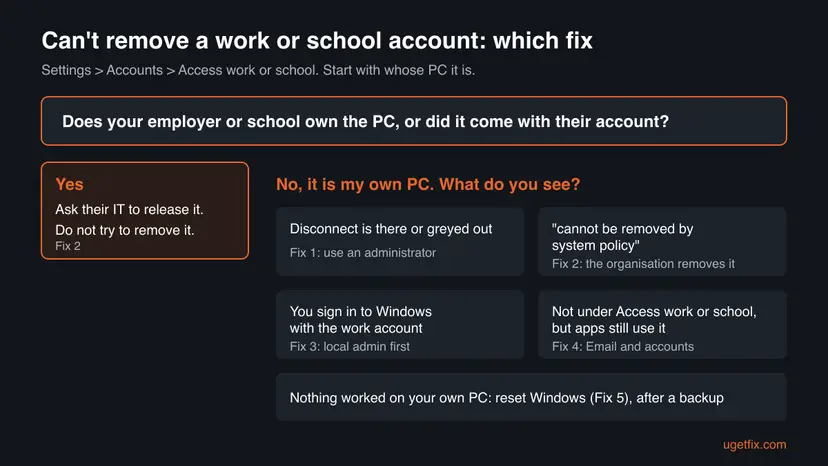
A work or school account sits in Settings > Accounts > Access work or school, and on your own PC an administrator can normally remove it with Disconnect. When the button is missing, greyed out or shows This work or school account cannot be removed by system policy, the organisation's management policy decides. Check whose PC it is first, then use the matching fix.
On your own PC, sign in with an administrator account, open Settings > Accounts > Access work or school, select the account and choose Disconnect (Fix 1). If Windows says This work or school account cannot be removed by system policy, the organisation blocked manual removal: ask its IT to remove the device, or remove it in their Company Portal (Fix 2). On a PC your employer or school owns, do not try to remove it.
| Error | This work or school account cannot be removed by system policy, or no Disconnect button, or a greyed out one. |
|---|---|
| Where it appears | Settings > Accounts > Access work or school in Windows 11 and Windows 10, after you select the account and choose Disconnect. |
| Main cause | The device is enrolled in the organisation's management (MDM, usually Microsoft Intune), and the policy AllowManualMDMUnenrollment is set to 0, which Microsoft documents as "Not allowed". |
| Fastest fix | Without the policy: Disconnect as an administrator (Fix 1). With the policy: the organisation removes the device on its side (Fix 2). |
| Also written as | cannot disconnect work or school account, unable to disconnect work or school account, can't remove school account Windows 11, no disconnect button. |
| Affects | Windows 11 and Windows 10. The page and the policy are the same on both. Windows 10 left support on 14 October 2025. |
| Vendor status | Not a bug. Microsoft documents the block as a management policy and says the management server can always remove the account remotely. |
| Time to fix | 5 minutes with Disconnect. A day or more when IT has to release the device. 1 to 2 hours for a reset. |
Facts checked on 15 October 2026. Steps written for Windows 11 (25H2 and 26H2) and Windows 10 22H2.
What "This work or school account cannot be removed by system policy" means
A work or school account is a Microsoft Entra ID account (formerly Azure AD) that an employer, university or school gives you. Connecting it to Windows can do three different things: let apps sign in, register the PC with the organisation, or enroll the PC in its management, often Microsoft Intune.
The message This work or school account cannot be removed by system policy appears when you select Disconnect on a PC that is enrolled in management and the organisation forbids manual unenrollment. Microsoft documents this as the policy Experience/AllowManualMDMUnenrollment: value 1 (the default) allows it, value 0 means "Not allowed".
| What you see | What it means |
|---|---|
| The account with a Disconnect button | Removal is allowed. Fix 1. |
| Disconnect greyed out or nothing happens | You are not signed in as an administrator. Fix 1. |
| This work or school account cannot be removed by system policy | Management blocks manual removal. Fix 2. |
| Connected to ... Azure AD or Entra ID, and you sign in with that account | The PC is joined to the organisation. Fix 3, own PC only. |
| Nothing listed, but Office or Teams still use the account | Only apps hold it. Fix 4. |
Why you can't remove the work or school account: causes ranked
The ranking follows Microsoft's policy documentation and the reports on Microsoft Q&A, where readers describe connecting the account from Excel or Teams and finding their PC managed afterwards.
| How often | Cause | Typical sign | Fix |
|---|---|---|---|
| Most often | The organisation's policy blocks manual unenrollment | The system policy message after Disconnect | Fix 2 |
| Often | You are signed in as a standard user | Disconnect is greyed out or asks for an admin password | Fix 1 |
| Often | Windows itself is signed in with the work account (the PC is joined) | Your work email on the sign-in screen | Fix 3 |
| Less often | Apps keep the account after it left Access work or school | Office, Teams or Outlook still sign in with it | Fix 4 |
| Rarely | A leftover enrollment on your own PC that the organisation can no longer remove | The organisation does not exist any more, or IT cannot find the device | Fix 5 |
If your employer or school owns the PC, or it reached you with their account already on it, the account is theirs to remove. Removing their management yourself breaks their rules and often the law. This page helps only on a PC you own and control; on any other, ask the owner's IT.
How to fix can't remove work or school account in Windows
Fix 1 is the normal removal, and most readers only miss administrator rights. Fix 2 covers the system policy message, which no setting on the PC can override. Fixes 3 to 5 are for your own PC only.
| What you see or have | Start with |
|---|---|
| A PC owned by your employer or school | Fix 2: ask IT |
| Disconnect is there, greyed out, or asks for a password | Fix 1 |
| This work or school account cannot be removed by system policy | Fix 2 |
| Your own PC signs in to Windows with the work account | Fix 3 |
| Nothing under Access work or school, but apps still use it | Fix 4 |
| Your own PC, the organisation cannot release it, nothing else worked | Fix 5 |
Fix 1. Disconnect the account from Access work or school as an administrator
5 minutesRead the warningYour own PC, and the account is listed under Access work or school with a Disconnect button, even a greyed out one.
Removing a work or school account changes device settings, so Windows needs an administrator. On a standard account the button does nothing or asks for credentials you may not have.
If the PC was managed, disconnecting can remove work apps, email and files the organisation protected. Copy anything of your own out of work folders first: Back up your files (Windows Backup, File History, Time Machine).
- Press Win + I, open Accounts and check under your name that it says Administrator.
- If it says Standard user, sign out and sign in with an administrator account, or ask the person who owns that account to make yours an administrator under Other users > Change account type.
- Open Access work or school. The shortcut works on Windows 11 and Windows 10:
ms-settings:workplace - Select the work or school account to expand it.
- Select Disconnect and confirm with Yes.
- Restart the PC and open Access work or school again.
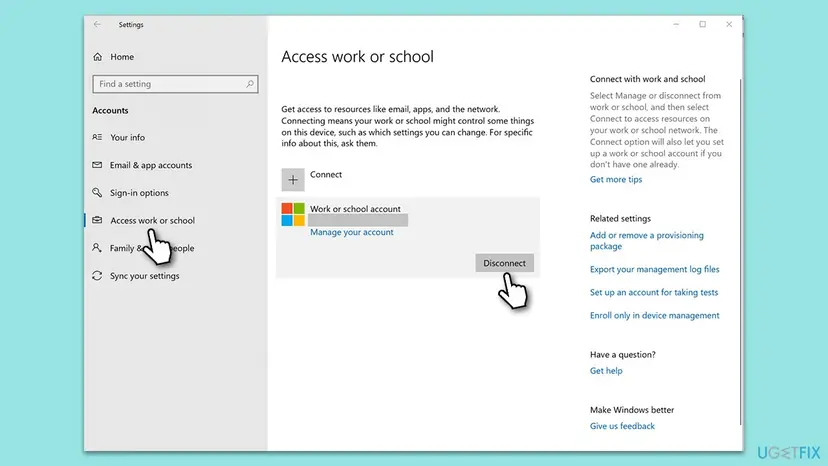
It worked if: The account is gone from Access work or school after the restart, and Settings no longer says some settings are managed by your organization.
If not: If Windows shows the system policy message, go to Fix 2. If you sign in to Windows with that account, go to Fix 3.
Fix 2. Ask the organisation to remove the device when the system policy blocks you
10 minutes, plus waiting for ITLow riskWindows says This work or school account cannot be removed by system policy, or the PC belongs to your employer or school.
The block is a management policy the organisation set on purpose. Microsoft documents that the management server can always remove the account remotely, so the reliable route goes through the organisation, not through Windows settings.
- Note your device name: open Settings > System > About and copy the Device name.
- If the organisation uses Intune, open its Company Portal website, sign in with the work or school account and open Devices.
- Select this PC. If the organisation allows it, choose Remove and confirm.
- If there is no Remove option, contact the IT or help desk. Give them the device name and ask them to retire or remove the device from management.
- When IT confirms, restart the PC and open Access work or school. Select Disconnect again if the account is still listed.
We do not show ways to strip the organisation's management locally. On a PC your employer or school owns, the policy is there to protect their data, and only they may lift it. On your own PC, they can lift it in minutes once asked.
Microsoft's policy page adds one detail: on a PC that is joined to the organisation and enrolled automatically, the unenrollment policy has no effect at all. Such a PC is almost always the organisation's own, so IT is the only route.
It worked if: After IT removes the device, the account disappears from Access work or school, or Disconnect now works without the message.
If not: If you sign in to Windows with the work account on your own PC, go to Fix 3. If the organisation no longer exists, see Fix 5.
Fix 3. Create a local administrator before you leave a joined organisation
20 to 60 minutesRead the warningYour own PC, where you sign in to Windows itself with the work or school email, and Access work or school says Connected to the organisation.
Windows cannot remove the account you are signed in with, and after leaving the organisation that account can no longer sign in. A local administrator gives you a way in and the rights to disconnect.
After the disconnect, the work account's profile cannot sign in on this PC. Copy your own files out of C:\Users\<work account folder> to the new account or a USB drive before you start.
- Create a new local account: Settings > Accounts > Other users > Add account > I don't have this person's sign-in information > Add a user without a Microsoft account.
- Select the new account, choose Change account type, pick Administrator and select OK.
- Sign out and sign in to the new local administrator account.
- Open Access work or school, select the organisation's entry and choose Disconnect.
- Confirm, enter the local administrator's password when asked, and restart.
- Copy your files from the old profile, then remove the old account under Other users.
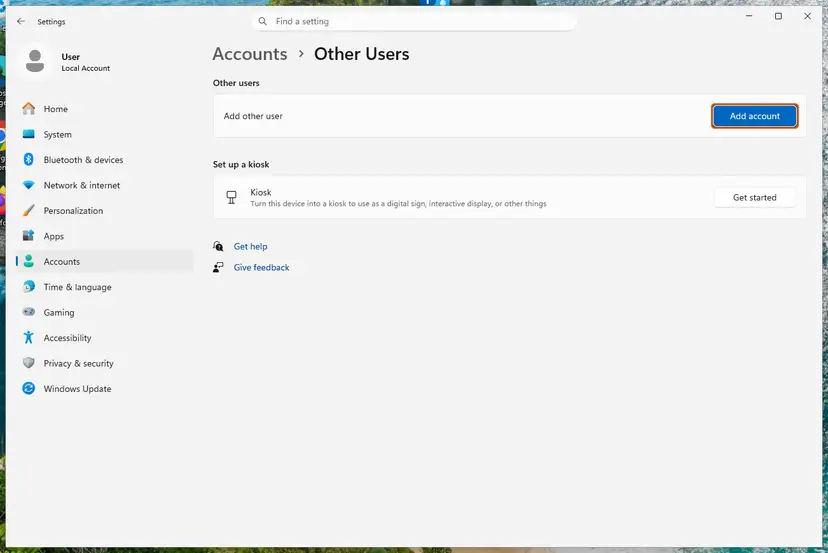
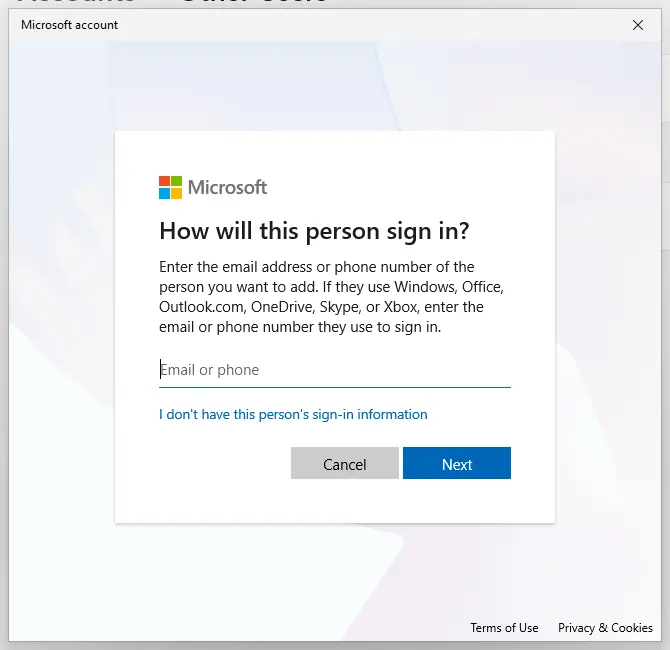
Full steps with screenshots: Create a new user account to test a problem. More on why Windows hides the local account switch on work accounts: Sign in with a local account instead is missing.
It worked if: You sign in with the local account, and Access work or school no longer lists the organisation.
If not: If the disconnect shows the system policy message, the organisation must release the PC: Fix 2.
Fix 4. Remove the account from Email & accounts and sign out of Office apps
10 minutesLow riskNothing is listed under Access work or school, or the account is gone there, but Office, Teams or Outlook still sign in with it.
Windows keeps accounts used by apps on a separate page. An account can stay there after the device link is gone, and Office apps keep their own sign-in.
- Open Settings > Accounts > Email & accounts (Windows 10: Email & app accounts).
- Under Accounts used by other apps, select the work or school account.
- Choose Remove and confirm. If only Manage shows, the account is still connected under Access work or school: go back to Fix 1.
- Open Word or Excel, select your name at the top and choose Sign out.
- Sign out of Teams and Outlook the same way, then restart the PC.
When an Office app asks to Stay signed in to all your apps, the check box Allow my organization to manage my device can enroll a personal PC. Microsoft Q&A advises choosing No, sign in to this app only to keep the account inside that app.
It worked if: The account is gone from Email & accounts, and Office opens without signing you in to work.
If not: If the account returns after a restart, it is still connected to Windows: start again at Fix 1.
Fix 5. Reset your own PC when the organisation cannot release it
1 to 2 hoursRead the warningYour own PC only, the organisation has closed or cannot find the device, and Fixes 1 to 4 failed.
A reset reinstalls Windows and clears its settings. It is the last option for a leftover connection on a PC you own when nobody can remove it from the other side.
Remove everything deletes your files and apps. Back up first: Back up your files (Windows Backup, File History, Time Machine). On a PC registered to an organisation, Windows can enroll it again during setup by design. That PC is not yours to clear, and only its owner can release it.
- Open Settings > System > Recovery (Windows 10: Update & Security > Recovery).
- Next to Reset this PC, select Reset PC (Windows 10: Get started).
- Choose Keep my files first, then Cloud download, and finish the reset.
- After setup, open Access work or school. If the account is still there, repeat with Remove everything.
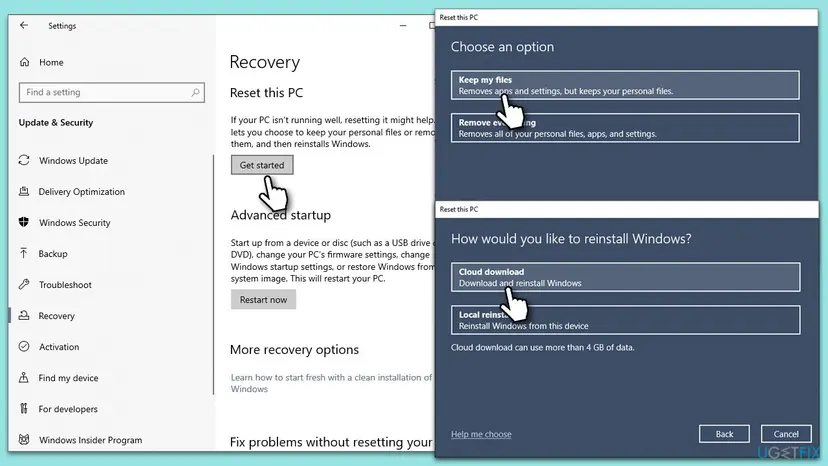
We could not confirm whether Keep my files always clears the connection. One user on Microsoft Q&A reports the school account still there after a reset. Step by step: Reinstall Windows without losing files.
It worked if: After setup, Access work or school lists nothing, and Settings no longer says your organization manages it.
If not: If setup asks for the organisation's sign-in, the PC is registered to them: only they can release it (Fix 2).
Still can't disconnect the work or school account: what to check
Windows keeps a management log for this page. Collect it with the facts below before you contact IT or ask on Microsoft Q&A.
- In Access work or school, select Export your management log files. Windows saves a report you can send to IT.
- Select the account and then Info, if shown: it names the organisation and the management server.
- Your Windows edition and version from
winver, such as Windows 11 Pro 25H2. - The exact message you get, and whether you are signed in as an administrator.
- Who bought the PC and whether it came with the organisation's sign-in during setup.
The system policy message is not a damaged Windows. It is a rule set by the organisation, and no repair on the PC changes it. Updates, system file checks and new accounts do not lift it; only the organisation can.
How to avoid an unwanted work or school account
- When Office or Teams asks to stay signed in to all your apps, clear Allow my organization to manage my device and choose to sign in to that app only.
- Use a separate Windows account for work on a personal PC, so your own profile is never managed.
- Before you connect a work account in Settings, read what the organisation asks to manage.
- When you leave a job or school, ask IT to remove your personal devices before your account is closed.
- Keep one local administrator account on your PC, so you can always disconnect.
Windows 10 left support on 14 October 2025. The removal steps work the same, but a PC that no longer gets security updates is a weaker home for work data.
Frequently asked questions
What does "This work or school account cannot be removed by system policy" mean?
It means the organisation that manages your PC has turned off manual removal. Microsoft documents the setting as AllowManualMDMUnenrollment in the Experience policy: 1 allows removal and is the default, 0 is "Not allowed". It is not an error in Windows, so repairs do not help. Microsoft also says the management server can always remove the account remotely. Ask the organisation's IT to retire the device, or remove it yourself in their Company Portal if they allow it.
Why can't I disconnect my work or school account in Windows 11?
Usually for one of three reasons. You are signed in as a standard user, so Windows will not change device settings. The organisation set a policy that blocks removal, which shows the system policy message. Or you sign in to Windows with that account itself, and Windows cannot remove the account in use. Check your account type, read the message, then follow Fix 1, Fix 2 or Fix 3.
Why is there no Disconnect button?
On Windows 11 the button appears only after you select the account to expand it. If it is still missing, the account may be in Email & accounts rather than Access work or school, so use Fix 4 there. Users also report the button missing on managed PCs where the organisation hides it. In that case the organisation decides, and Fix 2 applies. On a PC your employer or school owns, leave the account in place.
How do I delete the account from my PC?
On your own PC, sign in as an administrator, open Settings > Accounts > Access work or school, select the account and choose Disconnect. Restart, then check Email & accounts for any copy left for apps and remove it there. If Windows shows the system policy message, only the organisation can lift it. Contact their IT with your device name, or remove the device in their Company Portal website if they allow it.
Can I remove a school account from a school laptop?
No, and you should not try. A laptop owned or issued by a school stays under the school's management by design, so it can protect its data and enforce exam and safety rules. Microsoft documents that such PCs can block removal entirely. If the laptop is now yours, for example bought at the end of a course, ask the school's IT to release it from management. They can do it remotely.
Will removing the work account delete my files?
Disconnecting removes the account and anything the organisation protected: work apps, work email and managed files may stop opening. Your personal files in your own profile stay. If you sign in to Windows with the work account, its profile cannot sign in after the disconnect, so copy your files out first. A reset with Remove everything deletes all files. Back up before Fix 3 and Fix 5.
Does updating Windows fix it?
No source ties this problem to an update, so we removed that advice from the earlier version of this page. The system policy message comes from the organisation's management settings, and an update does not change them. Keeping Windows updated is still good practice, but it will not make the Disconnect button work. Use the fix that matches what Access work or school shows.
Does enabling the hidden Administrator account help?
We dropped that method. Any administrator account can disconnect an account that the policy allows to be removed, so a normal local administrator is enough and safer than the built-in one. Against the system policy message, no administrator account helps, because the block comes from the organisation. Create a local administrator through Other users as shown in Fix 3.
No me deja, nie mam takiej opcji: can you show it with pictures?
Yes. This page is in English, and each fix has screenshots of the Settings pages it uses, plus a chart that picks the right fix. The steps are the same in every Windows language: Settings > Accounts > Access work or school, select the account, then Disconnect. If the option is missing or Windows refuses, read the message and go to the fix the chart names.
Sources
- Microsoft Learn: Experience Policy CSP, AllowManualMDMUnenrollment (allowed values, behaviour on joined devices) (learn.microsoft.com)
- Microsoft Q&A: How to remove organization from managing my device (Disconnect, Company Portal, this app only) (learn.microsoft.com)
- Microsoft Q&A: Disconnecting a school/work email (the system policy message, local account workaround, account left after reset) (learn.microsoft.com)
Did this fix work?
One click, no account. It tells the next reader which guides are worth their time.
Questions and experiences: [Fix] Can't remove Work or School account from Windows
Still broken, or found a fix we did not cover? Ask here: members and our editors answer. Reading is open; writing needs a free account.
…