
Amsdk.sys "A driver cannot load on this device": how to fix it in Windows 11 and 10

Prefer to fix it yourself? The manual steps follow.
- 7methods
- 5 to 20 minutes
- Easy
Applies to Windows 11 and Windows 10 PCs that show "A driver cannot load on this device" for amsdk.sys
7 methods in this guide
I installed the latest Windows updates a few days ago and since then I keep getting an error saying "A driver cannot load on this device. Driver: amsdk.sys. A security setting is detecting this as a vulnerable driver and blocking it from loading. You'll need to adjust your settings to load this driver." What does this mean and how can I fix it?
Amsdk.sys is the kernel driver of the Zemana Anti-Malware SDK, used by Zemana AntiMalware and WatchDog Anti-Malware, and Windows blocks it because it is a known vulnerable driver. It is not an AMD file. Uninstall the program that put it there, or delete its leftover entry, and keep Memory integrity on.
The amsdk.sys driver cannot load because Windows Security recognises it as a vulnerable driver from the Zemana Anti-Malware SDK. Uninstall Zemana AntiMalware or WatchDog Anti-Malware if either is on the PC (Fix 1). If neither is installed, find where the file sits and scan it (Fix 2), then remove the leftover entry (Fix 3). Do not turn Memory integrity off for this driver.
| Error | "A driver cannot load on this device" from Program Compatibility Assistant, naming Driver: amsdk.sys |
|---|---|
| Where it appears | A small window at Windows sign-in, often first seen after a large Windows update such as 24H2 |
| Main cause | A program built on the Zemana Anti-Malware SDK (Zemana AntiMalware, WatchDog Anti-Malware) or its leftover service tries to load amsdk.sys, and Windows blocks it as vulnerable |
| Fastest fix | Uninstall the Zemana or WatchDog program (Fix 1); if none is installed, find and remove the leftover driver (Fix 2 and Fix 3) |
| Also written as | amsdk.sys, amsdk sys, amsdk, amsdk.sys driver; the patched WatchDog driver is named wamsdk.sys |
| Who makes it | The Zemana Anti-Malware SDK; WatchDog Anti-Malware ships a driver built on it. Not AMD, not Microsoft |
| Affects | Windows 11 (25H2, 26H2) and Windows 10 22H2 PCs where such a program is or was installed |
| Security status | Check Point Research reported in 2025 that attackers abused amsdk.sys version 1.0.600 to switch off security software; WatchDog then released wamsdk.sys 1.1.100 |
| Time to fix | 5 to 20 minutes, with one restart |
Facts checked on 16 October 2026. Steps written for Windows 11 (25H2 and 26H2) and Windows 10 22H2.
What amsdk.sys is and what "A driver cannot load on this device" means
Amsdk.sys is the amsdk.sys driver of the Zemana Anti-Malware SDK, a kit that other security programs build on. Zemana AntiMalware uses it, and so does WatchDog Anti-Malware. The driver runs in the Windows kernel so the scanner can stop processes and read the disk directly. That deep access is why Windows checks it.
The window comes from Program Compatibility Assistant. It tells you that Windows Security refused to load amsdk because it matches a known vulnerable driver. Your PC is not broken: Windows did this on purpose, and nothing on the system needs this file to work.
- Title
- A driver cannot load on this device
- Driver line
- Driver: amsdk.sys
- Reason line
- A security setting is detecting this as a vulnerable driver and blocking it from loading. You'll need to adjust your settings to load this driver
- Buttons
- Learn more, Cancel and a box Don't show this message again
- Which setting
- Memory integrity and the Microsoft vulnerable driver blocklist in Windows Security, Core isolation
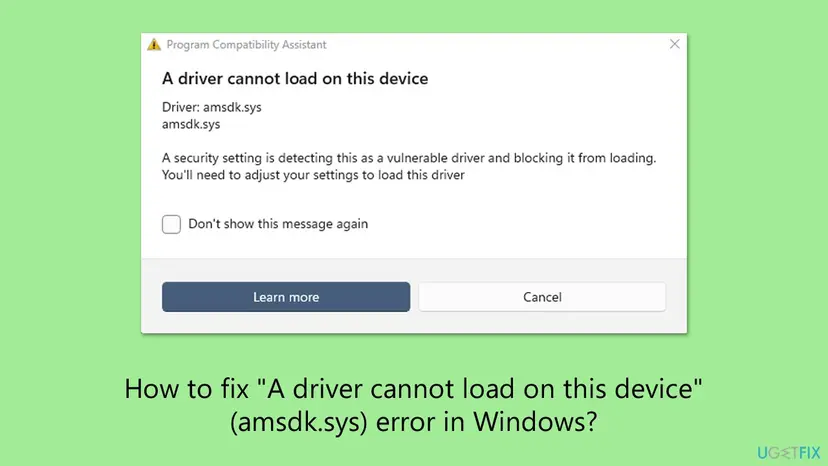
Many pages, including an older version of this one, link amsdk.sys to AMD Adrenalin or Ryzen Master. That is wrong. The name stands for Anti-Malware SDK. Check Point Research found that the WatchDog driver named amsdk.sys still carries the Zemana project name zam64.pdb inside. Reinstalling or rolling back AMD drivers does not touch it.
In 2025 Check Point Research reported that the Silver Fox group used the signed WatchDog driver amsdk.sys, version 1.0.600, to kill antivirus and EDR processes before installing the ValleyRAT backdoor. Once such a driver is loaded, even a program without administrator rights can misuse it. That is the strongest reason not to switch protection off for it.
Why the amsdk.sys error appears, from most to least common
Most often Zemana AntiMalware or WatchDog Anti-Malware is still installed, sometimes from years ago, and its service asks for amsdk.sys at every start. Less often the program was removed but its driver service stayed behind. Rarely, and this is the case to take seriously, the file was dropped by something you never installed.
| Cause | How common | What you see | Fix |
|---|---|---|---|
| Zemana AntiMalware (also the Portable edition) or WatchDog Anti-Malware still installed | Most cases | The window at every sign-in, a Zemana or WatchDog entry in Installed apps | Fix 1 |
| A Windows update switched on the blocklist or Memory integrity | Common | The message started right after an update, nothing else changed | Fix 1, then Fix 6 |
| Leftover driver service after the program was removed | Common | No Zemana or WatchDog app, the window still appears | Fix 2, then Fix 3 |
| You use WatchDog and its driver is an old version | Less common | WatchDog opens but real-time protection does not work | Fix 4 |
| The file was placed by malware, for example in a Temp folder | Rare | amsdk.sys sits outside Program Files or System32\drivers, no security program installed | Fix 2 |
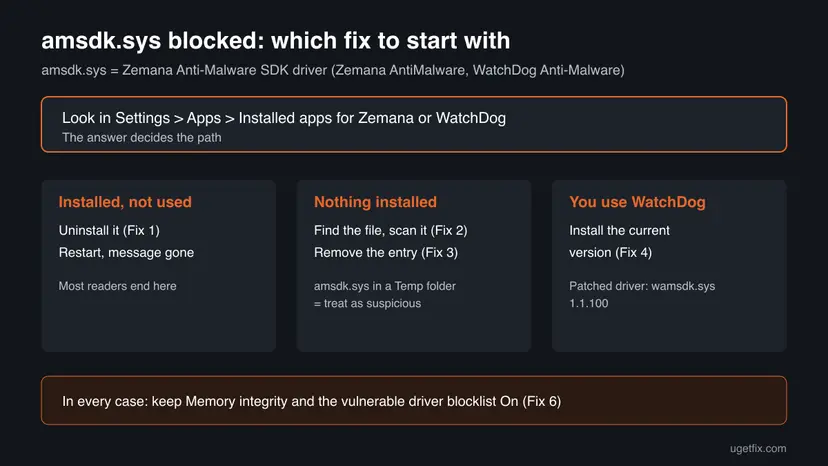
The same window can name other files from other makers. The approach on this page fits any of them, and our general guide to "A driver can't load on this device" covers how to find which program a driver belongs to.
How to fix the amsdk.sys "A driver cannot load on this device" error on Windows 11 and Windows 10
Start with Fix 1: most readers still have an old anti-malware tool that loads amsdk.sys. Fix 2 and Fix 3 are for a PC where no such program is installed. Fix 6 matters if you already followed advice to turn Memory integrity off. You need an administrator account.
| What you see or have | Start with |
|---|---|
| Zemana AntiMalware or WatchDog Anti-Malware is in Installed apps and you do not use it | Fix 1 |
| No Zemana or WatchDog program is installed, but the window still appears | Fix 2, then Fix 3 |
| You pay for WatchDog Anti-Malware and want to keep it | Fix 4 |
| You only want the window gone today and will clean up later | Fix 5 |
| You already turned Memory integrity off to stop the message | Fix 6 |
Fix 1. Uninstall Zemana AntiMalware or WatchDog Anti-Malware
5 minutesLow riskEveryone who finds a Zemana or WatchDog entry in Installed apps and does not rely on it. This is most readers with the message.
The driver only tries to load because the program's service asks for it at startup. When the program is gone, nothing requests amsdk.sys and the window stops. Microsoft Defender keeps protecting the PC on its own.
- Windows 11: open Settings > Apps > Installed apps. Windows 10: open Settings > Apps > Apps & features.
- Type
Zemanainto the search box above the list, then typeWatchDog. - Select ... next to the entry, for example Zemana AntiMalware, and choose Uninstall.
- Accept the program's own uninstaller prompts.
- Restart the PC and sign in again.
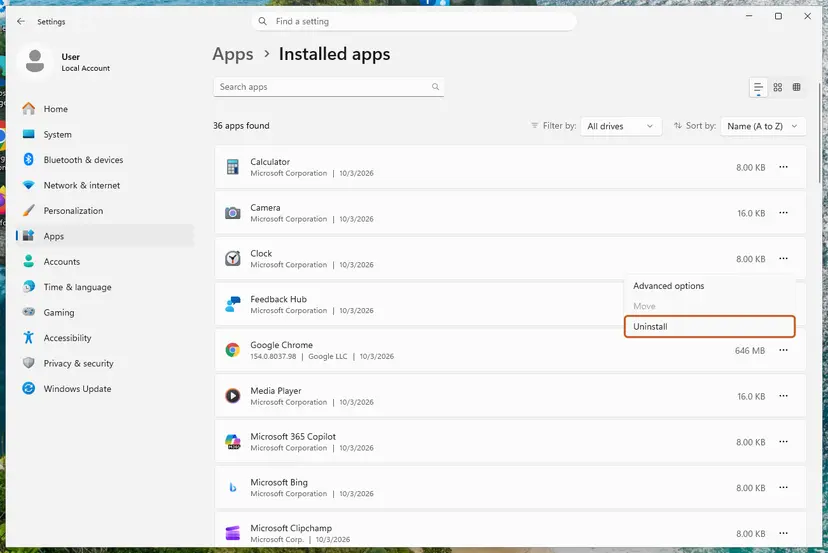
The Portable edition runs from a folder and may not appear in Installed apps, yet it can still leave its driver behind. If you ever ran it, delete its folder and continue with Fix 2 and Fix 3. The general uninstall steps are in Uninstall a program or app in Windows.
It worked if: After the restart no "A driver cannot load on this device" window appears.
If not: If the window still names amsdk.sys, the driver service was left behind: go to Fix 2.
Fix 2. Find where amsdk.sys sits and scan it with Microsoft Defender
10 minutesNo riskReaders who see the message but have no Zemana or WatchDog program installed, or who are not sure where the file came from.
Where the file lives tells you what it is. A leftover from a real install sits in a program or driver folder. In the attacks Check Point described, the driver was placed in a Temp folder and started as a service, which a normal program never does.
- Press Win + E to open File Explorer and select This PC.
- Type
amsdk.sysinto the search box at the top right and wait for the search to finish. - Right-click each result, choose Open file location, and note the folder path.
- Right-click the file, choose Properties, open the Details tab and read File description, Product name and File version.
- Right-click the file again and choose Scan with Microsoft Defender (on Windows 11 first select Show more options).
| Folder where you find it | What it most likely is | Next step |
|---|---|---|
C:\Windows\System32\drivers or a Zemana or WatchDog folder in Program Files | Leftover of a real install | Fix 3 |
C:\Windows\Temp, your user Temp folder or Downloads | Suspicious: a security tool does not install its driver there | Full Defender scan, then Fix 3 |
| Not found at all, window still appears | Only the service entry is left | Fix 3 |
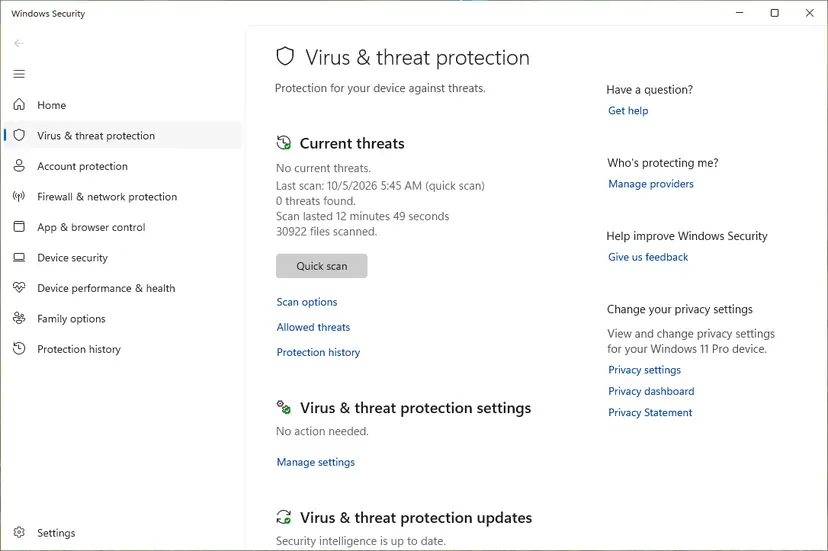
If the file was in a Temp folder or Defender reports a threat, run a full scan and an offline scan: How to scan for malware with Microsoft Defender.
It worked if: You know where amsdk.sys came from, and Defender reports no threats or has removed them.
If not: If Defender finds threats again after a restart, run a Microsoft Defender Offline scan from the same Scan options page before anything else, then continue with Fix 3.
Fix 3. Remove the leftover amsdk driver entry with Autoruns
10 minutesRead the warningReaders who see the window although no Zemana or WatchDog program is installed any more.
Uninstallers sometimes leave the driver's service registered, so Windows tries to load amsdk.sys at every start and shows the window. Autoruns, a free Microsoft Sysinternals tool, lists every driver Windows tries to load and can delete that entry. Users on Microsoft's forum report this ended the message for them.
Deleting an entry in Autoruns removes its registry key. Deleting the wrong driver can stop a device or Windows from starting. Make a restore point or registry backup first: Back up the registry before editing it.
- Download Autoruns from Microsoft's Sysinternals page on learn.microsoft.com and extract the ZIP file.
- Right-click Autoruns64.exe, select Run as administrator, then Yes.
- Open the Drivers tab and type
amsdkinto the filter box. - Check that the entry's image path ends in
amsdk.sysand note the folder it points to. - Right-click that entry, select Delete and confirm.
- Delete the
amsdk.sysfile itself from the folder you noted, if it is still there. - Restart the PC.
It worked if: No amsdk entry is left in Autoruns and the window no longer appears at sign-in.
If not: If the entry comes back after a restart, something reinstalls it: check Installed apps again for Zemana or WatchDog, and run a full Defender scan (Fix 2).
Fix 4. Install the current WatchDog Anti-Malware if you use it
10 minutesLow riskReaders who pay for WatchDog Anti-Malware and want to keep it running.
Microsoft's first advice for a blocked driver is an updated driver from the maker. After Check Point's report, WatchDog released a patched driver under a new name, wamsdk.sys, version 1.1.100. A current install should use that file instead of amsdk.sys.
- Uninstall the old WatchDog Anti-Malware first (Fix 1), so the old amsdk.sys service is removed.
- Download the current installer from WatchDog's own website, not from a download portal.
- Install it and restart the PC.
- Check whether the window still appears at sign-in.
We could not confirm whether Zemana AntiMalware itself still gets updates with a driver Windows accepts. If you rely on Zemana, the safest choice is to remove it and let Microsoft Defender protect the PC.
It worked if: WatchDog runs and no amsdk.sys window appears at sign-in.
If not: If the current version still triggers the window, contact WatchDog support with the details listed under Still not working, and keep the program off at startup (Fix 5) until they answer.
Fix 5. Stop the program from starting with Windows, or hide the notice
3 minutesNo riskReaders who want the window gone today and will remove the program later.
The window appears because something asks for the driver at sign-in. If the program does not start on its own, nothing asks. Protection stays on, and the driver stays blocked.
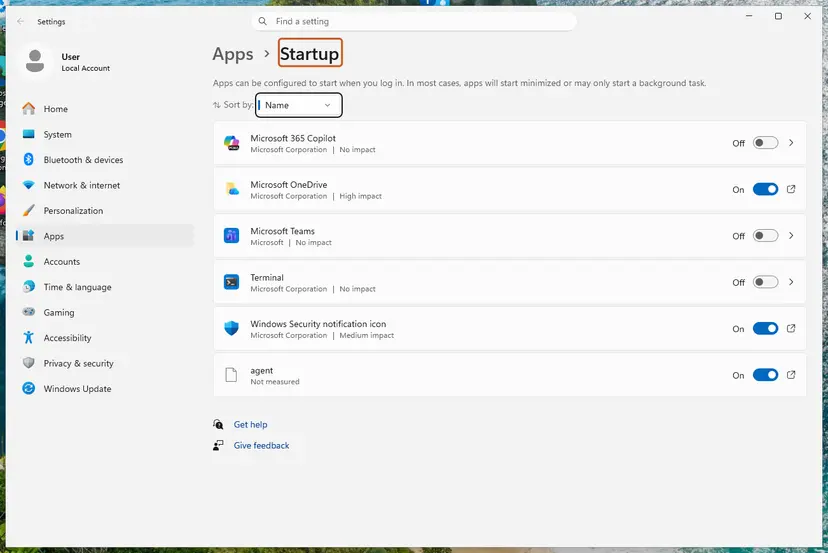
- Windows 11: open Settings > Apps > Startup. Windows 10: open Task Manager with Ctrl + Shift + Esc and select the Startup tab.
- Turn off the Zemana or WatchDog entry.
- Restart and sign in.
- If the window still appears once, tick Don't show this message again and select Cancel. That only hides the notice: amsdk.sys stays blocked.
It worked if: You sign in without the amsdk.sys window, and Memory integrity is still on.
If not: If the window keeps coming, the driver is started as a service, not by the app: remove it with Fix 1 or Fix 3.
Fix 6. If you turned Memory integrity off, switch it back on
5 minutes plus a restartLow riskReaders who followed older advice and turned Memory integrity or the vulnerable driver blocklist off to stop the message.
Microsoft names turning Memory integrity off as an option for a driver you need. Nobody needs amsdk.sys: it only serves a third-party scanner, and it has been abused to disable security software. With the driver removed, protection can go back on without any window.
- Type
Core isolationinto the taskbar search box and open it. Windows 11 path: Settings > Privacy & security > Windows Security > Device security > Core isolation details. Windows 10: Settings > Update & Security > Windows Security > Device security > Core isolation details. - Set Memory integrity to On.
- If the page shows a Microsoft Vulnerable Driver Blocklist switch, set it to On too.
- Restart the PC.
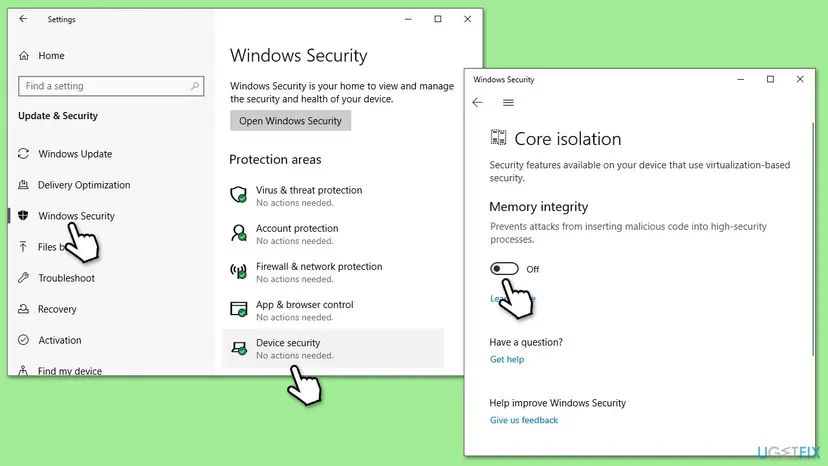
It worked if: After the restart Memory integrity shows On and no amsdk.sys window appears.
If not: If Memory integrity will not turn on, select Review incompatible drivers on the same page. If amsdk.sys is listed, remove it with Fix 3 and try again.
Fix 7. Install Windows updates, including optional driver updates
10 to 30 minutesNo riskEveryone, after the fixes above, and readers whose PC is behind on updates.
Microsoft updates the vulnerable driver blocklist and Defender's detections through Windows Update. Updating does not make amsdk.sys load, but it keeps the protection current. Microsoft also lists Windows Update as the place to look for an updated driver.
- Windows 11: open Settings > Windows Update and select Check for updates. Windows 10: Settings > Update & Security > Windows Update.
- Install what is offered and restart.
- Open Advanced options > Optional updates (Windows 10: View optional updates) and install any driver updates listed there.
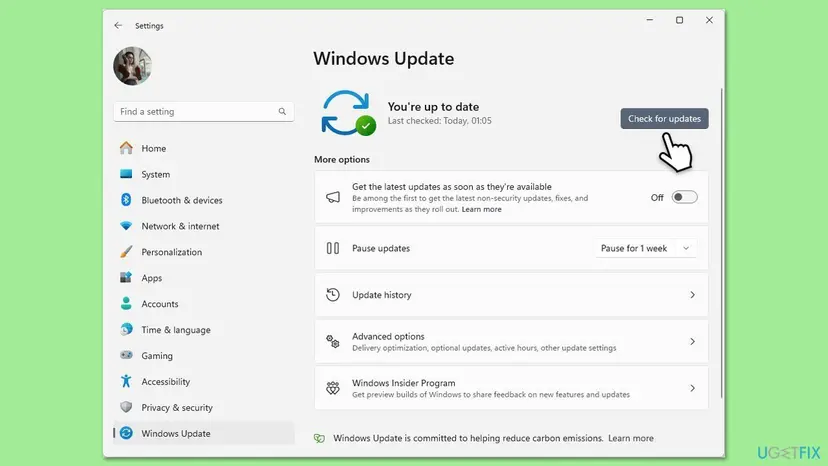
It worked if: Windows reports that it is up to date.
If not: If an update fails, see Reset Windows Update components.
The amsdk.sys window still appears: what to check and what to send
The window itself is the most direct log: it names the driver Windows blocked. Microsoft notes that the driver name and company name in the notification are the only reliable details it has about the driver. Read both before you remove anything.
- Core isolation lists incompatible drivers: select Review incompatible drivers to see each file and its published name. Remove the program that installed it.
- The window now names another file: the same approach applies to that file and its maker. A file such as atdcm64a.sys belongs to old AMD graphics software, not to Zemana.
- amsdk.sys returns after you deleted it: a program or a scheduled task puts it back. Run a full and an offline Defender scan (Fix 2).
- The Memory integrity switch is greyed out: an organisation manages the PC, or the processor does not support it. That is not caused by amsdk.sys.
Your Windows version from winver, the folder where amsdk.sys sits, the File version from its Details tab, the name and version of the anti-malware program, and a screenshot of the "A driver cannot load on this device" window.
Keep amsdk.sys and other vulnerable drivers from coming back
- Use one security program. Microsoft Defender is built into Windows and needs no third-party driver.
- Remove second-opinion scanners after you have used them, including portable ones.
- Check Core isolation once after you install any security or tuning tool.
- Turn Memory integrity or the vulnerable driver blocklist off to keep an old scanner working.
- Download amsdk.sys from file download sites.
- Use "driver updater" programs to look for this driver.
Microsoft updates the vulnerable driver blocklist through the monthly Windows updates, which is why the message can appear one day with no change on your side. Windows 10 left support on 14 October 2025, so a PC that stays on Windows 10 no longer gets those updates.
Frequently asked questions
What is amsdk.sys?
Amsdk.sys is a kernel mode driver from the Zemana Anti-Malware SDK, a kit that security programs build on. Zemana AntiMalware and WatchDog Anti-Malware ship it. It is not a Windows file, not an AMD file and not needed for Windows to run. Windows blocks it because it is a known vulnerable driver. If you find it with no such program installed, check where it sits and scan it (Fix 2).
Is amsdk.sys a virus?
The file from a real Zemana or WatchDog install is not a virus, but it is risky. In 2025 Check Point Research reported that attackers dropped the signed WatchDog amsdk.sys into a Temp folder to kill security software before installing a backdoor. So a copy you cannot explain, especially outside Program Files or System32\drivers, deserves a full Microsoft Defender scan: How to scan for malware with Microsoft Defender. While Windows keeps blocking it, the driver cannot run.
Why does the amsdk sys driver cannot load message appear after a Windows update?
Windows updates bring a newer vulnerable driver blocklist and sometimes switch Memory integrity on, for example with a feature update such as 24H2. A driver that loaded quietly for years is then refused, and Windows shows the window at sign-in. The update did not break anything. It started protecting you from a driver that was already on the PC.
What does "A security setting is preventing this driver from loading" mean?
It means Memory integrity, part of Core isolation in Windows Security, or the Microsoft vulnerable driver blocklist refused the driver. The exact window says "A security setting is detecting this as a vulnerable driver and blocking it from loading." Microsoft says such a driver is most likely not malicious but has a vulnerability. For amsdk.sys the right response is to remove it, not to adjust the setting.
Is there an amsdk sys driver update for Windows 11?
Not as a separate download. The driver comes inside the anti-malware program. WatchDog released a patched driver named wamsdk.sys, version 1.1.100, so the current WatchDog installer is the way to get it (Fix 4). We could not confirm a fixed driver for Zemana AntiMalware. Never download amsdk.sys from a file site: that is exactly the kind of copy attackers use.
Should I just turn Memory integrity off?
No. Memory integrity keeps malicious code out of the most protected part of Windows, and amsdk.sys has been used in real attacks to switch off security software. Removing the program takes five minutes and keeps both your PC and the protection. If you already turned it off, switch it back on with Fix 6.
Will ticking "Don't show this message again" fix it?
It hides the window but fixes nothing. Amsdk.sys stays blocked, so the anti-malware program's real-time protection that needs it will not work. If you do not use that program, uninstalling it (Fix 1) is cleaner than hiding the notice, because a program that cannot protect you only gives a false sense of safety.
Is this the same as atdcm64a.sys driver cannot load?
It is the same window but a different driver. Atdcm64a.sys belongs to old AMD graphics software, not to the Zemana SDK, and Windows blocks it as vulnerable for its own reasons. The method is the same idea: find the program that installed it, update or remove it, and keep Memory integrity on. The general guide linked under Why it appears walks through any file name.
I see "A driver cannot load on this device" for AMD Ryzen Master. Is that amsdk.sys?
No. AMD Ryzen Master uses its own driver, AMDRyzenMasterDriver.sys, and the window names that file instead. People search both together because many sites wrongly tie amsdk.sys to AMD. For Ryzen Master, install the current version from AMD's website or uninstall it if you do not tune the processor, then restart and keep Memory integrity on.
Can I delete amsdk.sys?
Yes, once the program that uses it is removed. Windows and your hardware do not need it. Remove the driver's service entry first with Autoruns (Fix 3), then delete the file, and back up the registry beforehand: Back up the registry before editing it. Deleting only the file while the service stays registered can leave an error at startup.
Sources
- Microsoft Support: A driver can't load on this device (support.microsoft.com)
- Check Point Research: Chasing the Silver Fox, the vulnerable WatchDog driver amsdk.sys (research.checkpoint.com)
- Microsoft Q&A: Driver amsdk.sys is being blocked from loading (learn.microsoft.com)
Did this fix work?
One click, no account. It tells the next reader which guides are worth their time.
Questions and experiences: Amsdk.sys "A driver cannot load on this device": how to fix it in Windows 11 and 10
Still broken, or found a fix we did not cover? Ask here: members and our editors answer. Reading is open; writing needs a free account.
…