
How to fix OOBEEULA error in Windows?

Prefer to fix it yourself? The manual steps follow.
8 methods in this guide
Hi, I attempted to reset my laptop because it had too many issues and was super slow, and I received an error: "Something went wrong, but you can try again. OOBEEULA." Restarting the PC does nothing, and I'm getting the same error every time. Any idea how to fix this?
OOBEEULA is the name of the licence terms page in the Windows setup screens, and the error means setup failed at that page after a reset, a reinstall or a clean install. Windows itself is usually installed and fine. Press Shift + F10 on the error screen and start the setup screens again with msoobe.exe.
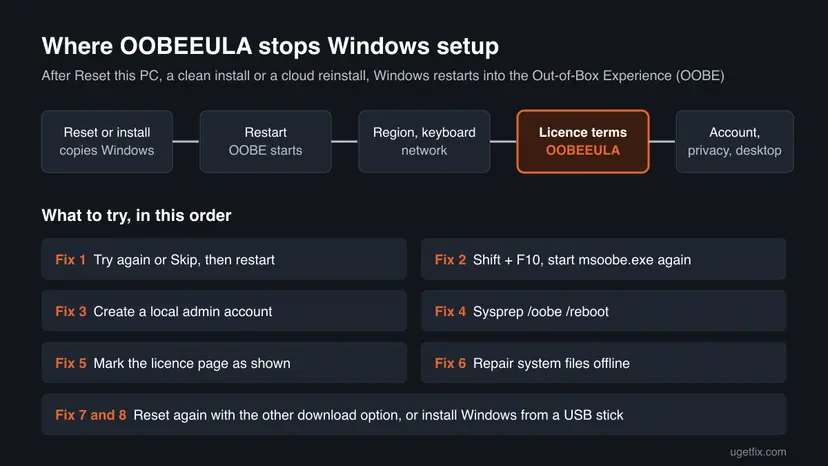
The OOBEEULA error stops the Out-of-Box Experience (OOBE), the first-run screens after Reset this PC or a new install, at the licence terms step. First select Try again or Skip and restart once (Fix 1). If the same screen returns, press Shift + F10, run cd %windir%\system32\oobe and then msoobe.exe, as a Microsoft Q&A answer advises (Fix 2). A local account (Fix 3) or sysprep /oobe /reboot (Fix 4) come next.
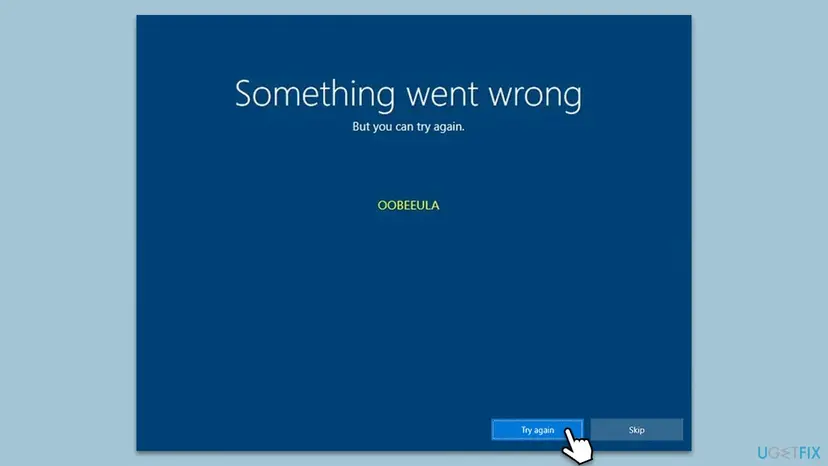
| Error | Something went wrong / But you can try again. / OOBEEULA, on a blue setup screen with Try again and Skip buttons. |
|---|---|
| Where it appears | In the first-run setup screens (OOBE) after Reset this PC, a cloud or local reinstall, a clean install from USB or a version upgrade, at the step that shows the licence terms. |
| Main cause | The setup screens cannot finish the licence or user account step, often because a reset was interrupted or setup could not create the first user. |
| Fastest fix | Try again or Skip, then restart (Fix 1). If it repeats: Shift + F10 and run msoobe.exe from %windir%\system32\oobe (Fix 2). |
| Also written as | oobeeula, oobe eula, oobeula, erro oobeeula, something went wrong oobeeula. Sister codes on the same screen: OOBEREGION, OOBELOCAL, OOBEKEYBOARD, OOBESETTINGSMULTIPAGE, OOBEAADV10. |
| Affects | Windows 11 (25H2 and 26H2) and Windows 10 22H2. Windows 10 left support on 14 October 2025, so a reset there installs a version that gets no more fixes. |
| Vendor status | Microsoft has no knowledge base article or update for OOBEEULA. A Microsoft Q&A answer marked helpful by 40+ people gives the msoobe.exe restart used in Fix 2. |
| Your files | After Remove everything the old files are already gone. After Keep my files they are usually still on the disk and can be copied out first (see Fix 7). |
| Time to fix | 5 minutes for Fix 1, 10 to 20 minutes for Fixes 2 to 4, one to two hours for a new reset or install. |
Facts checked on 15 October 2026. Steps written for Windows 11 (25H2 and 26H2) and Windows 10 22H2.
What the OOBEEULA error means
OOBE stands for Out-of-Box Experience: the blue first-run screens where you pick a region and keyboard, connect to a network, accept the licence terms, create an account and choose privacy settings. EULA is the End User License Agreement, the licence terms page. So OOBEEULA is simply the internal name of the step that failed.
The screen reads Something went wrong, then But you can try again., then the code OOBEEULA in small letters. It shows up after Windows has already copied itself to the disk. That matters: the installation usually exists and works, and only the first-run setup cannot complete, so you can often finish it from a command prompt instead of starting over.
- oobeeula, oobe eula and oobeula are the same code with different spacing or a missing letter.
- OOBEREGION, OOBELOCAL, OOBEKEYBOARD, OOBESETTINGSMULTIPAGE and OOBEAADV10 appear on the same screen at other steps. The fixes on this page work the same way for them, because each one is a failed step of the same setup program.
- Shift + F10 opens a Command Prompt on any OOBE screen. Every command fix below starts there, so you do not need a second PC for Fixes 2 to 5.
What causes the OOBEEULA error, most common first
Microsoft does not publish a cause list for OOBEEULA. The order below follows the Microsoft Q&A answer, which points to setup not being able to create a user, and what owners report on Microsoft's, Dell's and HP's community forums.
| Cause | How often | Start with |
|---|---|---|
| A one-time hiccup in the setup screens, for example a network drop or a slow first start after a reset. | Often | Fix 1 |
| The setup program cannot create the first user account, so it stops at the licence step and loops. | Most often when the error repeats | Fix 2, then Fix 3 |
| The setup state on the disk is half written after an interrupted Reset this PC or cloud reinstall. | Often | Fix 4, then Fix 5 |
| Damaged Windows files after a failed reset, a power cut or a debloat script that removed setup parts. | Sometimes | Fix 6 |
| The reset image itself is broken, for example a damaged recovery partition or a failed cloud download. | Rarely | Fix 7, then Fix 8 |
| A failing disk or memory that corrupts what setup writes. | Rarely | Still broken, below |
Owners on Dell and HP forums report the error right after Reset this PC with Remove everything, on new laptops in their first setup, and after cloud reinstalls. In the Microsoft Q&A thread the owner had chosen Remove everything and Cloud download, so the files were already gone when the error appeared.
How to fix the OOBEEULA error
Fixes 1 to 4 finish the setup you already have and keep everything the reset kept. Fix 5 and Fix 6 repair the setup state and the system files. Fixes 7 and 8 install Windows again.
| What you see or have | Start with |
|---|---|
| You saw the error for the first time. | Fix 1 |
| The error comes back after every restart. | Fix 2 |
| Fix 2 restarts setup but it fails again at the account step. | Fix 3 |
| The setup screens do not come back at all, or you want a clean first run. | Fix 4 |
| Fixes 2 to 4 all end on the same OOBEEULA screen. | Fix 5, then Fix 6 |
| The reset or cloud download was interrupted, or nothing above helped. | Fix 7 |
| Reset this PC fails too, or the recovery screens do not open. | Fix 8 |
Fix 1. Select Try again or Skip, then restart once
5 minutesNo riskEveryone who sees the error for the first time.
The licence step can fail on a one-time delay, for example while the network connects or the PC finishes its first start. A second attempt runs the same step with everything already loaded.
- On the error screen, select Try again and wait a full minute.
- If the same screen returns, select Skip if it is offered. Setup may move on to the next step.
- If it still stops, hold the power button until the PC turns off, wait ten seconds and turn it on again.
- If you use Wi-Fi or a cable, try once with the network disconnected, then once connected. Owners report that a different network state lets setup pass.
It worked if: Setup moves on to the account or privacy screens and later reaches the desktop.
If not: If OOBEEULA returns after the restart, go to Fix 2 and start setup again from Shift + F10.
Fix 2. Start the setup screens again from Shift + F10 with msoobe.exe
10 minutesLow riskThe OOBEEULA screen comes back after every restart.
The Microsoft Q&A answer says the error usually means setup could not create a user. Turning on the built-in Administrator account gives setup a working account, and msoobe.exe starts the first-run screens fresh.
- On the OOBEEULA screen, press Shift + F10. On many laptops it is Shift + Fn + F10. A Command Prompt window opens.
- Type
net user administrator /active:yesand press Enter. You should see The command completed successfully. - Type
cd %windir%\system32\oobeand press Enter. - Type
msoobe.exeand press Enter. - Wait. The PC restarts or the setup screens start again. Go through region, keyboard, network and the licence page.
- When you reach the desktop, open Terminal (Admin) and run
net user administrator /active:noso the built-in Administrator is off again.
The three commands from the Microsoft Q&A answer:
net user administrator /active:yes
cd %windir%\system32\oobe
msoobe.exeIf Shift + F10 does nothing, click once on the setup screen so it has focus and try again. Some keyboards need the Fn key held as well.
It worked if: Setup passes the licence terms page and asks you to create or sign in to an account.
If not: If setup fails again at the account step, create a local account first (Fix 3).
Fix 3. Create a local administrator account from Shift + F10
10 minutesLow riskSetup stops at OOBEEULA or at the account step even after Fix 2.
If setup cannot create the first user, you can create it yourself. With a working administrator account on the disk, Windows can sign you in and skip the step that keeps failing.
- On the error screen, press Shift + F10.
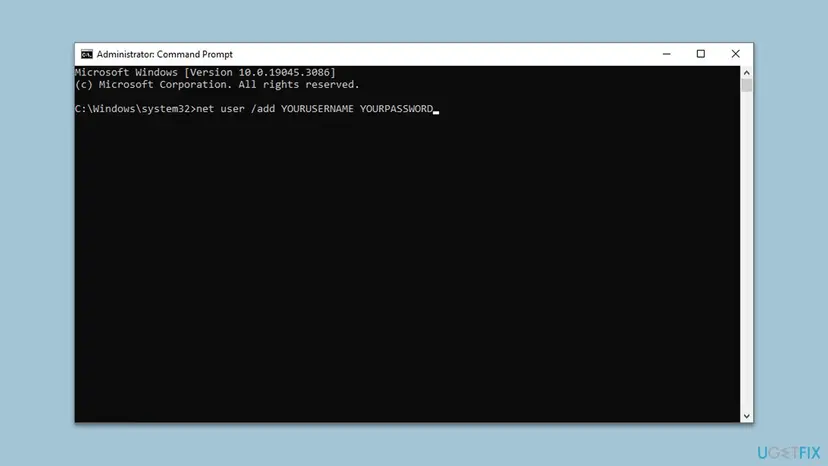
- Type
net user /add YourName YourPasswordand press Enter. Use your own short name and a password you will remember. - Type
net localgroup administrators YourName /addand press Enter. - Type
shutdown /r /t 0and press Enter to restart. - Sign in with the new name and password if Windows offers the sign-in screen, or let setup continue if it starts again.
- Once on the desktop, you can link a Microsoft account in Settings > Accounts later.
Making a local account later from Settings, with pictures: Create a new user account to test a problem
It worked if: Windows shows a sign-in screen with your new account, or setup continues past the licence page.
If not: If the PC goes straight back to OOBEEULA, restart the first-run screens with Sysprep (Fix 4).
Fix 4. Restart the first-run screens with Sysprep /oobe
15 minutesLow riskFixes 2 and 3 did not get you past the error, or setup keeps a half-finished state.
Microsoft documents that Sysprep /oobe restarts the computer into OOBE mode. Without /generalize it keeps the installed Windows and starts the first-run screens from their beginning instead of from the failed step.
- On the OOBEEULA screen, press Shift + F10.
- Type
%windir%\System32\Sysprep\sysprep.exe /oobe /rebootand press Enter. - Wait while Sysprep runs and restarts the PC. This can take a few minutes.
- Go through the setup screens again from the region page.
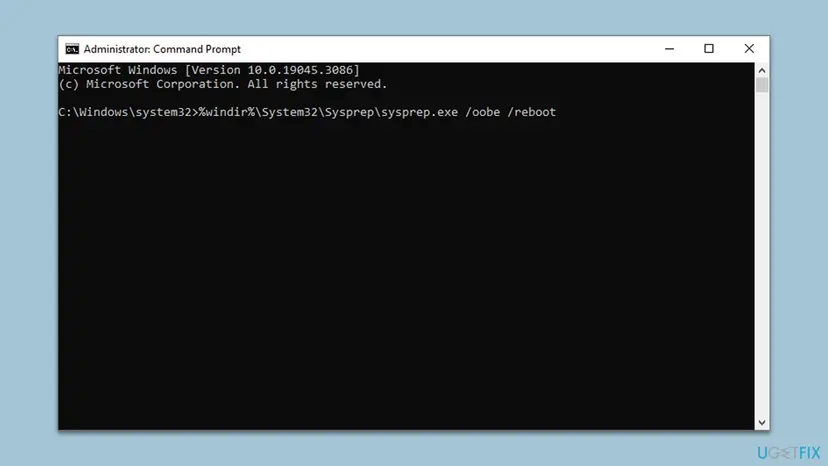
In the recovery environment, %windir% points to the small recovery system on drive X:, which has no Sysprep, so the command fails there. The prompt from Shift + F10 on the setup screen belongs to the installed Windows on C:. If Sysprep reports that it cannot validate the installation, skip to Fix 6.
It worked if: The PC restarts into the region screen and setup passes the licence terms page.
If not: If Sysprep fails or setup stops at OOBEEULA again, try the registry change in Fix 5.
Fix 5. Mark the licence page as shown in the registry
15 minutesRead the warningFixes 2 to 4 all end on the same OOBEEULA screen.
Owners report that setup skips the failing licence page when two values say the page and the first user are done. Microsoft does not document these values, so back up the key first and treat this as a workaround.
A wrong registry change can stop Windows from starting. Export the key before you add anything, so you can import it again: Back up the registry before editing it. We could not confirm these values in Microsoft documentation.
- On the error screen, press Shift + F10, type
regeditand press Enter. - Go to
HKEY_LOCAL_MACHINE\SOFTWARE\Microsoft\Windows\CurrentVersion\Setup\OOBE. - Select File > Export, choose Selected branch and save the file.
- Right-click empty space on the right, select New > DWORD (32-bit) Value and name it
SetupDisplayedEula. Set Value data to1. - Create a second DWORD named
UnattendCreatedUserand set it to1. - Close Registry Editor and restart with
shutdown /r /t 0.
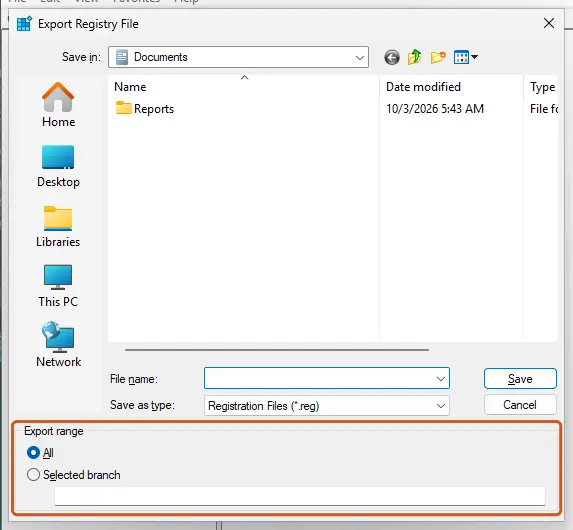
It worked if: Setup skips the licence page, or Windows goes to the sign-in screen with the account from Fix 3.
If not: If nothing changes, delete the two values again or import your backup, then repair the system files (Fix 6).
Fix 6. Repair the Windows files offline from the recovery screens
30 minutesLow riskThe error followed a power cut, a forced shutdown during the reset, or a debloat script.
The setup screens are Windows files like any other. If the reset left some of them damaged, an offline SFC scan from the recovery screens replaces them before setup runs again.
- Turn the PC off during startup twice. On the third start Windows opens Automatic Repair; select Advanced options.
- Select Troubleshoot > Advanced options > Command Prompt.
- Find the letter of the Windows drive with
dir C:\Windows; in recovery it is sometimes D:. - Run SFC offline with that letter, as the procedure below shows. Plain
sfc /scannowdoes not work in recovery. - Close the window, select Continue and let Windows start into setup.
Step by step, including the offline commands: Run DISM and SFC to repair Windows system files
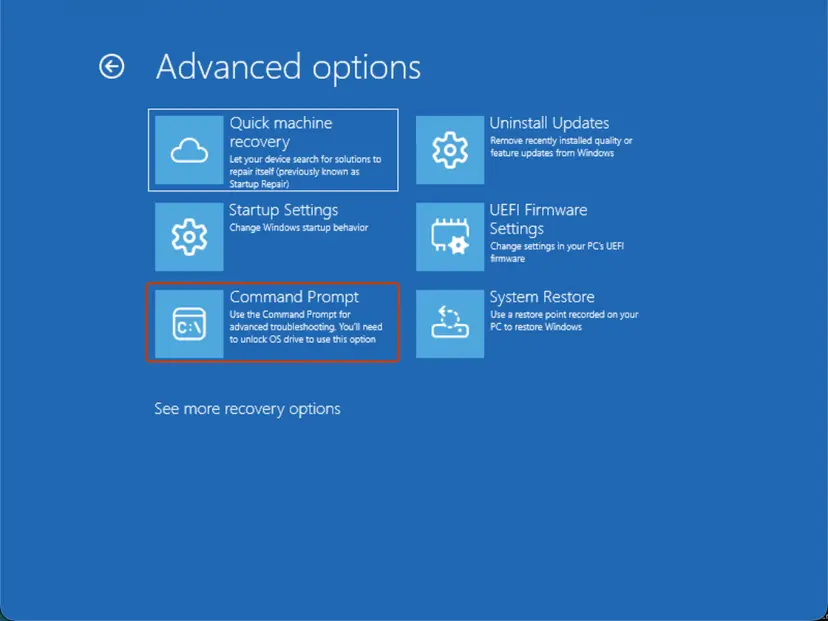
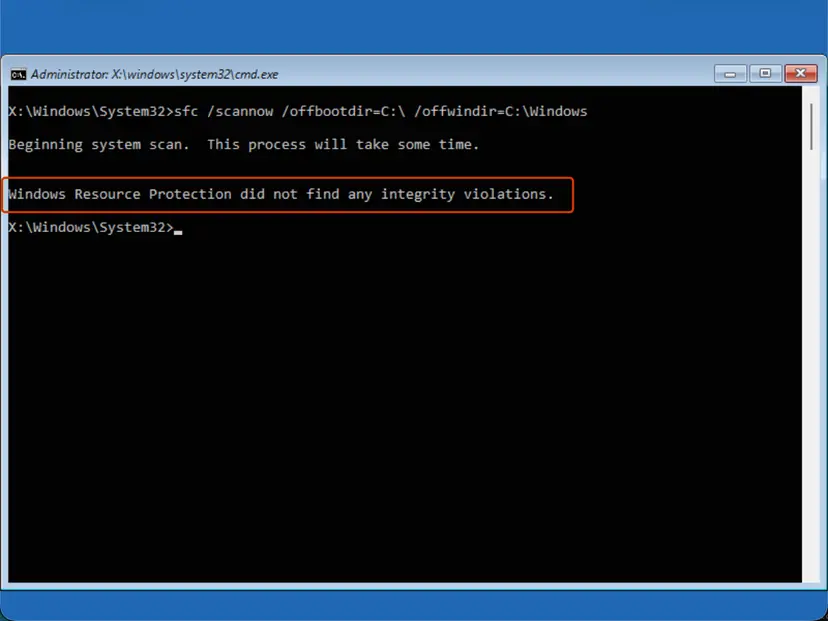
It worked if: SFC reports that it repaired files or found none damaged, and setup passes the licence page.
If not: If SFC cannot repair the files, or setup still stops at OOBEEULA, reset Windows again (Fix 7).
Fix 7. Run Reset this PC again with the other download option
1 to 2 hoursRead the warningThe first reset or cloud download was interrupted, or Fixes 1 to 6 did not help.
If the reset image was damaged, every repair works on broken files. Cloud download fetches fresh Windows files from Microsoft, and Local reinstall builds them from the PC; switching to the other one avoids the source that failed.
If you chose Keep my files, your documents are usually still in C:\Users. Copy them to a USB stick before resetting again: press Shift + F10, type notepad, use File > Open with All files to browse the disk, and copy folders to the stick by right-click. More ways: Back up your files (Windows Backup, File History, Time Machine). Have your BitLocker recovery key ready.
- Open the recovery screens: turn the PC off during startup twice, then select Advanced options.
- Select Troubleshoot > Reset this PC.
- Choose Keep my files if your files are still there, or Remove everything.
- Choose Local reinstall if the failed reset used Cloud download, or the other way round.
- Keep the PC on power and do not turn it off until the setup screens appear.
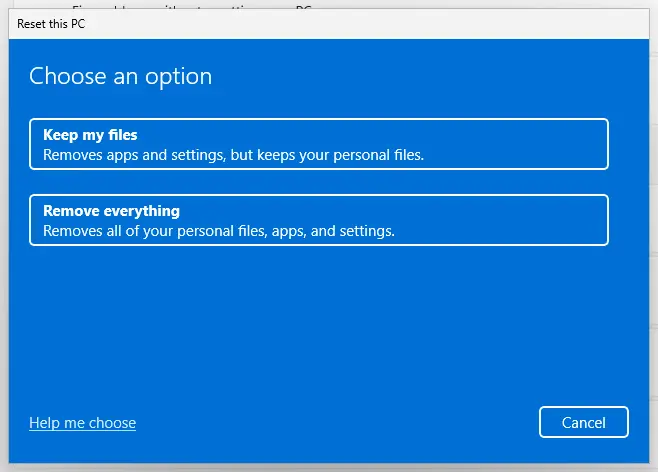
All reinstall options with pictures: Reinstall Windows without losing files
It worked if: The reset finishes, the setup screens pass the licence page and you reach a new desktop.
If not: If the reset fails again or OOBEEULA returns, install Windows from a USB stick (Fix 8).
Fix 8. Install Windows from a USB stick
1 to 2 hoursRead the warningReset this PC fails, the recovery screens do not open, or OOBEEULA returns after Fix 7.
A USB install does not use the recovery partition or anything left from the failed reset. It writes a fresh copy of Windows, so a broken reset image or setup state cannot carry over.
Copy any files you still need first, as described in Fix 7. A PC that came with Windows activates again on its own after the install, because the licence is tied to the hardware or your Microsoft account.
- On another Windows PC, open Microsoft's Download Windows 11 page and use Create Windows 11 Installation Media with a USB stick of 8 GB or more.
- On a Mac, the same page offers the ISO file instead; writing it to a bootable stick from macOS needs extra steps, so a Windows PC is easier.
- Plug the stick into the broken PC, start it and open the boot menu (often F12, F11, Esc or F9, depending on the maker).
- Start from the USB stick and choose Custom: Install Windows only.
- Delete the partitions of the Windows drive only, select the free space and install.
- In the first setup screens, accept the licence and create your account.
It worked if: Setup passes the licence terms page and reaches a clean desktop.
If not: If OOBEEULA appears even on a fresh USB install, read the hardware signs in Still broken below.
If the OOBEEULA error is still there: where to look and what to send
The error screen shows only the name of the step. Setup writes the details to log files that you can open from Shift + F10 with notepad, then File > Open and All files:
| What to check | Where | What it tells you |
|---|---|---|
| Setup log | C:\Windows\Panther\setupact.log and setuperr.log, plus the UnattendGC subfolder if it exists | The last lines before the failure name the step and often an error code. |
| Disk health | chkdsk C: from Shift + F10, or the maker's disk test | Bad sectors or a failing drive. |
| Memory | Windows Memory Diagnostic once Windows starts, or the maker's test | Faulty memory that corrupts setup files. |
| Reset option used | Your own notes | Keep or remove files, cloud or local: support will ask. |
When you ask Microsoft support or the PC maker, send a photo of the error screen, the last 30 lines of setuperr.log, the PC model and which reset or install you started. Memory test steps: How to test your RAM with Windows Memory Diagnostic.
If OOBEEULA appears on a fresh USB install, the disk check finds bad sectors, or installs freeze at random points, the drive or memory may be failing. On a laptop under warranty, contact the maker: Dell and HP both run recovery tools that reinstall their own image.
How to keep the OOBEEULA error from coming back
- Keep a laptop on its charger for the whole reset and first setup.
- Back up your files before Reset this PC, even when you choose Keep my files.
- Note your BitLocker recovery key and Microsoft account password before a reset.
- Keep a Windows USB stick made with Microsoft's media tool for emergencies.
- Do not turn the PC off while the reset or the first setup screens are working.
- Do not run debloat scripts that remove setup or account parts of Windows.
- Do not leave the built-in Administrator account on after Fix 2.
- Do not download Windows images from sites other than Microsoft or your PC maker.
Most OOBEEULA cases begin with an interrupted reset. A full charge, a stable connection for cloud downloads and patience on the black screens between steps remove most of the risk.
Frequently asked questions
What does the OOBEEULA error mean?
It means the Windows first-run setup, called the Out-of-Box Experience, failed at the licence terms step. OOBE is the setup program and EULA is the End User License Agreement. The screen reads Something went wrong, But you can try again, and then OOBEEULA. Windows has usually already been copied to the disk by then, so the installation exists and only the first setup cannot finish. That is why the fixes on this page start from a command prompt on the same screen instead of a new install.
How do I fix the OOBEEULA error on Windows 10?
The steps are the same as on Windows 11. Select Try again or Skip and restart once (Fix 1). If the screen returns, press Shift + F10, run net user administrator /active:yes, then cd %windir%\system32\oobe and msoobe.exe (Fix 2). Creating a local account (Fix 3) and sysprep /oobe /reboot (Fix 4) come next. Windows 10 left support on 14 October 2025, so if you have to reinstall anyway, consider whether the PC can run Windows 11.
Is the OOBEEULA error different on Windows 11?
No. Windows 11 shows the same Something went wrong screen with the OOBEEULA code, and the same Shift + F10 commands work. Windows 11 Home asks for a Microsoft account and an internet connection during setup, so a network problem can make the account steps fail more often. If setup stops after the licence page, creating a local account from the command prompt (Fix 3) gets you to the desktop, and you can add the Microsoft account afterwards.
Did I lose my files when the OOBEEULA error appeared?
It depends on the reset you chose. With Remove everything, the files were deleted before the error, and this guide cannot bring them back; see our file recovery procedures for what is still possible. With Keep my files, they are usually still in C:\Users under your old account name. Copy them to a USB stick from Shift + F10 with the Notepad Open dialog before you try Fix 7 or Fix 8.
Can I just press Skip on the OOBEEULA screen?
Yes, try it once. The Skip button on the error screen tells setup to move to the next step. Sometimes setup then finishes and reaches the desktop, and the licence terms are accepted later. If Skip brings back the same error, or a different OOBE code such as OOBESETTINGSMULTIPAGE, use the Shift + F10 fixes instead. Skipping does not damage anything, so there is no reason not to try it first.
What does msoobe.exe do?
msoobe.exe is the program that runs the Windows first-run setup screens. It lives in C:\Windows\System32\oobe. Starting it from the Shift + F10 prompt runs setup again from the current state, and a Microsoft Q&A answer recommends it together with turning on the built-in Administrator account for OOBEEULA. After you reach the desktop, turn that account off again with net user administrator /active:no, because it has full rights and no password by default.
Is Sysprep safe to use for this error?
Used as in Fix 4, yes. Microsoft documents that sysprep /oobe restarts the computer into OOBE mode. Without the /generalize option it does not remove the installation's identity, it only sends you back to the first setup screens. Run it from the Shift + F10 prompt on the setup screen, not from the recovery Command Prompt, where the command points to the wrong Windows. If Sysprep reports it cannot validate the installation, use Fix 6 or Fix 7.
Why does the OOBEEULA error keep coming back after restart?
Because setup saves where it stopped and starts again at the same step after every restart. If that step cannot complete, for example because the first user cannot be created, you see the same screen each time. A plain restart does not change that state. You need to change something first: give setup a working account (Fix 2 or Fix 3), start the first-run screens from the beginning (Fix 4), or repair the files it uses (Fix 6).
The page is in another language. Does this guide still apply?
Yes. People search for the code in many languages, for example erro oobeeula in Portuguese. The code OOBEEULA is the same in every language version of Windows, and so are the commands in Fixes 2 to 5. Only the button names on the screen change, such as Try again and Skip. On some non-English versions the administrators group in Fix 3 has a local name, so use the group name that net localgroup lists.
Sources
- Microsoft Q&A: OOBEEULA error help (answer with the msoobe.exe steps) (learn.microsoft.com)
- Microsoft Learn: Sysprep command-line options (learn.microsoft.com)
Did this fix work?
One click, no account. It tells the next reader which guides are worth their time.
Questions and experiences: fix OOBEEULA error in Windows
Still broken, or found a fix we did not cover? Ask here: members and our editors answer. Reading is open; writing needs a free account.
…