
How to fix "This version of WhatsApp became out of date" on Android?

Prefer to fix it yourself? The manual steps follow.
- 6methods
- 2 to 20 minutes
- Easy
Applies to WhatsApp Messenger and WhatsApp Business on Android phones and tablets with Android 6.0 or newer, with or without the Google Play Store
6 methods in this guide
Hello. When I try to open WhatsApp on my Android phone, the "This version of WhatsApp became out of date" message appears. It also prompts me to download an update from the Google Play Store, but when I tap it, no updates are found. How do I fix this?
The message means WhatsApp no longer accepts the copy installed on your phone, so it locks the app until you install a current version. Your chats are not deleted. Open the Google Play Store, tap Update on WhatsApp Messenger, then force stop the app; if the store finds nothing, the fixes below get the update in another way.
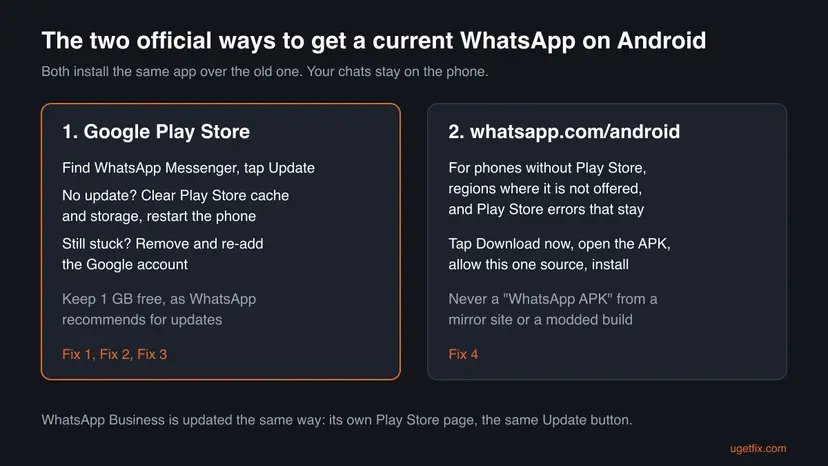
Install the current WhatsApp over the old one; your chats stay. Open the Google Play Store, find WhatsApp Messenger and tap Update (Fix 1). If the store shows no update, clear the Play Store's cache and storage and restart the phone (Fix 2). If you have no Play Store, as on many Huawei phones, download the APK from whatsapp.com/android (Fix 4). On Android older than 6.0 no current version exists.
| Error | "This version of WhatsApp became out of date." The app opens only to this message and a prompt to get the latest version. |
|---|---|
| Where it appears | On Android, right when WhatsApp or WhatsApp Business starts, and sometimes during phone number registration. |
| Main cause | The installed copy is older than WhatsApp still accepts, most often because automatic updates are off or the Play Store cannot install the update. |
| Fastest fix | Google Play Store > WhatsApp Messenger > Update, then Settings > Apps > WhatsApp > Force stop and open it again (Fix 1). |
| Also written as | This version of WhatsApp is out of date, WhatsApp out of date, the version of WhatsApp became out of date, WhatsApp version out of date. |
| Affects | Every Android phone with an old WhatsApp build: phones with auto-updates off, phones without Google Play, beta builds and unofficial modified copies. |
| Supported Android | Android 6.0 and newer, says the WhatsApp Help Center. Below that there is no current version to install. |
| Vendor status | Intended behaviour, not a bug. WhatsApp asks everyone to use the most up to date version and says registration can fail on an older one. |
| Are chats lost | No, updating installs over the old app and keeps the chats. Only a reinstall (Fix 6) needs a backup. |
| Time to fix | 2 minutes for an update, 10 minutes with the Play Store repairs, 20 minutes for a backup and reinstall. |
Facts checked on 15 October 2026. Steps written for WhatsApp Messenger and WhatsApp Business for Android, read against the WhatsApp Help Center on Android 6.0 and newer. Menu names differ slightly between Pixel, Samsung, Xiaomi and Huawei phones.
What "This version of WhatsApp became out of date" means
The message reads This version of WhatsApp became out of date. and it replaces the chat list as soon as the app starts. It is not a crash and not a ban. WhatsApp has decided that the build on your phone is too old to talk to its servers, so it refuses to go further until you install a newer one.
WhatsApp's own Help Center says it encourages everyone to always use the most up to date version, because new versions carry new features and bug fixes. It also warns that registering a phone number needs the latest version, otherwise registration might fail. That is why the message often appears right after a phone reset or on a new phone.
The message blocks the app, it does not touch your data. An update from the Play Store or the official APK installs over the old app and keeps the chats, photos and settings that are already on the phone.
People search the message in many ways: this version of WhatsApp is out of date, the version of WhatsApp became out of date, WhatsApp out of date problem, or WhatsApp is out of date. On Huawei phones the text is the same. WhatsApp Business shows the same message with its own name, and the same fixes apply to it.
Why WhatsApp says your version is out of date, most common cause first
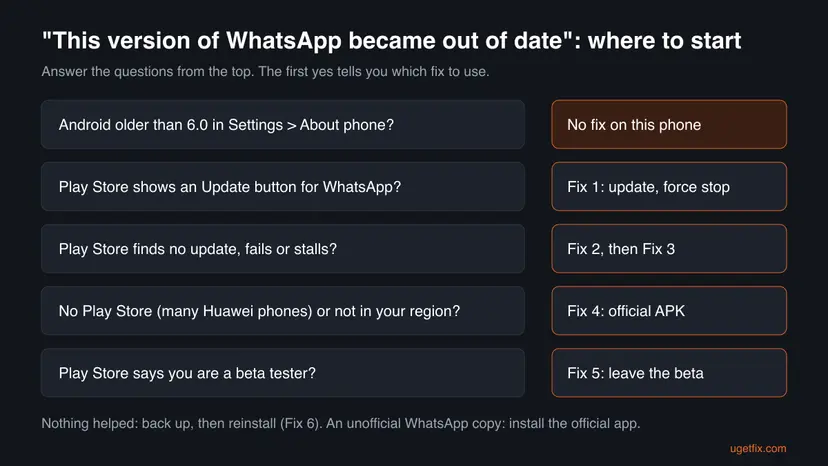
Most often the update simply never arrived: automatic updates are off, the phone was offline for weeks, or the Play Store got stuck. Less often the phone has no Play Store at all, or the copy of WhatsApp is not the one from the Play Store. Rarely the phone itself is too old.
| Cause | How common | How to recognise it | Fix |
|---|---|---|---|
| Automatic updates are off or the update was never installed | Most often | The Play Store page of WhatsApp shows an Update button | Fix 1 |
| The Play Store cannot download the update (stuck cache, low storage, error code) | Often | No update is found, the download stalls, or an error such as 495, 504 or 920 appears | Fix 2, Fix 3 |
| The phone has no Google Play Store, or WhatsApp is not offered in your region | Less often | Many Huawei phones, or a store message that the app is not available in your country | Fix 4 |
| A beta build of WhatsApp is installed | Less often | The Play Store page says you are a beta tester | Fix 5 |
| An unofficial modified copy of WhatsApp | Less often | The app was installed from a website, not from the Play Store or whatsapp.com, and has extra themes or features | Install the official app (Fix 6) |
| Android older than 6.0 | Rarely | Settings > About phone shows Android 5.1 or older | No fix on this phone |
In 2023 users of one WhatsApp beta build reported that the message stayed even after updating, which is what the earlier version of this guide described. That build is long out of use. Today the message almost always means exactly what it says: the copy on the phone is old.
How to fix "This version of WhatsApp became out of date" on Android
The fixes are ordered by how often they help and how little they cost. Fix 1 to Fix 5 install the new version over the old one and keep every chat. Only Fix 6 removes the app, and it starts with a backup. Check the Android version first if your phone is more than about eight years old.
| What you see or have | Start with |
|---|---|
| The Play Store page of WhatsApp shows an Update button. | Fix 1 |
| You updated, but the message is still there when the app opens. | Fix 1, steps 5 to 7 (force stop) |
| The Play Store says there is no update, or the download stalls or fails. | Fix 2, then Fix 3 |
| The Play Store shows an error code such as 403, 495, 504, 911, 920 or 923. | Fix 2, then Fix 4 |
| Your phone has no Google Play Store, for example a Huawei phone. | Fix 4 |
| The Play Store page says you are a beta tester. | Fix 5 |
| You installed WhatsApp from a website with extra features, or nothing else helped. | Fix 6 |
| Settings > About phone shows Android 5.1 or older. | The section When nothing works |
Fix 1. Update WhatsApp from the Google Play Store, then force stop it
2 minutesNo riskEveryone with the Play Store starts here, including readers who think they already updated.
The message only goes away when a newer build is installed. The Play Store installs it over the old app, so nothing is lost. A force stop then makes sure the old process, which still holds the out of date message, is closed and the new version starts.
- Connect to a stable Wi-Fi network. WhatsApp asks for a strong connection before updating.
- Open the Google Play Store and search for WhatsApp Messenger (or WhatsApp Business if that is the app with the message).
- Open the app's page and tap Update. If you see Open instead of Update, the store thinks you already have the newest version: go on with step 5.
- Wait until the button changes to Open.
- Open the phone's Settings > Apps and tap WhatsApp. On some phones the list is under Apps > See all apps or Apps > All apps.
- Tap Force stop and confirm with OK.
- Open WhatsApp again from the home screen.
On the app's Play Store page, tap the three dots in the top corner and make sure automatic updates are on. WhatsApp says auto-updates can be turned on in the device or app store settings, and that updates may not be offered in some regions because of local rules.
It worked if: WhatsApp opens to your chat list. The Play Store page of WhatsApp shows Open and no Update button.
If not: If the store finds no update or the download fails, go to Fix 2. If you have no Play Store, go to Fix 4.
Fix 2. Clear the Play Store's cache and storage, free space and restart
5 minutesLow riskThe Play Store finds no update, the download sits at pending, or the install fails for lack of space.
This is WhatsApp's own first answer when the app cannot be updated from the Play Store. A stuck store cache can hide an update that exists, and too little free space stops the install. WhatsApp recommends at least 1 GB of free space for installing or updating apps.
- Open the phone's Settings and tap Apps > Google Play Store > Storage and cache.
- Tap Clear cache.
- Tap Clear storage and confirm with Delete. This resets the store's settings, not your apps or your Google account.
- Check the free space in Settings > Storage. If it is under 1 GB, delete apps and files you no longer use or move them to an SD card.
- Restart the phone.
- Open the Play Store, find WhatsApp Messenger and tap Update.
Clearing the Play Store's storage is safe. Clearing WhatsApp's storage removes its data from the phone. WhatsApp's own advice is to clear only its cache, and to back up first if you go further. If you delete WhatsApp photos, voice messages or videos, you cannot see or hear them again.
It worked if: The Play Store now shows Update for WhatsApp and the download finishes.
If not: If the store still finds nothing or stops with an error, go to Fix 3. For error codes 403, 495, 504, 911, 920 and 923, go straight to Fix 4.
Fix 3. Remove and add your Google account again
5 minutesLow riskThe Play Store still finds no update or shows an error after Fix 2.
The Play Store checks updates through your Google account. When that sign-in is stuck, updates do not show. WhatsApp lists removing and re-adding the account, followed by clearing the store again, for Play Store errors that its other steps do not cover.
- Make sure you know your Google account password before you start.
- Open Settings and find your Google account. WhatsApp's path is About phone > Google Account; on most phones it is Settings > Passwords and accounts or Settings > Accounts.
- Tap the account and then Remove account, and confirm with Remove account.
- Restart the phone.
- Go back to the accounts screen, tap Add account and sign in to the same Google account.
- Clear the Play Store's cache and storage again, as in Fix 2.
- Open the Play Store and update WhatsApp.
It worked if: The Play Store shows WhatsApp's Update button and the update installs.
If not: Go to Fix 4 and install the official APK instead of waiting for the Play Store.
Fix 4. Install the official APK from whatsapp.com/android
5 minutesLow riskPhones without the Google Play Store (many Huawei phones), regions where the store does not offer WhatsApp, and Play Store errors that do not go away.
WhatsApp publishes the same app as an APK file on its own site and points to it for exactly these cases. Installed over the old copy, it updates the app in place, so the out of date message is gone without the Play Store.
- Make sure the phone has at least 1 GB of free space.
- In the phone's browser, open
https://www.whatsapp.com/android/. Type the address yourself; do not use a link from a search ad or a mirror site. - Tap Download now.
- Open the downloaded file (
WhatsApp.apk) from the browser's downloads or the Files app. - When Android asks, tap Settings and turn on Allow from this source for the browser, then go back.
- Tap Update or Install and wait until it finishes.
- Open Settings > Apps > WhatsApp, tap Force stop, then open WhatsApp.
After the install, open Settings > Apps > Special app access > Install unknown apps, tap the browser and turn Allow from this source off. Leaving it on lets any page the browser opens offer an app install.
It worked if: WhatsApp opens to your chats. On a phone with the Play Store, later updates may still come through the store.
If not: If Android says the app is not installed or the package conflicts with an existing one, your copy is a beta or an unofficial build: go to Fix 5 or Fix 6.
Fix 5. Leave the WhatsApp beta and install the stable version
10 minutesLow riskThe WhatsApp page in the Play Store says you are a beta tester, or you installed a beta build on purpose.
Beta builds are test versions. They are replaced quickly, and an old one can be refused while the stable version still works. Leaving the beta returns the phone to the normal update line.
- Open the Play Store and the WhatsApp Messenger page.
- Scroll to the section that says you are a beta tester and tap Leave.
- Wait a few minutes. The Play Store can take some time to move you back to the stable line.
- Tap Update if it appears. If the store offers nothing, use the APK from Fix 4.
- Force stop WhatsApp in Settings > Apps > WhatsApp and open it again.
It worked if: The page no longer shows the beta section and WhatsApp opens normally.
If not: If the stable version will not install over the beta, back up and reinstall as in Fix 6.
Fix 6. Back up, then remove and reinstall the official WhatsApp
20 minutesRead the warningNothing above worked, or the installed copy is an unofficial modified WhatsApp from a website.
A clean install removes a damaged or unofficial copy that cannot be updated in place. The official app from the Play Store or whatsapp.com then registers your number again and offers to restore your backup.
Removing WhatsApp deletes the chats on the phone that are not in a backup. If the app still opens anywhere past the message, back up first in WhatsApp > Settings > Chats > Chat backup > Back up. If it does not open, you can only restore the most recent backup the phone already made. Backups of unofficial copies may not restore into the official app; we could not confirm how they behave.
- Check that your phone number can receive an SMS or a call. WhatsApp needs this to verify the number again.
- Note which Google account the phone uses. A Google Drive backup is restored only with the same account.
- Touch and hold the WhatsApp icon and choose Uninstall, or go to Settings > Apps > WhatsApp > Uninstall.
- Install WhatsApp Messenger from the Play Store, or the APK from Fix 4.
- Open WhatsApp, tap Agree and continue, enter your phone number and the code you receive.
- Allow access to contacts and media if you want them in WhatsApp.
- When Restore backup appears, tap Restore and wait until it finishes.
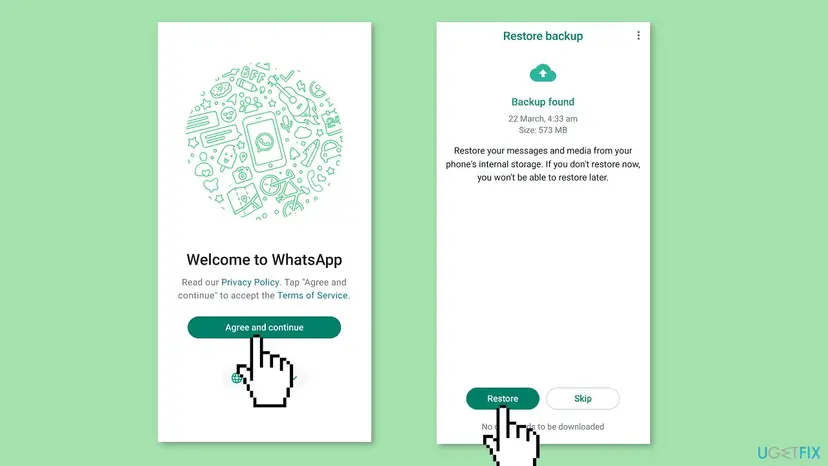
It worked if: WhatsApp opens on the current version with your restored chats.
If not: If no backup is found, make sure you signed in with the same phone number and Google account. Then read the section When nothing works.
When nothing works: old Android, region limits and what to tell support
Check the Android version first: Settings > About phone > Android version (on some phones under Software information). WhatsApp supports Android 6.0 and newer. Each year it drops the oldest systems with the fewest users and says it warns users inside the app a few times before support ends. On Android 5.1 or older no current WhatsApp exists, so no fix on this page can help on that phone.
- Old phone: move WhatsApp to a newer phone with the same number and restore your backup there. Android 16 phones are fully supported.
- Region: WhatsApp notes that updates may not be available in some regions because of local rules. The APK from
whatsapp.com/androidis its own suggested route when the store says the app is not available in your country. - No SMS or call possible: WhatsApp does not set up accounts on devices that can only use Wi-Fi, so a tablet without a SIM cannot register a new account.
- Still the same message on Android 6.0 or newer after Fix 4: contact WhatsApp support through the WhatsApp Help Center. Say the exact message, your phone model, the Android version, where you installed WhatsApp from, and which fixes you tried.
How to stop WhatsApp from going out of date again
- Keep automatic updates on for WhatsApp in the Play Store.
- Keep 1 GB or more free on the phone so updates can install.
- Open WhatsApp at least now and then on spare phones, so the update prompt reaches you in time.
- Keep a recent chat backup in Settings > Chats > Chat backup.
- Install WhatsApp from APK mirror sites or as a modded build with extra features.
- Clear WhatsApp's own storage to fix an update problem.
- Leave a phone on an unsupported Android version as your main WhatsApp device.
- Ignore the in-app warnings that your Android version will stop being supported.
If WhatsApp also misbehaves on a computer, the Windows app has its own problems, explained in our guide to the WhatsApp white screen.
Frequently asked questions
Why does WhatsApp say this version is out of date when the Play Store has no update?
Usually the Play Store has not caught up with the update, not the other way round. A stuck store cache, a stuck Google account sign-in or less than 1 GB of free space can all hide or block the update. Clear the Play Store's cache and storage and restart the phone (Fix 2), then re-add the Google account (Fix 3). If the store still shows nothing, install the official APK from whatsapp.com/android (Fix 4). It is the same app and installs over your old copy.
Will I lose my chats if I update WhatsApp?
No. Updating from the Play Store or with the official APK installs the new version over the old one and keeps your chats, media and settings. WhatsApp still advises a backup before updating, which costs nothing if the app opens. Chats are at risk only when you uninstall WhatsApp or clear its storage, so do that only after a backup, as Fix 6 describes.
How do I fix this version of WhatsApp became out of date on a Huawei phone?
The message is the same on Huawei phones, but many of them have no Google Play Store, so the usual update button is missing. Install the official APK from whatsapp.com/android (Fix 4): tap Download now, open the file and allow the install from this source for the browser. It updates the app in place and keeps your chats. Turn the install permission off again afterwards.
WhatsApp will not open at all after this message. What now?
The app is locked on purpose until it is updated, so restarting it alone will not help. Update it from outside the app: the Play Store (Fix 1) or the official APK (Fix 4). Then force stop WhatsApp in Settings > Apps > WhatsApp and open it again. The same applies whether you see the message in English or in your own language, and on any recent Android version, including Android 16.
Does WhatsApp Business show the same out of date message?
Yes. WhatsApp Business is a separate app and goes out of date in the same way. Update it from its own page in the Play Store, called WhatsApp Business, not from the WhatsApp Messenger page. The force stop step and the Play Store repairs in Fix 2 and Fix 3 work the same. Back up its chats separately; they are not part of a WhatsApp Messenger backup.
Is the WhatsApp APK from whatsapp.com safe?
Yes. It is WhatsApp's own build, and the WhatsApp Help Center links to whatsapp.com/android when the Play Store cannot install the app. The risk lies elsewhere: APK mirror sites and modified versions may carry changed code. Type the address yourself, download only from that page, and turn off Allow from this source for the browser once WhatsApp is installed.
Why does an unofficial or modded WhatsApp keep saying it is out of date?
Modified copies are not WhatsApp's software. They are not updated through the Play Store, so they fall behind the versions WhatsApp accepts and stop working. This page does not cover them and we do not link to them. The lasting fix is the official WhatsApp from the Play Store or whatsapp.com/android, set up as in Fix 6. Their backups may not restore into the official app.
What is the oldest Android phone that can still use WhatsApp?
WhatsApp supports Android 6.0 and newer, according to its Help Center today. It reviews the list every year and drops the oldest systems with the fewest users, after warning in the app a few times. Check your version in Settings > About phone. On Android 5.1 or older, no current WhatsApp version will install, so the out of date message cannot be fixed on that phone.
What does "the sender may be using an older version of WhatsApp" mean?
That note is about the other person's app, not yours. As the wording says, the sender may be on an older WhatsApp; we could not confirm from WhatsApp's pages exactly when the note appears. Your app does not need a fix for it. Ask them to update WhatsApp, and if they then see "This version of WhatsApp became out of date", the fixes on this page apply to their phone.
Can the wrong date on my phone cause this message?
We could not confirm that from WhatsApp's own pages, so we do not list it as a cause. A wrong date and time is a separate problem in WhatsApp with its own message. If your phone's clock is wrong, set it to automatic in Settings > System > Date and time anyway, then follow Fix 1. The out of date message itself goes away only with a newer version of the app.
Sources
- WhatsApp Help Center: How to manually update WhatsApp (Play Store update, registration needs the latest version, regional limits) (faq.whatsapp.com)
- WhatsApp Help Center: Can't download or update WhatsApp (Play Store cache and storage, 1 GB, Google account, error codes, APK from whatsapp.com/android) (faq.whatsapp.com)
- WhatsApp Help Center: About supported operating systems (Android 6.0 and newer, yearly review, in-app warnings) (faq.whatsapp.com)
Did this fix work?
One click, no account. It tells the next reader which guides are worth their time.
Questions and experiences: fix "This version of WhatsApp became out of date" on Android
Still broken, or found a fix we did not cover? Ask here: members and our editors answer. Reading is open; writing needs a free account.
…