
How to fix Windows activation error 0xc0020036?

Prefer to fix it yourself? The manual steps follow.
- 6methods
- 5 to 30 minutes
- Easy to medium
Applies to Windows 11 and Windows 10 Home, Pro, Education and Enterprise when slmgr or a product key entry fails with 0xC0020036
6 methods in this guide
Hello. I was trying to upgrade to Windows 10 from Windows 8.1 today. Once it was complete, I received a strange error 0xc0020036, which claims that I am not running Windows non-core edition. I bought Windows from the official store back when Windows 8.1 was released, so my license is genuine. Any help with this is appreciated.
Error 0xC0020036 is not a verdict on your licence: it means the activation script slmgr could not reach the Software Protection service that holds your licence, so it got no answer at all. In most cases the service is stopped or disabled. Start it in services.msc, run the command again, and only then look at your key.
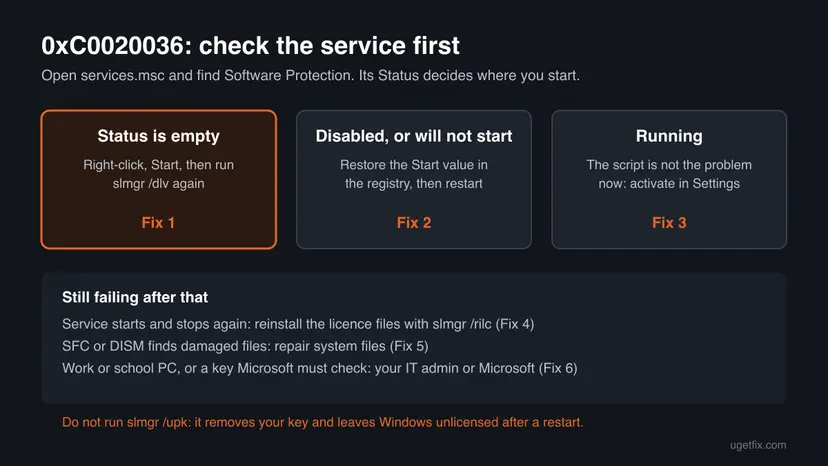
Press Win + R, type services.msc, find Software Protection and select Start if its Status is empty (Fix 1). Then run slmgr /dlv again in an administrator Command Prompt. If the service is disabled or will not start, restore its Start value in the registry (Fix 2). Once it runs, activate in Settings > System > Activation (Fix 3). Do not run slmgr /upk.
| Error | 0xC0020036 in a Windows Script Host box: "Error: 0xC0020036 On a computer running Microsoft Windows non-core edition, run 'slui.exe 0x2a 0xC0020036' to display the error text." |
|---|---|
| Where it appears | After an slmgr command such as slmgr /dlv, /ipk or /ato in Command Prompt, and for some users when they enter a product key in Settings. |
| Main cause | The Software Protection service (sppsvc) is not running, so the request finds no endpoint. Microsoft's code list names 0xC0020036 EPT_NT_NOT_REGISTERED. |
| Fastest fix | Start Software Protection in services.msc and run the command again (Fix 1). |
| Also written as | 0xc0020036, C0020036, "error code 0xc0020036", "slui.exe 0x2a 0xc0020036". Users often see it next to 0xC004F012 or 0xC004F074. |
| Affects | Windows 11 and Windows 10, every edition. Windows 10 reached end of support on 14 October 2025, but its activation works the same way. |
| Microsoft's status | Not listed on Microsoft's page of consumer activation errors (checked 15 October 2026). No known Windows bug or fix version. |
| What it is not | Not a sign of a pirated copy and not a wrong edition. "Non-core edition" is fixed wording that slmgr prints with every error code. |
| Time to fix | About 5 minutes when the service only needs a start. Up to 30 minutes with the registry and system file repair. |
Facts checked on 15 October 2026. Steps written for Windows 11 (25H2 and 26H2) and Windows 10 22H2.
What Windows activation error 0xC0020036 means
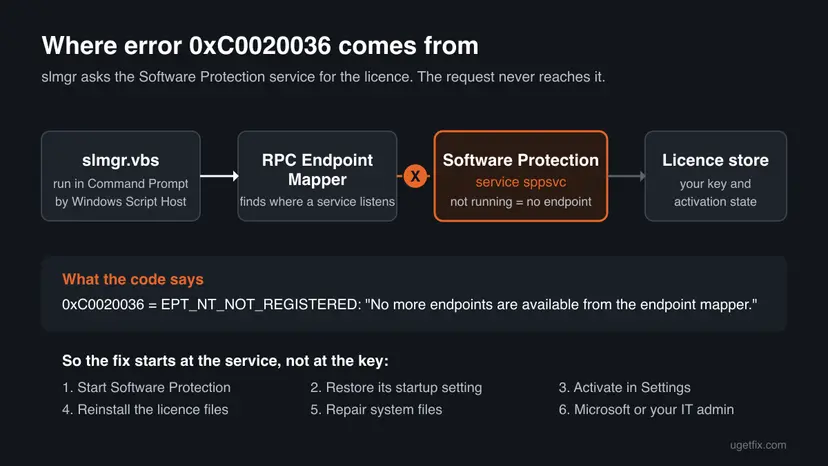
The error comes from slmgr, the script Microsoft ships with Windows to install product keys, activate Windows and show the licence status. Microsoft Learn describes slmgr.vbs as a Visual Basic script, and it runs through Windows Script Host. That is why the message opens in a small box with the title Windows Script Host, not on the Activation page.
The code itself is a Windows status value, not an activation code. Microsoft's NTSTATUS reference lists 0xC0020036 as EPT_NT_NOT_REGISTERED with the text "No more endpoints are available from the endpoint mapper." In plain words: the script asked Windows where the licensing service listens, and no such service was registered at that moment.
| What you see | Where | What it tells you |
|---|---|---|
| Error: 0xC0020036 On a computer running Microsoft Windows non-core edition, run 'slui.exe 0x2a 0xC0020036' to display the error text. | Windows Script Host box after an slmgr command | slmgr got no answer from the licensing service. |
| Windows isn't activated / Activate Windows watermark | Desktop and Settings > System > Activation | Only the result. The service may have stopped before it could confirm the licence. |
| We can't activate Windows on this device right now, with 0xC0020036 | Activation page after Change product key | Users report the same code here. The cause is the same service. |
| 0xC004F012 or 0xC004F074 in the same session | Activation page or slmgr | Separate codes. Users report them together with 0xC0020036, and they often clear once the service runs. |
The sentence is not about your Windows edition. slmgr prints the same wording with every code: Microsoft Q&A threads show it with 0xC004F069, 0x80070422 and 0x803F7001 too. Core means Server Core, the Windows Server installation without a desktop, where the slui window cannot open. On Home or Pro you can ignore that part.
The message suggests slui.exe 0x2a 0xC0020036. That command opens a small window that shows the error text for the code. It changes nothing, and we could not confirm which text it shows for this code on Windows 11, so do not wait for it to explain more than this page does.
Why error code 0xC0020036 appears, from most to least common
Every cause ends in the same place: the Software Protection service does not answer. What differs is why it does not run. Microsoft describes the service as the one that enables the download, installation and enforcement of digital licenses for Windows and Windows applications, and highly recommends not disabling it.
| Cause | How often | How to tell | Fix |
|---|---|---|---|
| The Software Protection service cannot be reached when you run slmgr, for example because it was stopped and did not start again on request. | Most often | In services.msc the Status of Software Protection is empty and slmgr fails until you start it by hand. | Fix 1 |
| The service is disabled or its startup setting was changed, for example by a tweak tool. | Often | Startup Type shows Disabled, or Start fails at once. | Fix 2 |
| The service runs, but the licence files it reads are damaged. | Sometimes | The service starts and stops again, or slmgr shows 0xC004F012 next to 0xC0020036. | Fix 4 |
| Damaged system files stop the service from loading. | Sometimes | SFC or DISM reports corrupt files, and other services fail too. | Fix 5 |
| A work or school PC after a feature update, or a key Microsoft must look at. | Rarely at home | A volume licence (Education, Enterprise) or a key that still fails once the service runs. | Fix 6 |
Users on Microsoft's forum also reported the error on Windows 10 Education PCs with a volume licence right after the Fall Creators Update (version 1709). The answer that worked for them was the service setting in Fix 2. We found no Microsoft statement that a specific update causes 0xC0020036.
- A wrong or blocked product key gives its own codes, such as 0xC004C003, which Microsoft describes as a key blocked on the activation server.
- A changed motherboard gives 0xC004F211. If Settings shows that code once the service runs, follow our guide to Windows activation error 0xC004F211.
- A pirated copy is not what this code means. Activation tools that stop or replace the licensing service can cause it, and they are not a fix.
How to fix error 0xc0020036 in Windows
Fixes 1 and 2 bring the Software Protection service back, which is what the code asks for. Fix 3 activates Windows once the service runs. Fixes 4 and 5 repair the files the service needs, and Fix 6 is for keys and work PCs that need a person.
| What you see or have | Start with |
|---|---|
Software Protection in services.msc has an empty Status. | Fix 1 |
| Its Startup Type is Disabled, or Start fails with an error. | Fix 2 |
| The service runs and slmgr works, but Windows is still not activated. | Fix 3 |
| The service starts and then stops again, or you also see 0xC004F012. | Fix 4 |
| Other services fail as well, or Windows was recently damaged by a crash. | Fix 5 |
| A work or school PC, or a key that still fails. | Fix 6 |
Fix 1. Start the Software Protection service and run the command again
2 minutesNo riskEvery reader first: it takes two minutes and fixes the case where the service is simply stopped.
0xC0020036 means the endpoint mapper had no endpoint for the licensing service. A stopped Software Protection service registers no endpoint, so starting it gives slmgr something to talk to.
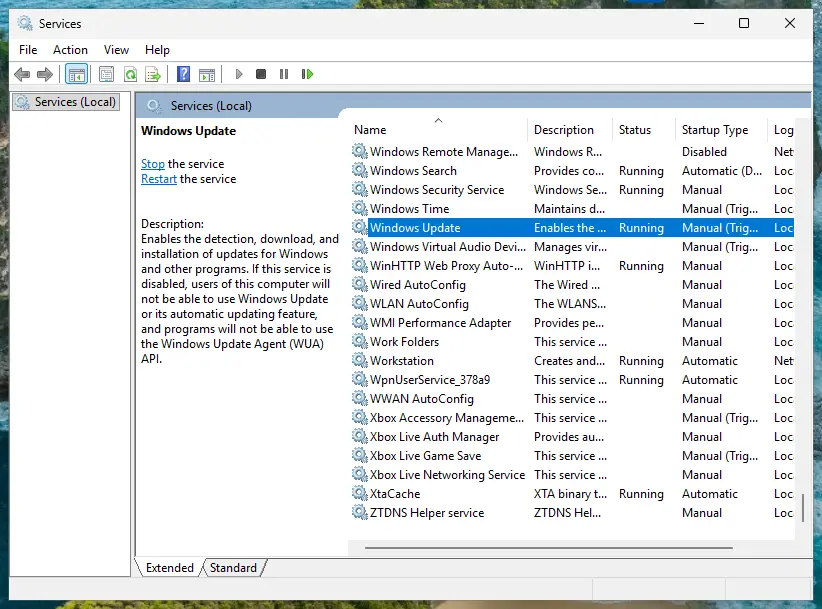
- Press Win + R, type
services.mscand press Enter. - Click any row and type S to jump to the services that start with S. Find Software Protection.
- Read the Status column. Running means the service is up; an empty field means it is stopped.
- If it is stopped, right-click Software Protection and select Start. Wait until the progress window closes.
- Check two more rows while you are here: Remote Procedure Call (RPC) and RPC Endpoint Mapper must both show Running.
- Type cmd in the search box on the taskbar, select Run as administrator next to Command Prompt, then Yes. Run the command that failed, or this one:
slmgr /dlv
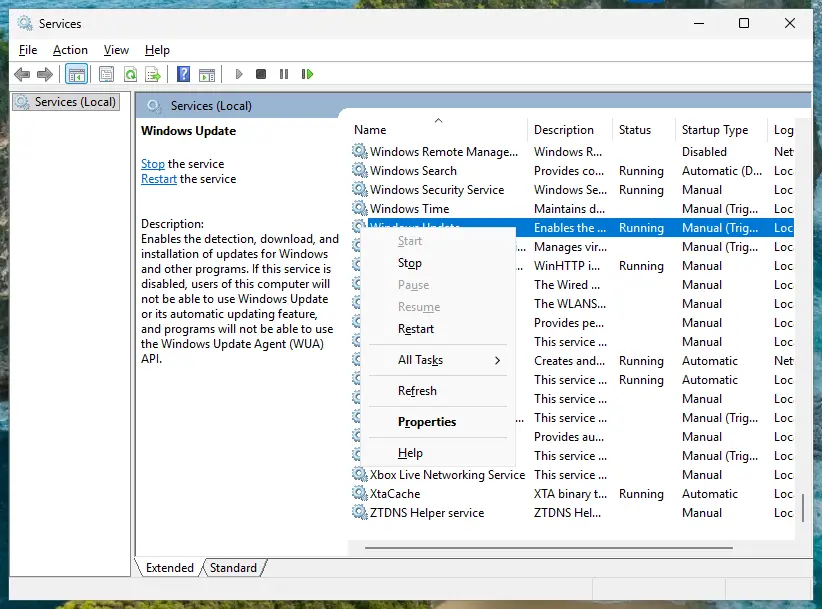
You can also start the service from the same administrator Command Prompt. The service name sppsvc is the same in every language of Windows:
Start the Software Protection service
net start sppsvcUsers report that the Startup type list of Software Protection cannot be changed in the Services window, and that the service stops by itself a short while after it starts. Windows starts it when a licence check needs it, so an empty Status on its own is not a fault. What matters is whether Start works. If it does not, go to Fix 2.
If Remote Procedure Call (RPC) or RPC Endpoint Mapper is not running, the problem is bigger than activation, because many parts of Windows depend on them. Restart the PC once and, if they are still stopped, go to Fix 5.
It worked if: slmgr /dlv opens a Windows Script Host box with your edition, a partial product key and a License Status line instead of the error.
If not: If Start fails with a message, or slmgr still shows 0xC0020036 right after the service started, write down the message and go to Fix 2.
Fix 2. Restore the startup setting of Software Protection in the registry
5 minutesRead the warningThe service shows Disabled, refuses to start, or is stopped again after every restart.
When the service's Start value is set to Disabled, Windows never starts it and slmgr gets 0xC0020036 every time. Users on Microsoft's forum fixed this error, including on volume licence PCs after the 1709 update, by setting that value back to 2.
A wrong change in the registry can stop Windows features from working. Export the sppsvc key before you edit it, so you can import it again if anything goes wrong. Step by step: Back up the registry before editing it. Change only the one value below.
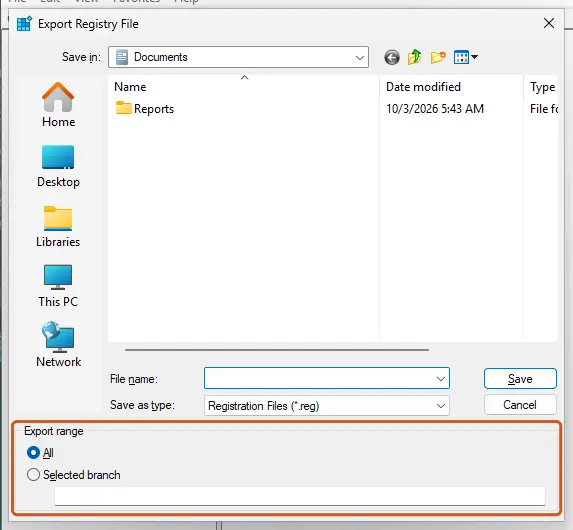
- Press Win + R, type
regedit, press Enter and select Yes. - Paste this path into the address bar at the top and press Enter:
HKEY_LOCAL_MACHINE\SYSTEM\CurrentControlSet\Services\sppsvc - Right-click sppsvc in the left pane, select Export and save the file as your backup.
- In the right pane, double-click Start.
- Make sure Hexadecimal is selected, set Value data to
2and select OK. - Close Registry Editor and restart the PC.
- Open Command Prompt as administrator and check the licence again:
slmgr /dlv
| Start value | Meaning (Microsoft's services registry reference) |
|---|---|
| 2 | Automatic: loaded by the Service Control Manager during system startup. |
| 3 | Manual (demand start). |
| 4 | Disabled: the service is not loaded. Software Protection must not be on 4. |
Microsoft's list of system services gives the startup type of Software Protection as Automatic. If Registry Editor refuses to save the value, do not change the key's permissions to force it. That is a sign of deeper damage, and Fix 5 is the safer way.
It worked if: After the restart Software Protection shows Running or starts when you select Start, and slmgr /dlv shows the licence information.
If not: If the service starts and then stops again, go to Fix 4. If it still will not start at all, go to Fix 5.
Fix 3. Activate Windows in Settings once the service runs
5 minutesNo riskThe service runs and slmgr no longer shows 0xC0020036, but Windows still says it is not activated.
The service was missing, not the licence, so Windows may simply not have checked in since. The Activation page shows the real activation result and offers the Activation troubleshooter, which slmgr cannot.
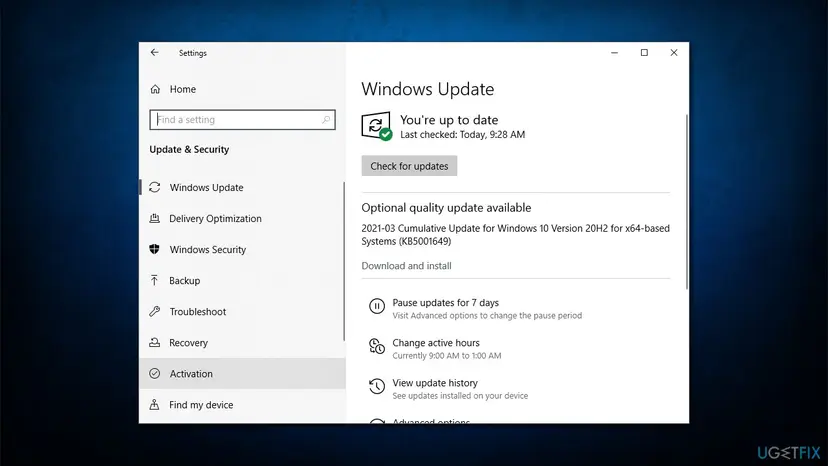
- Open Settings > System > Activation. On Windows 10 it is Settings > Update & Security > Activation.
- If it says Windows is activated, you are done. The error was only the stopped service.
- If not, select Troubleshoot. You must be signed in as an administrator, and the PC must be online.
- If you bought a key, select Change product key, type the 25-character key and select Next, then Activate.
- If the page shows a new code, read it: that code, not 0xC0020036, tells you what is still wrong.
If you prefer Command Prompt, Microsoft notes that slmgr /ipk silently replaces an installed key and that the PC or the Software Protection service should be restarted afterwards. Then start activation:
Install your key and activate (administrator Command Prompt)
slmgr /ipk XXXXX-XXXXX-XXXXX-XXXXX-XXXXX
slmgr /atoOlder guides for this error suggest them. Microsoft says /upk uninstalls the product key, and after a restart Windows is in an Unlicensed state unless a new key is installed. /cpky only removes the key from the registry. Neither starts the service, and on a digital licence you may have no key to type back in.
It worked if: The Activation page says Windows is activated, and the watermark disappears after a restart.
If not: A code such as 0xC004F211 or 0xC004C003 is a licence question: follow that code. If slmgr shows 0xC0020036 again, the service stopped again: go to Fix 4.
Fix 4. Reinstall the licence files with slmgr /rilc
5 minutesLow riskThe service starts but stops again, or slmgr shows 0xC004F012 next to 0xC0020036.
The Software Protection service reads licence files when it starts. If they are damaged it can fail and leave no endpoint. Microsoft's /rilc option reinstalls the known-good copies stored during installation.
- Open Command Prompt as administrator.
- Make sure the service runs:
net start sppsvc - Reinstall the licence files. Microsoft says this replaces matching licences in the Trusted Store with the copies in
%SystemRoot%\system32\oemand%SystemRoot%\System32\spp\tokens:slmgr /rilc - Wait for the Windows Script Host box and select OK. It can take a minute.
- Restart the PC.
- Open Command Prompt as administrator again and start activation:
slmgr /ato
/rilc does not remove your product key. A digital licence linked to the hardware or to your Microsoft account activates again when Windows checks in.
Answers on Microsoft's forum go further and rename the licence store file tokens.dat so Windows builds a new one. We found no Microsoft documentation of that step for Windows 11, so this page does not give it. If /rilc does not help, Fix 5 and Fix 6 are the documented ways on.
It worked if: slmgr /rilc finishes without an error, the service stays Running after the restart, and slmgr /ato reports that the product was activated successfully.
If not: If /rilc itself shows 0xC0020036, the service stopped before the command ran. Go back to Fix 2, then Fix 5.
Fix 5. Repair system files with DISM and SFC
15 to 30 minutesLow riskThe service will not start even with the right setting, or other Windows services fail too.
Software Protection runs from system files that Windows protects. If one of them is damaged, the service cannot load whatever its setting is. DISM repairs the component store and SFC then replaces damaged system files from it.
Run DISM first and SFC second, in an administrator Command Prompt. Step by step: Run DISM and SFC to repair Windows system files
- Open an elevated command window. Right-click Start and select Terminal (Admin), or type cmd in the search box, right-click Command Prompt and select Run as administrator. Select Yes when Windows asks for permission.
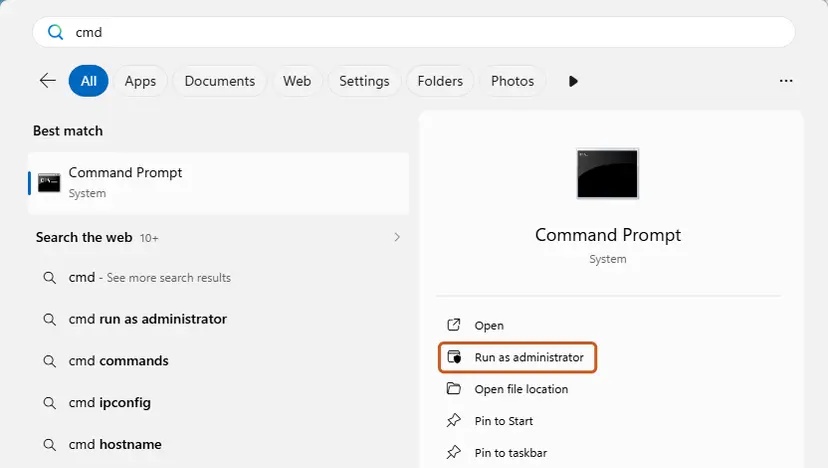
Search for cmd and choose Run as administrator. Screenshot: Windows 11 26H2. - Run DISM first. Type the command below and press Enter. DISM downloads clean copies of damaged components from Windows Update, so it can take several minutes. Wait until it says The operation completed successfully.
DISM.exe /Online /Cleanup-Image /RestoreHealth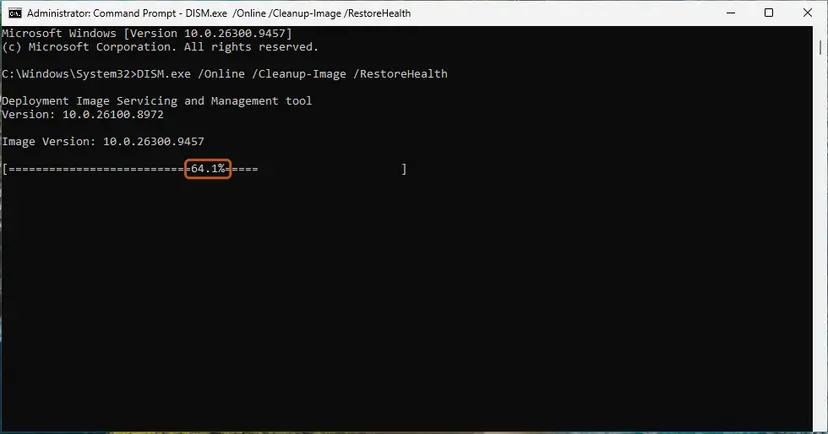
DISM /RestoreHealth running. Screenshot: Windows 11 26H2. - Run System File Checker. In the same window, type the command below and press Enter. Do not close the window until the verification reaches 100%.
sfc /scannow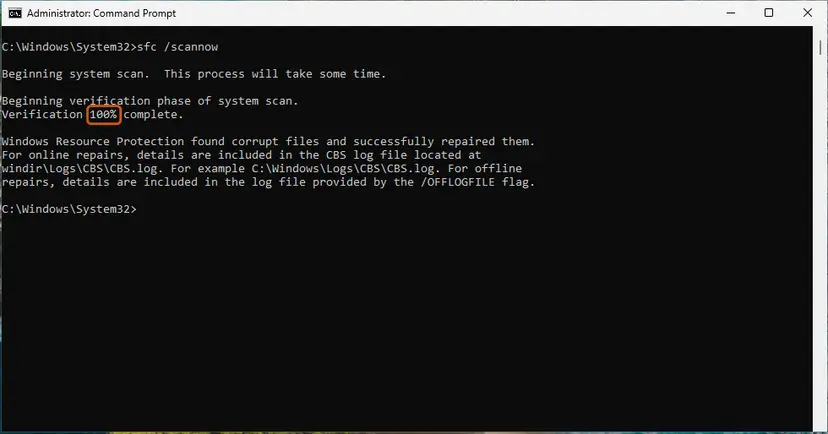
sfc /scannow at 100%. Screenshot: Windows 11 26H2. - Read the result and restart. Compare the last message with the table below this guide, then restart the PC so that repaired files are loaded.
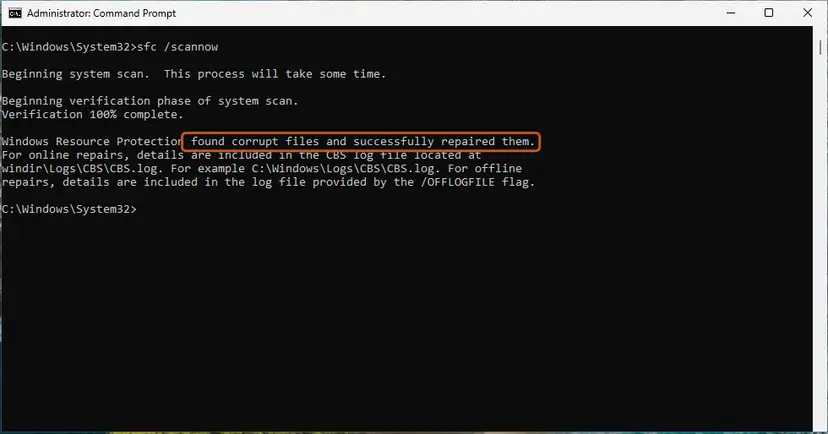
The result line tells you what SFC did. Screenshot: Windows 11 26H2.
These steps were written for Windows 11 24H2 and 25H2. The full page with the other versions and what each result means: Run DISM and SFC to repair Windows system files
Restart the PC after SFC finishes, then repeat Fix 1. The old version of this guide gave SFC as the second method; we moved it down because it only helps when files are damaged, and starting the service is faster.
It worked if: SFC reports that it found and repaired corrupt files, or that it found no integrity violations, and Software Protection starts after the restart.
If not: If SFC cannot repair some files and the service still fails, the system needs a repair install that keeps your files: Reinstall Windows without losing files. Or go to Fix 6 first.
Fix 6. Ask Microsoft support or your IT administrator
15 minutes plus the replyNo riskA work or school PC, or a home PC where the service runs but activation still fails.
Once the service runs, a remaining failure is about the licence itself: a volume key, a blocked key or a purchase Microsoft must look up. Microsoft says activation on organisation PCs is managed by the organisation.
| Your PC | Who to ask | What to send |
|---|---|---|
| Work or school PC (Education, Enterprise, a volume key) | Your IT administrator | The code, the time, the output of slmgr /dlv. A KMS client logs event ID 12288 in the Application log for each attempt. |
| Home PC with a key you bought | Microsoft support, support.microsoft.com/contactus, Windows activation | The key card, shop email or Store order, and a screenshot of slmgr /dlv. |
| PC that came with Windows | The PC maker first | The model, the serial number and the error. |
- Do not enter a personal key or buy a licence in the Store on a work PC.
- Take a screenshot of the Windows Script Host box with the error and of
slmgr /dlvonce it works. - Write down what you did before the error: an upgrade, a reset, a tweak tool, a new motherboard.
- Send everything in one message.
Tools that promise free activation replace or stop licensing components and run with full rights on your PC, and they can cause this very error. Keys sold far below the retail price are often resold volume keys. Neither is a fix, and this page does not link to them.
It worked if: The administrator reactivates the PC, or Microsoft confirms the licence and tells you the next step.
If not: If you are told the licence cannot be used on this PC, the error is no longer technical: you need a valid licence for this device.
If error 0xC0020036 is still there
When the code keeps coming back, find out whether the service fails to start or starts and dies. The logs below tell you which, and they are what support will ask for.
| What to check | Where | What it tells you |
|---|---|---|
| Service status and startup type | services.msc, Software Protection | Stopped, disabled or running at the moment of the error. |
| Service start failures | Event Viewer, Windows Logs > System, source Service Control Manager | Entries naming Software Protection show it failed to start and often why. |
| Licensing events | Event Viewer, Windows Logs > Application, source Security-SPP | When the service started, stopped and checked the licence. |
| Licence status | slmgr /dlv in an administrator Command Prompt | Works only while the service runs. Shows the channel and License Status. |
- Service set to Automatic but stopped after every restart: something turns it off. Check any tweak, privacy or activation tool you installed, and remove it.
- Service fails with a file error in the System log: Fix 5, then a repair install that keeps your files.
- Service runs and Settings shows another code: follow that code. 0xC0020036 is solved.
How to keep error 0xC0020036 from coming back
Microsoft warns that if you disable Software Protection, Windows and licensed applications may run in a notification mode. Keeping the service on its default setting is the whole prevention. The rest makes the next activation question easy.
- Leave Software Protection on its default Automatic start.
- Link a digital licence to your Microsoft account on Settings > System > Activation while Windows is activated.
- Keep the key card, the shop email or the Store order where you can find it.
- Read the code on the Activation page before you run commands from a guide.
- Do not use service tweak tools that turn off licensing or update services.
- Do not run
slmgr /upk,/cpkyor/rearmunless Microsoft or your administrator tells you to. - Do not run activators or keys from forums and videos.
- Do not change permissions in the registry to force a service setting.
One more change is coming. Microsoft is deprecating VBScript, the language slmgr.vbs is written in. Since Windows 11 24H2 it is a feature on demand that is on by default, and Microsoft says it will no longer be enabled by default around 2027. If slmgr stops running at all, check Settings > System > Optional features for VBScript.
Frequently asked questions
What does error code 0xc0020036 mean?
It means the activation script slmgr could not reach the Windows licensing service. Microsoft's NTSTATUS list names the code EPT_NT_NOT_REGISTERED: "No more endpoints are available from the endpoint mapper." In practice the Software Protection service was not running when the command asked for it. Your licence was never checked, so the error says nothing about whether it is valid. Start the service and run the command again.
What is slui.exe 0x2a 0xc0020036?
It is the command the error message suggests. slui.exe is the Windows activation client, and slui.exe 0x2a followed by a code opens a window with the error text for that code. It is only a viewer: it does not activate Windows or change anything. You can run it from the search box or Command Prompt, but the steps on this page are what fix the error.
Does "non-core edition" mean I have the wrong edition of Windows?
No. slmgr adds the sentence "On a computer running Microsoft Windows non-core edition" to every error it shows, whatever the code. Core refers to Server Core, a Windows Server installation without a desktop, where the slui window cannot open. On Windows 11 or Windows 10 Home and Pro the sentence only tells you that you can run slui to read the text. It does not say your edition or your licence is wrong.
Is 0xc0020036 a sign that my Windows is not genuine?
No. The code comes before any licence check: the service that would check the licence did not answer. Users with retail keys, upgrades from Windows 8.1 and volume licences at schools have all reported it. Activation tools that stop or replace the licensing service can cause it, but the code itself is not a verdict. Once the service runs, the Activation page tells you the real licence status.
Does 0xc0020036 happen on Windows 11 25H2?
Yes, it can. The code depends on the Software Protection service, which is the same on Windows 11 25H2, 26H2 and Windows 10 22H2. A user on Microsoft Q&A reported it on Windows 11 Pro in November 2025. The fixes are the same, only the Settings path differs: Settings > System > Activation on Windows 11, Settings > Update & Security > Activation on Windows 10.
Why does the error come back after every restart?
Because the service does not start with Windows. Its startup setting is probably Disabled or Manual, or a tool you installed turns it off. Set the Start value of sppsvc back to 2 as in Fix 2, then check your startup apps for tweak, privacy or activation tools that manage services. If the service is set to Automatic and still stops, read the System log in Event Viewer as described above.
Should I run slmgr /upk and slmgr /cpky to fix it?
No. Older guides suggest it, but Microsoft says /upk uninstalls the product key and leaves Windows unlicensed after a restart unless a new key is installed. /cpky removes the key from the registry. Neither starts the Software Protection service, so neither fixes 0xC0020036, and if your Windows used a digital licence you may have no key to type back in. Start the service instead.
I upgraded from Windows 8.1 and got 0xc0020036. What now?
Start with Fix 1, because an upgrade can leave the Software Protection service stopped until the next restart. Once it runs, open the Activation page. Microsoft says its free upgrade offer ended on 29 July 2016 and the Windows 7 and 8 upgrade path is removed, so an old 8.1 key may not activate a current Windows. If the Activation page then shows a key error, you need a Windows 10 or Windows 11 licence.
The error appears in Spanish, Portuguese or Russian Windows. Do these steps apply?
Yes. The code 0xC0020036 is the same in every language, and so are the commands slmgr /dlv, net start sppsvc and services.msc. Only the display names change: the service list shows Software Protection under its translated name, but its service name in the properties is always sppsvc. This page is in English; ¿cómo solucionar?, o que fazer, что делать: follow Fix 1 first.
Sources
- Microsoft Learn: [MS-ERREF] NTSTATUS values (0xC0020036 EPT_NT_NOT_REGISTERED) (learn.microsoft.com)
- Microsoft Learn: Slmgr.vbs options for obtaining volume activation information (learn.microsoft.com)
- Microsoft Learn: Security guidelines for system services in Windows Server 2016 (Software Protection, sppsvc) (learn.microsoft.com)
Did this fix work?
One click, no account. It tells the next reader which guides are worth their time.
Questions and experiences: fix Windows activation error 0xc0020036
Still broken, or found a fix we did not cover? Ask here: members and our editors answer. Reading is open; writing needs a free account.
…