
How to fix Outlook error code 3399811147 in Windows?

Prefer to fix it yourself? The manual steps follow.
- 8methods
- 5 to 30 minutes
- Intermediate
Applies to Classic Outlook for Microsoft 365 and Outlook 2021 or 2024 with a work, school or Microsoft 365 business mailbox on Windows 11 and Windows 10
8 methods in this guide
I can't use my Outlook account because of error code 3399811147. I am using it for my work. Any advice?
Error code 3399811147 means classic Outlook asked Windows for your Microsoft 365 account and got Oops, something went wrong. with Tag: 7ita9 back. Your mailbox is fine and Outlook on the web still works, because only the copy of the account stored on this PC is stale. Disconnect extra work accounts first, then clear the stored sign-in.
Code 3399811147 (Tag 7ita9) means Outlook could not get your work account from Windows. First check that Outlook on the web opens your mail. If it does, open Settings > Accounts > Access work or school, disconnect any work account that is not the one you sign in to Windows with, and restart (Fix 1). If the error returns, clear the saved credentials and the OneAuth and IdentityCache folders (Fix 2 and Fix 3).
| Error | Oops, something went wrong. in an Outlook sign-in window, with the details Correlation Id, Timestamp, DPTI, Message ("An unexpected error occurred."), Tag: 7ita9 and Code: 3399811147. |
|---|---|
| Where it appears | When classic Outlook starts, when it asks for the password again, or when you try to add the account or create a new mail profile. |
| Main cause | The work account that Windows stores for Office apps no longer works: an extra or old account under Access work or school, expired cached credentials, or leftover Office identities. |
| Fastest fix | Disconnect the extra work or school account in Settings and restart the PC (Fix 1). |
| Also written as | error 3399811147, code: 3399811147, Error Code: 3399811147, Tag: 7ita9 Code: 3399811147, Error Tag: 7ita9, Something went wrong. [7ita9]. In hexadecimal it is 0xCAA5004B. |
| Affects | Classic Outlook with a Microsoft 365 account on Windows 11 and Windows 10. Teams, OneDrive and Word can show the same code because they share the account. |
| Microsoft's status | Not documented: Microsoft publishes no page for 3399811147. Its articles on stored Office accounts describe the same stores this guide clears. |
| Time to fix | 5 minutes for Fix 1. Up to 30 minutes if you need the registry step. Nothing to download. |
Facts checked on 15 October 2026. Steps written for classic Outlook for Microsoft 365 on Windows 11 (25H2 and 26H2) and Windows 10 22H2, read against Microsoft's documentation and administrator reports.
What Outlook error code 3399811147 means
Outlook opens, or tries to, and a small Microsoft window appears instead of your inbox. In English Outlook it starts with Oops, something went wrong. Under a details link it lists the lines below. Users on Microsoft Q&A and Spiceworks post the same block, word for word, from 2023 to 2026.
The details of the Outlook window. Older builds write Error Tag and Error Code.
Oops, something went wrong.
Correlation Id: <a long number>
Timestamp: <date and time in UTC>
DPTI: <a long string>
Message: An unexpected error occurred.
Tag: 7ita9
Code: 3399811147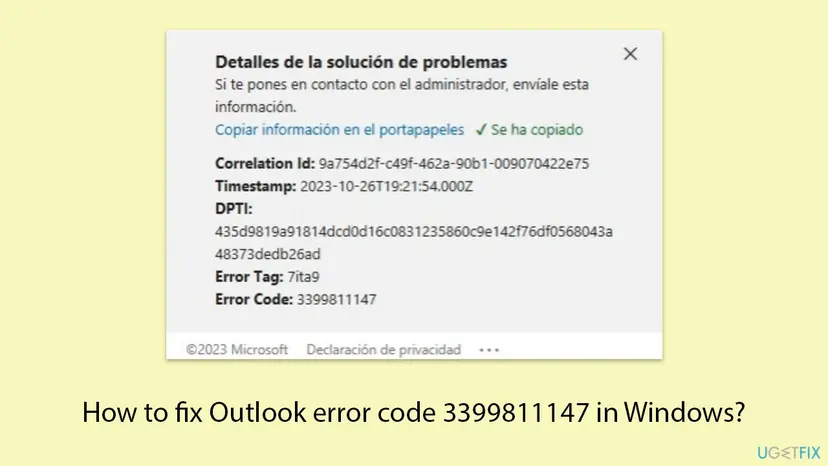
The window does not come from Outlook's mail engine. It comes from the Windows sign-in component that every Microsoft 365 app uses to get your account. The Code is the useful line: 3399811147 is the decimal form of 0xCAA5004B, a code from the family that Teams and Microsoft 365 print on sign-in failures. Microsoft does not publish its meaning.
| Line | What it tells you | What to do with it |
|---|---|---|
| Correlation Id and Timestamp | This one failed sign-in. | Copy both for IT or Microsoft support. |
| DPTI | An internal value Microsoft does not explain. | Give it to support only, never in a public post. |
| Tag: 7ita9 | Where the sign-in component stopped. | The same tag shows in Teams and OneDrive. |
| Code: 3399811147 | 0xCAA5004B, a sign-in error returned by Windows. | Start with the stored accounts on this PC. |
If Teams shows the same window with Something went wrong. [7ita9], it is the same account problem. Our Teams guide to tag 7ita9 decodes 0xCAA5004B in depth. This page follows the Outlook path: Outlook profiles, the Mail app and the Office registry keys.
What causes error 3399811147 in Outlook, ranked
Microsoft has not named a cause. The order below comes from the reports we read and from what Microsoft documents about the stored Office accounts. It is our reading, not a statistic.
| How often | Cause | Typical sign | Fix |
|---|---|---|---|
| Most often | An extra or old work or school account connected to Windows | Outlook on the web works. The top answer in the largest Microsoft Q&A thread, marked helpful by more than 40 people, was to remove it. | Fix 1 |
| Often | Expired or wrong cached credentials | The error started after a password change or after a weekend away from the office network. | Fix 2 |
| Often | Leftover accounts and tokens in the shared Office stores | The password is accepted and the window comes back. A new mail profile cannot be created. | Fix 3, Fix 4 |
| Less often | Stale Office identities and Outlook profiles in the registry | Fix 1 to Fix 4 did nothing. In the Spiceworks case this was the step that worked. | Fix 5 |
| Rarely | A Windows profile copied from an old PC | The error started on a new laptop. One Q&A answer traced it to AppData copied over. | Still there section |
| Rarely | A VPN, proxy or security program blocking the sign-in plug-in | Outlook signs in on another network. | Fix 7 |
The old version of this page listed add-ins, Windows Update and a restart of the Web Account Manager service as fixes. We found no report or Microsoft document that ties code 3399811147 to any of them. In the Spiceworks case, updating Office and running a system file check did not help.
Before you start: your own PC or a company laptop
Fix 1 and Fix 5 remove account data from Windows. On your own PC that is the point. On a laptop that your employer manages, disconnecting the account the organisation added can remove its setup. Do the browser test and Fix 2 and Fix 3 there, and ask IT before the rest.
- Open
https://outlook.office.comin a browser and sign in with your work address. - If your mail opens, the account, password and licence are fine. The problem is the copy on this PC: follow the fixes in order.
- If the browser also refuses you, no change on the PC can help. Go to the section after the fixes.
How to fix Outlook error code 3399811147 on Windows
Close Outlook before each fix and open it again after. Outlook will ask for your password, and perhaps for approval on your phone, as on a new PC. That prompt is the sign that a fix took hold. Your mail stays on the Microsoft 365 server and downloads again.
| Your case | Start with | Then |
|---|---|---|
| Outlook on the web works, the desktop app shows 3399811147 | Fix 1 | Fix 2, Fix 3 |
| Your password changed recently | Fix 2 | Fix 3 |
| You cannot create a new mail profile, same error | Fix 3 | Fix 4, Fix 5 |
| Teams and OneDrive fail too | Fix 1 | Fix 4 |
| Only Outlook fails, other Office apps sign in | Fix 6 | Fix 5 |
| Works on another network or at home only | Fix 7 | IT |
Fix 1. Disconnect extra work or school accounts from Windows
5 minutesLow riskEveryone with their own PC, first. Above all when a former employer's or a second organisation's account is listed.
Windows hands Outlook the work account it holds under Access work or school. When that entry is old or a second one competes with it, the sign-in fails with 3399811147. Microsoft's article on stored Office accounts gives this step, and it is the most confirmed answer for this code on Microsoft Q&A.
If your employer set up the laptop, the account under Access work or school may carry its management. Ask IT before you select Disconnect there, and use Fix 2 and Fix 3 in the meantime.
- Close Outlook, Teams and the other Office apps.
- Press Win + I and open Accounts > Access work or school. You can also type
Access work or schoolin the Windows search box. - Select each listed work or school account to expand it.
- For every account that is not the one you sign in to Windows with, select Disconnect and confirm.
- Restart the PC.
- Open Outlook and sign in with your work address when it asks.
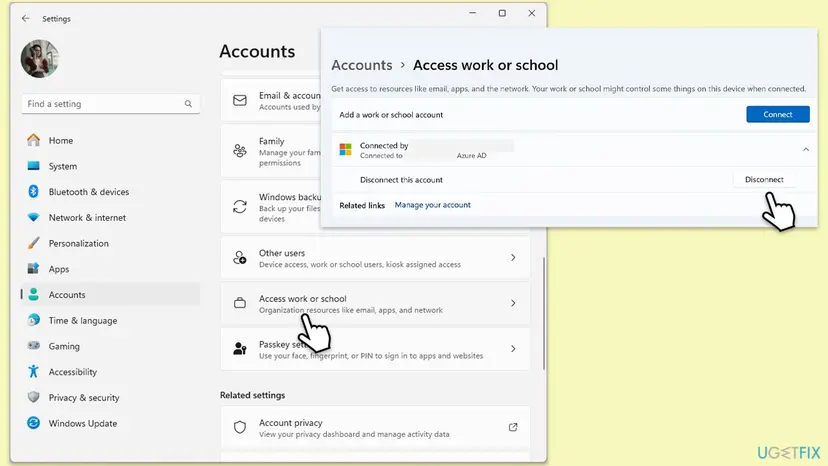
One user noted that after this step Outlook and OneDrive keep working even though the account no longer shows under Access work or school. That is normal: the apps sign in on their own when they need to. You do not need to select Connect again unless your organisation asks for it.
It worked if: Outlook asks for your password once, then opens the inbox without the 7ita9 window.
If not: If the error returns, or no extra account was listed, remove the saved Office credentials with Fix 2.
Fix 2. Remove the saved Office and Outlook credentials
5 minutesLow riskAfter a password change, or when Fix 1 found nothing to disconnect. Safe on a company laptop.
Credential Manager keeps the passwords and tokens that Office saved. When the password changed, Outlook keeps offering the old one and the sign-in component refuses it. Removing the entries forces a fresh sign-in.
- Close Outlook and every other Office app.
- Select Start, type
credential managerand open Credential Manager. - Select Windows Credentials.
- Under Generic Credentials, select the arrow next to each entry whose name mentions Office, Outlook, Microsoft 365 or your work address.
- Select Remove and confirm. Repeat for each such entry.
- Restart the PC and open Outlook.
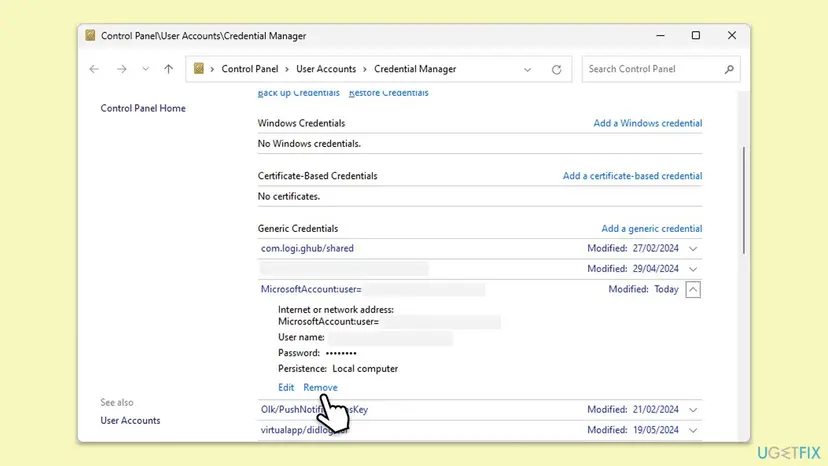
It worked if: Outlook asks for the current password and opens the mailbox.
If not: If you type the password, approve the sign-in and the window comes back, clear the shared account cache with Fix 3.
Fix 3. Delete the OneAuth and IdentityCache folders
5 minutesLow riskThe password is accepted and 7ita9 returns, or Outlook will not even create a new mail profile.
These two folders hold the accounts and tokens that Outlook, Word, Teams and OneDrive share. Microsoft tells users to sign out of all Microsoft 365 apps, remove both folders and sign in again when the apps hold the wrong account.
- In Word or Outlook, if it opens, go to File > Office Account and select Sign out. Then close all Office apps, Teams and OneDrive.
- Press Win + R, paste this path and press Enter:
%localappdata%\Microsoft - Open OneAuth, press Ctrl + A and delete everything in it.
- Go back, open IdentityCache and delete everything in it.
- If Windows says a file is in use, restart the PC and delete it before you open any app.
- Restart the PC, open Outlook and sign in.
The same %localappdata%\Microsoft folder also has an Outlook folder. It holds the offline copy of your mailbox and, on some PCs, personal .pst files. Do not delete it in this fix. Fix 6 rebuilds the profile the safe way.
It worked if: Outlook asks for the account as on a new PC and signs in after the approval.
If not: If the sign-in stops at the same point after the approval, empty the token store of the account plug-in with Fix 4.
Fix 4. Empty the token store of the Windows account plug-in
5 minutesLow riskFix 3 brought the sign-in prompt back but the sign-in still ends with 3399811147. Your own PC.
Work accounts are signed in by the Windows package Microsoft.AAD.BrokerPlugin, which keeps its own token files. Microsoft's article gives these exact folders to empty when Office cannot use the account.
- Close Outlook and the other Office apps.
- Open File Explorer, paste this path into the address bar and press Enter:
%LOCALAPPDATA%\Packages\Microsoft.AAD.BrokerPlugin_cw5n1h2txyewy\AC\TokenBroker\Accounts - Press Ctrl + A, right-click the selection and select Delete.
- Do the same in this folder:
%LOCALAPPDATA%\Packages\Microsoft.Windows.CloudExperienceHost_cw5n1h2txyewy\AC\TokenBroker\Accounts - Restart the PC and open Outlook.
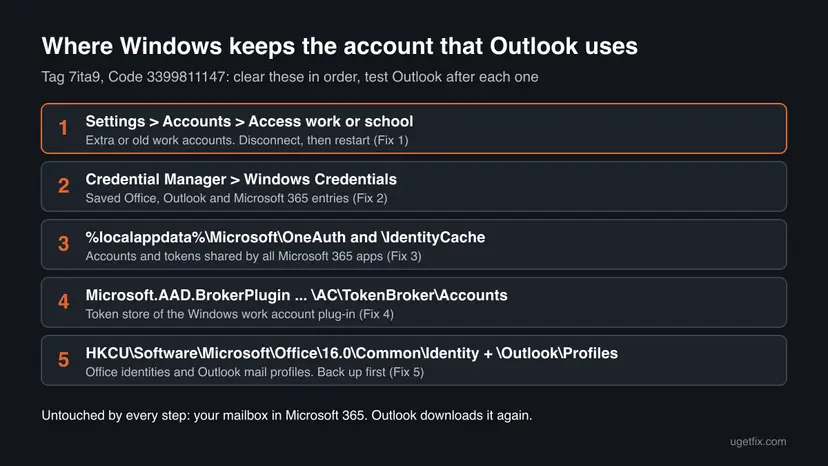
It worked if: After the approval Outlook loads the inbox instead of the error window.
If not: If a folder does not exist, skip it. If the error stays, clear the Office identity keys with Fix 5.
Fix 5. Remove the Office Identity and Outlook Profiles registry keys
15 minutesRead the warningYour own PC, when Fix 1 to Fix 4 did not help, or when a new profile fails with the same error.
Office keeps its list of signed-in identities, and Outlook its mail profiles, in the registry under your user. In the Spiceworks case, Fix 1 to Fix 3 had failed and clearing these two keys made Outlook build a fresh profile with a new sign-in.
Deleting Profiles removes every Outlook mail profile on this Windows account, with its account settings. Microsoft 365 mail comes back from the server. Note where any .pst files are (in Outlook: File > Account Settings > Data Files) so you can open them again. Export both keys first: Back up the registry before editing it.
- Close Outlook, the other Office apps, Teams and OneDrive.
- Press Win + R, type
regeditand select OK. Select Yes in the permission prompt. - Paste this path into the address bar and press Enter:
HKEY_CURRENT_USER\Software\Microsoft\Office\16.0\Common\Identity - Select File > Export, keep Selected branch and save the file. Then right-click Identity and select Delete.
- Go to this path, export it the same way and delete it:
HKEY_CURRENT_USER\Software\Microsoft\Office\16.0\Outlook\Profiles - Close Registry Editor and restart the PC.
- Open Outlook. It asks to add an account: type your work address and sign in.
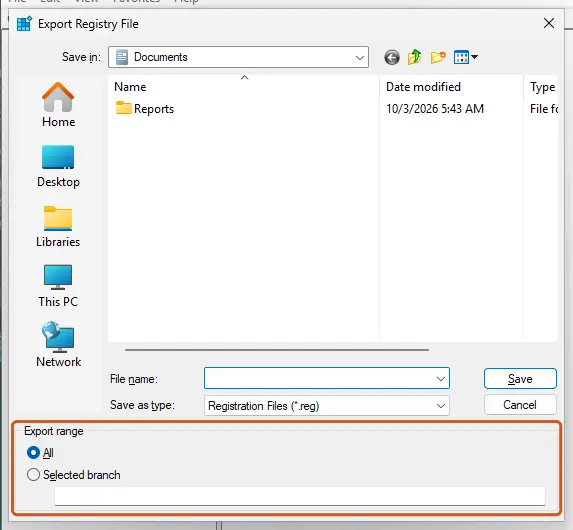
It worked if: Outlook starts like the first time, signs in with a new prompt and downloads the mailbox again.
If not: If 3399811147 stays, double-click the exported .reg files to restore the keys and go to Fix 7.
Fix 6. Create a new Outlook profile in the Mail app
10 minutesLow riskOnly Outlook fails while Word, Teams and OneDrive sign in, and you prefer not to edit the registry.
A damaged mail profile can keep a broken account binding even after the shared stores are clean. A new profile starts a fresh sign-in for Outlook alone. In the Spiceworks case it failed with the same error until the stored account was cleared, so do it after Fix 2 and Fix 3.
- Close Outlook.
- Open Control Panel, set View by to Small icons and select Mail (Microsoft Outlook).
- Select Show Profiles, then Add, and type a name such as
Outlook2. - Enter your work address and complete the sign-in.
- Select Always use this profile, choose the new profile and select OK.
- Open Outlook. Keep the old profile until the new one has downloaded your mail, then remove it in the same window.
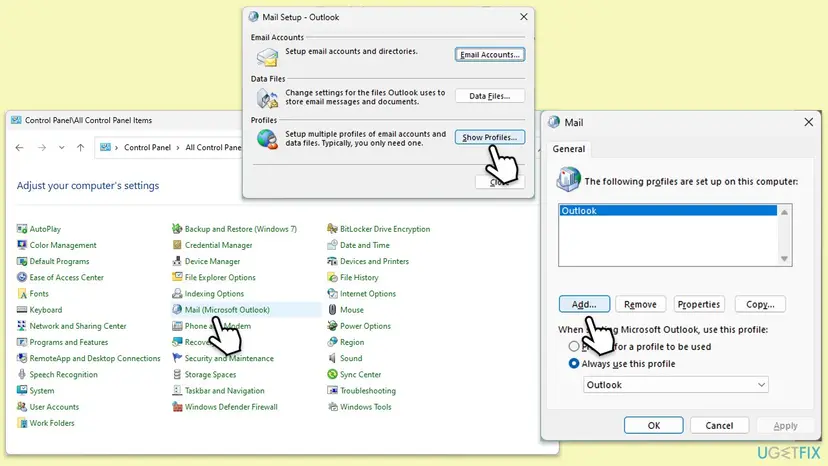
It worked if: The new profile signs in and Outlook opens with it, without the 7ita9 window.
If not: If adding the profile shows the same error, the stored account is still broken: go back to Fix 3 to Fix 5.
Fix 7. Test without VPN, proxy and third-party security software
10 minutesLow riskOutlook signs in on one network and not on another, or the error began after a VPN or security program was installed.
Microsoft warns that some antivirus, proxy or firewall software can block the Microsoft.AAD.BrokerPlugin process that signs in work accounts. Outlook then gets an error back instead of a token.
- Disconnect the VPN, or connect to a phone hotspot, and open Outlook.
- Open Settings > Network & internet > Proxy. If a manual proxy is on and you did not set it, switch it off for one test.
- Pause the antivirus for one attempt. For Microsoft Defender: Turn off Microsoft Defender protection for a moment.
- Open Outlook, then switch the protection, proxy and VPN back on, whatever the result.
If Outlook signs in with one program paused, keep the program and ask its maker or IT to allow Microsoft.AAD.BrokerPlugin_cw5n1h2txyewy. A paused antivirus is a test, not a fix.
It worked if: Outlook signs in on the other network or with the program paused, which names the blocker.
If not: If nothing changes, switch everything back on and repair Office with Fix 8.
Fix 8. Update and repair Microsoft Office
15 to 30 minutesLow riskLast, when the stored accounts are clean and the error stays. It also fixes a damaged Office install.
This is not where 3399811147 usually comes from, but Microsoft lists an Office update among its extra steps for stored-account errors, and Online Repair replaces damaged Office files, including the sign-in parts.
- Open Outlook or Word and go to File > Office Account.
- Select Update Options > Update Now and wait until Office says it is up to date.
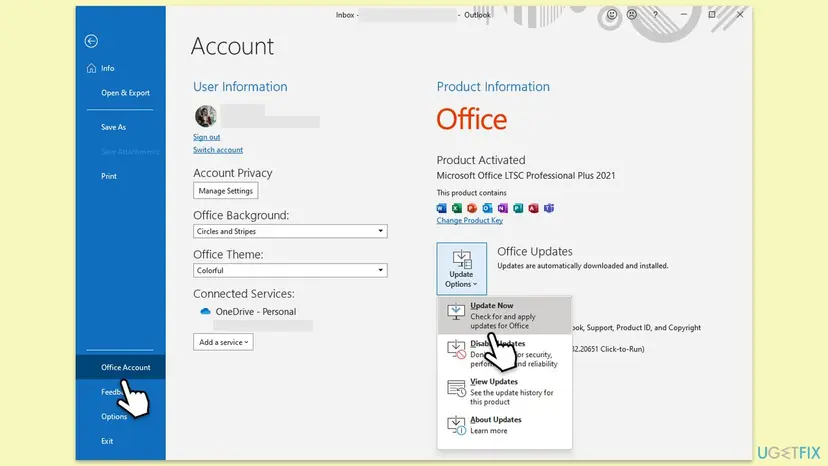
If the error stays, run Online Repair. It needs the internet and takes longer than Quick Repair, but it replaces every Office file. Step by step: How to repair Microsoft 365 or Office.
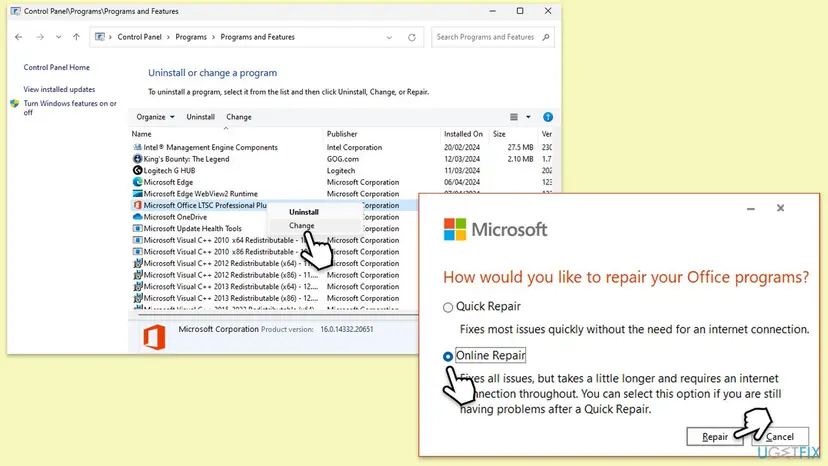
It worked if: Office updates or repairs and Outlook signs in after a restart.
If not: If 3399811147 is still there, read the next section.
If Outlook still shows 3399811147
When every fix failed but Outlook on the web works, the Windows user profile itself is the likely problem. When the web fails too, the account is refused by the service and only IT can help.
| What you see | Likely reason | What to do |
|---|---|---|
| Outlook on the web also refuses the password | Wrong, expired or not yet synced password | Reset the password or contact IT. |
| The web says the account is blocked or has no mailbox | Blocked sign-in or no licence | IT, in the Microsoft 365 admin center. |
| New laptop, profile copied from the old one | Account data from AppData copied over | A new Windows user profile, with only Documents, Desktop and Pictures moved. |
| Only this Windows user fails | Damaged Windows profile | Test with a second user: Create a new user account to test a problem. |
- Microsoft's own tool: the Microsoft 365 sign-in troubleshooter in the Get Help app checks the sign-in parts for you.
- For IT or support: the Correlation Id and Timestamp from the window, since when it happens, whether the web and phone work, and whether your password changed.
- On a new laptop: one Q&A answer fixed the error by deleting a Windows profile that had been copied from the old PC and moving only the personal folders. Ask IT before deleting a profile.
How to keep Outlook error 3399811147 from coming back
- Keep one work account per Windows profile. Disconnect old employers' and schools' accounts under Access work or school.
- After a password change, sign out of Windows and in again while online, so the apps get a token for the new password.
- Do not copy AppData to a new PC. Move documents and pictures, and let Outlook build its own profile.
- Give security software an exception for
Microsoft.AAD.BrokerPlugin_cw5n1h2txyewyif Fix 7 named it. - Keep Office and Windows updated. Windows 10 left support on 14 October 2025, so its sign-in parts no longer get security fixes.
Frequently asked questions
What is error code 3399811147?
It is a sign-in error that Microsoft 365 apps show when Windows cannot hand them your account. Written in hexadecimal it is 0xCAA5004B, from the code family that Teams and Office print on sign-in failures. Microsoft publishes no definition. In the reports we read it follows an extra or old work account on the PC, expired cached credentials or leftover Office identities. The mailbox and the account are usually fine, which is why Outlook on the web keeps working.
What do Tag 7ita9 and Code 3399811147 mean together?
They are two lines of the same window. The tag marks where the sign-in component stopped, and the code says what it got back. Every report we read pairs 7ita9 with 3399811147, in Outlook, Teams and OneDrive. Together they point to the stored account on this PC, not to Outlook's mail data. Start with Fix 1 and disconnect extra work or school accounts.
Why does Outlook on the web work but the desktop app shows 3399811147?
The browser signs in on its own, without the account data that Windows keeps for desktop apps. If the web works, your password, mailbox and licence are fine. The fault is in the copy on this PC: an extra account under Access work or school, old saved credentials or leftovers in the OneAuth and IdentityCache folders. Fix 1 to Fix 4 clear those in order.
Will I lose my emails if I follow these fixes?
Not with a Microsoft 365 or Exchange mailbox. The mail lives on the server and Outlook downloads it again after the sign-in. Fix 1 to Fix 4 touch only account data. Fix 5 removes Outlook profiles, so any .pst files you opened in Outlook must be added again under File > Open & Export. Note their location before you start. A POP account's mail lives in a .pst file on the PC, so back it up first.
I cannot create a new Outlook profile because of error 3399811147. What now?
That is a typical sign that the account stored in Windows is broken, not the profile. A new profile asks the same component for the same account and gets the same error. Clear the stored account first: Fix 2 for the saved credentials, Fix 3 for the OneAuth and IdentityCache folders, Fix 4 for the plug-in's tokens. If it still fails, Fix 5 removes the Office Identity and Outlook Profiles keys, which an administrator reported as the step that finally worked.
Why does error 3399811147 come back every week?
A recurring error means something on the PC keeps recreating the stale account. Most often it is a second work or school account under Access work or school, or a password that changes often while the PC sits off the company network. Disconnect the extra account (Fix 1), and after each password change sign out of Windows and back in while online. If the PC is managed, tell IT that it repeats.
Is Teams error code 3399811147 the same problem?
Yes. Teams shows the same Code 3399811147 under Something went wrong. [7ita9], because Teams and Outlook use the same stored account. Fix 1 to Fix 4 on this page help both. For Teams-only steps, such as resetting the Teams app, see our Teams guide to tag 7ita9. If both apps fail on the same day, fixing the account once usually fixes both.
Should I disable the antivirus or the Web Account Manager service to fix it?
No. Pausing the antivirus for one sign-in test is fine (Fix 7), and it must be turned back on at once. If the test names the program, ask for an exception for the sign-in plug-in instead. Restarting or disabling the Web Account Manager service is not a documented fix for this code, and disabling it would stop the very component that signs Outlook in. Clear the stored account with Fix 1 to Fix 4 instead.
Does error 3399811147 mean my work account is blocked?
Not by itself. Test Outlook on the web with the same address. If your mail opens, the account is active and the problem is on the PC. If the web refuses you too, the password may be wrong or expired, sign-in may be blocked, or no mailbox licence is assigned. Only your IT department can change those, so send them the Correlation Id and the Timestamp from the window.
Sources
- Microsoft Learn: Another account from your organization is already signed in on this computer (OneAuth, IdentityCache, Access work or school, BrokerPlugin token store) (learn.microsoft.com)
- Microsoft Q&A: Outlook 365 Error Code: 3399811147 (user answers: Access work or school, copied profile) (learn.microsoft.com)
- Spiceworks Community: Outlook error Tag: 7ita9 Code: 3399811147 (administrator case, Office Identity and Outlook Profiles keys) (community.spiceworks.com)
Did this fix work?
One click, no account. It tells the next reader which guides are worth their time.
Questions and experiences: fix Outlook error code 3399811147 in Windows
Still broken, or found a fix we did not cover? Ask here: members and our editors answer. Reading is open; writing needs a free account.
…