How to fix
“Potential Windows update database error detected” issue
on Windows
Resolve the “Potential Windows update database error detected” issue on Windows 10 and 11 quickly and effectively, with expert-tested solutions.


What causes How to fix “Potential Windows update database error detected” issue?
- System file corruption
- Disabled automatic Windows Update service
- Manual installation of updates
- Issues with Windows Update components
- Network connectivity problems
Repairs Windows system files, removes malware, and restores a clean OS state — without reinstalling.
I tried to repair Windows when I was unable to download updates. I accessed to Windows Update and selected “Repair Windows Update Database Corruption” and “Repair Windows Update components,” but was shown "Potential Windows update database error detected" error, and it said that the issue was not fixed. Can you please help?
Since IT specialists spread awareness about outdated operating systems and its dangers, people are more likely to install all the latest Windows updates[ref en-1] to improve system performance, stability, and security. To successfully update the OS to its latest version, all users need is a working internet connection.
However, Windows 10 update process sometimes is a tough nut to crack due to various errors, including “Potential Windows update database error detected.”[ref en-5] The latter error harasses Windows users when they access the Windows Update[ref en-1] section and attempt to check for updates.
The error code "Potential Windows update database error detected" can pop-out while performing various other different processes related to Windows updating and not only when trying to update your Windows OS to the newest version. There are other options such as "Repair Windows Update" that the user can select. Note that there is a possibility that the error code might appear in this type of process also.
Most of the updates on Windows are installed automatically,[ref en-2] unless the device owner defers the updates manually. However, if you opt for installing some updates before the system detects and installs them automatically, you may have some problems. You should know that if there are no official pop-up messages that ask users to update the system, so users should do it manually via the Settings panel.
In order to fix Potential Windows update database error detected error, a root cause should be detected. However, there are several different reasons why the error occurs in the first place (such as system file corruption, for example), so methods to fix it also differ from machine to machine.
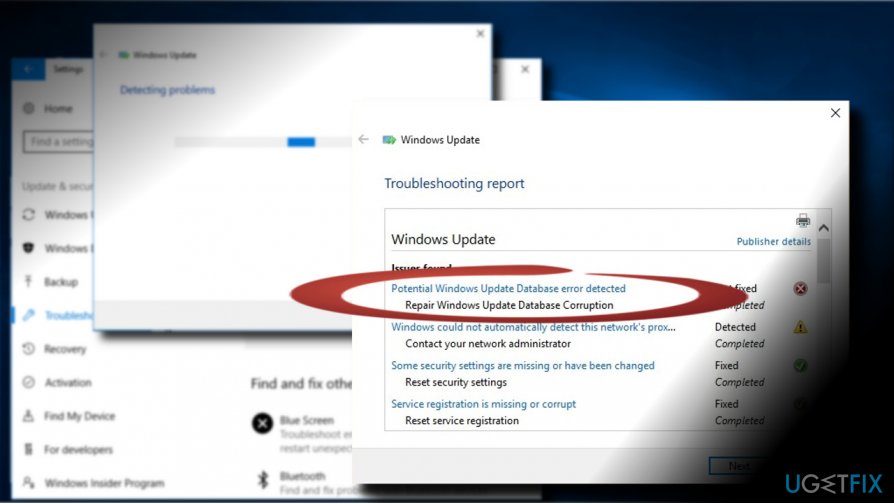
"Potential Windows update database error detected" issue
If you have disabled automatic Windows Update service and keep installing Windows 10 updates manually, you may face various obstacles, for example, 0x80070020, 0x80080005, 0x8024001f, 0x80244022, 0x80096004 and others. The first Windows Update service remedy is the Windows Update Troubleshooter, which is supposed to detect and fix the error automatically.
BUT what if Windows Update Troubleshooter[ref en-3] scan ends up with an error “Potential Windows update database error detected?” The answer is simple – you will have to fix all the problems manually. First of all, address the issue related to Windows Update Troubleshooter and then find the fixes regarding Windows Update error.
In addition, you should also check the system for damaged registry entries[ref en-4] or corrupted system files. Registry entries and crucial system files often trigger system’s problems, software incompatibilities and similar issues. To check that, we would strongly recommend using [d1] or another professional software utility.
Method 1. Use Command Prompt
- Right-click on Windows key and select Command Prompt (Admin).
- Copy and paste the following commands in the Command Prompt and press Enter after each of them:
net stop wuauserv
net stop cryptSvc
net stop bits
net stop msiserver
Ren C:\\Windows\\SoftwareDistribution SoftwareDistribution.old
Ren C:\\Windows\\System32\\catroot2 Catroot2.old
net start wuauserv
net start cryptSvc
net start bits
net start msiserver
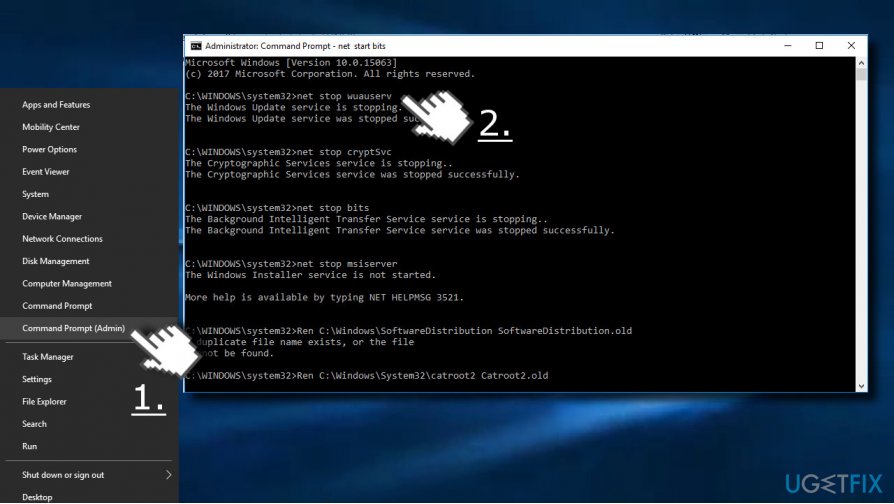
If these commands did not help to fix "Potential Windows update database error detected" issue, try sfc / scannow and Dism tools.
Method 2. Run SFC and DISM tools
- Click Windows key + X and select Command Prompt (Admin).
- Type sfc /scannow command and press Enter.
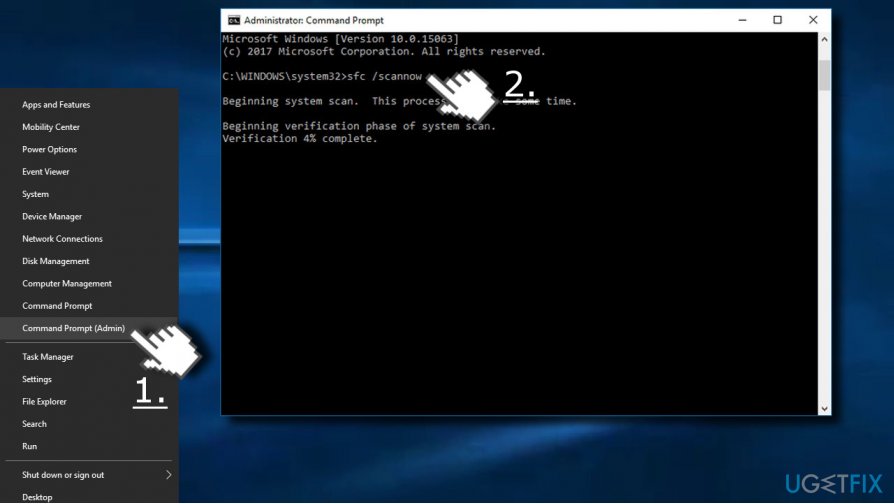
- Then type the following commands and hit Enter after each of them:
DISM.exe /Online /Cleanup-image /Scanhealth
DISM.exe /Online /Cleanup-image /Restorehealth
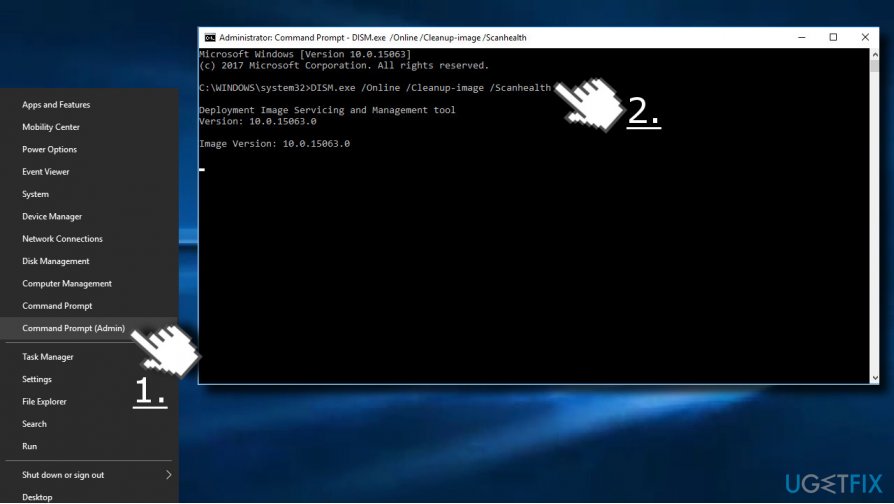
- Close Command Prompt and reboot the system.
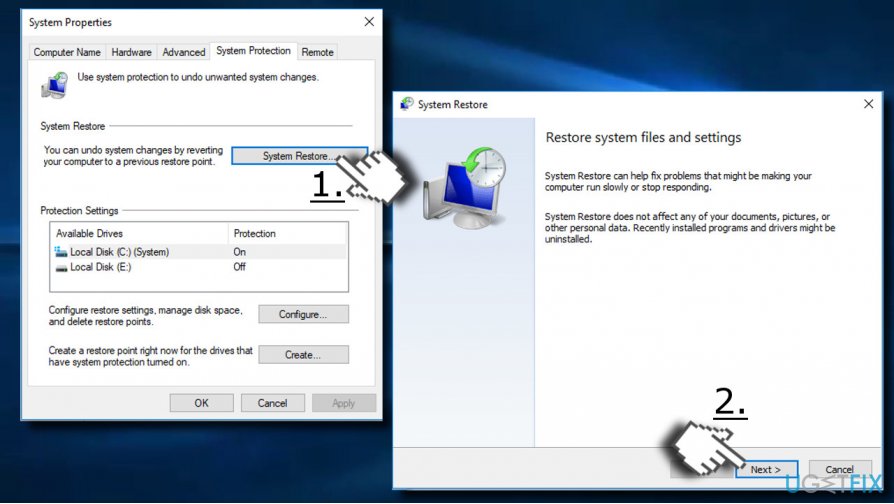
Method 3. Enable System Restore
If Windows Update service worked fine up until today, you may try to use System Restore function and then try to check for Windows Updates. If you don’t know how to use System Restore, please refer to this post.
Method 4. Erase folders which might be causing the issue
- Find C:\\Windows\\SoftwareDistribution\\Download folder and delete all content that is inside it.
- Search for C:\\Windows\\SoftwareDistribution and open it.
- Locate the Download.old file and delete it.
- The update should be performed successfully.
Method 5. Perform a clean boot
- Type in System Configuration into Windows search and press Enter.
- Navigate to Services tab and tick Hide all Microsoft services.
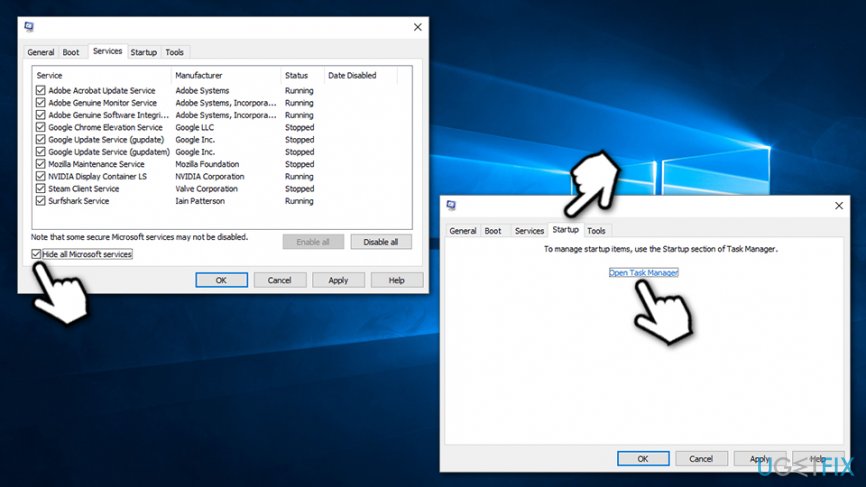
- Now click on Disable all at the bottom-right of the window.
- Go to Startup tab and click Open Task Manager.
- Click on each of the entries and then click Disable button.
- Close down the Task Manager and press Apply and OK on the system configuration window.
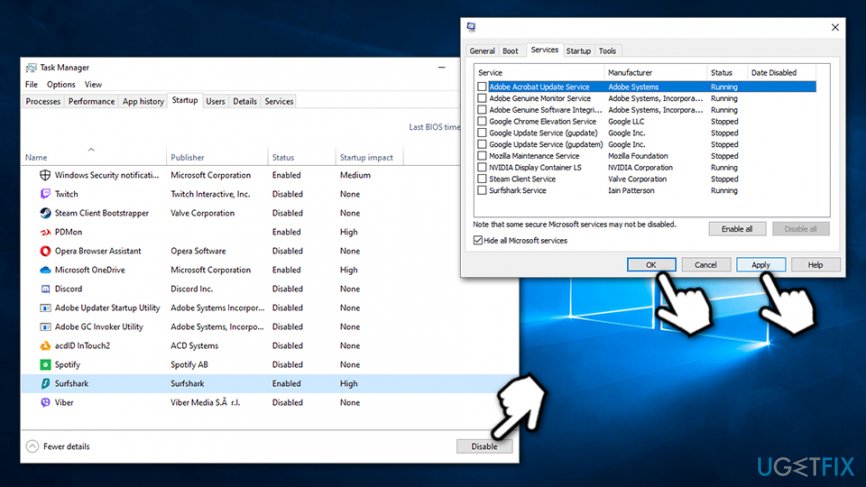
Reboot the PC and check whether the "Potential Windows update database error detected" error persists. If so, it means that one of the apps is causing the issue - enable each of them one-by-one to determine the culprit and uninstall it.
Method 6. Reset Windows OS
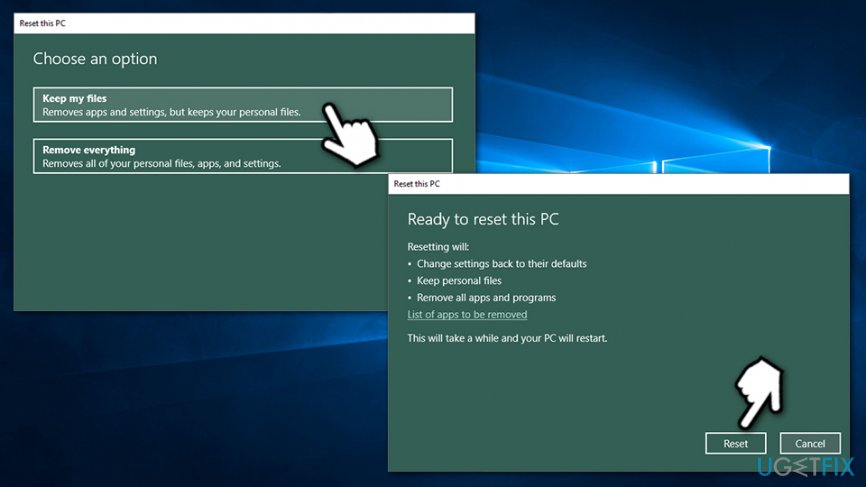
If none of the above methods helped, you can reset Windows - the process will not cause you to lose your personal files. Note that apps installed will be lost, however.
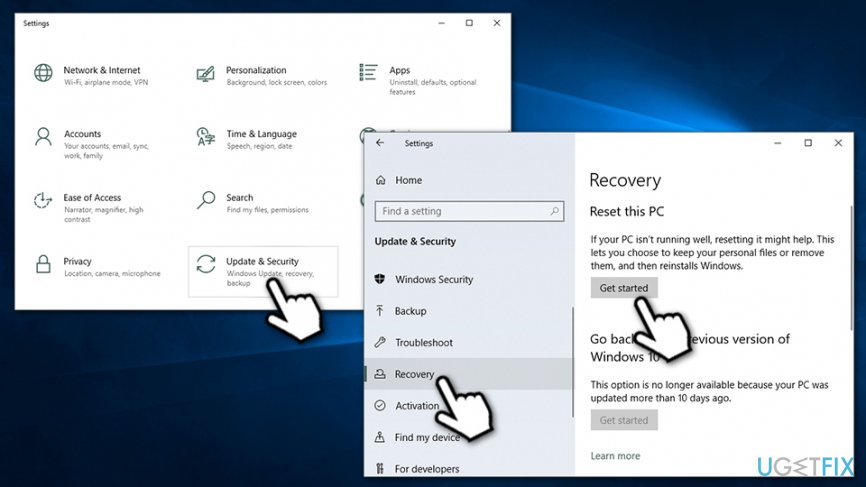
- Right-click on Start button and select Settings.
- Go to Update & Security section.
- On the left side of the window, select Recovery.
- Under Reset my PC, select Get started.
- Pick Keep my files.
- Confirm with Reset.
Bottom line
To fix the 'Potential Windows update database error detected' issue, users can try repairing the Windows Update Database Corruption and Windows Update components. If these methods do not resolve the problem, it may be necessary to explore additional troubleshooting steps or consult IT support.
Frequently asked questions
This error typically arises due to corruption in the Windows Update database or interrupted updates, which can prevent your system from downloading and installing updates properly.
You can fix this issue by running the Windows Update Troubleshooter, which can automatically detect and repair common problems related to updates.
Yes, you can manually reset the Windows Update components using Command Prompt commands, which may resolve the database error and restore proper update functionality.




Report an issue
What's wrong with this guide? We review every report and update or remove content.
Report received — thank you. We'll review and fix it.
You need a free account to submit a report.
Be the first to comment