
How to fix printing error 0x00000bcb in Windows?

Prefer to fix it yourself? The manual steps follow.
- 8methods
- 5 to 30 minutes
- Intermediate
Applies to Windows 11 and Windows 10 PCs that connect to a printer shared by another PC or by a print server
8 methods in this guide
I keep getting the error 0x00000bcb ("Windows cannot connect to printer") whenever I try to connect to the shared printer. Any tips on how to deal with this?
Error 0x00000bcb means your PC does not have the driver for a shared printer and could not download it from the computer that shares it. Most often Windows blocked the download because only an administrator may install printer drivers. Install the maker's driver on your own PC and connect again as an administrator.
0x00000bcb is Windows error 3019, "The specified printer driver was not found on the system and needs to be downloaded." Your PC tried to take the driver from the host and failed, usually because a standard account may not install it. Install the printer maker's driver on your PC, then connect again with an administrator account (Fix 1). If that fails, add a fitting driver on the host (Fix 2) or use a local port (Fix 3).
| Error | Windows cannot connect to the printer. Operation failed with error 0x00000bcb. Windows error 3019, ERROR_PRINTER_DRIVER_DOWNLOAD_NEEDED. |
|---|---|
| Where it appears | In the Connect to Printer box, when you add a printer that another PC or a print server shares, or when a Group Policy tries to deploy one. |
| Main cause | The client has no driver for the printer, and the download from the host is blocked: a standard account since August 2021, no driver for your processor type on the host, or a driver signature Windows rejects. |
| Fastest fix | Install the maker's driver on your PC, then connect as an administrator (Fix 1). Next: an extra driver on the host (Fix 2) or a local port (Fix 3). |
| Also written as | 0x0000bcb, 0x000000bcb, 00000bcb, 0x80070bcb, error 0xbcb, bcb error printer, erro 0x00000bcb. |
| Affects | Windows 11 and Windows 10, and older Windows 7 clients. Any printer brand shared through Point and Print. |
| Microsoft's status | Not a bug. Since the updates of 10 August 2021 (KB5005652), installing a driver from a shared printer needs an administrator by default. Microsoft has no article for 0x00000bcb by number. |
| Time to fix | 5 to 10 minutes for Fix 1, 15 minutes for Fix 2 or Fix 3, longer on a domain where the IT department sets policies. |
Facts checked on 15 October 2026. Steps written for Windows 11 (25H2 and 26H2) and Windows 10 22H2.
What printer error 0x00000bcb means
The full message is "Windows cannot connect to the printer. Operation failed with error 0x00000bcb." It shows in a small box titled Connect to Printer. You see it when you add a printer that another computer shares or double-click it under Network in File Explorer. A printer pushed by Group Policy can fail the same way.
Unlike many printer codes, this one is precise. 0xBCB is 3019 in decimal, and Microsoft's list of system error codes names 3019 ERROR_PRINTER_DRIVER_DOWNLOAD_NEEDED. Its text reads: "The specified printer driver was not found on the system and needs to be downloaded." Your PC knows which driver the printer needs, does not have it, and the download from the host did not happen.
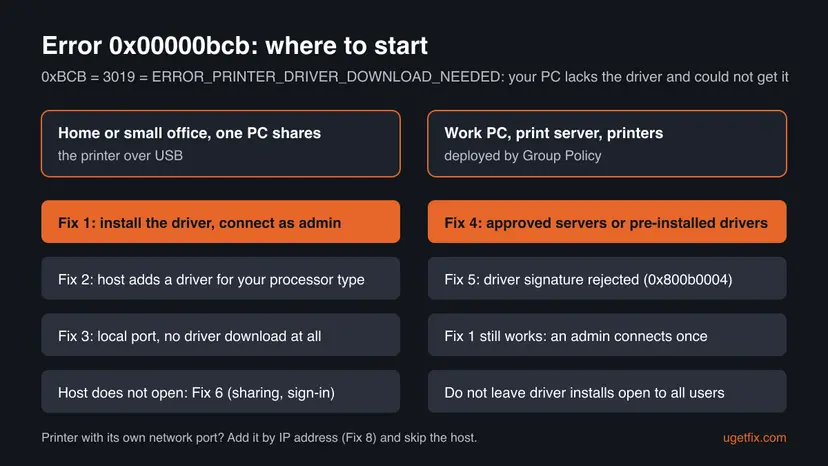
Windows prints eight digits after 0x: 0x00000bcb. People also type 0x0000bcb, 0x000000bcb, 00000bcb or "bcb error printer". Leading zeros change nothing. 0x80070bcb is the same error 3019 in the HRESULT form that some tools and logs use. "Erro 0x00000bcb impressora" is the Portuguese search for the same message.
Why Windows cannot connect to the printer with 0x00000bcb: causes, ranked
When you connect to a shared printer, Windows uses Point and Print: it asks the host which driver the printer uses and copies that driver to your PC. 0x00000bcb is the answer when that copy is needed and does not happen. The reports on Microsoft Q&A and Microsoft's own security article point to these causes, from common to rare.
| # | Cause | How to recognise it | Fix |
|---|---|---|---|
| 1 | A standard account may not install the driver | The error started after a Windows update, or you sign in without administrator rights | Fix 1 |
| 2 | The host has no driver for your processor type | An old or 32-bit host shares to a 64-bit or Arm PC | Fix 2, Fix 3 |
| 3 | Policy on a work network blocks the download | Printers come from a print server or a Group Policy, and several PCs fail | Fix 4 |
| 4 | Windows rejects the driver's signature | Windows 11 24H2 and later, and Event Viewer shows 0x800b0004 next to the failure | Fix 5 |
| 5 | The host cannot be reached or refuses your sign-in | \\HostName does not open or asks for a password that does not work | Fix 6 |
| 6 | An old copy of the printer or a stuck spooler | It worked before, and an old entry is still listed | Fix 7 |
- Why the account comes first. Microsoft's KB5005652 says that updates released on 10 August 2021 and later require administrator rights to install new printers or update drivers from a remote computer through Point and Print. The first 0x00000bcb threads on Microsoft Q&A date from September and October 2021, right after that change.
- What a driver maker says. Black Ice Software's help for its Print2Email Server states that 0x00000BCB means its printer driver is not installed on the client, and that since the August 2021 updates only administrators may install printer drivers. Its fix is the one in Fix 1: an administrator adds the driver through Print server properties > Drivers > Add with Have Disk.
- Why an administrator account is not always enough. In one Microsoft Q&A thread, the user got 0x00000bcb between two Windows 10 21H1 PCs even with admin accounts. When the host has no driver your PC can use, there is nothing to download, whoever signs in.
- Why the signature matters. A Microsoft Q&A report from May 2026 shows a Windows 11 24H2 PC that rejected a print server's v3 driver with 0x00000bcb, while Event Viewer logged 0x800b0004, a signature that is not trusted.
0x00000bcb on Windows 11, Windows 10 and Windows 7
The message and its meaning are the same on every version. What differs is where the settings are, and how strict Windows is about driver signatures.
| Situation | Windows 11 | Windows 10 22H2 | Windows 7 |
|---|---|---|---|
| Add a shared printer | Settings > Bluetooth & devices > Printers & scanners > Add device | Settings > Devices > Printers & scanners > Add a printer or scanner | Control Panel, Devices and Printers > Add a printer |
| Driver install from a share by a standard user | Needs an administrator | Needs an administrator | Depends on the last update installed |
| Processor types | x64 or Arm64 | x64, rarely x86 | x86 or x64 |
| Support | Serviced | Support ended on 14 October 2025 | Support ended in January 2020 |
How to fix printer error 0x00000bcb: eight fixes in order
Fix 1 to Fix 3 put a usable driver on your PC and solve most home cases. Fix 4 and Fix 5 are for work networks and print servers. Fix 6 to Fix 8 cover sharing, old entries and printers with their own network port.
| What you see or have | Start with |
|---|---|
| A home or office PC shares a printer, you get 0x00000bcb on Connect | Fix 1 |
| Fix 1 did not help, or the host is an old or 32-bit Windows | Fix 2 or Fix 3 |
| Printers come from a print server or a Group Policy, several PCs fail | Fix 4 |
| Event Viewer shows 0x800b0004 or a signature error next to the failure | Fix 5 |
\\HostName does not open or asks for a password that fails | Fix 6 |
| It worked before and an old copy of the printer is listed | Fix 7 |
| The printer has its own Wi-Fi or Ethernet connection | Fix 8 |
Fix 1. Install the printer driver on your PC first, then connect as an administrator
5 to 10 minutesLow riskFor everyone who sees the shared printer but gets 0x00000bcb on Connect. You need an administrator account or password for your PC.
The error says a driver download is needed. When the right driver is already on your PC, nothing has to be downloaded, and the step that fails is gone. The administrator covers the rule Microsoft added in August 2021 for drivers that come from a shared printer.
- On your PC, open Settings > System > About and read System type: x64-based or Arm-based.
- On the host, note the exact printer model in Printers & scanners.
- From the printer maker's website, download the full driver for that model, your Windows version and your system type. Install it with no printer connected.
- Sign in with an administrator account, or be ready to type an administrator password when Windows asks.
- Open Settings > Bluetooth & devices > Printers & scanners, select Add device, then Add manually.
- Choose Select a shared printer by name, type
\\HostName\ShareNameand select Next. Approve the administrator prompt. - Print a test page from the printer's page in Printers & scanners.
If the maker offers only a setup program that wants a printer attached, open Printers & scanners > Print server properties, go to the Drivers tab and select Add. Pick your processor type (x64 or x86), select Have Disk and point to the unpacked driver folder with the .inf file.
Do not set RestrictDriverInstallationToAdministrators to 0 to let a standard account connect. Microsoft warns that the value 0 makes devices vulnerable. Have an administrator connect the printer once; standard users can print through it afterwards.
It worked if: The printer is added without the 0x00000bcb box and the test page comes out.
If not: If the box still shows 0x00000bcb with a driver installed, the host's driver does not match yours. Go to Fix 2 or Fix 3.
Fix 2. On the host, add a driver for the client's processor type
15 minutesLow riskThe host is an older or 32-bit Windows, or your PC is Arm-based, and Fix 1 did not help. Needs an administrator on the host.
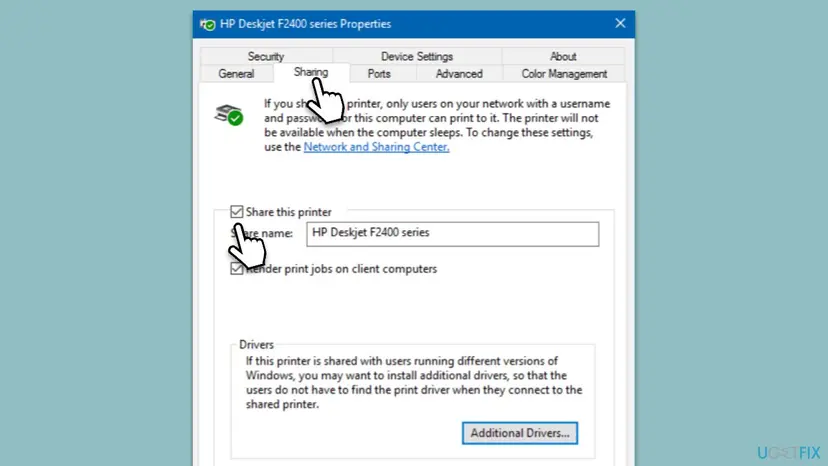
Point and Print can only hand over a driver the host has for your processor type. The host's own Sharing tab says it plainly: with users on other Windows versions, install additional drivers so they do not have to find the driver themselves. That is exactly the driver error 3019 says is missing.
- On the host, open Settings > Bluetooth & devices > Printers & scanners, select the printer and then Printer properties.
- Open the Sharing tab and check that Share this printer is on and the Share name is what you type on the client.
- Select Additional Drivers, tick the processor type of the client PC and select OK.
- Point Windows to the maker's driver for that processor type when it asks for files.
- Restart the host, then connect from the client again as in Fix 1, steps 5 and 6.
It worked if: The client connects, and Windows copies the driver from the host without the error.
If not: If the maker has no driver for one of the two Windows versions, skip the download altogether with Fix 3.
Fix 3. Add the shared printer on a local port with its own driver
15 minutesLow riskFix 1 and Fix 2 did not help, or the host's driver cannot be passed on at all. Needs an administrator.
A normal connection depends on the driver that comes from the host. A local port skips Point and Print: your PC uses its own driver and queue and only sends finished pages to the share. With no driver download, error 3019 has nothing to fail on.
- Install the printer driver on your PC, as in Fix 1, steps 1 to 3.
- Open Settings > Bluetooth & devices > Printers & scanners, select Add device, then Add manually. On Windows 10 select Add a printer or scanner, then The printer that I want isn't listed.
- Choose Add a local printer or network printer with manual settings and select Next.
- Choose Create a new port, set Type of port to Local Port and select Next.
- Type
\\HostName\ShareNameas the port name and select OK. - Pick the printer model from the list, or select Have Disk and point to the driver you downloaded.
- Name the printer, do not share it again, and print a test page.
| Normal connection | Local port | |
|---|---|---|
| Driver | Downloaded from the host | Installed by you from the maker |
| Print queue | On the host | On your PC |
| Can fail with 0x00000bcb | Yes | No, there is no download |
It worked if: The test page prints, and the printer is listed on your PC like a local printer.
If not: If Windows says "access is denied" when you type the port name, the host refuses your sign-in. Go to Fix 6.
Fix 4. Work networks: let clients take drivers from approved print servers only
20 to 30 minutesRead the warningPrinters come from a print server or are deployed by Group Policy, and many users get 0x00000bcb. For the IT administrator.
On a domain, the August 2021 rule stops every standard user from downloading drivers from the print server. Microsoft's answer is to install drivers ahead of time or to allow package Point and Print only to named servers, not to switch the protection off.
Older answers on Microsoft Q&A set RestrictDriverInstallationToAdministrators to 0 together with NoWarningNoElevationOnInstall 1. Microsoft says the value 0 makes devices vulnerable, and that no combination of mitigations equals the value 1. Back up the key first with Back up the registry before editing it and keep 0 only as a short test, never as the fix.
- Best option: install the printer drivers on the clients ahead of time, with your software deployment tool or as an administrator through Print server properties > Drivers > Add.
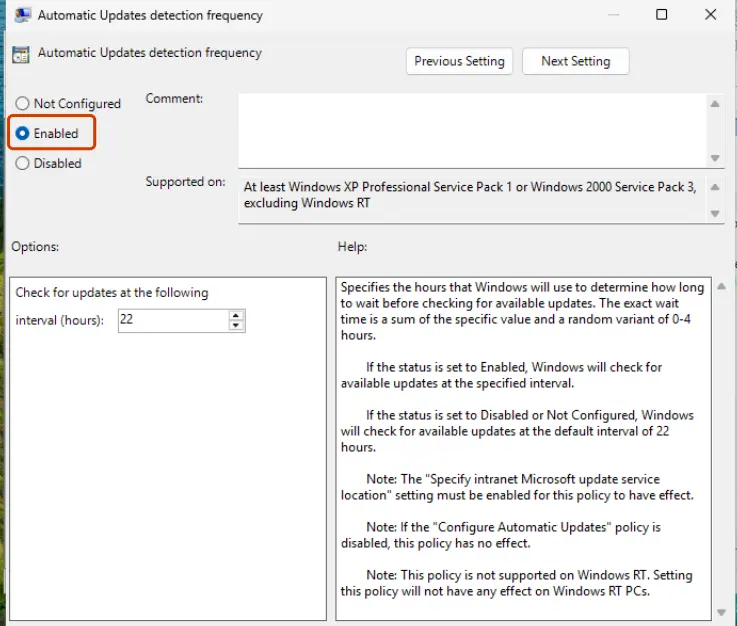
- Or open the Group Policy editor and go to Computer Configuration > Administrative Templates > Printers.
- Open Package Point and print - Approved servers, set it to Enabled and list the full names of your print servers.
- Make sure the print server's drivers are package-aware drivers from the maker; the policy covers only package Point and Print connections.
- Run
gpupdate /forceon a test client, sign in as a standard user and connect a printer.
It worked if: Standard users connect printers from the approved servers without 0x00000bcb, and the driver rule stays at its safe default.
If not: If the policy does not help, the drivers on the server may not be package drivers. Pre-install them on the clients, or see Fix 5 if the signature is rejected.
Fix 5. Windows 11 24H2 and later: replace a driver whose signature Windows rejects
15 to 30 minutesLow riskEvent Viewer shows 0x800b0004 or a ValidateDriver failure at the time of the error, often with older v3 drivers on a print server.
Windows checks the signature of every driver it downloads from a print server. In a Microsoft Q&A report from May 2026, a Windows 11 24H2 client rejected a server's v3 driver with 0x00000bcb and 0x800b0004. The answers there agree that there is no supported way to skip the check on the client.
- Open Event Viewer and go to Applications and Services Logs > Microsoft > Windows > PrintService > Admin.
- Look for an error at the time of the failure that names the driver and a code such as 0x800b0004.
- From the printer maker, download the current WHQL-signed driver package for the model, for both the server and the clients.
- Replace the driver on the print server, then connect from a client again.
One advisor on that thread suggested importing the driver's signing certificate into Trusted Root Certification Authorities. We do not recommend it at home: it tells the PC to trust everything signed with that certificate. A signed driver from the maker is the clean fix.
It worked if: The client downloads the new driver and connects without the error, and the PrintService log shows no signature failure.
If not: If the maker has no signed driver for Windows 11, add the printer by IP address (Fix 8) with a current driver, or use the maker's universal driver.
Fix 6. Check sharing, network discovery and sign-in on the host PC
10 minutesLow risk\\HostName does not open, asks for credentials that fail, or the local port in Fix 3 says access is denied.
Your PC must reach the host before it can ask for a driver. Microsoft's checklist for shared printers names the share, the same local network, matching credentials and two sharing switches.
- On the host, check the Sharing tab as in Fix 2, steps 1 and 2.
- On both PCs, open Settings > Network & internet > Advanced network settings > Advanced sharing settings and turn on Network discovery and File and printer sharing.
- Make sure both PCs are on the same local network and the host is awake.
- Use the same account on both PCs, or enter the host's user name and password when Windows asks.
- On your PC, type
\\HostNamein the File Explorer address bar. The printer must be listed before you try Fix 1 again.
On Windows 10 the printer is under Settings > Devices > Printers & scanners, then Manage and Printer properties. The sharing switches are under Network & Internet > Status > Network and Sharing Center > Change advanced sharing settings, in the Private profile.
It worked if: \\HostName opens and lists the printer, and Fix 1 now finishes.
If not: If the host opens by IP address but not by name, use \\ and the IP address in the printer path. If the error changes to 0x00000709, follow our guide to shared printer error 0x00000709.
Fix 7. Remove the old printer and its driver, then restart Print Spooler
10 minutesLow riskThe printer worked before, an old copy of it is still listed, or Fix 1 stops halfway.
An old connection or a half-installed driver for the same printer can make Windows ask for a driver it cannot place. Removing both and restarting the Print Spooler service gives the next connection a clean start. The old guide's spooler restart belongs here: a quick check, not the usual answer.
- In Printers & scanners on your PC, select every old copy of the shared printer and select Remove.
- Open Print server properties, go to the Drivers tab, select the old driver of that printer and select Remove, then Remove driver and driver package.
- Restart Print Spooler on your PC and on the host, as shown below.
- Restart your PC and connect again with Fix 1.
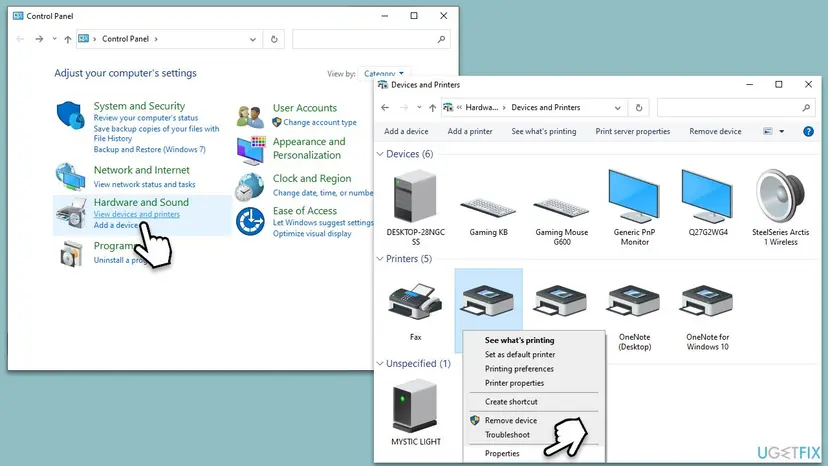
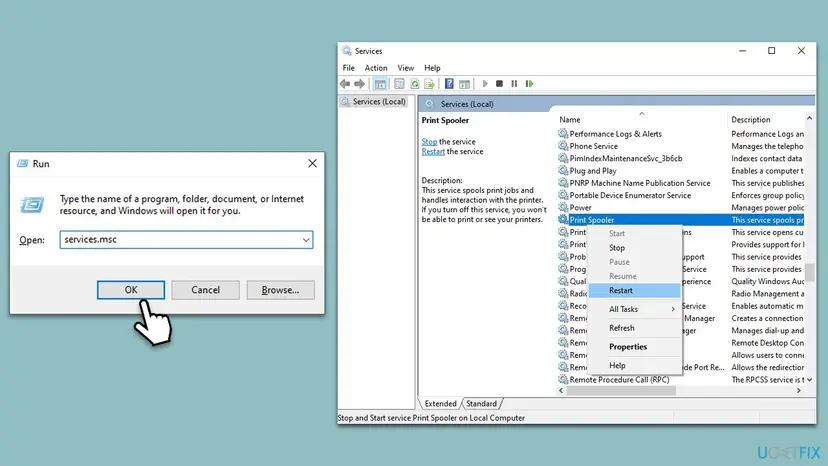
Step by step for any service: Check and restart Windows services.
It worked if: Print Spooler shows Running on both PCs and the printer connects without the error.
If not: If the spooler stops by itself, see our guide to print spooler error 0x000006BA. Otherwise try Fix 8.
Fix 8. Add a network printer by its IP address instead of through another PC
10 minutesLow riskThe printer has its own Wi-Fi or Ethernet connection and was added through another PC only out of habit.
A printer with its own network port does not need a host. Added by IP address, it gets a TCP/IP port and a driver installed on your PC, so there is no driver download from a share that can fail with 0x00000bcb.
- Find the printer's IP address on its control panel or on a network page it prints.
- Open Settings > Bluetooth & devices > Printers & scanners, select Add device, then Add manually.
- Choose Add a printer using an IP address or hostname and select Next.
- Type the IP address and choose the maker's driver you installed in Fix 1.
- Remove the old shared copy of the printer.
A printer plugged into another PC by USB can only be reached through that PC. For it, Fix 1 to Fix 3 are the routes.
It worked if: The printer shows in Printers & scanners with its own port and prints a test page.
If not: Give the printer a fixed address in your router so the port keeps working, then read the log in the next section.
Still getting error 0x00000bcb? Where the real cause is written
The box only says a driver was needed. Windows writes which driver and why it failed in its logs. Collect these facts before you change anything else, and send them along if you ask the printer maker, your IT department or Microsoft for help.
| Check | Where | What it tells you |
|---|---|---|
| Print Service log | Event Viewer, Applications and Services Logs > Microsoft > Windows > PrintService > Admin | The driver name and a second code, such as 0x800b0004 for a signature |
| Driver on the host | Host: Print server properties > Drivers | Driver name, type and processor (x64, x86 or Arm64) |
| Your system type | Settings > System > About | Whether the host's driver can fit your PC |
| Driver policy | HKEY_LOCAL_MACHINE\Software\Policies\Microsoft\Windows NT\Printers\PointAndPrint | RestrictDriverInstallationToAdministrators 1 or absent means only administrators install drivers |
| Host reachable | File Explorer, \\HostName | If it does not open, fix sharing first (Fix 6) |
- Is it hardware? No. The code comes from Windows before any page is sent. If the printer prints from the host, the printer itself is fine.
- The old printer troubleshooter. A user on Microsoft Q&A reported that
msdt.exe -id PrinterDiagnostichelped. Microsoft is retiring MSDT troubleshooters on newer Windows 11 releases and redirects some to Get Help, so that command may not run on your PC. - What to send to support: both Windows versions and system types, the printer model and driver name, how the printer is connected, the path you used and the PrintService events from the time of the error.
How to keep error 0x00000bcb from coming back
The error returns when a new PC joins the network, a user without administrator rights connects for the first time, or the host gets a new driver. A few habits stop that.
- Install the maker's driver on every client before you connect it to a shared printer.
- Have an administrator connect each shared printer once.
- Add drivers for every processor type of your clients on the host.
- Give a network printer a fixed IP address and add it by IP on every PC.
- Use signed package drivers from the maker on print servers.
- Do not leave
RestrictDriverInstallationToAdministratorsat 0. - Do not trust a driver's certificate by hand just to get past a signature check.
- Do not share a printer from a PC that no longer gets updates if a newer PC can host it.
Frequently asked questions
What does error code 0x00000bcb mean in Windows?
It is Windows system error 3019, named ERROR_PRINTER_DRIVER_DOWNLOAD_NEEDED. Microsoft's description is "The specified printer driver was not found on the system and needs to be downloaded." In practice your PC tried to connect to a shared printer, did not have its driver and could not download it from the host. The usual reason is the administrator rule for printer drivers that Windows has applied since August 2021. Start with Fix 1.
Why did 0x00000bcb start after a Windows update?
Because of the PrintNightmare security fixes. Microsoft's KB5005652 changed the default with the updates of 10 August 2021: non-administrators can no longer install new printers or update drivers from a remote computer through Point and Print without elevation. A PC that connected before can then fail when the driver must be installed again. Uninstalling the update is not a fix; installing the driver as an administrator is.
How do I fix 0x00000bcb on Windows 11?
Install the printer maker's driver for Windows 11 and your processor type, then add the printer under Settings > Bluetooth & devices > Printers & scanners > Add device > Add manually as an administrator (Fix 1). On Windows 11 24H2 and later, also check Event Viewer for a signature error such as 0x800b0004; then the print server needs a signed driver (Fix 5).
How do I fix 0x00000bcb on Windows 10?
The same way as on Windows 11: install the driver on your own PC and connect as an administrator. The menus differ: use Settings > Devices > Printers & scanners > Add a printer or scanner, then The printer that I want isn't listed. Windows 10 left support on 14 October 2025, so a Windows 10 host also gets no more printing fixes; plan to share the printer from a Windows 11 PC.
Can I fix 0x00000bcb without administrator rights?
Usually not. Every fix that puts a driver on your PC needs an administrator once. Ask the person who manages the PC, or your IT department, to connect the printer; afterwards you can print with your own account. On a company network, the IT department can allow driver downloads from approved print servers (Fix 4). Changing the registry value to 0 yourself is not a safe fix.
Is it safe to set RestrictDriverInstallationToAdministrators to 0?
Not as a lasting fix. Microsoft says the value 0 makes devices vulnerable and recommends it only for a short time while you change your setup. It lets non-administrators install signed and unsigned drivers from a print server, which is what the PrintNightmare attacks used. Microsoft adds that no combination of mitigations equals the value 1. Pre-install drivers or use approved servers instead.
What is error 0x80070bcb?
The same error 3019 in another form. Windows wraps system errors into HRESULT codes that start with 0x8007, so 0x80070bcb and 0x00000bcb both mean "the printer driver needs to be downloaded". You may see the longer form in logs, scripts or management tools. The fixes on this page apply to both.
What does "erro 0x00000bcb impressora" mean?
It is the Portuguese search for the same printer error, as in "erro 0x00000bcb windows 10" or "erro 0x00000bcb windows 11". The Windows message reads the same in every language apart from the translated text, and the code 0x00000bcb is identical. This page is in English, but the fixes and the menu order are the same on a Portuguese Windows.
Does 0x00000bcb happen on Windows 7?
Yes. The code is older than Windows 10, and reports exist for Windows 7 clients connecting to shared printers. The fix is the same: install the driver on the Windows 7 PC and connect, or add the printer on a local port (Fix 1 and Fix 3). Windows 7 has had no security updates since January 2020, so do not use it as the PC that shares the printer.
Is error 0x00000bcb related to 0x00000709 or 0x0000011b?
They come from the same family of shared printer problems but mean different things. 0x00000bcb is a missing driver. 0x0000011b and 0x00000709 are about the connection between the PCs after the RPC security changes. If your error changes to 0x00000709, read our guide to error 0x00000709. For "Operation failed with error 0x00004005", see our 0x00004005 guide.
Sources
- Microsoft Learn: System Error Codes (1700-3999), ERROR_PRINTER_DRIVER_DOWNLOAD_NEEDED 3019 (0xBCB) (learn.microsoft.com)
- Microsoft Support: KB5005652, Manage new Point and Print default driver installation behavior (CVE-2021-34481) (support.microsoft.com)
- Microsoft Support: Fix shared printer connection problems in Windows (support.microsoft.com)
Did this fix work?
One click, no account. It tells the next reader which guides are worth their time.
Questions and experiences: fix printing error 0x00000bcb in Windows
Still broken, or found a fix we did not cover? Ask here: members and our editors answer. Reading is open; writing needs a free account.
…