
How to fix Windows 10 Update error code 0xc1900204?

Prefer to fix it yourself? The manual steps follow.
- 7methods
- 15 minutes to 1 hour
- Intermediate
Applies to Windows 10 22H2 and Windows 11 (24H2, 25H2, 26H2) feature updates and in-place upgrades through Windows Update, the Installation Assistant, setup.exe or a company upgrade task
7 methods in this guide
Hello. I have tried to update Windows 10, and I came across a problem. After the download of an update had finished, I received an error. Can you help me fix error code 0xc1900204?
Error 0xc1900204 is not a damaged download. Microsoft documents it as a block: Setup cannot keep your files and apps, because the Windows it is installing does not match the Windows you have, for example Enterprise to Home. Compare your edition, language and architecture with the upgrade first.
0xc1900204 means Setup cannot do the upgrade you asked for while keeping files and apps, because the target Windows does not match the installed one. Compare edition, language and architecture (Fix 1), then run Setup from media that matches (Fix 2). On Windows 11, Fix problems using Windows Update often gets past it (Fix 3). Update repairs such as SFC rarely help.
| Error | 0xC1900204, Microsoft's MOSETUP_E_COMPAT_MIGCHOICE_BLOCK: "The system does not pass the requirements for desired migration choice." |
|---|---|
| Where it appears | In Settings > Windows Update as Install error - 0xc1900204 next to a feature update or the Windows 11 upgrade, or in a company tool as Windows Setup failed with hexadecimal exit code 0xC1900204. |
| Main cause | The upgrade does not match the installed Windows (edition, language, architecture or build), so Setup cannot keep apps and files. |
| Fastest fix | Read your edition, language and system type (Fix 1), then run setup.exe from a Windows ISO that matches them (Fix 2). |
| Also written as | 0xc1900204, (0xc1900204), 0x1900204, error 0xC1900204, or 3247440388 when a tool shows the code as a decimal number. |
| Not the same as | 0xC1900200 (the PC fails a minimum requirement) and 0xC1900208 (an app or driver blocks the upgrade). 0xC1900205 is the cancelled form of this error. |
| Affects | Windows 10 22H2 and Windows 11 feature updates, Insider builds and company in-place upgrades. Windows 10 left support on 14 October 2025. |
| Microsoft's status | Documented Setup behaviour, not a bug. Microsoft's example of an unavailable choice is Enterprise to Home. |
| Time to fix | 15 minutes to find the mismatch, then the length of the upgrade itself. |
Facts checked on 15 October 2026. Steps written for Feature updates on Windows 10 22H2 and upgrades to Windows 11 25H2 and 26H2 through Windows Update and setup.exe.
What error 0xc1900204 means on Windows 10 and Windows 11
Before an upgrade, Windows Setup asks what you want to keep: personal files and apps, personal files only, or nothing. Microsoft calls this the migration choice. Its table of Setup codes lists 0xC1900204 as MOSETUP_E_COMPAT_MIGCHOICE_BLOCK: "The migration choice selected isn't available (ex: Enterprise to Home)".
In plain words, the update itself is fine. Setup compared the Windows on your PC with the Windows it was asked to install, found they do not fit together, and refused to carry your apps across. Nothing was changed on your PC.
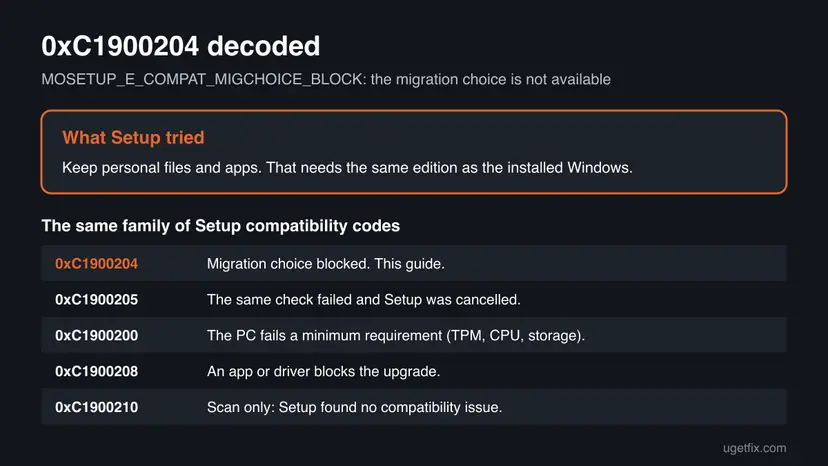
| Code | Microsoft's name | What it means for you |
|---|---|---|
| 0xC1900204 | MOSETUP_E_COMPAT_MIGCHOICE_BLOCK | The keep files and apps choice is not possible for this upgrade. This guide. |
| 0xC1900205 | MOSETUP_E_COMPAT_MIGCHOICE_CANCEL | The same check failed and Setup was cancelled. Same fixes. |
| 0xC1900200 | MOSETUP_E_COMPAT_SYSREQ_BLOCK | A minimum requirement such as TPM 2.0 fails. A different guide. |
| 0xC1900208 | MOSETUP_E_COMPAT_INSTALLREQ_BLOCK | An incompatible app or driver blocks the upgrade. |
| 0xC1900210 | MOSETUP_E_COMPAT_SCANONLY | A scan-only run found no compatibility issue. |
The troubleshooter, SFC and a cache reset repair broken files. 0xc1900204 is a decision Setup makes after comparing two versions of Windows. Until the two match, or you choose to keep less, every attempt gets the same answer.
Why Windows update error 0xc1900204 appears
The ranking below is ours. Microsoft names only the edition example; the other rows are the other things Setup compares. A company task sequence that used the wrong product key is a documented case from an enterprise upgrade write-up.
| Cause | How often | How to tell | Fix |
|---|---|---|---|
| The media or update is a different edition than the installed Windows, such as Pro media on Home or a Home key in the firmware on a Pro install. | Most often | Settings > System > About shows one edition; the ISO or task targets another. | Fix 1, Fix 2 |
| The ISO is in another language than the installed base language. | Often with ISOs | dism /online /get-intl shows a different installed language than the ISO name. | Fix 1, Fix 2 |
| Windows Update holds a broken copy of the feature update on a Windows 11 PC. | Sometimes | The error appears only in Windows Update; setup.exe was never tried. | Fix 3, Fix 5 |
| The PC runs an Insider or preview build newer than the media. | Sometimes | winver shows an Insider build or a build number above the ISO's. | Fix 4 |
| A company upgrade task targets the wrong edition, for example through the product key. | On managed PCs | The message says Windows Setup failed with hexadecimal exit code 0xC1900204. | Fix 4 |
| Damaged system files make Setup read the installed edition wrongly. | Rarely | DISM or SFC reports errors it fixed. | Fix 6 |
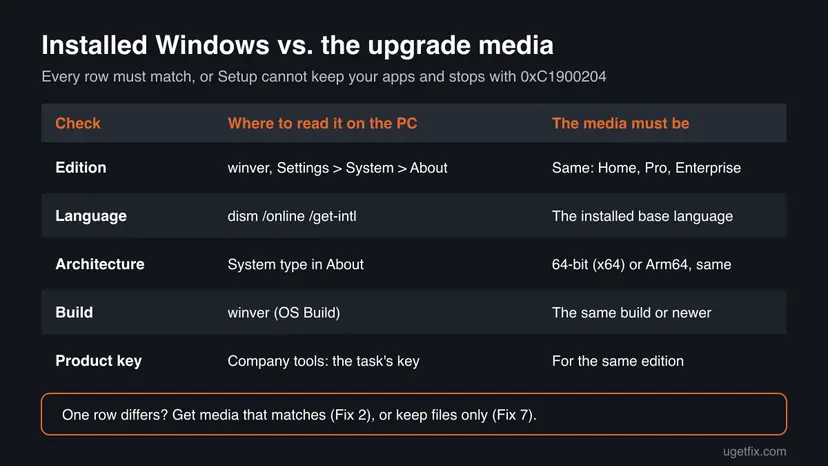
If you are asking what the reason for this error is in another language, the answer is the same: the Windows being installed does not match the Windows on the PC.
How to fix Windows 10 Update error code 0xc1900204
Fix 1 tells you what does not match, so you only change what you need. Fix 2 and Fix 3 run the upgrade in a way that matches. Fix 4 covers Insider builds and company tools. Fix 5 and Fix 6 are short repairs for the rare cases they help. Fix 7 is the last resort when apps cannot be kept.
| What you see or have | Start with |
|---|---|
| You do not know what differs between your Windows and the upgrade. | Fix 1 |
| You ran setup.exe from an ISO and got 0xc1900204. | Fix 1, then Fix 2 |
| Windows 11 shows Install error - 0xc1900204 in Windows Update. | Fix 3 |
| The PC is in the Windows Insider Program or runs a preview build. | Fix 4 |
| A work tool says Windows Setup failed with hexadecimal exit code 0xC1900204. | Fix 4 |
| Everything matches and the error stays. | Fix 5, then Fix 6 |
| You cannot get matching media at all. | Fix 7 |
Fix 1. Compare your Windows edition, language and architecture with the upgrade
5 minutesNo riskEveryone. It takes five minutes and tells you which media you need.
0xc1900204 only says the migration choice is not available. The cause is a difference between two copies of Windows, so you need the exact values of the installed one before you download or change anything.
- Press Win + R, type
winverand press Enter. Note the version and the OS Build number. - Open Settings > System > About. Note Edition and System type (64-bit or ARM-based).
- Right-click Start, open Terminal (Admin) or Command Prompt (Admin) and run
dism /online /get-intl. - Note Default system UI language and the line Installed language(s): the first installed language is the base language.
- Compare these values with the ISO file name, the edition you picked in the Media Creation Tool, or the company task.
- If you cannot see the problem, open
C:\$Windows.~BT\Sources\Panther\setupact.login Notepad and search for0xC1900204and the lines around it that name the edition.
In the log, Setup writes the edition it found and the edition it was asked to install. One enterprise case showed Product EditionID = Professional next to an Enterprise installation, followed by Result = 0xC1900204.
It worked if: You know which value differs: edition, language, architecture or build.
If not: If every value matches the media, go to Fix 3 on Windows 11 or Fix 5 on Windows 10.
Fix 2. Run Setup from a Windows ISO that matches your installation
20 minutes, plus the upgradeLow riskFix 1 showed a different edition or language, or you upgrade with an ISO.
Setup can keep apps only when the media fits the installed Windows. Microsoft's multi-edition ISOs pick the edition from your PC, so a fresh download in the right language usually removes the mismatch.
- Open Microsoft's Download Windows 11 page (for Windows 10 22H2, the Download Windows 10 page).
- Under the disk image section, pick the multi-edition ISO and select Download Now.
- In the language list, choose the exact base language from Fix 1, including the variant such as English (United States) or English International.
- Pick the 64-bit download for an x64 PC. An ARM-based PC needs Arm64 media.
- Right-click the ISO, select Mount and double-click
setup.exeon the new drive. - On Choose what to keep, check that Keep personal files and apps can be selected, then let Setup run.
Setup shows the same block on this screen before it shows the code. If the option is grey, the media still does not match: go back to Fix 1 and compare the language and edition again.
It worked if: Setup offers Keep personal files and apps and starts copying files.
If not: If the option is still grey with matching media, try Fix 4 for preview builds, or Fix 7.
Fix 3. Use Fix problems using Windows Update on Windows 11
30 to 60 minutesLow riskWindows 11 shows Install error - 0xc1900204 in Windows Update and you never ran an ISO.
This option downloads a repair copy of your own Windows version and keeps apps, files and settings. Because Windows Update picks the copy for your edition and language, it takes out the mismatch a broken or wrong download can cause.
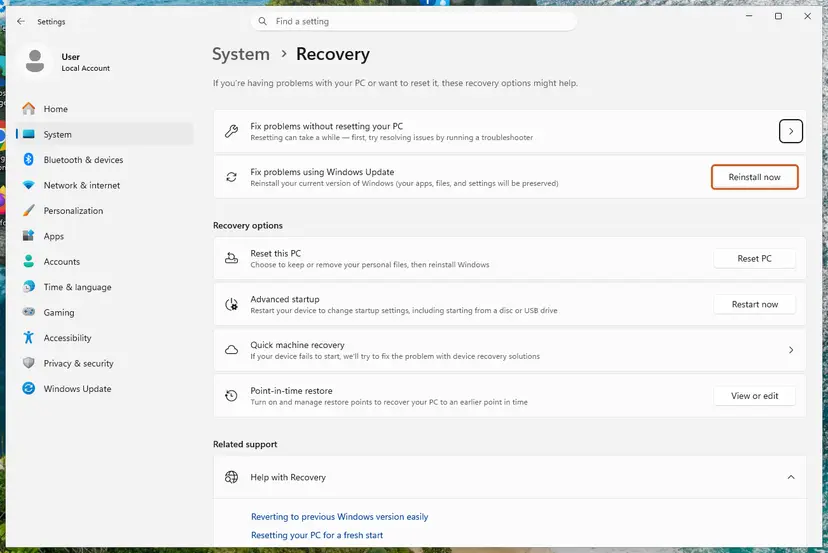
- Open Settings > System > Recovery.
- Next to Fix problems using Windows Update, select Reinstall now.
- Choose whether the PC may restart on its own, then select OK.
- Keep the PC plugged in and online until it restarts.
- Open Settings > Windows Update and select Check for updates to try the feature update again.
Windows 10 22H2 does not have this option. On Windows 10, use Fix 2 with the Windows 10 ISO instead. More on this and the other ways to reinstall: Reinstall Windows without losing files.
It worked if: Windows reinstalls the current version, and the feature update then installs without the error.
If not: If Windows Update shows 0xc1900204 again, reset its cache with Fix 5.
Fix 4. Leave preview builds or correct the company upgrade task
15 minutes to set upLow riskThe PC runs an Insider build, or a work tool reports Windows Setup failed with hexadecimal exit code 0xC1900204.
An Insider build can be newer than any public ISO, and Setup does not keep apps when the target is older than the installed build. In company upgrades, a documented case failed because Setup read an OEM Professional key from the firmware instead of the Enterprise key, and aimed at the wrong edition.
- Insider PC: open Settings > Windows Update > Windows Insider Program and note the channel.
- Wait for the next build in the same channel, which installs over the current one, instead of using a public ISO.
- To leave preview builds for good, choose to stop getting builds when the next public release reaches your build, then update normally.
- Work PC: give the IT department the code, the installed edition from Fix 1 and the
setupact.logfile. - For administrators: check that the task sequence passes a product key for the installed edition and the matching image index, so Setup does not fall back to the key in the firmware.
It worked if: The next Insider build installs, or the company task upgrades the PC to the same edition.
If not: If you must go to an older public build now, only a keep files option or a clean install is possible: Fix 7.
Fix 5. Reset Windows Update components so it downloads the update again
10 minutesLow riskFix 1 found no mismatch and the error shows only in Windows Update.
This does not change your edition. It clears the download cache, so Windows Update fetches a fresh copy of the feature update for your edition and language instead of a stored one that does not fit.
- Open Command Prompt as administrator. Type cmd in the search box, right-click Command Prompt and select Run as administrator. Select Yes when Windows asks for permission.
- Stop the update services. Type the commands below and press Enter after each one. If Windows says that other services depend on Cryptographic Services, it stops them too. A message that a service is not started is fine.
net stop wuauserv
net stop bits
net stop cryptsvc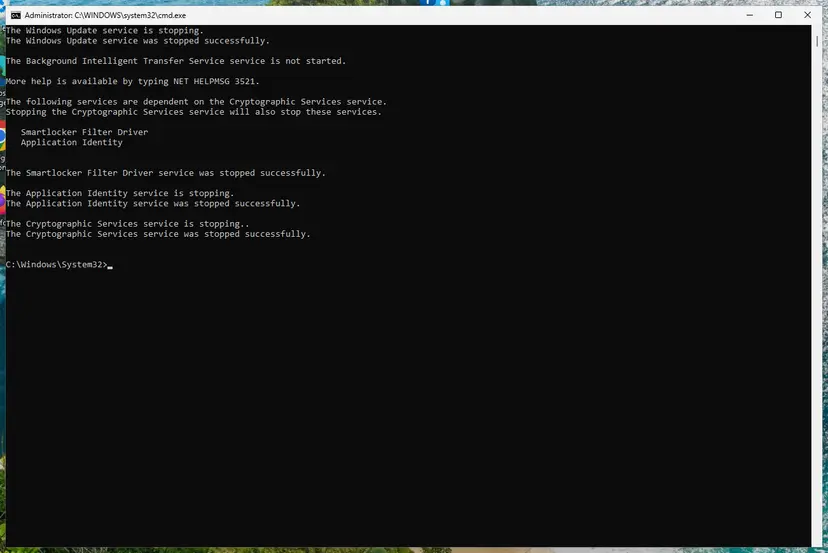
The update services are stopped. Screenshot: Windows 11 26H2. - Delete the download queue files. This clears the list of downloads that the Background Intelligent Transfer Service keeps. If Windows says it cannot find the files, continue.
del "%ALLUSERSPROFILE%\Application Data\Microsoft\Network\Downloader\qmgr*.dat" - Rename the update cache folders. Renaming keeps a copy in case you need it; Windows creates new, empty folders when the services start again. If you get Access is denied, a service is still running: repeat the previous step.
ren %systemroot%\SoftwareDistribution SoftwareDistribution.old
ren %systemroot%\System32\catroot2 catroot2.old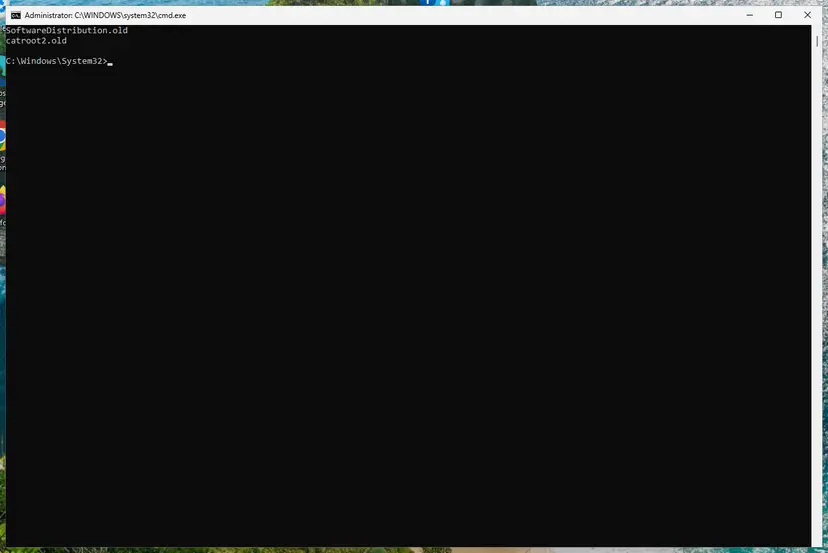
Both folders now end in .old. Screenshot: Windows 11 26H2. - Start the services again. Type the commands below and press Enter after each one. The requested service has already been started is fine: Windows started it on its own.
net start cryptsvc
net start bits
net start wuauserv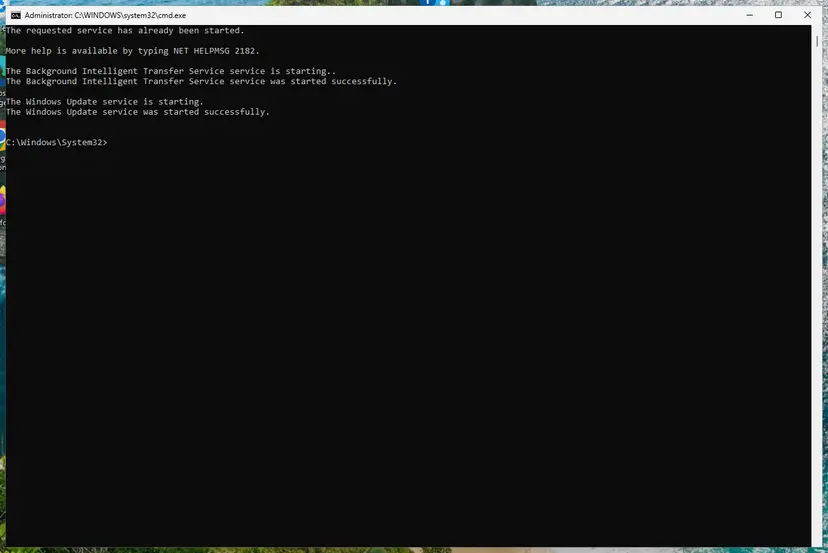
BITS and Windows Update are running again. Screenshot: Windows 11 26H2. - Restart and check for updates. Restart the PC. Then select Start > Settings > Windows Update > Check for updates. The first check can take longer than usual because everything is downloaded again.
These steps were written for Windows 11 and Windows 10 (the steps are the same). The full page with the other versions and what each result means: Reset Windows Update components
It worked if: After a restart, Check for updates downloads the feature update again and it installs.
If not: If the error returns, go to Fix 6, then Fix 2.
Fix 6. Repair Windows system files with DISM and SFC
20 minutesLow riskEverything matches, the cache reset did not help, and Fix 1 values look odd, such as an edition that does not fit your licence.
Setup reads the installed edition from Windows itself. Damaged component files are a rare reason for a wrong reading, and DISM with SFC is the safe way to rule that out.
- Open an elevated command window. Right-click Start and select Terminal (Admin), or type cmd in the search box, right-click Command Prompt and select Run as administrator. Select Yes when Windows asks for permission.
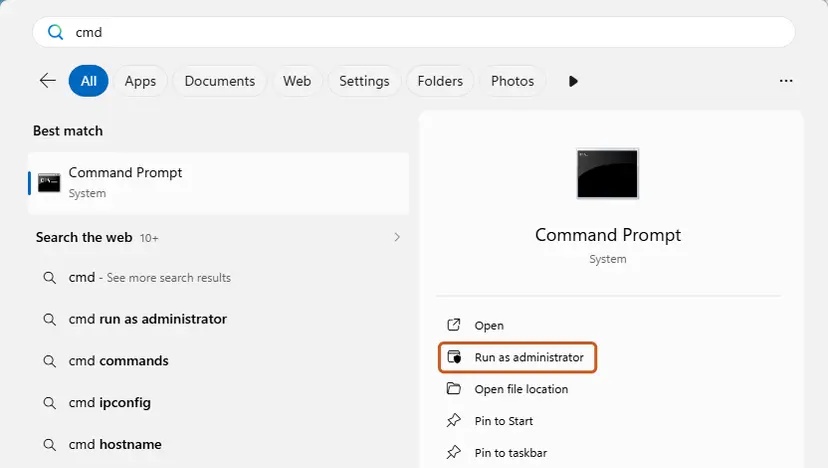
Search for cmd and choose Run as administrator. Screenshot: Windows 11 26H2. - Run DISM first. Type the command below and press Enter. DISM downloads clean copies of damaged components from Windows Update, so it can take several minutes. Wait until it says The operation completed successfully.
DISM.exe /Online /Cleanup-Image /RestoreHealth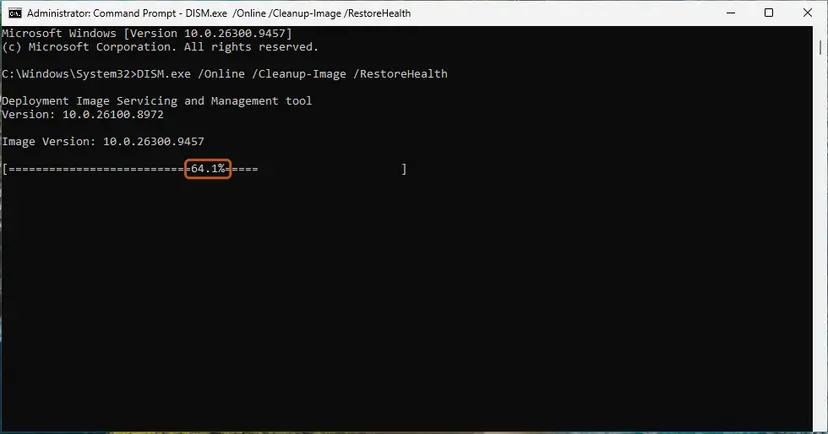
DISM /RestoreHealth running. Screenshot: Windows 11 26H2. - Run System File Checker. In the same window, type the command below and press Enter. Do not close the window until the verification reaches 100%.
sfc /scannow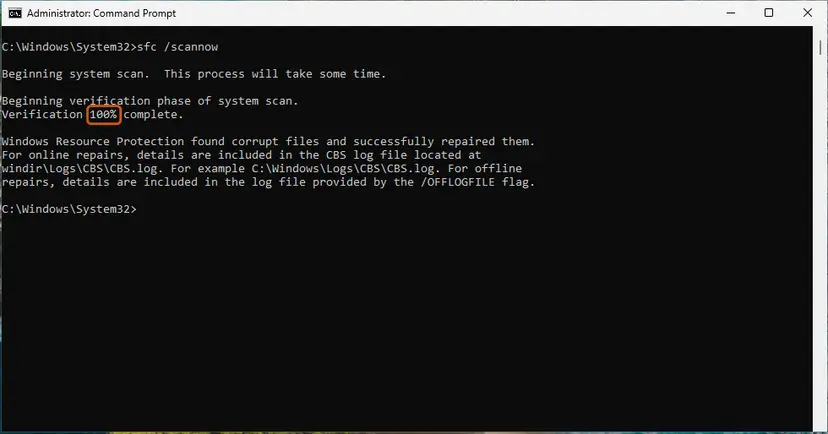
sfc /scannow at 100%. Screenshot: Windows 11 26H2. - Read the result and restart. Compare the last message with the table below this guide, then restart the PC so that repaired files are loaded.
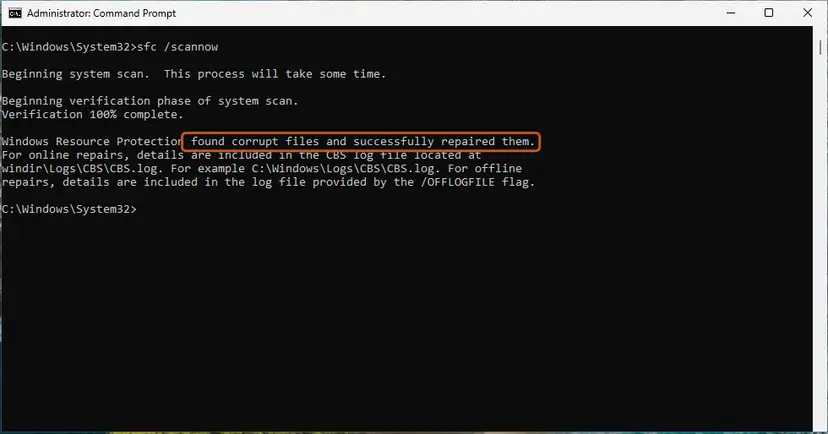
The result line tells you what SFC did. Screenshot: Windows 11 26H2.
These steps were written for Windows 11 24H2 and 25H2. The full page with the other versions and what each result means: Run DISM and SFC to repair Windows system files
It worked if: SFC reports that it found no integrity violations, or that it repaired them, and the upgrade runs.
If not: If nothing changes, the mismatch is real: get matching media (Fix 2) or use Fix 7.
Fix 7. Keep personal files only, or reset the PC, when apps cannot be kept
1 to 2 hoursRead the warningYou cannot get media that matches, for example you want to move from Enterprise to Home.
0xc1900204 blocks only the keep apps choice. Choosing to keep personal files only, or using Reset this PC with Keep my files, is a different migration choice and is often still allowed.
Both options keep your personal files but remove installed apps and most settings. Back up your files first: Back up your files (Windows Backup, File History, Time Machine). Note your programs and their licence keys, and have your BitLocker recovery key ready.
- With the ISO mounted, run
setup.exeand on Choose what to keep select Keep personal files only. - Or open Settings > System > Recovery, select Reset PC next to Reset this PC, then Keep my files.
- Choose Cloud download for a fresh copy of Windows.
- After Windows starts, install your apps again and run Windows Update.
Step by step with screenshots: Reinstall Windows without losing files.
It worked if: Windows installs the new version with your personal files in place.
If not: If this choice is blocked too, read the next section.
If error 0xc1900204 is still there
When the code returns after Fix 2, Setup still sees a mismatch. Its logs say which one, and they are what support needs.
| What you find | What to do |
|---|---|
setupact.log names a different edition than you see in Settings | Your licence or firmware key may be for another edition. Activation settings in Settings > System > Activation show which one. |
| The log shows a language or architecture difference | Download the ISO again with the exact language variant and the right architecture. |
| You see 0xC1900200 or 0xC1900208 now | A different block. Read our guide to error 0xC1900200 for requirements. |
| A work or school PC | The IT department controls the edition and the upgrade task. |
- What to send to support: the full code, how you started the upgrade and the version you upgrade from and to.
- Attach
setupact.logandsetuperr.logfromC:\$Windows.~BT\Sources\Panther. - Add the edition, system type and the output of
dism /online /get-intlfrom Fix 1.
0xc1900204 is a decision about editions and choices. Your disk, memory and processor are not the cause. If the PC fails a hardware requirement, Setup shows 0xC1900200 instead.
How to keep 0xc1900204 from coming back
- Download upgrade media in the same language and edition as the installed Windows.
- Let Windows Update deliver feature updates where you can: it picks the right edition for you.
- Keep the old
setupact.logbefore you try again on a work PC.
- Do not mix an Insider build with public ISOs.
- Do not change edition and upgrade version in the same step.
- Do not use tools that change the edition in the registry to trick Setup.
If you need another edition, change it first through Settings > System > Activation with a valid key, then upgrade.
Frequently asked questions
What does error 0xc1900204 mean?
It means Windows Setup cannot do the upgrade with the keep choice you selected. Microsoft names it MOSETUP_E_COMPAT_MIGCHOICE_BLOCK: the system does not pass the requirements for the desired migration choice. Its own example is an upgrade from Enterprise to Home, where apps cannot be carried across. Nothing was installed and your files were not touched. Compare your edition and language with the upgrade as in Fix 1.
What does Install error - 0xc1900204 in Windows Update mean?
It is the same code shown under a feature update in Settings > Windows Update. Windows Update downloaded the update, Setup compared it with your Windows and refused to keep your apps. On Windows 11, Fix problems using Windows Update (Fix 3) reinstalls a matching copy. On Windows 10, run Setup from a matching ISO (Fix 2), or reset the update cache first (Fix 5).
What does "Windows Setup failed with hexadecimal exit code 0xC1900204" mean?
This wording comes from tools that run Windows Setup for you, such as a company upgrade task, and report its exit code. The decimal form of the same code is 3247440388. It means the edition or image the task targets does not match the installed Windows. A documented case was a task that let Setup use an OEM Professional key from the firmware for an Enterprise PC. Fix 4 has the checks.
Does 0xc1900204 happen on Windows 11?
Yes. The code comes from Windows Setup, which runs the same way for Windows 11 feature updates such as 25H2 and 26H2 and for upgrades from Windows 10. The causes and the fixes are the same. Windows 11 also has Fix problems using Windows Update, which is often the quickest way past it (Fix 3).
What is the difference between 0xc1900204 and 0xc1900200?
0xC1900200 means the PC fails a minimum system requirement, such as TPM 2.0, Secure Boot, the processor or storage. 0xC1900204 means the PC may be fine, but the upgrade does not match the installed Windows, so apps cannot be kept. They need different fixes. For the first one, read our guide to Windows update error 0xC1900200.
Will the troubleshooter, SFC or the old registry change fix 0xc1900204?
Usually not. The troubleshooter and SFC repair broken files, and this error is a comparison between two versions of Windows. The old version of this guide also suggested moving ProgramFilesDir in the registry; that does not change the edition and can break installed programs, so we removed it. Use SFC only as in Fix 6, after the edition checks.
Can I keep my apps if I change from Pro to Home or from Enterprise to Pro?
Not in one upgrade step. Microsoft's own example of a choice that is not available is Enterprise to Home. You can upgrade within the same edition and keep apps, then change the edition separately. If you must move to a lower edition, choose Keep personal files only or Reset this PC with Keep my files, as in Fix 7, and install your apps again.
Is it safe to stay on my current version if 0xc1900204 will not go away?
On Windows 11, your current version keeps getting monthly security updates until its own support ends, so you have time to fix this calmly. On Windows 10, support ended on 14 October 2025 and the PC no longer receives free security fixes, so staying is a growing risk. Keep Microsoft Defender on and back up your files while you plan the upgrade.
Sources
- Microsoft Learn: Windows 10 upgrade error codes (0xC1900204 MOSETUP_E_COMPAT_MIGCHOICE_BLOCK, example Enterprise to Home, neighbour codes) (learn.microsoft.com)
- Microsoft Learn: Windows 10 upgrade resolution procedures (0xC1900204 and 0xC1900205 descriptions) (learn.microsoft.com)
- A Square Dozen: in-place upgrade fails with error 0xC1900204 (invalid SKU), setupact.log lines and the product key cause (asquaredozen.com)
Did this fix work?
One click, no account. It tells the next reader which guides are worth their time.
Questions and experiences: fix Windows 10 Update error code 0xc1900204
Still broken, or found a fix we did not cover? Ask here: members and our editors answer. Reading is open; writing needs a free account.
…