
How to fix Windows update error 0x80070541?
Prefer to fix it yourself? The manual steps follow.
On this page
Hello, I tried to update Windows as I was having problems with printing after the March update, so I hoped the newest patch would fix the issue. However, I could not apply the update as I got the error 0x80070541. Anything that could be done to fix this?
0x80070541 is yet another error that users might encounter while trying to apply the latest update for Windows 10 versions 2004/20H2. While Windows update errors are fairly common (for example, 0x80070002 or 0x80080005 are recurring), this one is a little bit different, as it seems to be affecting every single user worldwide.
March 2021 Patch Tuesday update was released as per usual, patching security vulnerabilities and implementing features, although not everything went as planned. Many users said that, after installing the KB5000802 update, printing was completely broken, with the parts of pages being left blank, making it useless.
In the meantime, others claimed that, as soon as they tried to print something, Windows immediately Blue Screened with APC_INDEX_MISMATCH win32kfull.sys error code, forcing people to restart their devices and possibly losing their data. The broken printing on Windows was very widespread, are affected printers such as Kyocera, Canon, and Ricoh, although it did not affect everybody.
Naturally, Microsoft patched these major problems with an optional update soon after, although problems continued. KB5001649 is the update that was meant to address this, but it seems like people are unable to update due to the 0x80070541 error which occurs during the installation process.
It returns the following message that can be seen in the update history:
2021-03 Cumulative Update for Windows 10 Version 20H2 for x64-based Systems (KB5001649)
Failed to install on XXX - 0x80070541
The solution to this problem is to either wait till the update process is fixed by Microsoft or to download the update manually from the Windows update catalog. Below you will find a step-by-step guide in order to fix 0x80070541 error. Keep in mind that the problem is temporary and should go away within a short period of time.
This maintenance and repair tool can also remove and already installed malware and fix the damage done to Windows system files.
Download KB5001649 from Microsoft Update Catalog
As already mentioned, the only way to fix 0x80070541 error is to download the relevant update manually. Keep in mind that your Windows version should be version 1903 or later for it to work.
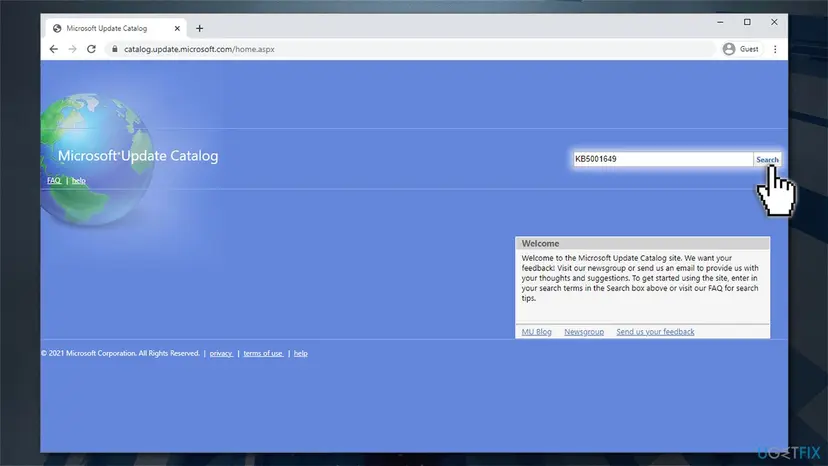
- Go to the official Microsoft Update Catalog website
- Type in the KB number in question, for example, KB5001649, and press Search
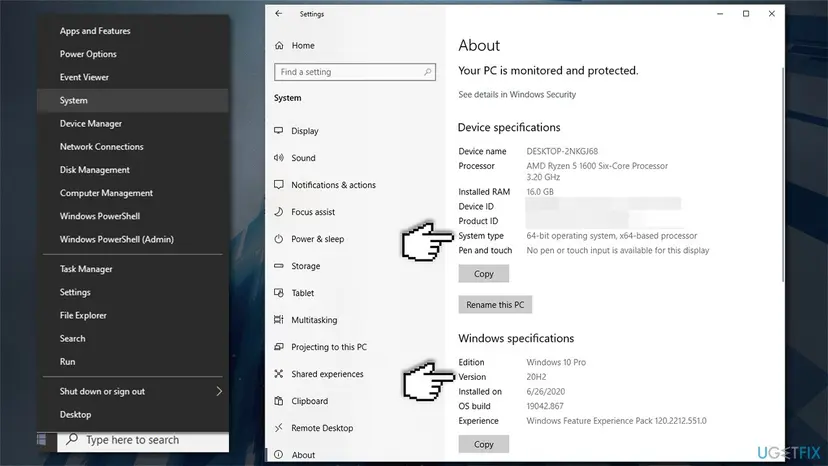
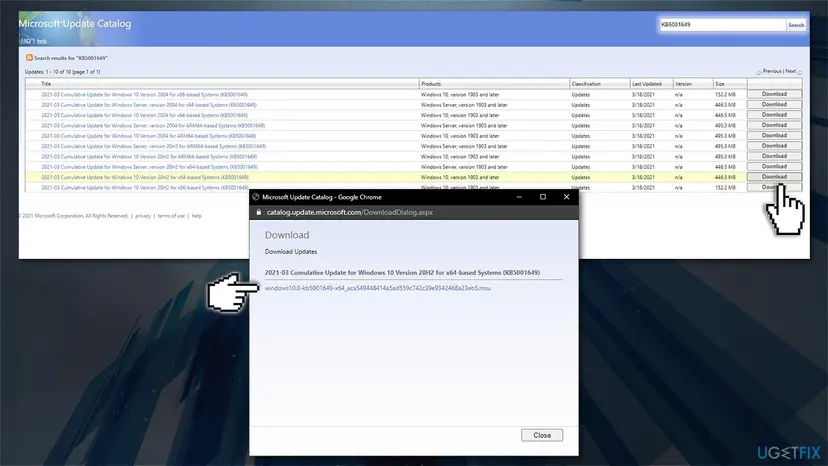
In here, you will see many instances of the update. You should download the appropriate update for your system, and for that, you need to know the Windows version and the architecture it is running. If you are not using a PC in a corporate environment, you can ignore the "Windows Server" versions completely. Here's how to find out other info:
- Right-click on Start and pick System
- Under Device specifications, check the System type section: it should either be 64-bit or 32 bit
- Now, scroll down to Windows specifications and check the Version section - it should be either 2004 or 20H2
- Go to the search results within the Update Catalog and click Download next to the appropriate update version for your device
- Click on the .msu file to begin download
How to fix windows update error 0x80070541 download the update - Open the downloaded .msu file to begin the installation and press Yes
- Restart your computer.
Uninstall the most recent Windows updates
If the most recent update broke some functions and features on your machine, you can uninstall them and roll them back to the previous version.
- Type in Control Panel in Windows search and press Enter
- Go to Program > Uninstall a program
- On the left side, click View installed updates
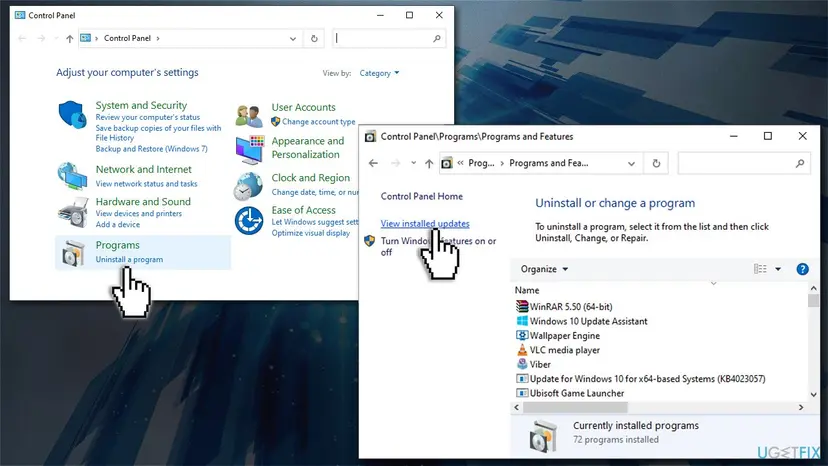
How to fix windows update error 0x80070541 uninstall updates - Scroll down until you find relevant Windows update which broke printing (e.g., KB5000802)
- Right-click on the update and press Uninstall
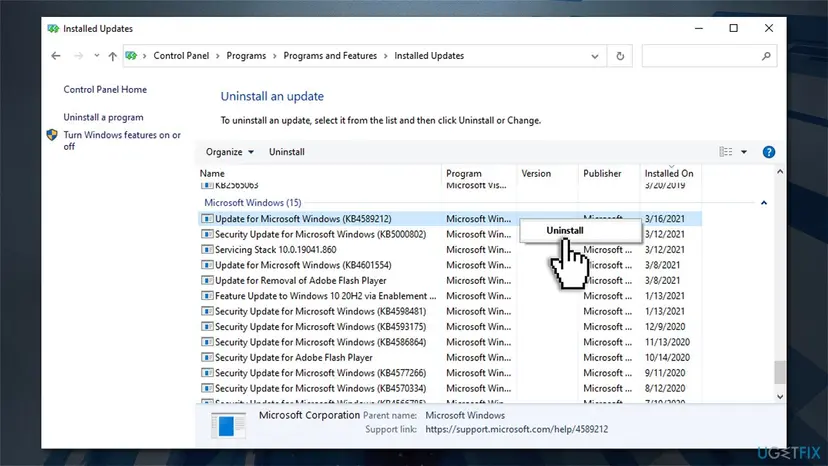
How to fix windows update error 0x80070541 uninstall updates2 - Restart your PC.
Pause Windows updates
Finally, if you are not trusting Microsoft with delivering flawless updates, you can pause them:
- Type Updates in Windows search and press Enter
- Scroll down and select Advanced options
- Find the Pause updates section
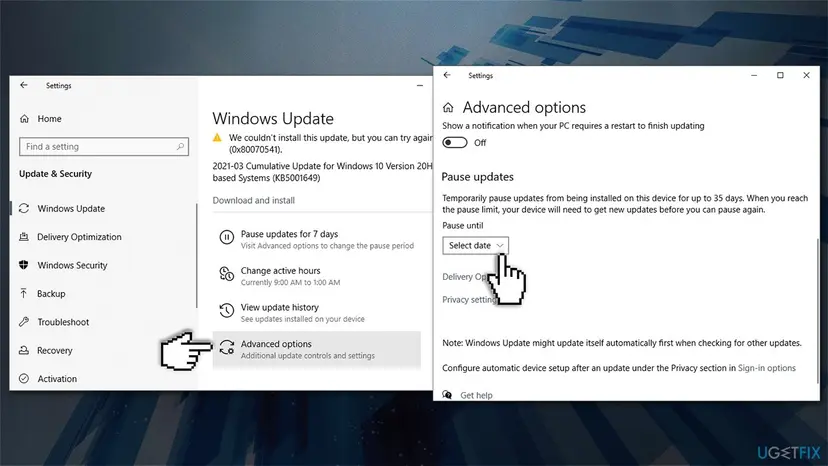
How to fix windows update error 0x80070541 pause updates - Click on the Select date drop-down menu
- Select the date you want to pause the updates till - it is available for up to 35 days.
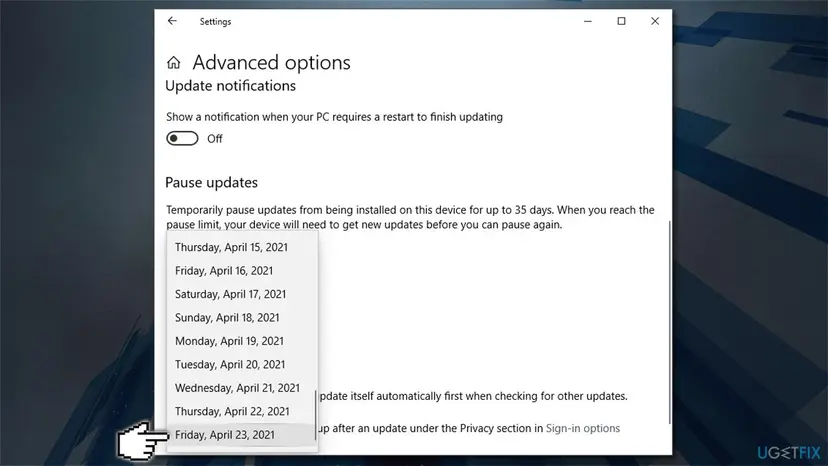
How to fix windows update error 0x80070541 pause updates2
Did this fix work?
One click, no account. It tells the next reader which guides are worth their time.
Questions and experiences: fix Windows update error 0x80070541
Still broken, or found a fix we did not cover? Ask here: members and our editors answer. Reading is open; writing needs a free account.
…