
How to fix Windows Update Standalone Installer 0x80096002 error?

Prefer to fix it yourself? The manual steps follow.
- 6methods
- 5 to 40 minutes
- Medium
Applies to Windows 11 and Windows 10: .msu update packages opened with the Windows Update Standalone Installer (wusa.exe)
6 methods in this guide
I was trying to install Microsoft virtual machine. Even though I am using a 64-bit operating system, I was only able to download the 32-bit version. The installation went successfully, but then, after launching it, "Windows Update Standalone Installer. Installer encountered an error: 0x80096002. The certificate for the signer of the message is invalid or not found" notification popped up. Do you know how to avoid this alert and run the program after all?
Error 0x80096002 appears when you open a .msu update file and the Windows Update Standalone Installer cannot find a valid certificate for whoever signed it. Most often the package was made for another Windows version, or what it installs is already part of Windows 10 and 11. Check that the file matches your Windows first.
0x80096002 is TRUST_E_NO_SIGNER_CERT: "The certificate for the signer of the message is invalid or not found." The Windows Update Standalone Installer refused a .msu file before installing anything. Most often the file is for another Windows version or processor, so download the package for your exact Windows from the Microsoft Update Catalog (Fix 1). If it is an old add-on such as .NET 3.5 or Windows Identity Foundation, turn it on in Windows Features instead (Fix 2).
| Error | 0x80096002, named TRUST_E_NO_SIGNER_CERT by Microsoft: "The certificate for the signer of the message is invalid or not found." |
|---|---|
| Where it appears | In a Windows Update Standalone Installer window, right after you double-click a .msu file, as Installer encountered an error: 0x80096002. |
| Main cause | The .msu package was built for another Windows version or processor type, or it installs something Windows 10 and 11 already include. |
| Fastest fix | Check your Windows version and processor, then download the matching package from the Microsoft Update Catalog (Fix 1). |
| Also written as | 0x80096002, error 0x80096002, (0x80096002), 80096002, hr=80096002 in the update log, and "Windows Update Standalone Installer error". |
| Program behind it | wusa.exe, the Windows Update Standalone Installer in C:\Windows\System32. It opens every .msu file you double-click. |
| Affects | Windows 11 and Windows 10, and earlier Windows 8 and 7. Reports often involve packages written for Windows 7 or Windows 8 opened on a newer Windows. |
| Microsoft's status | Not a known issue. It is a normal refusal: Windows will not install a package whose signer it cannot verify for this system. |
| Close relatives | 0x80096004 (TRUST_E_CERT_SIGNATURE), 0x80096010 (TRUST_E_BAD_DIGEST), 0x800B0100 (TRUST_E_NOSIGNATURE, no signature at all). |
| Time to fix | 5 to 15 minutes for Fix 1 or Fix 2, up to 40 minutes when system files need a repair. |
Facts checked on 15 October 2026. Steps written for Windows 11 (25H2 and 26H2) and Windows 10 22H2.
What Windows Update Standalone Installer error 0x80096002 means
Microsoft's list of security and setup error codes (Winerror.h) names 0x80096002 TRUST_E_NO_SIGNER_CERT. Its text is the second line of the error window: "The certificate for the signer of the message is invalid or not found." It belongs to the trust checks of Windows, next to 0x80096004 and 0x80096010.
A .msu file is a Microsoft update package. When you double-click one, Windows starts the Windows Update Standalone Installer, wusa.exe. Before it installs anything, it opens a small scan file inside the package, wsusscan.cab, and checks who signed it and whether the package applies to this PC. A log posted for this exact code shows that step failing: ServiceName = Windows Update Standalone Installer, then OpenOfflineSyncSource failed, hr=80096002. So nothing was installed and nothing on your PC was changed.
| What you see | Where | What it tells you |
|---|---|---|
| Windows Update Standalone Installer / Installer encountered an error: 0x80096002 / The certificate for the signer of the message is invalid or not found | A small window right after you open a .msu file | wusa.exe stopped at its first check. The package was not installed. |
OpenOfflineSyncSource failed, hr=80096002 | The Windows Update log | The scan file inside the .msu could not be used as an update source for this PC. |
| 0x80096002 from another setup program | Installers that check signatures | The same trust check failed for a file that is not a .msu. Fix 3 still applies. |
Installing the package's certificate by hand does not help. A user who tried exactly that still got 0x80096002, because the cause was the package: it was meant for another Windows version. Do not import certificates from a download to get around this error.
Why the 0x80096002 error appears
Most cases come down to a package that does not belong on this Windows. From the most likely to the least likely:
| Cause | How often | How to tell | Fix |
|---|---|---|---|
| The .msu was made for another Windows version (for example Windows 7 or 8) or another processor type (x86, x64, arm64). | Most often | The file name starts with Windows6.1 or Windows8, or says x86 while your Windows is 64-bit. | Fix 1 |
| What the package installs is already built into Windows 10 and 11, such as .NET Framework 3.5, Windows Identity Foundation 3.5 or a newer PowerShell. | Often | The package is an add-on or framework, not a monthly update. | Fix 2 |
| The file is damaged, incomplete, or came from a site other than Microsoft. | Sometimes | The signature check in Fix 3 does not say Valid. | Fix 3 |
| wusa.exe fails on its scan step, while the package itself is fine. | Sometimes | The package matches your Windows and its signature is valid. | Fix 4 |
The update cache or the signature catalogs in catroot2 are damaged. | Rarely | Other updates fail too, not only this .msu. | Fix 5 |
| Damaged system files. | Rarely | Several signed installers fail with trust errors. | Fix 6 |
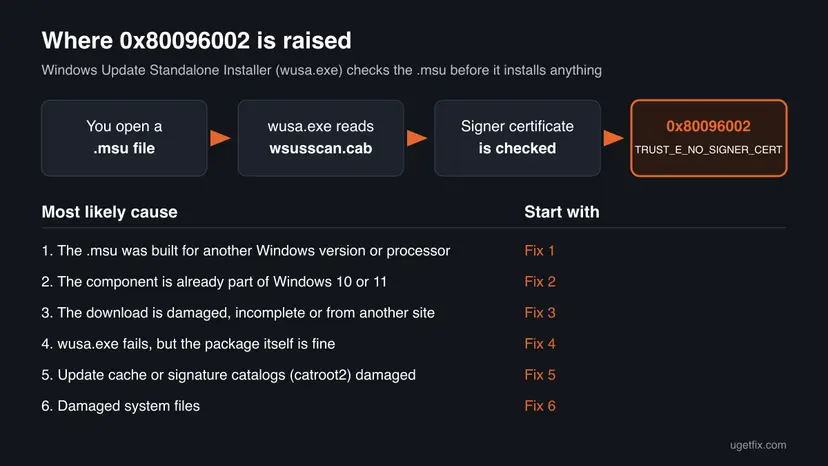
If you were trying to install an old Microsoft virtual machine package, it was written for an older Windows, and the 32-bit download makes the mismatch worse. On Windows 10 and 11 you do not install a .msu for that: use the virtualization features in Windows Features (Fix 2).
How to fix Windows Update Standalone Installer error 0x80096002
Fix 1 and Fix 2 solve most cases, because the usual cause is a package that does not fit your Windows. Fix 3 and Fix 4 are for a package that should fit. Fix 5 and Fix 6 cover the rare cases where Windows itself is damaged.
| What you see or have | Start with |
|---|---|
| The .msu name mentions Windows 6.1, Windows 8 or x86, or you are not sure which version you downloaded. | Fix 1 |
| You want .NET Framework 3.5, Windows Identity Foundation, a virtual machine feature or another old add-on. | Fix 2 |
| You got the file from a site other than Microsoft, or the download may have stopped early. | Fix 3 |
| The package matches your Windows and its signature is valid, but wusa.exe still fails. | Fix 4 |
| Other updates fail too, or several signed programs will not install. | Fix 5, then Fix 6 |
Fix 1. Download the .msu that matches your Windows version and processor
10 minutesLow riskEveryone, first. Especially when the file name mentions an older Windows or x86.
A .msu carries a scan file that says which Windows it is for. On a Windows it does not fit, wusa.exe cannot use that file as an update source and stops with 0x80096002. The package for your exact version passes that check.
- Check your Windows version. Press Windows key + R, type winver and press Enter. Note the version (for example 25H2) and the OS build.
- Find the KB number. Open Settings > Windows Update. A failed or pending update is listed with its KB number; earlier ones are under Update history.
- Check the processor type. Open Settings > System > About and look at System type: an x64-based PC needs the x64 file, an ARM-based PC (for example Snapdragon) needs the arm64 file.
- Search the catalog. Open the Microsoft Update Catalog at catalog.update.microsoft.com in your browser, type the KB number (for example KB5124010) in the search box and press Enter.
- Pick the right row. Find the row whose title names your Windows version and your processor type (x64-based or arm64-based) and select Download on that row.
- Download every file listed. A window lists one or more .msu links. Download all of them into one empty folder, for example C:\packages. On Windows 11 24H2 and later the list can include earlier checkpoint updates that the new one needs.
- Install a single file. If there is only one file, double-click it and confirm the installation in the Windows Update Standalone Installer.
These steps were written for Windows 11 24H2 and later; Windows 10 22H2. The full page with the other versions and what each result means: Install an update from the Microsoft Update Catalog
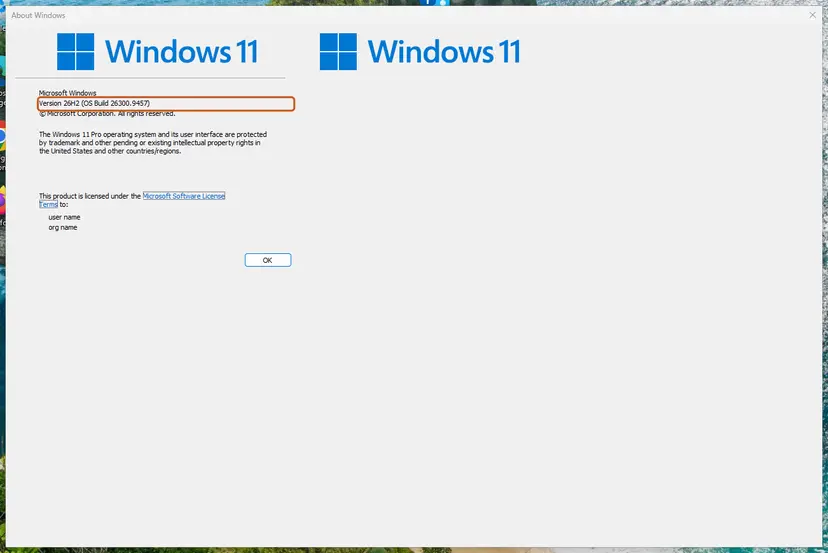
| In the .msu file name | It is for |
|---|---|
windows11.0 | Windows 11 |
windows10.0 | Windows 10 (and some Windows 11 packages, check the Catalog row) |
Windows8.1 or Windows8-RT | Windows 8.1 or 8, not Windows 10 or 11 |
Windows6.1 | Windows 7, not Windows 10 or 11 |
x64, arm64, x86 | 64-bit Intel or AMD, ARM processors, 32-bit Windows |
No package for your Windows in the Catalog usually means the program is no longer needed or no longer supported there. Read Fix 2 before you look further.
It worked if: The Windows Update Standalone Installer asks Do you want to install the following Windows software update? and the install runs without 0x80096002.
If not: If the matching file fails too, check its signature, Fix 3. If there is no matching file, go to Fix 2.
Fix 2. Turn on the feature in Windows Features instead of installing an old package
5 to 10 minutesLow riskThe .msu installs a framework or add-on that Windows 10 and 11 already include, such as .NET Framework 3.5 or Windows Identity Foundation 3.5, or a virtual machine feature.
On a newer Windows these parts ship with the system and are switched on in Windows Features. Their old standalone packages were made for Windows 7 or 8, and trying to install them again fails, as one user found with Windows Management Framework 3.0 on a Windows that already had PowerShell 3.0.
- Press Win + R, type
optionalfeaturesand press Enter. The Windows Features window opens. - Find what the .msu was meant to install, for example .NET Framework 3.5 (includes .NET 2.0 and 3.0) or Windows Identity Foundation 3.5.
- For a virtual machine, look for Hyper-V or Virtual Machine Platform. Hyper-V is listed only on the Pro, Enterprise and Education editions.
- Select the check box and select OK.
- If Windows asks to download files from Windows Update, select Let Windows Update download the files for you.
- Restart the PC when Windows asks, then start your program again.
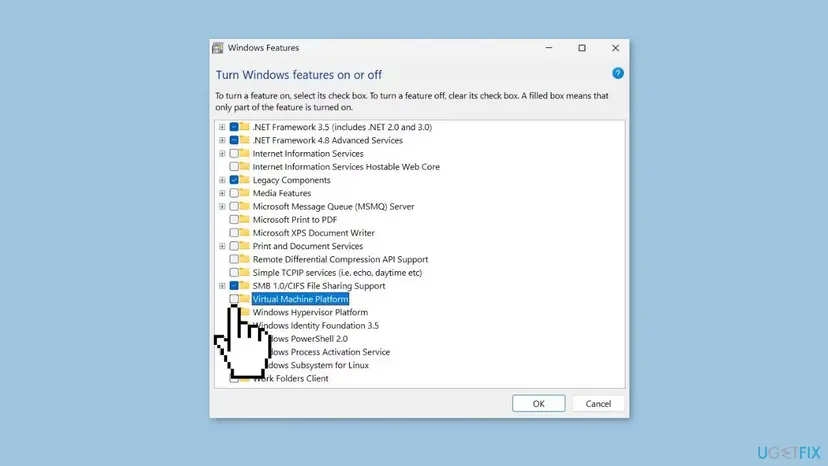
It worked if: The feature shows a filled check box after the restart, and the program that needed it starts.
If not: If the feature does not turn on, see our guide How to fix Turn Windows features on or off is not working. If you really need the .msu, go to Fix 3.
Fix 3. Download the package again from Microsoft and check its signature
5 minutesLow riskThe file came from a site other than Microsoft, the download may have stopped early, or Fix 1 did not help.
0x80096002 says the signer's certificate is invalid or missing. A changed or cut-off file breaks the signature, and a file from an unofficial site may not carry Microsoft's signature at all. PowerShell shows the signature status before you try again.
- Delete the old .msu and download it again from
catalog.update.microsoft.comor from the program's Microsoft download page. - Right-click Start and select Terminal (on Windows 10, Windows PowerShell).
- Run the command below, with the real path and file name of your package.
- Read the Status column: Valid means the signature is fine. Anything else means the file is damaged or not signed by Microsoft.
Get-AuthenticodeSignature "C:\packages\your-update.msu" | Format-List Status, StatusMessage, SignerCertificateDo not look for a way to install a .msu without its signature check. The check is what keeps a fake update off your PC. A file that does not say Valid belongs in the bin.
It worked if: Status reads Valid and the signer is Microsoft. Open the file again.
If not: If the file is valid and still fails with wusa.exe, install it with DISM, Fix 4.
Fix 4. Install the package with DISM instead of the Standalone Installer
10 minutesLow riskThe package matches your Windows and its signature is valid, but wusa.exe still stops with 0x80096002.
The error comes from wusa.exe's scan step, where it reads wsusscan.cab as an update source. DISM adds the package to Windows directly. If the package does not fit, DISM refuses it with a plainer message, which also answers the question.
- Put the .msu in an empty folder, for example
C:\packages. - Type cmd in the search box, right-click Command Prompt and select Run as administrator.
- Run the command below with your file name.
- Wait for The operation completed successfully. and restart when DISM asks.
DISM /Online /Add-Package /PackagePath:C:\packages\your-update.msuIf DISM says the package is not applicable to this computer, the package is not for your Windows, or it is already installed. Go back to Fix 1 or Fix 2.
It worked if: DISM reports The operation completed successfully. and the update shows in Settings > Windows Update > Update history after the restart.
If not: If DISM fails with a trust or certificate error too, reset the update components, Fix 5.
Fix 5. Reset the Windows Update components and the signature catalogs
10 minutesLow riskThe package is right for your Windows, but it and other updates fail.
The Standalone Installer uses the same update services and the catroot2 folder, where Windows keeps the signature catalogs it checks against. Renaming SoftwareDistribution and catroot2 and restarting Cryptographic Services gives the check a clean start.
- Open Command Prompt as administrator. Type cmd in the search box, right-click Command Prompt and select Run as administrator. Select Yes when Windows asks for permission.
- Stop the update services. Type the commands below and press Enter after each one. If Windows says that other services depend on Cryptographic Services, it stops them too. A message that a service is not started is fine.
net stop wuauserv net stop bits net stop cryptsvc - Delete the download queue files. This clears the list of downloads that the Background Intelligent Transfer Service keeps. If Windows says it cannot find the files, continue.
del "%ALLUSERSPROFILE%\Application Data\Microsoft\Network\Downloader\qmgr*.dat" - Rename the update cache folders. Renaming keeps a copy in case you need it; Windows creates new, empty folders when the services start again. If you get Access is denied, a service is still running: repeat the previous step.
ren %systemroot%\SoftwareDistribution SoftwareDistribution.old ren %systemroot%\System32\catroot2 catroot2.old - Start the services again. Type the commands below and press Enter after each one. The requested service has already been started is fine: Windows started it on its own.
net start cryptsvc net start bits net start wuauserv - Restart and check for updates. Restart the PC. Then select Start > Settings > Windows Update > Check for updates. The first check can take longer than usual because everything is downloaded again.
These steps were written for Windows 11 and Windows 10 (the steps are the same). The full page with the other versions and what each result means: Reset Windows Update components
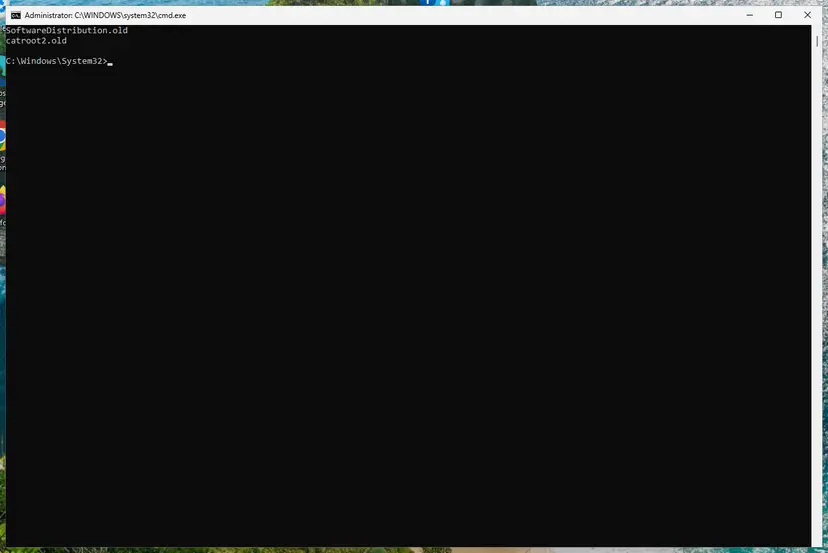
It worked if: After the restart, the .msu opens and asks to install the update.
If not: If the same .msu still fails after the restart, repair the system files with DISM and SFC in Fix 6.
Fix 6. Repair system files with DISM and SFC
20 to 30 minutesLow riskSeveral signed installers fail with trust errors, or Fix 1 to Fix 5 did not help.
In rare cases damaged system files break the trust checks for every package. DISM repairs the component store and SFC then replaces damaged system files with Microsoft's signed copies.
- Open an elevated command window. Right-click Start and select Terminal (Admin), or type cmd in the search box, right-click Command Prompt and select Run as administrator. Select Yes when Windows asks for permission.
- Run DISM first. Type the command below and press Enter. DISM downloads clean copies of damaged components from Windows Update, so it can take several minutes. Wait until it says The operation completed successfully.
DISM.exe /Online /Cleanup-Image /RestoreHealth - Run System File Checker. In the same window, type the command below and press Enter. Do not close the window until the verification reaches 100%.
sfc /scannow - Read the result and restart. Compare the last message with the table below this guide, then restart the PC so that repaired files are loaded.
These steps were written for Windows 11 24H2 and 25H2. The full page with the other versions and what each result means: Run DISM and SFC to repair Windows system files
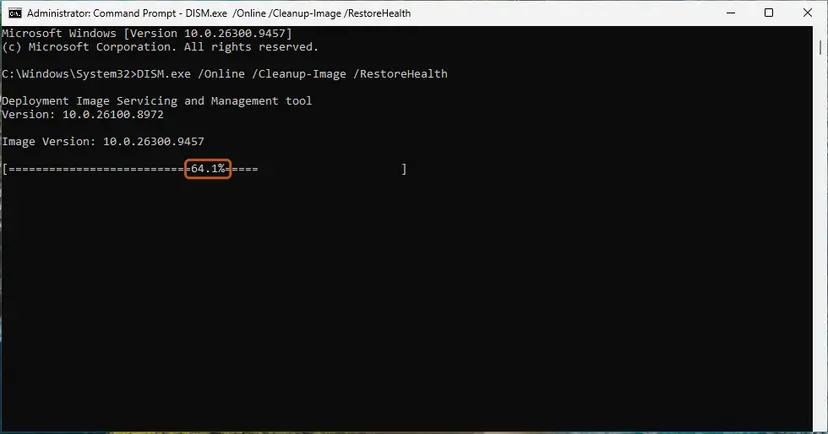
It worked if: SFC reports that it found no integrity violations or that it repaired them. The .msu installs after a restart.
If not: Read the log as shown in "If the error is still there".
If the 0x80096002 error is still there
The Windows Update log shows which package the Standalone Installer was reading when it stopped. That tells you whether the file or Windows is the problem.
- Right-click Start and select Terminal (Admin) (on Windows 10, Windows PowerShell (Admin)).
- Run
Get-WindowsUpdateLog. It writes WindowsUpdate.log to your desktop. - Open the file and search for
80096002. - Read the lines just above it:
ServiceName = Windows Update Standalone InstallerandScanFileLocationshow which package's scan file failed.
- The package is for an older Windows: there is no fix for that package on this PC. Use Fix 2 or a newer version of the program.
- The package is right and every fix failed: reinstall Windows over itself and keep your files and apps: Reinstall Windows without losing files
- Work or school PC: send the code, the package name and the log lines to IT. Company policy can block packages from outside its update server.
- Windows 10: support ended on 14 October 2025. Only PCs in Extended Security Updates still get security updates, so a package for Windows 10 may never be offered again on a PC outside that program.
How to keep error 0x80096002 from coming back
- Check your version with
winverand your processor type before you download a .msu. - Get packages only from the Microsoft Update Catalog or Microsoft's own download pages.
- Use Windows Features for frameworks and add-ons that Windows already includes.
- Do not install packages made for Windows 7 or 8 on Windows 10 or 11.
- Do not import certificates from a download to get a package through.
- Do not use tools that promise to skip the signature check.
Frequently asked questions
What does error 0x80096002 mean?
It means Windows could not find a valid certificate for the signer of a file it was asked to install. Microsoft names the code TRUST_E_NO_SIGNER_CERT and describes it as: the certificate for the signer of the message is invalid or not found. With a .msu file, it comes from the Windows Update Standalone Installer, which stopped before installing anything. Most often the package is for a different Windows version or processor, so the fix is the right package (Fix 1) or the built-in feature (Fix 2).
What is the Windows Update Standalone Installer?
It is the Windows program that installs .msu update packages, wusa.exe in C:\Windows\System32. It starts on its own when you double-click a .msu file you downloaded, for example from the Microsoft Update Catalog. It checks the package first, asks whether you want to install it, and then hands it to the Windows servicing stack. When the first check fails, you see a Windows Update Standalone Installer error window with a code such as 0x80096002.
Why do I get a Windows Update Standalone Installer error when Windows Update works?
Because Windows Update only offers packages that fit your PC, while a .msu you download yourself can be for any Windows. The Standalone Installer checks the package you chose and refuses it when it does not fit or its signer cannot be verified. That is why Windows Update can work fine while one .msu fails. Compare the file name with your Windows version (Fix 1).
Can I install a Windows 7 .msu on Windows 10 or 11?
No. Packages for Windows 7 have names that start with Windows6.1, and the Standalone Installer refuses them on Windows 10 and 11, often with 0x80096002. Many of them installed things that newer Windows already includes, such as .NET Framework 3.5 or Windows Identity Foundation 3.5, which you turn on in Windows Features (Fix 2). For a program that only came as a Windows 7 package, look for a newer version from its maker.
Does compatibility mode fix error 0x80096002?
We do not expect it to. Compatibility mode changes how a program's own .exe runs, but a .msu is opened by wusa.exe, a part of Windows, and the package still fails the same check. If the package is for another Windows, no setting on your PC makes it fit. Get the right package (Fix 1) or use the built-in feature (Fix 2). Compatibility mode can still help an old program after it is installed.
Should I install the certificate from the .msu file to fix it?
No. Importing the certificate does not help, as one user who tried it found: the error stayed, because the package itself was for another Windows. Adding certificates from downloads to your trusted store can also let unsafe software look trusted later. Check the file with Get-AuthenticodeSignature (Fix 3); a genuine Microsoft package shows Valid without any change to your certificates.
Does wuauclt /resetauthorization /detectnow fix 0x80096002?
No. That command told an old Windows Update client to renew its server cookie and check for updates. It has nothing to do with a .msu you open by hand, and on Windows 10 and 11 wuauclt no longer does that job. The check that fails is the package's own scan file. Use Fix 1 to Fix 4 instead, and reset the update components (Fix 5) only when other updates fail too.
Is error 0x80096002 a sign of malware?
Usually not. In most cases it is Windows refusing a package that does not fit, which is a protection doing its job. But if the .msu came from a site other than Microsoft, treat it as suspect: delete it and get the package from the Microsoft Update Catalog. If signed programs from several makers fail with trust errors, run a full scan with Microsoft Defender: How to scan for malware with Microsoft Defender
Is there a solution for this error in other languages?
Yes, the error and the fixes are the same in every language version of Windows. Only the window text is translated; the code 0x80096002 stays the same. Readers who searched in Spanish for a solution can follow the fixes on this page in the same order: first check that the .msu matches your Windows (Fix 1), then use Windows Features for built-in components (Fix 2).
Sources
- Microsoft Learn: COM Error Codes (Security and Setup), Winerror.h (learn.microsoft.com)
- Microsoft Q&A: Installer encountered an error: 0x80096002 (learn.microsoft.com)
- Super User: Bypassing windows update error 0x80096002 (superuser.com)
Did this fix work?
One click, no account. It tells the next reader which guides are worth their time.
Questions and experiences: fix Windows Update Standalone Installer 0x80096002 error
Still broken, or found a fix we did not cover? Ask here: members and our editors answer. Reading is open; writing needs a free account.
…