
How to fix Microsoft Office error code 0x2-0x0 in Windows

Prefer to fix it yourself? The manual steps follow.
- 7methods
- 5 to 45 minutes
- Easy
Applies to Microsoft 365 apps, Office 2024, 2021, 2019 and 2016 (Click-to-Run installs) on Windows 11 and Windows 10
7 methods in this guide
I've been trying to activate my Microsoft Office 365 on my Windows 11 machine, but whenever I enter my product key, I get error code 0x2-0x0 with the message "Sorry, something went wrong". I've already checked my internet connection and signed out and back in, but the error persists, and I cannot use Word or Excel. What is the reason behind this?
Error 0x2-0x0 appears when Word, Excel, Outlook or another Office app cannot start because a file it needs is missing or blocked. Restart the PC first, then repair Office from Installed apps. If the error comes back minutes after a repair, security software is the most likely cause.
0x2-0x0 is a start-up error of Office: the app could not find a file it needs. Restart the PC, then open Installed apps, choose your Microsoft 365 or Office entry, select Modify and run Quick Repair, then Online Repair if needed (Fix 1 and 2). If Office works for a few minutes after the repair and then fails again, check your security software (Fix 4).
| Error | 0x2-0x0 in an Office "Something went wrong" window. The first part, 0x2, is the Windows code for a file that was not found. |
|---|---|
| Where it appears | When you open Word, Excel, Outlook, PowerPoint or another Office app, before the app window appears. Some readers first see it during activation, right after the app starts. |
| Main cause | Damaged or missing Office program files, or security software that removes or blocks them. |
| Fastest fix | Restart the PC, then repair Office from Installed apps with Quick Repair and Online Repair (Fix 1 and 2). |
| Also written as | 0x2-0x0, 0x2 0x0, "0x2" on its own, and the related 0x5-0x0. Searches for "error code 0x0" in Word or Office usually mean the same window. |
| Affects | Microsoft 365 apps and Office 2016 to 2024 installed with Click-to-Run, on Windows 11 and Windows 10. Windows 10 left support on 14 October 2025. |
| Microsoft's status | Not listed as a known bug. Microsoft's page for "Something went wrong" start-up errors gives one order: restart, repair, then uninstall and reinstall. |
| When it is not your PC | In a company, many PCs failing at once points to a security product or a policy, not to each PC. In one case Microsoft's forum records, Cisco AMP Secure Endpoint was the cause. |
| Time to fix | About 5 minutes for a restart and Quick Repair, 20 to 45 minutes for Online Repair or a reinstall. |
Facts checked on 15 October 2026. Steps written for Windows 11 (25H2 and 26H2) and Windows 10 22H2.
What Office error code 0x2-0x0 means
The code has two parts. The first number, 0x2, is the standard Windows system error 2, ERROR_FILE_NOT_FOUND: something Office tried to open was not there. The second part, 0x0, adds no detail. A close relative, 0x5-0x0, uses Windows error 5, access denied, and often shows up on the same PC.
Microsoft groups these codes under one support page: "Something went wrong" error when you try to start a Microsoft 365 app. The page covers Office 2016 to 2024 and Microsoft 365, and it lists the most common solutions first: restart, repair Office, then uninstall and reinstall. Our fixes follow that order and add the checks Microsoft's page leaves out.
| Where you see it | What you see | What it tells you |
|---|---|---|
| Any Office app, the moment you open it | A small window titled Something went wrong. Users report the wording "We couldn't start your program. Please try starting again." followed by "Error code: 0x2-0x0". | Office could not load a file it needs. The app never opens. |
| Outlook fails with 0x2-0x0 while Word or Excel fail with 0x5-0x0 | Two codes on one PC | Files are missing in one place and blocked in another. Security software is a strong suspect (Fix 4). |
| After entering a product key or signing in | Users report "Sorry, something went wrong" with 0x2-0x0 | The app starts the licence check and fails on a missing file. Repair first; activation follows once Office starts. |
The old version of this page treated 0x2-0x0 as an activation error. The sources we read tie it to Office failing to start. A repaired Office then activates by signing in with the account that owns the licence.
Why error 0x2-0x0 appears, from most to least common
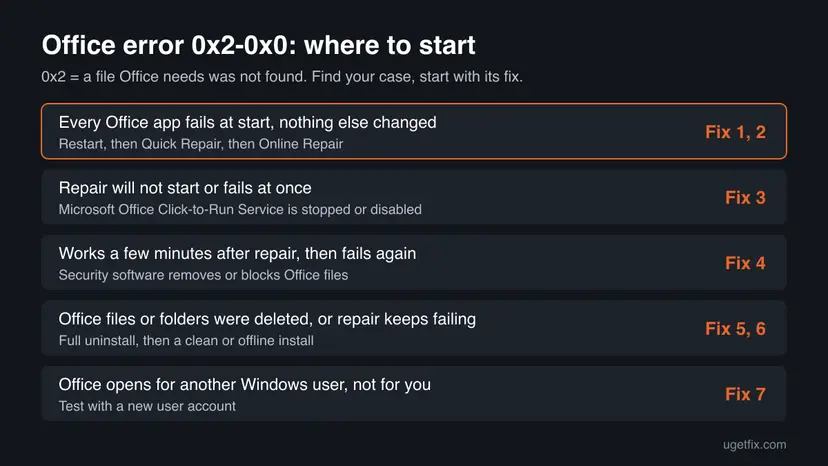
Because 0x2 means a missing file, the question is what removed or hid that file. Find the row that matches what happened on your PC and start with its fix.
| Cause | How often | How to tell | Fix |
|---|---|---|---|
| Office program files are damaged after a failed update, a crash or a forced shutdown. | Most often | Every Office app fails, and nothing else on the PC changed. | Fix 1, Fix 2 |
| The Microsoft Office Click-to-Run Service is stopped or disabled, so Office cannot load its files. | Sometimes | Repair will not start or ends at once, and a cleanup or tuning tool was run recently. | Fix 3 |
| Security software removes or blocks Office files. | Sometimes, often in companies | Office works for a few minutes after a repair or reinstall, then fails again. | Fix 4 |
| Office files or folders were deleted by hand or by a cleaner. | Less often | You or a tool removed folders under Program Files or AppData. | Fix 5, Fix 6 |
| Your Windows user profile has broken Office settings. | Rarely | Office opens normally for another Windows user on the same PC. | Fix 7 |
Users also report the code after a Windows update or after switching Microsoft 365 plans. In both cases the update or plan change itself does not explain a missing file, and a repair is still the first step.
How to fix Microsoft Office error code 0x2-0x0
Fixes 1 and 2 are Microsoft's own order and work for most readers. Fix 3 is for a repair that will not run. Fix 4 is for Office that fails again minutes after a repair. Fixes 5 and 6 replace Office completely, and Fix 7 tests your Windows profile.
| What you see or what happened | Start with |
|---|---|
| Every Office app fails at start with 0x2-0x0. | Fix 1 |
| Quick Repair finished, but the error is still there. | Fix 2 |
| The repair window will not open or stops at once. | Fix 3 |
| Office works for a few minutes after a repair, then fails again, or several PCs fail at once. | Fix 4 |
| You deleted Office folders, or Online Repair fails. | Fix 5 |
| The Office download or reinstall itself fails. | Fix 6 |
| Office starts for another Windows user on the same PC. | Fix 7 |
Fix 1. Restart the PC, then run Quick Repair on Office
5 to 10 minutesLow riskEvery Office app shows 0x2-0x0 at start. This is the first fix for nearly everyone.
Microsoft lists a restart and a repair as the most common solutions for Office start-up errors. Quick Repair checks the installed Office files and replaces the damaged or missing ones, which is exactly what error 0x2 points to.
- Save your work in other programs and restart the PC. Sign in and try the Office app once more.
- Still failing: right-click Start and select Installed apps (Windows 10: Apps and Features).
- Find your Microsoft 365 or Microsoft Office entry, select the three dots next to it and choose Modify.
- Select Yes if Windows asks for permission.
- In How would you like to repair your Office programs?, choose Quick Repair and select Repair.
- When it finishes, open Word or Excel again.
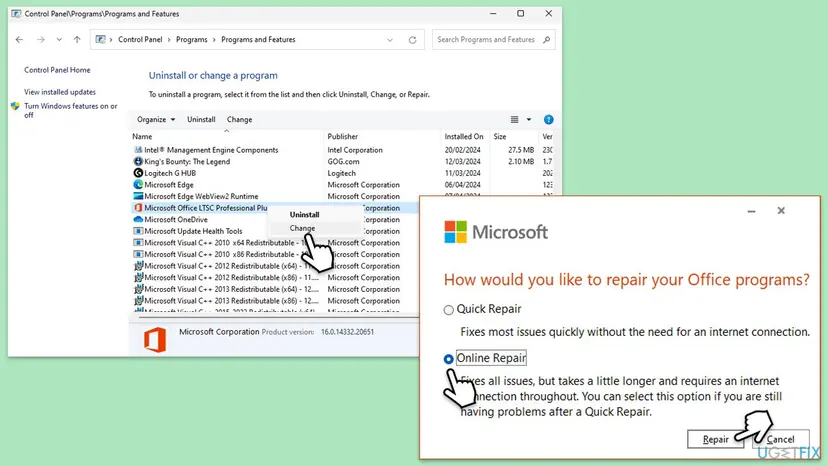
The repair covers the whole Office suite, even if only one app fails. Full steps with both Windows versions: How to repair Microsoft 365 or Office
It worked if: The Office app opens to its start screen without the Something went wrong window.
If not: If the error is still there, run Online Repair: Fix 2. If the repair window will not open, go to Fix 3.
Fix 2. Run Online Repair to replace all Office files
20 to 40 minutesLow riskQuick Repair finished, but 0x2-0x0 still appears.
Quick Repair only replaces files it finds damaged. Online Repair downloads Office again and replaces everything, so it also restores files that are gone. Microsoft recommends it to make sure everything gets fixed.
- Check that the PC is online and close all Office apps.
- Open Installed apps again, select the three dots next to your Office entry and choose Modify.
- Choose Online Repair and select Repair, then confirm.
- Wait until the repair finishes. Do not shut down the PC during the download.
- Restart the PC and open the Office app.
Online Repair works like a reinstall of the program files. Your documents in Documents, Desktop or OneDrive are not touched. After the repair, Office may ask you to sign in again: use the Microsoft account that owns the licence.
It worked if: The Office app opens and, after you sign in, shows your account at the top of the window.
If not: If Online Repair fails or never starts, check the service in Fix 3. If Office starts and then fails again a few minutes later, go to Fix 4.
Fix 3. Make sure the Microsoft Office Click-to-Run Service is running
5 minutesLow riskThe repair window does not open, stops at once, or Office fails right after a cleanup or tuning tool changed your services.
Microsoft 365 and current Office versions run through Click-to-Run. If its service is stopped or set to Disabled, Office cannot load its own files and fails at start. The service name is ClickToRunSvc.
- Press Win + R, type
services.mscand press Enter. - Find Microsoft Office Click-to-Run Service in the list.
- Double-click it. If Startup type is Disabled, set it to Automatic and select Apply.
- If Service status says Stopped, select Start, then OK.
- Open the Office app again. If it still fails, run Fix 1 now that the service runs.
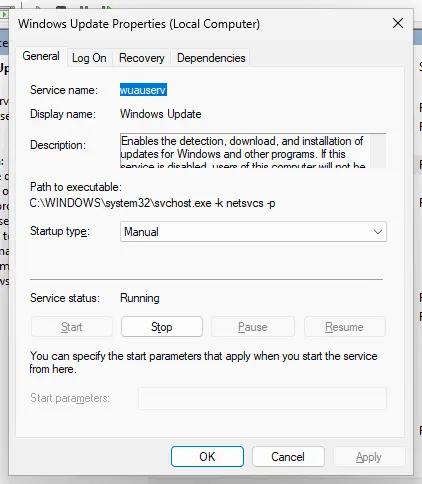
Step by step, with pictures: Check and restart Windows services
It worked if: The service shows Running with startup type Automatic, and Office or its repair window opens.
If not: If the service is missing from the list, Office is only partly installed: go to Fix 5.
Fix 4. Check whether security software removes or blocks Office files
10 to 15 minutesLow riskOffice works for a few minutes after a repair or reinstall and then fails again, or several PCs in a company fail at the same time.
In a case recorded on Microsoft's forum, ten company PCs failed with 0x2-0x0 and 0x5-0x0, and repair and reinstall only helped for minutes. The cause was a conflict with Cisco AMP Secure Endpoint. Security software that quarantines an Office file produces exactly a missing file (0x2) or access denied (0x5).
- Open Windows Security from the Start menu and select Virus & threat protection > Protection history.
- Look for recent entries that name Office files, such as files under
C:\Program Files\Microsoft OfficeorC:\Program Files\Common Files\microsoft shared\ClickToRun. - If you use another security product, open its quarantine or event log and look for the same folders.
- If Office files are listed, restore them only if the product confirms they are signed by Microsoft, then repair Office again (Fix 2).
- On a work PC, send the entries to your IT team. They can add an exclusion for Office in the endpoint product.
Never leave your antivirus off to keep Office working. If you must test, pause it for one start of Office and turn it back on at once: Turn off Microsoft Defender protection for a moment. A product that keeps blocking Office needs an update or an exclusion from its maker or your IT team.
It worked if: Office keeps working after a restart, and no new Office entries appear in the protection history.
If not: If no security product touches Office and it still fails, replace Office completely: Fix 5.
Fix 5. Uninstall Office completely and install it again
30 to 45 minutesLow riskOffice folders were deleted, Online Repair failed, or Fix 3 showed the Click-to-Run service is missing.
Microsoft's next step after a failed repair is a full uninstall and reinstall. Its uninstall troubleshooter removes leftover parts that a normal uninstall keeps, and a half-removed Office is a common source of missing files.
- Find your Office product key or confirm that Office is listed on the Microsoft account that bought it, at account.microsoft.com/services.
- Open aka.ms/SaRA-officeUninstallFromPC in a browser on the same PC.
- Select Open if the browser says This site is trying to open Get Help, then follow the prompts.
- Restart the PC when asked.
- Sign in at microsoft365.com with the account that owns Office and install it again.
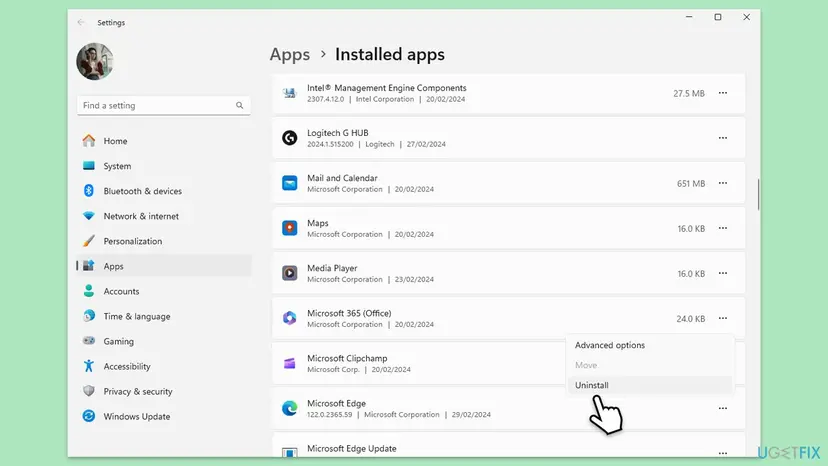
Microsoft notes that the uninstall troubleshooter cannot remove Office 2024 yet. For Office 2024, uninstall it from Installed apps as in the picture, restart, and install it again from your account.
It worked if: Office installs without errors, opens, and activates when you sign in with the account that owns it.
If not: If the download or setup itself fails, use the offline installer: Fix 6.
Fix 6. Install Office with the offline installer
30 to 60 minutesLow riskThe normal Office setup fails, stalls, or the reinstall in Fix 5 does not finish.
Microsoft says the offline installer may help bypass proxy, firewall, antivirus or connection problems during installation. It downloads all files first, so nothing is left missing halfway.
- Sign in at microsoft365.com with the account that owns Office.
- Open the install options and look for the offline installer download for your version.
- Save the file, open it and run Setup from the new drive letter it shows.
- When setup finishes, open Word and sign in with the same account.
Microsoft keeps the exact steps on its page Use the Office offline installer, with a tab for each Office version. Pick the tab that matches your purchase.
It worked if: Setup completes and the Office apps open without 0x2-0x0.
If not: If setup completes but Office still fails for your user only, go to Fix 7.
Fix 7. Test Office in a new Windows user account
10 minutesLow riskOffice still fails after a repair or reinstall, or it opens for another person on the same PC.
A Microsoft forum moderator suggested a new local account for this exact error. Office keeps part of its settings in each user's profile, so a clean account shows whether the problem is in your profile or in Office itself.
- Create a new local user account and sign out of yours: Create a new user account to test a problem
- Sign in to the new account and open Word or Excel.
- If Office opens there, the problem is in your old profile. Move your files to the new account or ask your IT team to rebuild the profile.
- If Office fails in the new account too, the cause is Office or security software: return to Fix 4 or Fix 5.
It worked if: You know whether the error follows your Windows user or the whole PC.
If not: If every account fails and every fix above failed, collect the facts in the next section and contact Microsoft support.
If Office error 0x2-0x0 is still there
When all seven fixes failed, collect these facts before you contact Microsoft support or your IT team. They decide whether the cause is Office, security software or the PC.
| What to check | Where | What it tells you |
|---|---|---|
| Which apps show which code | Open Word, Excel and Outlook one by one | 0x2 means a missing file, 0x5 a blocked one. Both on one PC point to security software. |
| Application errors at the time of the failure | Event Viewer > Windows Logs > Application | Entries from the Office app or from your security product at the same minute name the file or process. |
| Quarantined Office files | Windows Security > Protection history, or your security product's log | Office files listed there are the direct cause. |
| Click-to-Run service state | services.msc | Disabled or missing means Office is only partly installed. |
| Your Office version and channel | The Installed apps entry, or File > Account in an app that opens | Support needs it to compare with known issues. |
If Windows system files are also missing or several programs fail at start, the disk may be failing. Back up your files first, then check the drive: Check a disk for errors (chkdsk).
If Word opens but then says it was unable to start correctly, that is a different message with its own fixes. See our guide to Sorry, something went wrong and Word was unable to start.
How to avoid error 0x2-0x0 next time
The error starts when Office files go missing, so prevention is about not letting anything remove them.
- Let Office updates finish before you shut down the PC.
- Keep your security product up to date and report Office files it quarantines.
- Uninstall Office only from Installed apps or with Microsoft's troubleshooter.
- Keep the Microsoft account that owns Office written down.
- Delete folders under Program Files or AppData by hand to free space.
- Let cleaner or tuning tools disable Microsoft services.
- Leave antivirus protection turned off to keep Office running.
Frequently asked questions
What does error code 0x2-0x0 mean in Microsoft Office?
It means an Office app could not start because a file it needs was not found. The first part, 0x2, is the Windows code for a missing file, and the second part adds no detail. Microsoft treats it as one of the "Something went wrong" start-up errors, and its fix order is a restart, a repair of Office, then an uninstall and reinstall.
What does 0x2 mean on its own?
0x2 is the number 2 written in hexadecimal, the format Windows uses for error codes. As a Windows error, 2 means the system cannot find the file specified. Searches such as "0x2" or "0x2=" often come from programmers checking a hex value, and that is all the code means there. In Office, 0x2-0x0 is that same missing file error shown by the app at start.
Is "An unknown error has occurred. The error code is: 0x0" the same error?
Not quite. That message shows only 0x0, which in Windows means no specific error code was passed on, so the window says nothing about the cause. We could not confirm which Office window uses that exact wording. If it appears when Word, Excel or Office start or activate, the same order still applies: restart, repair Office (Fix 1 and 2), then sign in again with the account that owns the licence.
Why do I get error 0x0 or 0x2-0x0 in Microsoft Word?
Word shares its program files with the rest of Office, so a missing or blocked shared file stops Word with this code. That is why repairing Word repairs the whole Office suite. If only Word fails while Excel and PowerPoint open, run Quick Repair anyway, then check your security product's quarantine for Word files. Searches in other languages, such as the Swedish "felkod 0x0 word", describe the same error.
Is 0x2-0x0 an Office activation error?
It can appear while you activate, as in the reader's question above, but the code itself points to a missing file, not to a refused licence. Activation errors from Microsoft's servers use other codes, such as 0xC004C060 for a key that is no longer valid. Repair Office first. Once the apps start, sign in with the Microsoft account that owns the licence to activate.
Will I lose my documents if I repair or reinstall Office?
No. Quick Repair, Online Repair and a reinstall replace program files only. Documents in Documents, Desktop or OneDrive stay where they are. You may need to sign in again after a reinstall, and some app settings such as the recent files list or custom ribbon changes can be reset. Back up anything important first if you are unsure, and keep your Office account details at hand.
Why does Office work for a few minutes and then show 0x2-0x0 again?
Something on the PC removes or blocks Office files again after the repair. In a case on Microsoft's forum, company PCs failed this way with 0x2-0x0 and 0x5-0x0, and the cause was a conflict with Cisco AMP Secure Endpoint. Check your security product's quarantine and history (Fix 4), and on a work PC ask IT to add an exclusion for Office.
What is the difference between 0x2-0x0 and 0x5-0x0?
Both come from the same start-up check. 0x2 means a file was not found, and 0x5 means access to a file was denied. Seeing both on one PC, for example 0x2-0x0 in Outlook and 0x5-0x0 in Word, suggests that something is removing some files and locking others. Security software is the first thing to check, then a full reinstall.
Does updating Windows fix error 0x2-0x0?
Not directly. Microsoft's own fix list for this kind of start-up error does not include Windows Update, so this page leaves it out as a main fix. Keeping Windows up to date is still good practice. If the error started right after an update, repair Office first, because the update may have been interrupted while Office files were being changed.
Sources
- Microsoft Support: "Something went wrong" error when you try to start a Microsoft 365 app (support.microsoft.com)
- Microsoft Q&A: Error opening Office 0x2-0x0 and 0x5-0x0 (learn.microsoft.com)
Did this fix work?
One click, no account. It tells the next reader which guides are worth their time.
Questions and experiences: fix Microsoft Office error code 0x2-0x0 in Windows
Still broken, or found a fix we did not cover? Ask here: members and our editors answer. Reading is open; writing needs a free account.
…