
How to fix Windows activation error 0xC004C020?

Prefer to fix it yourself? The manual steps follow.
- 7methods
- 5 to 15 minutes with your own licence, longer when an IT team or a seller must answer
- Easy
Applies to Windows 11 and Windows 10 Pro, Education and Enterprise activated with a volume licence key (MAK)
7 methods in this guide
I have clean-installed Windows recently, and now I'm getting activation error 0xC004C020. I purchased a Windows 10 licence from the official store.
Error 0xC004C020 means the key in Windows is a Multiple Activation Key (MAK), a volume key bought by an organisation, and it has been used on more devices than its limit allows. Nothing on your PC is broken. Check which key Windows holds first, then replace it with your own licence or ask the key's owner.
0xC004C020 means Windows is trying to activate with a volume key (MAK) that has reached its activation limit. Open Command Prompt as administrator and run slmgr /dli to see which key is installed (Fix 1). If you bought Windows yourself, replace that key with your own product key or digital licence (Fix 2 and 3). On a work or school PC, only the organisation's IT team can give a new key or more activations (Fix 4).
| Error | 0xC004C020: "The activation server reported that the Multiple Activation Key has exceeded its limit." |
|---|---|
| Where it appears | On the Activation page, Settings > System > Activation (Windows 10: Settings > Update & Security > Activation), or in a Windows Script Host box after slmgr /ato. |
| Main cause | A volume licence key (MAK) used on more devices than the Microsoft Software License Terms allow. |
| Fastest fix | Your own licence: replace the MAK with your product key or digital licence (Fix 2, 3). Work PC: ask your IT team (Fix 4). |
| Also written as | 0xc004c020, c004c020, "error code: 0xC004C020", "Fehlercode 0xC004C020", and the message text about the Multiple Activation Key limit. |
| Affects | Windows 11 and Windows 10 editions that take volume keys, mostly Pro, Education and Enterprise. Windows 10 left support on 14 October 2025, but its activation works the same way. |
| Microsoft's status | Not a bug. Microsoft says a MAK can be activated only a limited number of times by design, and more activations come from the Microsoft Licensing Activation Centers. |
| What does not help | Updates, system file repair, reinstalling Windows with the same key, or waiting. The limit is counted on Microsoft's server. |
| Time to fix | About 5 minutes with your own key. Days when an IT team, a seller or Microsoft must answer. |
Facts checked on 15 October 2026. Steps written for Windows 11 (25H2 and 26H2) and Windows 10 22H2.
What Windows activation error 0xC004C020 means
Microsoft's activation troubleshooting page for IT staff names the error "0xC004C020 The activation server reported that the Multiple Activation Key has exceeded its limit". It adds that a MAK can be activated only a limited number of times, by design. Once that number is used up, the server refuses every new activation with the same key.
Microsoft's page for home users says the same in plain words. The error occurs when a Volume License was used on more devices than the Microsoft Software License Terms allow. A Volume License is one an organisation bought from Microsoft to install Windows on many devices. Its advice is to use a different product key, and to contact your organisation's support person.
| Where you see it | What you see | What it tells you |
|---|---|---|
| Settings > System > Activation (Windows 10: Settings > Update & Security > Activation) | Windows is not activated and the line Error code: 0xC004C020 | The key in Windows is a volume key whose count is used up. |
A Windows Script Host box after slmgr /ato | The activation server reported that the Multiple Activation Key has exceeded its limit. | The same refusal, with Microsoft's full wording. |
| A German or other language Windows | Fehlercode 0xC004C020 or the translated message | The same error. The code is identical in every language. |
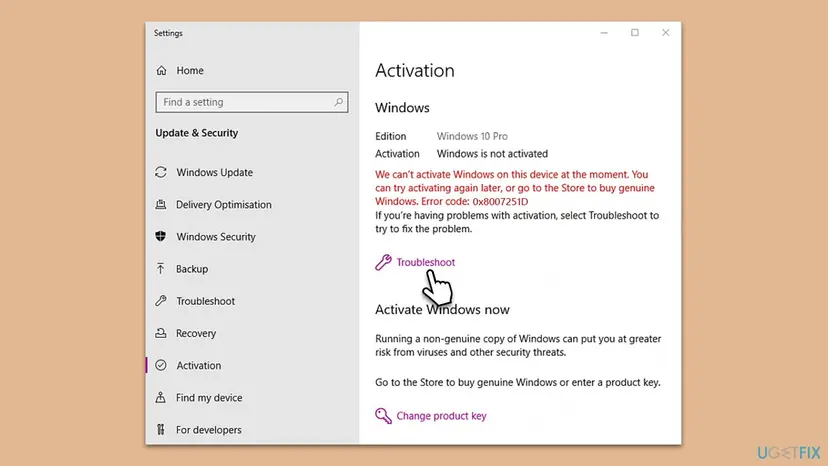
Retail boxes, Microsoft Store purchases and Windows that came with a new PC use retail or OEM licences, not a MAK. If you see 0xC004C020 on your own PC, the key now in Windows is not the one you bought. That is why Fix 1 checks the key first.
Why error 0xC004C020 appears, from most to least common
The code is about the key, not the PC. So the question that decides the fix is how a volume key got into your Windows. Find your row and go to its fix.
| Cause | How often | How to tell | Fix |
|---|---|---|---|
| A key bought on its own from a key site or marketplace that turns out to be a volume key. | Most often on home PCs | You paid far below the shop price, and slmgr /dli shows a VOLUME_MAK channel. | Fix 6 |
| A work, school or second-hand PC that still holds the organisation's MAK, or a company install image used on a home PC. | Often | The PC came from an employer, a school or a refurbisher, or was set up by an IT team. | Fix 4, Fix 2 |
| You own a retail or Store licence, but a volume key was entered during or after a clean install. | Sometimes | You have an order email, a key card or a Microsoft account with the purchase. | Fix 2, Fix 3 |
| The organisation's MAK is simply used up on its own devices. | In companies | Several company PCs show the same code at the same time. | Fix 5 |
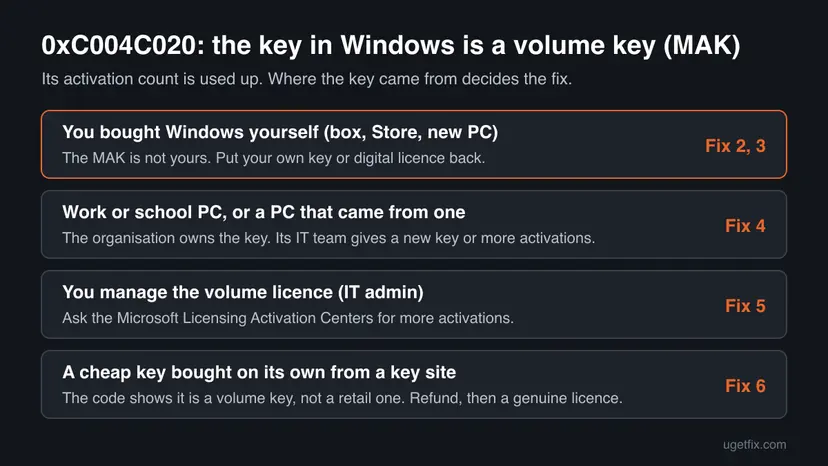
The reader's question above is the third row. A licence bought from Microsoft's store is never a MAK, so a clean install that ends in 0xC004C020 means a volume key was entered instead of that licence. Fix 1 shows it, and Fix 2 or Fix 3 puts the bought licence back.
How to fix Windows activation error 0xC004C020
Fix 1 tells you which kind of key Windows holds, in one command. Fixes 2 and 3 are for people who bought Windows themselves. Fixes 4 and 5 are for work, school and company PCs. Fix 6 is for a key bought on its own, and Fix 7 is for a genuine purchase that still fails. No repair tool or update raises a MAK limit, so they are left out.
| What you see or have | Start with |
|---|---|
| You do not know where the key in Windows came from. | Fix 1 |
| You have your own product key: a box card, a Store email or a COA sticker. | Fix 2 |
| You bought Windows from the Microsoft Store or it was activated before the reinstall, and you have no key to type. | Fix 3 |
| The PC belongs to an employer or school, or came from one. | Fix 4 |
| You are the IT admin and the MAK is used up. | Fix 5 |
| You bought the key alone from a marketplace or key site. | Fix 6 |
| The purchase is genuine and every fix above failed. | Fix 7 |
Fix 1. Check which licence key Windows holds with slmgr /dli
2 minutesNo riskEveryone, before anything else. It takes one minute and tells you which fix is yours.
0xC004C020 is returned only for a Multiple Activation Key, so the licence channel tells you whether Windows really holds a volume key and whose it may be. The last five characters let you compare it with the key you bought.
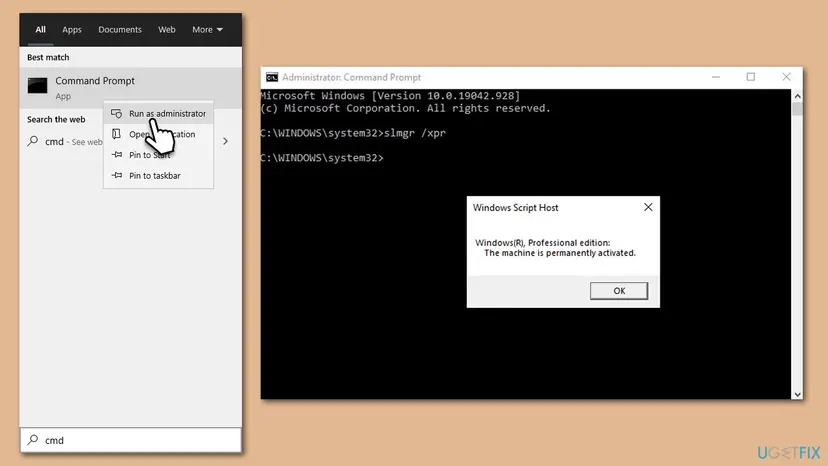
- Open Start, type cmd, right-click Command Prompt and select Run as administrator.
- Select Yes in the User Account Control window.
- Type
slmgr /dliand press Enter. - Wait a few seconds for the Windows Script Host box and read the Description line and the Partial Product Key.
- Select OK to close the box.
| The Description line contains | What it means | Go to |
|---|---|---|
| VOLUME_MAK channel | A Multiple Activation Key is installed. This is the key the error is about. | Fix 2 to 6, by where the key came from |
| RETAIL channel or OEM channel | Your own licence is installed. Read the code on the Activation page again: it may be another error. | Fix 3, then Fix 7 |
| VOLUME_KMSCLIENT channel | The PC expects a company activation server, not a MAK. | Fix 4 |
Write down the five characters after Partial Product Key. If they do not match the end of the key on your order email or box card, the key in Windows is not yours.
It worked if: The Windows Script Host box shows the licence name, its channel and the last five characters of the key.
If not: If slmgr reports an error instead of the box, check that Command Prompt was opened as administrator and run the command again.
Fix 2. Replace the volume key with your own product key
3 to 5 minutesNo riskYou have a genuine key: a retail box card, a Microsoft Store confirmation email, or a COA sticker on a PC that came with Windows.
Microsoft's advice for this code is to use a different product key. A new key overwrites the MAK, and a retail or OEM key is counted against your own licence, not the organisation's used-up limit.
- Open Settings > System > Activation (Windows 10: Settings > Update & Security > Activation).
- Select Change product key. Windows may ask for an administrator password.
- Type the 25-character key and select Next, then Activate.
- Wait for the page to update, then run
slmgr /dliagain: the channel should no longer say VOLUME_MAK.
To do the same from Command Prompt, which gives a clearer message when it fails, run Command Prompt as administrator and use these two commands.
Install your key and activate online
slmgr /ipk XXXXX-XXXXX-XXXXX-XXXXX-XXXXX
slmgr /atoA Home key does not activate Pro, and Microsoft says a key for the Enterprise edition cannot activate Home or Pro. If the volume key came with an Enterprise or Education install, your Home or Pro key will be refused with another code, such as 0xC004F00F or 0xC004F210. Then reinstall the edition you bought.
It worked if: The Activation page says Windows is activated, and slmgr /dli shows RETAIL or OEM.
If not: If you have no key to type because you bought Windows digitally, go to Fix 3. If your own key is refused with another code, look that code up first.
Fix 3. Get your digital licence back with the Activation troubleshooter
5 to 10 minutesNo riskYou bought Windows from the Microsoft Store, upgraded for free, or the PC was activated before the clean install, and you have no key to type.
A digital licence is linked to the PC's hardware and often to your Microsoft account, but Windows uses it only when no other key is installed. While the MAK is in place, Windows keeps trying that key. The troubleshooter looks up the licence for this device.
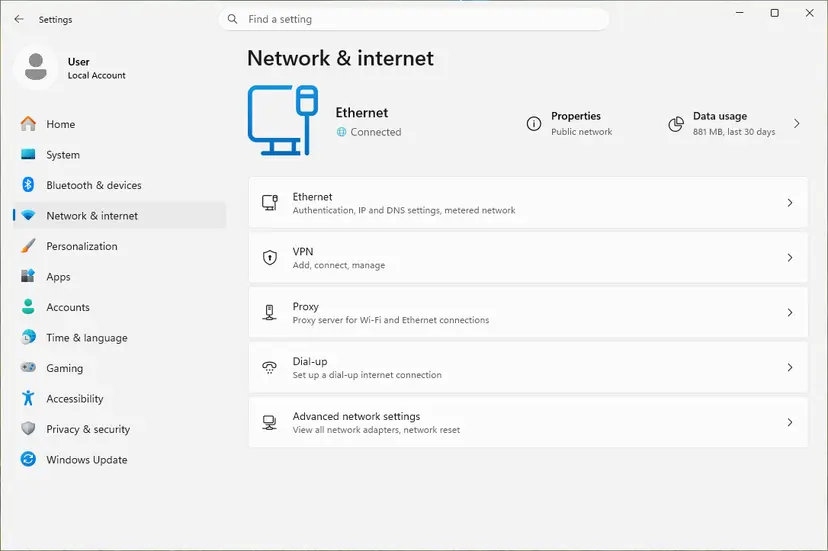
- Check that the PC is online. Activation needs a working connection: How to check your internet connection in Windows
- Open Settings > System > Activation (Windows 10: Settings > Update & Security > Activation).
- Select Troubleshoot and wait for the scan.
- If it offers to sign in, use the Microsoft account you bought Windows with or used on this PC before.
- If the troubleshooter finds the licence, follow its prompt to activate.
Microsoft says a digital licence only activates the edition it was issued for. A Pro licence will not activate an Enterprise install. If the MAK came with an Enterprise or Education image, reinstall Windows from Microsoft's own media and pick the edition you own.
If the motherboard was replaced since the last activation, this is a different problem. Our guide to Windows activation error 0xC004F211 covers moving a licence after a hardware change.
It worked if: The Activation page says Windows is activated with a digital license or linked to your Microsoft account.
If not: If the troubleshooter finds no licence for this device, use the key from your order (Fix 2) or contact Microsoft with the order details (Fix 7).
Fix 4. Work, school or second-hand PC: ask the organisation's IT team
5 minutes, plus the IT team's replyNo riskThe PC belongs to an employer or school, was set up by an IT team, or was bought second-hand from a company or refurbisher.
The MAK belongs to the organisation that bought the volume licence. Microsoft's own advice for 0xC004C020 is to contact your organisation's support person, because only the licence owner can issue another key or ask Microsoft for more activations.
- Run
slmgr /dli(Fix 1) and note the Description line and the Partial Product Key. - Take a screenshot of the Activation page with the code 0xC004C020.
- Send both to your IT team or helpdesk, with the PC name from Settings > System > About.
- Wait for their instructions. They may give you a new key, ask you to connect to the company network, or add activations to the MAK.
If you bought a used PC and it holds a former owner's MAK, that key is not yours to keep using, and the former owner may not answer. Ask the seller or refurbisher for the licence that should come with the PC. If none comes, the PC needs your own licence: Fix 2 or Fix 6.
It worked if: The IT team gives you a working key or adds activations, and the Activation page then says Windows is activated.
If not: If you are the IT admin yourself, go to Fix 5.
Fix 5. IT admin: request more MAK activations from Microsoft
15 minutes, plus Microsoft's replyNo riskYou manage the organisation's volume licence and company PCs report 0xC004C020.
Microsoft's IT troubleshooting page gives exactly this fix: by design a MAK has a limited number of activations, and if you need more you request them from the Microsoft Licensing Activation Centers.
- Collect the MAK's last five characters from
slmgr /dlion an affected PC, and your volume licence agreement details. - Count how many devices really need activation, including PCs that were reinstalled or replaced.
- Open Microsoft's Licensing Activation Centers page, which Microsoft links from its activation error page, and find the contact for your region.
- Request more activations for the MAK and give the agreement details.
- When Microsoft confirms the increase, run
slmgr /atoon each affected PC.
Activate again after the limit is raised
slmgr /atoOn Microsoft's IT page, the related code 0xC004C003 means a MAK is blocked on the activation server. The fix for that one is a new MAK from the same centres, not more activations.
It worked if: slmgr /ato reports that the product activated successfully, and slmgr /dli shows License Status: Licensed.
If not: If Microsoft declines more activations, the PCs need another licence: a new MAK or a different activation method for the organisation.
Fix 6. Ask the seller of a separately bought key for a refund, then get a genuine licence
15 minutes, plus the seller's replyNo riskYou bought the key on its own from a marketplace, an auction or a cheap key website, and Fix 1 shows VOLUME_MAK.
A MAK is meant for an organisation's own devices under its volume licence agreement. A key sold to you on its own that returns this code is a volume key whose limit is used up, and nothing on your PC can raise that limit.
- Take a screenshot of the error with the code 0xC004C020 visible, and of the
slmgr /dliresult showing VOLUME_MAK. - Find your order: the seller's email, the marketplace order page and the key.
- Write to the seller and ask for a refund, quoting Microsoft's meaning: the key is a volume licence used on more devices than allowed.
- If the seller does not answer, open a dispute with the marketplace or payment provider and attach the screenshots.
- Buy a genuine licence: open Settings > System > Activation and select Go to Microsoft Store, or buy a boxed key card from a retailer and enter it with Fix 2.
Sellers often send another key instead of a refund, and a second volume key from the same source can fail the same way. Tools that promise free activation change system files and run with full rights. This page does not link to any of them.
It worked if: The seller refunds the payment, and after a Store purchase the Activation page says Windows is activated.
If not: If no refund comes, the money is a matter for the marketplace or your card provider. The PC still needs a genuine licence from the last step.
Fix 7. Contact Microsoft support with proof of a genuine purchase
15 to 30 minutesNo riskYou bought Windows from Microsoft or an authorised retailer, Fix 1 shows your own key or digital licence should apply, and Fixes 2 and 3 did not activate.
Microsoft's error page sends codes it cannot solve on the page to customer support. Support can look up a purchase and the state of a key, which nothing on the PC can do.
- Collect the proof: the order number or confirmation email, the account used to buy, and a photo of any key card.
- Take a screenshot of the Activation page and of the
slmgr /dliresult. - Check the PC's date, time and time zone before you contact them: How to fix the date and time in Windows
- Open support.microsoft.com/contactus in a browser and choose Windows activation.
- Give support all the facts in one message, including that the error is 0xC004C020 and the channel
slmgr /dlishowed.
It worked if: Support activates the licence you bought, or tells you which key to use.
If not: If support says the key you have is a volume key that is not yours, the seller owes you a refund: Fix 6.
If error 0xC004C020 is still there
When none of the fixes worked, the question is not technical any more. It is whose key is in Windows and whether its owner can add activations. Collect these facts before you ask your IT team, the seller or Microsoft.
| What to check | Where | What it tells you |
|---|---|---|
| Which licence Windows uses | slmgr /dli in Command Prompt as administrator | VOLUME_MAK means the volume key is still installed. RETAIL or OEM means your own key is in place. |
| Full licence details | slmgr /dlv in the same window | More detail on the installed licence, useful for an IT team or support. |
| The installed edition | Settings > System > About | Enterprise or Education on a home PC points to a company install image. |
| Where the key came from | Your order email, box card or the PC's history | A key sold on its own or a former company PC is the case this code describes. |
Updating Windows, running a system file check, the phone activation window or reinstalling with the same key does not change the count on Microsoft's server. These steps from older guides are left out for that reason.
How to avoid error 0xC004C020 next time
On a home PC, the error starts with a volume key that should never have been there. Keep your own licence in Windows and the code does not come back.
- Install Windows from Microsoft's own media and pick the edition your licence is for.
- Link your digital licence to your Microsoft account, so a clean install activates by itself.
- Keep the order email or key card, so you can enter the key again after a reinstall.
- IT admins: track how many devices each MAK has activated, and plan reinstalls against that count.
- Buy a key sold on its own on an auction site, a classified ad or a key website.
- Use a company or school install image on a personal PC.
- Keep using a former employer's key on a PC you bought second-hand.
- Run activator tools that promise free activation.
Frequently asked questions
What does error code 0xC004C020 mean?
It means the activation server refused a Multiple Activation Key because its limit is used up. Microsoft's wording is "The activation server reported that the Multiple Activation Key has exceeded its limit." A MAK is a volume key an organisation buys to activate a set number of devices. Nothing on your PC is damaged, and no repair tool changes the count, which is kept on Microsoft's server.
How do I fix 0xC004C020 on Windows 11?
First run slmgr /dli in Command Prompt as administrator to see the key's channel. If it says VOLUME_MAK and you own a retail or Store licence, replace the key under Settings > System > Activation > Change product key, or run the Activation troubleshooter to restore your digital licence. On a work or school PC, contact the IT team. The steps are Fix 1 to Fix 4 above.
Why do I get 0xC004C020 after a clean install with a licence from the Microsoft Store?
A Microsoft Store licence is a retail digital licence, not a volume key, so it never produces this code itself. After a clean install the error means a volume key was entered, often from a company install image or a key typed in during setup. Run slmgr /dli, then use Change product key with your own key, or the Activation troubleshooter with your Microsoft account. Check that the edition matches the one you bought.
What is a Multiple Activation Key (MAK)?
A MAK is a volume licence key that Microsoft sells to organisations so they can activate Windows on many devices with one key. Microsoft says each MAK can be activated only a limited number of times, by design. Each device activates once with Microsoft's servers, and the count goes down. When it reaches zero, new activations fail with 0xC004C020 until the organisation asks Microsoft for more.
I bought a cheap Windows key online and got 0xC004C020. Is it fake?
It is not a retail key. The code is returned only for a Multiple Activation Key, which is meant for an organisation's own devices under its volume licence. A key sold to you on its own that shows this error is a volume key whose limit is used up. Ask the seller for a refund, as in Fix 6, and buy a licence from the Microsoft Store or a retailer.
Can Microsoft raise the activation limit of a MAK?
Yes, for the organisation that owns the licence. Microsoft's IT troubleshooting page says you can request more activations from the Microsoft Licensing Activation Centers. That request comes from the organisation's licensing contact with its agreement details. A home user who received a MAK from a third party cannot make that request, because the key is not theirs.
Will phone activation with SLUI 4 fix 0xC004C020?
We could not confirm that it does, and Microsoft does not list it for this code. Microsoft recommends phone activation with SLUI 04 for errors where the PC cannot reach the activation servers, such as 0xC004FC03. For 0xC004C020, its advice is a different product key or more activations from the Licensing Activation Centers. Older guides suggested the phone route, so this page no longer does.
Is 0xC004C020 the same as 0xC004C008 or 0xC004C003?
They are related volume licence errors with different meanings. Microsoft says 0xC004C008 appears when a KMS host key has exceeded its activation limit, and 0xC004C003 means the MAK is blocked on the activation server. 0xC004C020 means a MAK has exceeded its own limit. All three point to the key, not the PC, and all three are solved with a new key or more activations.
The message says the product key "has exceeded its unlock limit". Is that this error?
Users also search for that wording, but we could not find it in Microsoft's documentation for 0xC004C020. Microsoft's wording is that the Multiple Activation Key has exceeded its limit. If your message shows the code 0xC004C020, the meaning and fixes on this page apply. If it shows another code, look up that code, because the fix depends on it.
What about "printer not activated error code 20" or "the software licence checkout failed error 20"?
Those are different errors from other software, not Windows activation error 0xC004C020. This page is only about the Windows volume licence code. A printer that is not activated and a software licence checkout failure come from the printer driver or from the licensing system of another program. Search for the exact message together with the program's name, or ask its maker's support.
Sources
- Microsoft Support: Get help with Windows activation errors (support.microsoft.com)
- Microsoft Learn: Troubleshoot Windows activation error codes (learn.microsoft.com)
Did this fix work?
One click, no account. It tells the next reader which guides are worth their time.
Questions and experiences: fix Windows activation error 0xC004C020
Still broken, or found a fix we did not cover? Ask here: members and our editors answer. Reading is open; writing needs a free account.
…