
How to fix Windows Update error 0x8007045b?

Prefer to fix it yourself? The manual steps follow.
- 9methods
- 10 minutes to 2 hours
- Intermediate
Applies to Windows 11 and Windows 10: updates and upgrades that fail with 0x8007045b, services that fail to start with it, System Restore, and Configuration Manager update scans
9 methods in this guide
- What the error means
- Causes, ranked
- The fixes
- 1. Full restart and retry
- 2. Find the real error
- 3. Find who restarts the PC
- 4. Clear the update cache
- 5. Install the update by hand
- 6. Service failed to start
- 7. Restore from Windows RE
- 8. Repair system files
- 9. Repair install
- Still there: read the logs
- Prevent it
- FAQ
Hello. I have an issue with a Windows Update error that displays the 0x8007045b code. I try to install the update, but it fails and I cannot upgrade to Windows 10. It fails on my Windows 8 PC and on my wife's Windows 7 device. I cannot understand the issue here. Help me fix Windows Update error 0x8007045b.
Error 0x8007045b, also shown as 0x8007045b(-2147023781), means that a system shutdown is in progress. Windows was already restarting when the update, a service or System Restore needed it, so Microsoft treats the code as a side effect and says the real error is the one logged before it. Restart properly and retry first, then read CBS.log.
0x8007045b is ERROR_SHUTDOWN_IN_PROGRESS: the install ran into a restart or shutdown that was already under way. Microsoft says the code itself can be ignored. Do a full restart with Start > Power > Restart and retry (Fix 1). If it comes back, find the error logged just before it in CBS.log (Fix 2) and the program that forces the restart (Fix 3).
| Error | 0x8007045b: Win32 error 1115, ERROR_SHUTDOWN_IN_PROGRESS, "A system shutdown is in progress." |
|---|---|
| Where it appears | Settings > Windows Update and Update history, Windows setup during an upgrade, service start errors (BITS, AppXSvc, Windows Firewall), System Restore, and Configuration Manager logs on managed PCs. |
| Main cause | A restart was already running: either Windows restarted itself because the install stopped responding, or a third-party service restarted the PC during the install. |
| Fastest fix | A full restart with Start > Power > Restart, then retry the update (Fix 1). |
| Also written as | 0x8007045B, 8007045b, 0x8007045b(-2147023781), -2147023781 (the same number as a signed decimal), error 1115, 0x45B, hr = 0x8007045b. |
| Affects | Every Windows version from Windows 7 to Windows 11 25H2, and Windows Server. The code is a general Windows error, not one update. |
| Microsoft's status | By design: "not an error but an exception". Microsoft says it can be safely ignored and the error before it should be fixed (article updated 4 September 2026). |
| Where the cause is logged | C:\Windows\Logs\CBS\CBS.log, C:\$Windows.~BT\Sources\Panther\setupact.log, and Event ID 1074 in the System log, which names the process that started the restart. |
| Time to fix | 10 minutes for Fix 1. About 30 minutes to read the logs and stop the program behind the restart. 1 to 2 hours for a repair install. |
Facts checked on 16 October 2026. Steps written for Windows 11 (25H2 and 26H2) and Windows 10 22H2.
What error 0x8007045b (-2147023781) means
0x8007045b is an ordinary Windows system error in the eight digit form that Windows Update and many services print. 0x8007 marks a Win32 error, and 045B is 1115 in decimal. Microsoft names error 1115 ERROR_SHUTDOWN_IN_PROGRESS, with the text "A system shutdown is in progress." The number -2147023781 in brackets is the same value written as a signed decimal.
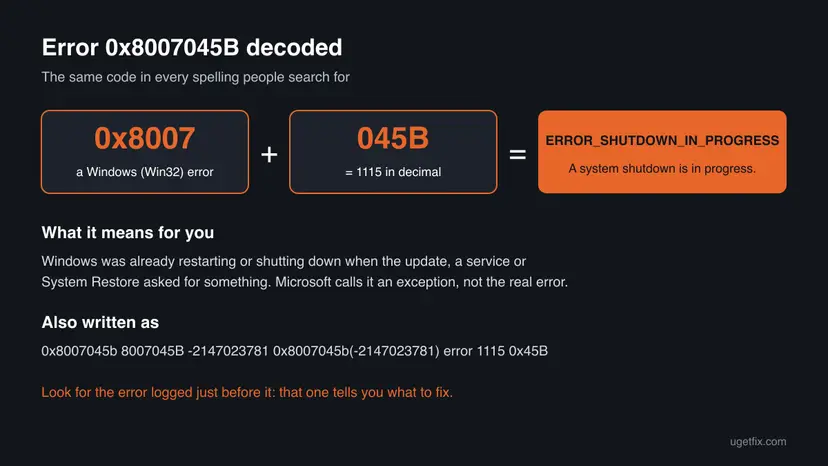
So the code does not say that the update is broken. It says that at the moment Windows tried to install it, start a service or restore files, a shutdown or restart had already begun, and Windows refused new work. Microsoft's own article calls this behavior by design and adds that 0x8007045b "can be safely ignored". The useful question is why the restart started.
| What you see | Where | What it tells you |
|---|---|---|
| The update with Install error - 0x8007045b or 0x8007045b(-2147023781) | Settings > Windows Update and Update history | The install was cut off by a restart. The page does not say why. |
Info CBS Failed restart attempt. [HRESULT = 0x8007045b - ] | C:\Windows\Logs\CBS\CBS.log | The install hung, Windows tried to restart to recover, and the update was usually rolled back. |
Failed to create CBS session 9. hr = 0x8007045B | setupact.log during a version upgrade | Another program restarted the PC in the middle of the upgrade. |
| "The BITS service failed to start. Error 0x8007045b." or "Failed to start system service: AppXSvc with error: 0x8007045b." | Event Viewer or a setup log | A service was asked to start while Windows was shutting down. |
| "An unexpected error occurred during System Restore. (0x8007045b)" | The System Restore result after a restart | A known System Restore issue with encrypted files. Fix 7 covers it. |
Failed to run BeginSearch() on WUAgent. Error = 0x8007045b. | Configuration Manager client logs on a work PC | The update scan ran while the PC was restarting. |
One failure after sleep or a quick power off is a matter of timing, and a full restart clears it. When the same update fails with 0x8007045b every time, something restarts the PC during every attempt, or the install hangs every time. Then the fix is to find that, not to retry.
Why Windows Update error 0x8007045b happens, from most to least likely
Microsoft names two situations behind 0x8007045b during updates and upgrades. The ranking below adds the cases that the page's own searches show, for example services and System Restore. Each cause points to the fix that matches it.
| Cause | How often | How to tell | Fix |
|---|---|---|---|
| A restart or shutdown was still pending when the update started, for example after sleep or a fast shutdown. | Most often | It failed once and you have not done a full restart since. | Fix 1 |
| The install stopped responding for about 15 minutes, so Windows restarted to recover and rolled the update back. | Often | CBS.log shows HangDetect and Failed restart attempt. [HRESULT = 0x8007045b - ]. | Fix 2, then Fix 4 and Fix 5 |
| A third-party service restarted the PC during the update or upgrade. | Sometimes | Event ID 1074 names a program that is not part of Windows. | Fix 3 |
| A service such as BITS or AppXSvc was asked to start during shutdown. | Sometimes | The message names the service and appears near a restart. | Fix 6 |
| System Restore needed the encryption service after it had stopped. | Rarely | System Restore fails with a file under AppData\Local\Packages. | Fix 7 |
| Damaged update cache or system files make the install hang again and again. | Rarely | The same KB fails every time and the earlier error in CBS.log names files. | Fix 4, Fix 8, Fix 9 |
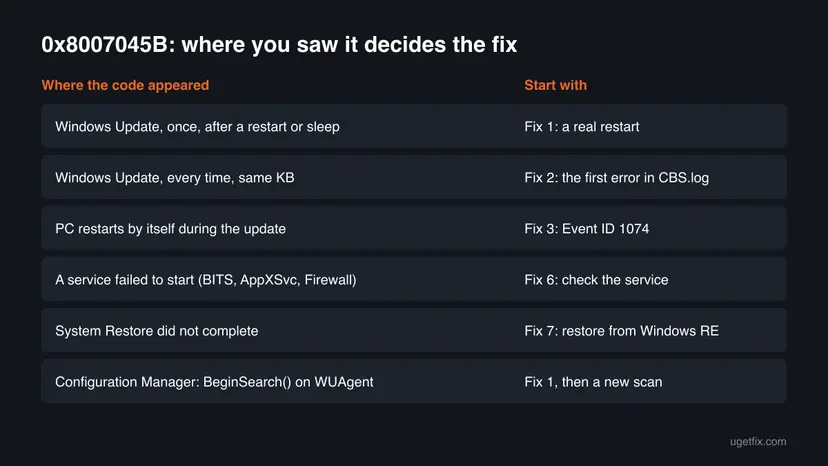
Many pages treat 0x8007045b like any update error and start with the troubleshooter or system file checks. Microsoft's article says the opposite: the code is an exception, and the work is to find what restarted the PC or what made the install hang.
How to fix Windows Update error 0x8007045b
Fix 1 takes ten minutes and changes nothing, so everybody starts there. Fixes 2 and 3 read the logs and tell you which cause is yours. Fixes 4 and 5 get the update installed another way. Fixes 6 and 7 are for the service and System Restore cases. Fixes 8 and 9 repair Windows itself.
| What you see or have | Start with |
|---|---|
| It failed once, or you have not done a full restart since it appeared. | Fix 1 |
| The same update fails with 0x8007045b every time. | Fix 2 |
| The PC restarts by itself during the update or upgrade. | Fix 3 |
| CBS.log shows a hang, or the update downloads again and again. | Fix 4, then Fix 5 |
| A service, such as BITS, AppXSvc or Windows Firewall, failed to start with 0x8007045b. | Fix 6 |
| System Restore did not complete and shows 0x8007045b. | Fix 7 |
| Every fix above failed. | Fix 8, then Fix 9 |
Fix 1. Do a full restart, then retry the update
10 minutesNo riskAlways first, and above all when the error appeared once or right after sleep.
The code means Windows was in the middle of a shutdown. A full Restart finishes that shutdown and any update steps waiting for it, so the next install starts on a PC that is not shutting down.
- Save your work and close open apps.
- Select Start > Power > Restart. Use Restart, not Shut down, because Restart always does a full restart and finishes pending update work.
- Wait until you are signed in again and the desktop has settled for a minute or two.
- Open Settings > Windows Update and select Retry or Check for updates.
- Keep the PC awake while it installs: do not close a laptop lid or let it sleep.
- If it fails again, open Settings > Windows Update > Update history and note the KB number and the date of each failure.
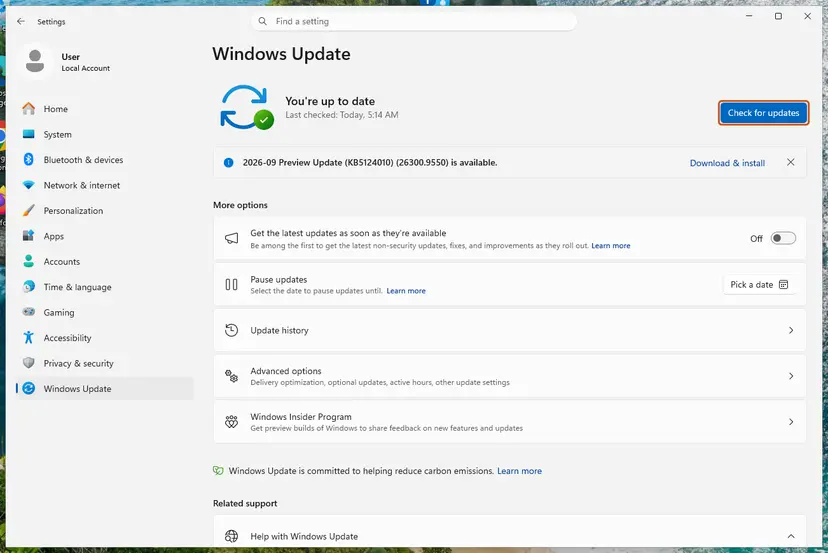
It worked if: The update installs, asks for one more restart, and Windows Update says you are up to date.
If not: If the same update fails again with 0x8007045b, find the real error in CBS.log with Fix 2.
Fix 2. Find the error logged before 0x8007045b in CBS.log or setupact.log
15 minutesNo riskThe same update or upgrade fails every time, and you want to know which of the next fixes is yours.
Microsoft says 0x8007045b can be ignored and the error before it is the one to fix. In a hang, CBS.log shows the hang detection and the failed restart, and Microsoft names 0x800F0920 as the earlier error in that case.
- Right-click Start and select Terminal (Admin). On Windows 10, search for
cmdand select Run as administrator. - Copy CBS.log to the desktop, so that you read a copy while Windows keeps writing the original.
copy %windir%\Logs\CBS\CBS.log %USERPROFILE%\Desktop\CBS-copy.log - List the lines that carry the code and note the time of the last hit.
findstr /i /c:"8007045b" %USERPROFILE%\Desktop\CBS-copy.log - Open
CBS-copy.login Notepad, press Ctrl + F and go to the lines with that time. - Read 30 to 50 lines above it. Look for
HangDetect,0x800f0920and any othererrororHRESULTline. - If the failure was a version upgrade, open
C:\$Windows.~BT\Sources\Panther\setupact.logand search it for0x8007045Bthe same way.
| You find | It means | Go to |
|---|---|---|
Setting HangDetect value and will attempt a restart to recover | The install stopped responding and Windows restarted to recover. | Fix 4, then Fix 5 |
Failed to create CBS session 9. hr = 0x8007045B in setupact.log | Something restarted the PC during the upgrade. | Fix 3 |
| Another error code with a file path | That earlier error is the real problem. Search for that code. | Fix 8 |
| Nothing but 0x8007045b | The log was rolled over or the timing was the cause. | Fix 1 once more, then Fix 3 |
CBS.log grows with every update, and older parts move into compressed files in the same folder. Copy it right after a failure, so the lines you need are still in the main file.
It worked if: You have the error that came before 0x8007045b, or you see the hang lines, and you know which fix to try.
If not: If the log shows nothing clear, check who restarted the PC in Fix 3.
Fix 3. Find the program that restarts the PC with Event ID 1074 and stop it
20 minutesLow riskThe PC restarts by itself during the update or upgrade, or setupact.log shows the CBS session error.
Microsoft's second cause is a third-party service that restarts the PC during the upgrade. Windows writes every requested restart as Event ID 1074 with the name of the process that asked for it.
- Press Win + R, type
eventvwr.mscand press Enter. - Open Windows Logs > System.
- Select Filter Current Log on the right, type
1074in the event ID box and select OK. - Open the events from the time of the failed update. Each one starts with "The process", then the program's path, then "has initiated the restart of computer".
- Note any path that is not Windows itself, for example a management agent, a backup tool or a vendor update tool.
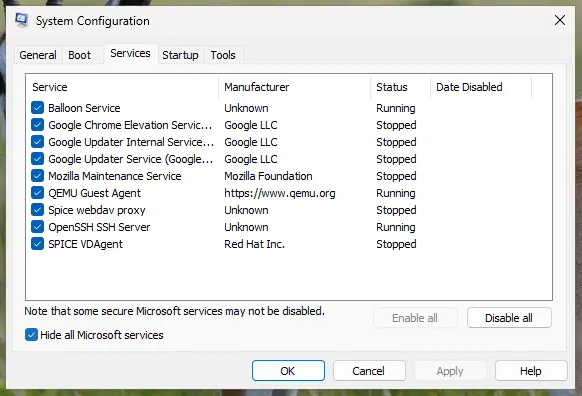
In Microsoft's example the restart came from mgmtagnt.exe, a third-party management agent. Microsoft's advice is to stop or disable that service until the upgrade is done. On a home PC the simplest way to do that for one attempt is a clean boot: How to perform a clean boot in Windows.
- Open System Configuration. Select Search on the taskbar, type msconfig and select System Configuration from the results.
- Hide Microsoft services. On the Services tab, select the Hide all Microsoft services check box. Only services from other companies stay in the list.
- Disable the remaining services. Select Disable all, then select Apply.
- Open Task Manager. On the Startup tab of System Configuration, select Open Task Manager.
- Disable the startup apps. On the Startup apps tab in Task Manager, select each item whose status is Enabled and select Disable. Write down or take a screenshot of the items you disable: you need the list to turn them back on.
- Confirm the changes. Close Task Manager. On the Startup tab of System Configuration, select OK.
- Restart and test. Restart the PC. Windows now starts in a clean boot environment: try again the thing that failed (run the app, install the update, uninstall the program).
These steps were written for Windows 11 25H2 and 26H2. The full page with the other versions and what each result means: How to perform a clean boot in Windows
- Retry the update while the PC is in clean boot.
- When it installs, undo the clean boot and select Enable all.
- Update the program that forced the restart, or ask its maker how to delay restarts during Windows updates.
- On a work PC, send the Event ID 1074 text to your IT team. Do not stop a company agent yourself.
It worked if: The update or upgrade finishes without a forced restart, and no new Event ID 1074 from a third-party program appears at that time.
If not: If only Windows itself appears in the 1074 events, the install is hanging instead. Go to Fix 4.
Fix 4. Reset Windows Update components and clear the update cache
10 minutesLow riskCBS.log shows a hang, or the same update downloads and fails again and again.
When an install keeps hanging until Windows restarts, a damaged download in the update cache is one reason it never finishes. Renaming SoftwareDistribution and catroot2 with the services stopped makes Windows fetch fresh copies.
- Open Command Prompt as administrator. Type cmd in the search box, right-click Command Prompt and select Run as administrator. Select Yes when Windows asks for permission.
- Stop the update services. Type the commands below and press Enter after each one. If Windows says that other services depend on Cryptographic Services, it stops them too. A message that a service is not started is fine.
net stop wuauserv
net stop bits
net stop cryptsvc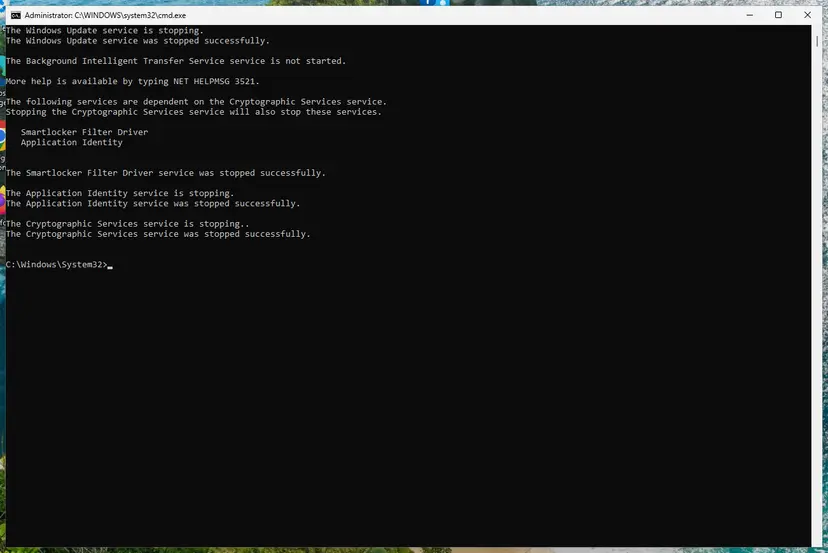
The update services are stopped. Screenshot: Windows 11 26H2. - Delete the download queue files. This clears the list of downloads that the Background Intelligent Transfer Service keeps. If Windows says it cannot find the files, continue.
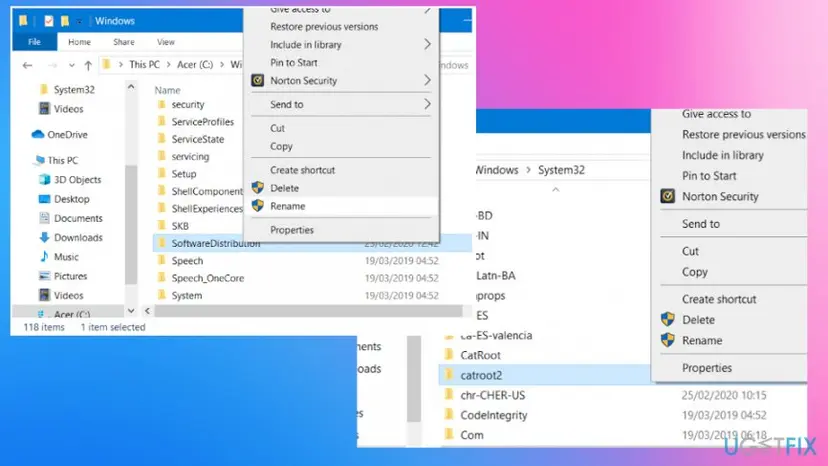
del "%ALLUSERSPROFILE%\Application Data\Microsoft\Network\Downloader\qmgr*.dat" - Rename the update cache folders. Renaming keeps a copy in case you need it; Windows creates new, empty folders when the services start again. If you get Access is denied, a service is still running: repeat the previous step.
ren %systemroot%\SoftwareDistribution SoftwareDistribution.old
ren %systemroot%\System32\catroot2 catroot2.old
Both folders now end in .old. Screenshot: Windows 11 26H2. - Start the services again. Type the commands below and press Enter after each one. The requested service has already been started is fine: Windows started it on its own.
net start cryptsvc
net start bits
net start wuauserv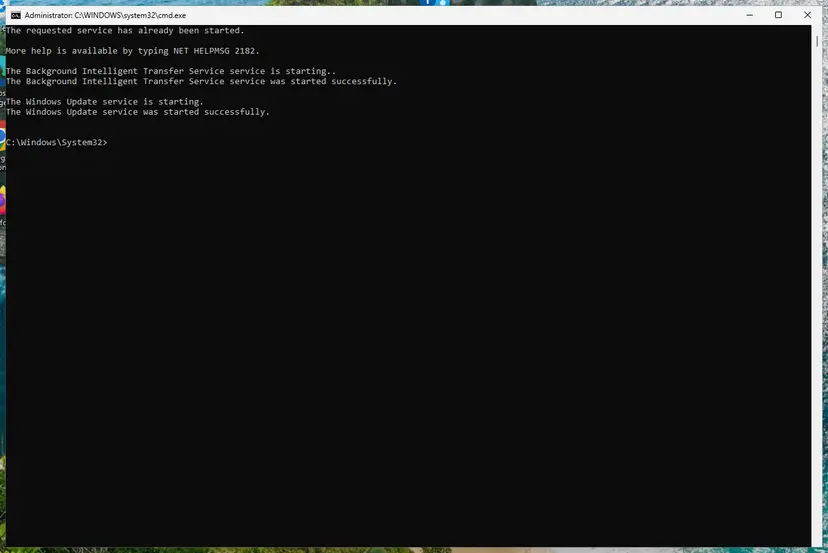
BITS and Windows Update are running again. Screenshot: Windows 11 26H2. - Restart and check for updates. Restart the PC. Then select Start > Settings > Windows Update > Check for updates. The first check can take longer than usual because everything is downloaded again.
These steps were written for Windows 11 and Windows 10 (the steps are the same). The full page with the other versions and what each result means: Reset Windows Update components
It worked if: The services start again, Windows Update downloads the update from the start, and it installs.
If not: If it fails again with 0x8007045b, install the update by hand in Fix 5.
Fix 5. Install the update by hand from the Microsoft Update Catalog
15 minutesLow riskOne cumulative or security update keeps failing, for example the KB that Update history shows.
The catalog file installs without the Windows Update download and scan, so it skips the part that keeps restarting or hanging. If it fails with the same code, the problem is in the servicing stack, which Fix 8 repairs.
- Check your Windows version. Press Windows key + R, type winver and press Enter. Note the version (for example 25H2) and the OS build.
- Find the KB number. Open Settings > Windows Update. A failed or pending update is listed with its KB number; earlier ones are under Update history.
- Check the processor type. Open Settings > System > About and look at System type: an x64-based PC needs the x64 file, an ARM-based PC (for example Snapdragon) needs the arm64 file.
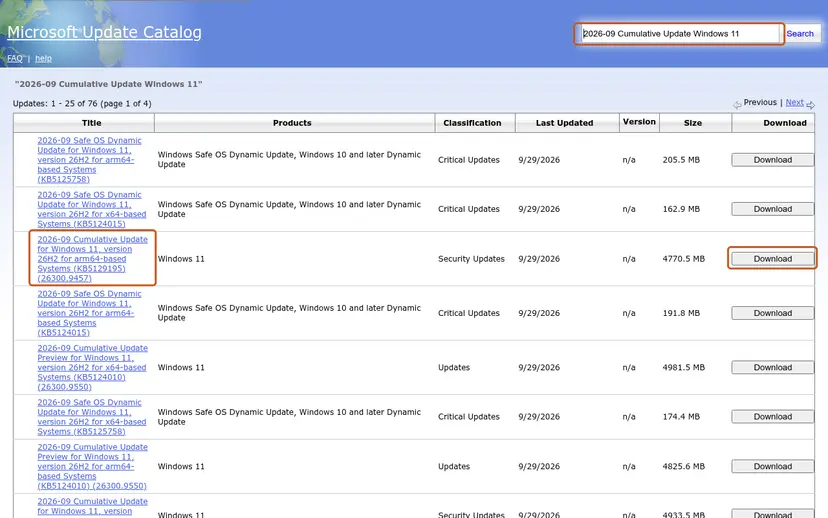
- Search the catalog. Open the Microsoft Update Catalog at catalog.update.microsoft.com in your browser, type the KB number (for example KB5124010) in the search box and press Enter.
- Pick the right row. Find the row whose title names your Windows version and your processor type (x64-based or arm64-based) and select Download on that row.
- Download every file listed. A window lists one or more .msu links. Download all of them into one empty folder, for example C:\packages. On Windows 11 24H2 and later the list can include earlier checkpoint updates that the new one needs.
- Install a single file. If there is only one file, double-click it and confirm the installation in the Windows Update Standalone Installer.
- Install several files with DISM. If there are several files, open an elevated Terminal or Command Prompt and run DISM with the newest file. DISM finds the other files in the same folder and installs them in the right order.
DISM /Online /Add-Package /PackagePath:C:\packages\<newest-file>.msu - Restart. Restart the PC when the installation finishes, then run winver again: the OS build should have changed.
These steps were written for Windows 11 24H2 and later; Windows 10 22H2. The full page with the other versions and what each result means: Install an update from the Microsoft Update Catalog
It worked if: The installer finishes, asks for a restart, and Update history shows the update as installed.
If not: If the installer stops or the PC restarts during it, go back to Fix 3, then try Fix 8.
Fix 6. Start the service that failed with 0x8007045b again after a full restart
5 minutesNo riskA message says a service such as BITS, AppXSvc or Windows Firewall failed to start with 0x8007045b.
Windows refuses to start a service once shutdown has begun, and it logs this code. After a full restart the same service usually starts on its own, which shows the message was about timing.
- Note the service name in the message, for example Background Intelligent Transfer Service (BITS) or AppX Deployment Service (AppXSvc).
- Do a full restart with Start > Power > Restart.
- Open Services and find the service: Check and restart Windows services.
- Check that its Status is Running, or that its Startup Type is the one Windows uses (BITS and AppXSvc start when needed).
- If it is stopped and should run, right-click it and select Start.
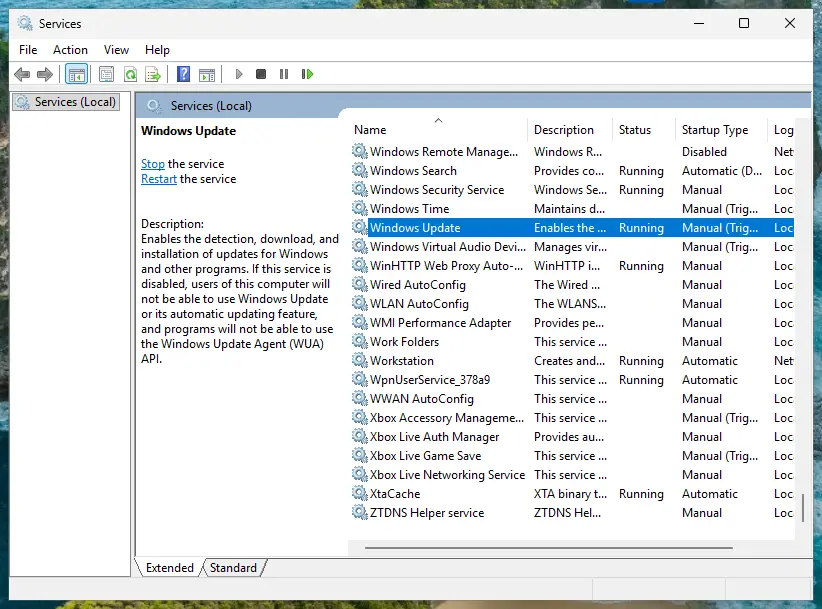
A service that something tries to start while the PC is shutting down will log this code each time. If nothing else is wrong, the message is harmless. If the service does not work after a restart either, the cause is a different error: read the event just before it.
It worked if: The service is running after the restart and the feature that needs it, such as updates or the Microsoft Store, works again.
If not: If the service will not start after a full restart, repair system files in Fix 8.
Fix 7. Run System Restore from Windows RE when it fails with 0x8007045b
30 minutesRead the warningSystem Restore says "An unexpected error occurred during System Restore. (0x8007045b)".
Microsoft describes this as a known System Restore issue. Restore points can hold files encrypted with EFS, and the restore runs during shutdown after the EFS service has stopped. In Windows RE that service keeps running, so the restore can read those files.
System Restore removes apps, drivers and updates installed after the restore point. Your documents stay, but back up anything important first: Back up your files (Windows Backup, File History, Time Machine).
- Right-click Start and select Terminal (Admin).
- Tell Windows to start the recovery environment at the next restart.
reagentc /boottore - If it says Windows RE is disabled, run
reagentc /enableand then the command above again. - Restart the PC. It starts in Windows RE.
- Select Troubleshoot > Advanced options > System Restore and follow the prompts to pick the restore point.
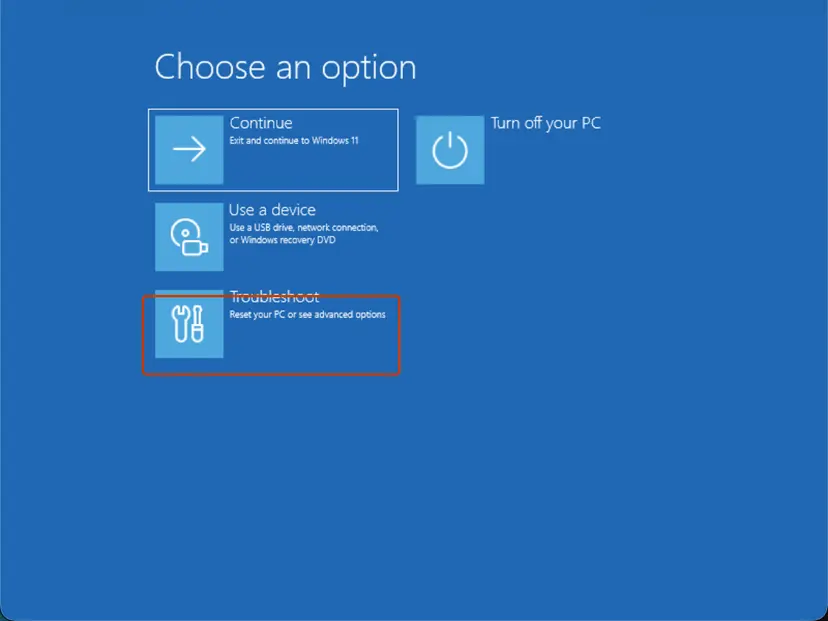
It worked if: System Restore finishes, Windows starts, and a message says the restore completed.
If not: If the restore fails in Windows RE too, try an older restore point, or use Fix 9 instead of a restore.
Fix 8. Repair system files and the component store with DISM and SFC
30 minutesLow riskThe error before 0x8007045b names system files, or the install hangs every time.
An install that hangs until Windows restarts can be stuck on a damaged file in the component store. DISM repairs the store, then SFC repairs the system files built from it.
- Open an elevated command window. Right-click Start and select Terminal (Admin), or type cmd in the search box, right-click Command Prompt and select Run as administrator. Select Yes when Windows asks for permission.
- Run DISM first. Type the command below and press Enter. DISM downloads clean copies of damaged components from Windows Update, so it can take several minutes. Wait until it says The operation completed successfully.
DISM.exe /Online /Cleanup-Image /RestoreHealth - Run System File Checker. In the same window, type the command below and press Enter. Do not close the window until the verification reaches 100%.
sfc /scannow - Read the result and restart. Compare the last message with the table below this guide, then restart the PC so that repaired files are loaded.
These steps were written for Windows 11 24H2 and 25H2. The full page with the other versions and what each result means: Run DISM and SFC to repair Windows system files
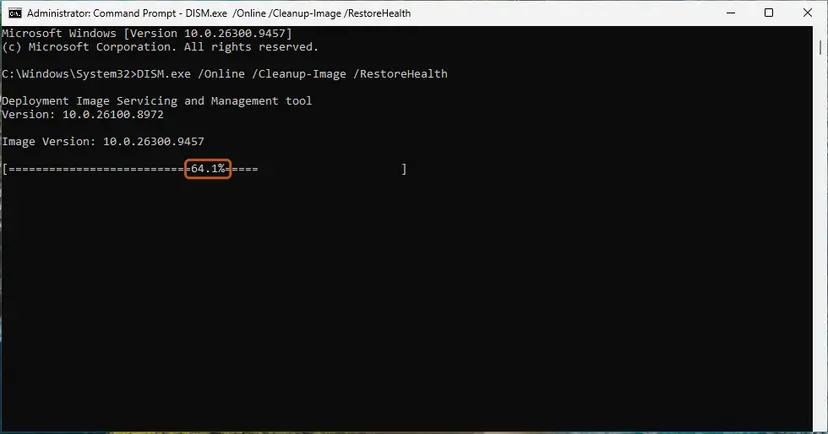
It worked if: DISM says the restore operation completed, SFC finds no integrity violations or repairs them, and the update installs after a restart.
If not: If the update still fails with 0x8007045b, use the repair install in Fix 9.
Fix 9. Repair Windows with an in-place reinstall that keeps your files and apps
1 to 2 hoursRead the warningEvery fix above failed, or you need a version upgrade that keeps failing.
A repair install replaces every Windows file and the servicing stack at once and brings the PC to the current build. It also stands in for the old Fresh Start option, without removing your apps.
The repair keeps your files and apps when you choose to keep them, but a power cut or a forced restart during it can still go wrong. Back up your documents, plug a laptop in and finish Fix 3 first if a program restarts the PC.
- Open Recovery in Settings. Open Settings > System > Recovery. Next to Fix problems using Windows Update, select Reinstall now. This keeps your apps, files and settings.
- Start the reinstall. Choose whether the PC may restart on its own 15 minutes after the installation, then select OK.
- Wait and restart. Windows Update downloads and installs a repair copy of your current Windows version. Keep the PC plugged in and online, and restart it when asked.
- If that did not help: Reset PC. Back in Settings > System > Recovery, next to Reset this PC, select Reset PC. This keeps your personal files but removes installed apps and settings.
- Choose Keep my files. Select Keep my files. Do not select Remove everything.
- Choose where Windows comes from. Select Cloud download to download a fresh copy of Windows, or Local reinstall to use the files already on the PC (faster, but may not include the latest updates).
- Reset. Review the summary and select Reset. The PC restarts several times.
These steps were written for Windows 11 22H2 and later. The full page with the other versions and what each result means: Reinstall Windows without losing files
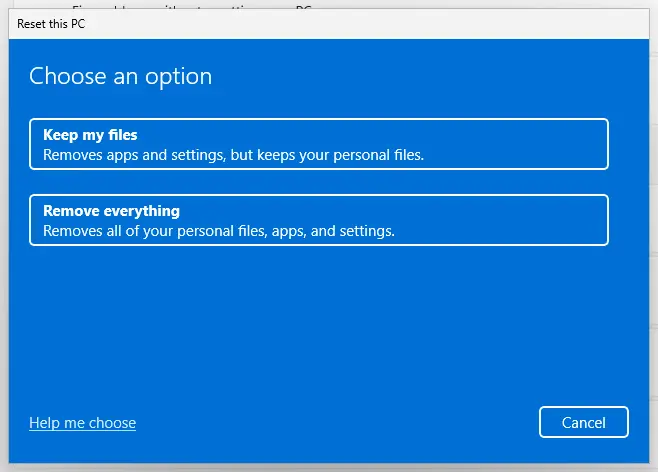
It worked if: Windows starts on the current build, your files and apps are there, and Windows Update installs the next update.
If not: If the repair install fails too, read setupact.log as in the next section and ask for help with the lines you find.
If 0x8007045b is still there: the logs to read and what to send
Each failure leaves three traces: the hang or the earlier error in CBS.log, the restart request in the System log, and for upgrades the setup log. Collect them right after a failure.
| Log | Where | What to look for |
|---|---|---|
| CBS.log | %windir%\Logs\CBS | HangDetect, Failed restart attempt, 0x8007045b and the error just before it |
| System log | Event Viewer, Windows Logs > System | Event ID 1074, the process that requested the restart |
| setupact.log | C:\$Windows.~BT\Sources\Panther | Failed to create CBS session 9. hr = 0x8007045B |
| Rollback event logs | C:\$WINDOWS.~BT\Sources\Rollback\evtlogs | The restart event saved when an upgrade rolled back |
- What to send to support or to Microsoft Q&A: the KB number or upgrade version, the dates from Update history, the lines before 0x8007045b in CBS.log, and the process named in Event ID 1074.
- For administrators: when the install hangs, Microsoft's fix is a longer TrustedInstaller time-out, described in its article "Windows Update hangs and new updates are uninstalled after a restart". Change it only by that article.
- On a work PC: a management agent that restarts PCs belongs to your IT team. Send them the 1074 event instead of stopping it.
- A similar code after the restart: if the update installs and then rolls back with 0x80070302, see our guide to error 0x80070302.
How to keep error 0x8007045b from coming back
The code returns whenever an install and a restart meet. A few habits keep updates from running into a shutdown.
- Restart the PC with Start > Power > Restart at least once a week, and always after Windows asks you to.
- Let updates finish before you close a laptop lid, and keep it plugged in during big updates.
- Set restarts of backup, management and vendor update tools to times outside your Windows Update active hours.
- Keep one security program and keep it updated, so that no second tool restarts or blocks the PC during an install.
- Windows 10 left support on 14 October 2025. A Windows 10 PC without Extended Security Updates gets no new monthly updates, so plan the move to Windows 11.
Frequently asked questions
What does error 0x8007045b mean?
It means "A system shutdown is in progress." The code is Win32 error 1115, ERROR_SHUTDOWN_IN_PROGRESS, in the form Windows Update uses. Windows was already shutting down or restarting when an update, a service or System Restore needed it, so it refused the work. Microsoft calls it an exception rather than a real error and says it can be safely ignored. What you fix is the reason for the restart, which CBS.log and Event ID 1074 show.
What is 0x8007045b(-2147023781)?
It is the same error written twice. Windows Update shows the code in hexadecimal, 0x8007045b, and in brackets the same number as a signed decimal, -2147023781. Both mean ERROR_SHUTDOWN_IN_PROGRESS, "A system shutdown is in progress." Searching for either spelling leads to the same fixes: a full restart first, then the error logged before it in CBS.log, then the program that restarts the PC.
Can I ignore error 0x8007045b?
You can ignore the code, but not the failed update. Microsoft writes that 0x8007045b can be safely ignored and that the focus should be on the error before it, in the hang case 0x800F0920. If the update installs after a full restart, there is nothing more to do. If it fails again, the earlier error in CBS.log is what you fix, and that is what Fix 2 finds.
Is 0x8007045b different on Windows 11?
No. The code means the same on Windows 11, Windows 10 and Windows Server, and it is not tied to one update. Users have reported it on Windows 11 24H2 with monthly cumulative updates, such as KB5062553. The fixes on this page are written for Windows 11 25H2 and 26H2 and Windows 10 22H2. Where a menu differs, the steps give both paths.
What does "Failed to run BeginSearch() on WUAgent. Error = 0x8007045b" mean in SCCM?
On a PC managed by Configuration Manager, the client asked Windows Update to scan for updates while the PC was shutting down or restarting. Admins on forums report it right after the restart that follows an update install, with the update then shown as failed. Let the PC finish its restart and run the next software update scan. If it repeats, check Event ID 1074 for the process that restarts the PC.
Why does the BITS or AppXSvc service fail to start with 0x8007045b?
Because something asked the service to start after Windows had begun to shut down, and Windows refuses new services at that point. Messages such as "The BITS service failed to start. Error 0x8007045b." usually appear near a restart in the log. After a full restart, check the service in Services, as Fix 6 shows. If it runs and updates work, the message was harmless timing.
How do I fix System Restore error 0x8007045b?
Run System Restore from Windows RE instead of from Windows. Microsoft describes a known issue: restore points can hold files encrypted with EFS, and System Restore extracts them during shutdown, after the EFS service has stopped. In Windows RE the service keeps running. Run reagentc /boottore as administrator, restart, then select Troubleshoot, Advanced options and System Restore. Fix 7 has every step.
Does Fresh Start fix error 0x8007045b?
Older guides suggested Fresh Start from Windows Security, but it removed most of your apps and is not how current Windows is repaired. A repair install with the Windows 11 or Windows 10 installation media keeps your files and apps, replaces every Windows file and brings the PC to the current build. Use it only after the faster fixes, and back up first. Fix 9 links to the steps.
Is 0x80070456 the same error as 0x8007045b?
No. Codes that start with 0x8007 share the prefix but mean different Win32 errors, and the last four digits decide which. 0x8007045b is error 1115, a shutdown in progress. This page covers only that code. Search for the exact code you see, because the fixes for other codes are different. The same goes for searches in other languages, such as aktualizacja: this page is about update error 0x8007045b.
Sources
Did this fix work?
One click, no account. It tells the next reader which guides are worth their time.
Questions and experiences: fix Windows Update error 0x8007045b
Still broken, or found a fix we did not cover? Ask here: members and our editors answer. Reading is open; writing needs a free account.
…