
How to fix "You'll need a new app to open this windowsdefender" error in Windows?

Prefer to fix it yourself? The manual steps follow.
2 methods in this guide
Hello. When I try opening the Windows Defender app I receive this message - "You'll need a new app to open this windowsdefender." How can I fix this?
Windows Defender is an important part of the operating system. It protects users against Trojans, ransomware, and other types of malware infections. Windows users can feel safer with this built-in application when it comes to cybersecurity threats. Besides the virus detection, it has a lot of other functions, like:
- Real-time threat detection
- Firewall & network protection
- Protection against phishing sites
- System performance reports
- Hardware security
- Parental controls
Windows Defender covers a lot of aspects from Internet safety to hardware. Parents can also use it to limit their children's activities while they are using the machine. It is considered to be a fairly good option for everyday users that want to protect their privacy and security. Nowadays, cyber threats are constantly on the rise, and it is great that Windows users can ensure their device's security for free.
However, some people have been experiencing issues with the app. More specifically, certain users receive a message "You'll need a new app to open this windowsdefender" when they try to open the security app. This has left many people feeling uneasy and unprotected. It is unknown what exactly causes this prompt to show up but users found that executing certain Powershell commands has helped.
This powerful software helps to maintain a healthy system and keep it running smoothly. Otherwise, if you are ready to begin the guide that could help you fix the "You'll need a new app to open this windowsdefender" error, follow the steps below very carefully.
Method 1. Run a Powershell Command
- Open and Run Windows PowerShell as Administrator
- Copy and paste the command below and press Enter
Get-AppxPackage Microsoft.SecHealthUI -AllUsers | Reset-AppxPackage
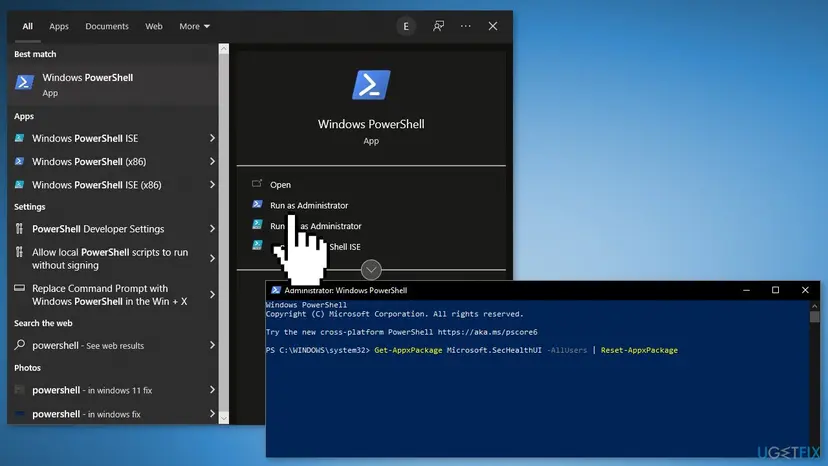
- Restart your computer and check if the issue persists
- If that did not work, open PowerShell as Administrator again and run this command:
Windows 11: Get-AppXPackage -AllUsers | Foreach {Add-AppxPackage -DisableDevelopmentMode -Register "$($_.InstallLocation)\\AppXManifest.xml"}
Windows 10: Add-AppxPackage -Register -DisableDevelopmentMode "C:\\Windows\\SystemApps\\Microsoft.Windows.SecHealthUI_cw5n1h2txyewy\\AppXManifest.xml"
- Restart your PC
Method 2. Reset Windows
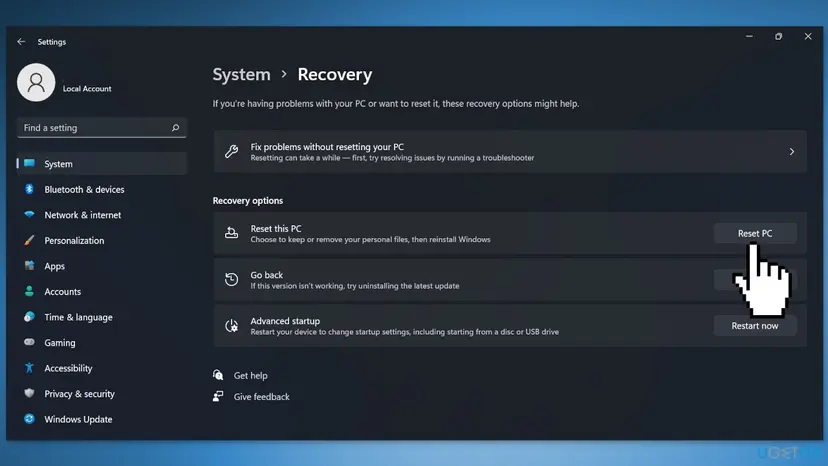
- Go to Settings, and choose System
- Go to the Recovery tab and click Reset PC
- Follow the on-screen instructions to finish the process
You might also be interested in these topics:
Did this fix work?
One click, no account. It tells the next reader which guides are worth their time.
Questions and experiences: fix "You'll need a new app to open this windowsdefender" error in Windows
Still broken, or found a fix we did not cover? Ask here: members and our editors answer. Reading is open; writing needs a free account.
…