
How to fix Windows activation error 0x8007232B?

Prefer to fix it yourself? The manual steps follow.
- 8methods
- 5 to 15 minutes on a home PC, longer when an IT team must change DNS or the KMS host
- Easy on a home PC, Advanced for the KMS host steps
Applies to Windows 11 and Windows 10 Pro, Education and Enterprise with a KMS client key, and Windows Server KMS clients
8 methods in this guide
Hello. I tried to activate Windows on my PC, but I receive error 0x8007232B. What should I do?
Error 0x8007232B, "DNS name does not exist", means Windows is set up for company activation through a Key Management Service (KMS) host and cannot find one. On a home PC that almost always means the wrong key or edition is installed. Run slmgr /dli first to see which licence Windows holds.
0x8007232B means Windows is trying to activate through a company KMS host and cannot find it in DNS. Run slmgr /dli in Command Prompt as administrator (Fix 1). On a home PC, replace the key with your own product key for the same edition, or restore your digital licence with the Activation troubleshooter (Fix 2 and 3). On a work PC, connect to the work network or VPN and try again (Fix 4).
| Error | 0x8007232B: "DNS name does not exist." Windows cannot find a KMS host to activate against. |
|---|---|
| Where it appears | On the Activation page, Settings > System > Activation (Windows 10: Settings > Update & Security > Activation), or in a Windows Script Host box after slmgr /ato. |
| Main cause | A KMS client (volume) key is installed, but no KMS host can be reached: a home PC with an Enterprise or volume install, or a work PC off the work network. |
| Fastest fix | Home PC: enter your own product key for the same edition (Fix 2). Work PC: connect to the work network or VPN (Fix 4). |
| Also written as | 0x8007232b, 8007232b, 0x800723b (a common typo), "Error code: 0x8007232B", "Fehlercode 0x8007232B", "code erreur 0x8007232B" and hr=0x8007232B in the Event Viewer log. |
| Affects | Windows 11, Windows 10 and Windows Server, physical PCs, virtual machines and Azure VMs. Windows 10 left support on 14 October 2025, but its activation works the same way. |
| Microsoft's status | Not a bug. Microsoft lists it for an Enterprise key used on Home or Pro, and for a work device that is not connected to the workplace network. |
| What does not help | System file repair, Windows Update or a reinstall with the same media. The key and the network decide this error. |
| Time to fix | About 5 minutes with your own key. An hour or more when an IT team must fix DNS records or firewall rules. |
Facts checked on 15 October 2026. Steps written for Windows 11 (25H2 and 26H2) and Windows 10 22H2.
What Windows activation error 0x8007232B means
Microsoft's IT troubleshooting page names the error "0x8007232B (DNS name does not exist)" and says it occurs when you try to activate Windows by using Key Management Services (KMS). It typically means the KMS client cannot locate a valid KMS host through the automatic discovery process.
KMS is how companies, schools and cloud providers activate many PCs at once. The PC holds a public KMS client setup key and asks DNS for a _vlmcs service record that points to the organisation's KMS host on port 1688. When DNS has no such record, the activation stops with this code. A home network never has one, so a home PC with a KMS client key always fails this way.
| Where you see it | What you see | What it tells you |
|---|---|---|
| Settings > System > Activation (Windows 10: Settings > Update & Security > Activation) | Windows is not activated and Error code: 0x8007232B | Windows tried KMS activation and found no host. |
A Windows Script Host box after slmgr /ato | Error: 0x8007232B DNS name does not exist. | The same failure, with Microsoft's full wording. |
| Event Viewer, Application log | License Activation (slui.exe) failed with the following error code: hr=0x8007232B | The background activation attempt failed with the same code. |
| A German, French or other language Windows | Fehlercode 0x8007232B, code erreur 0x8007232B | The same error. The code is identical in every language. |
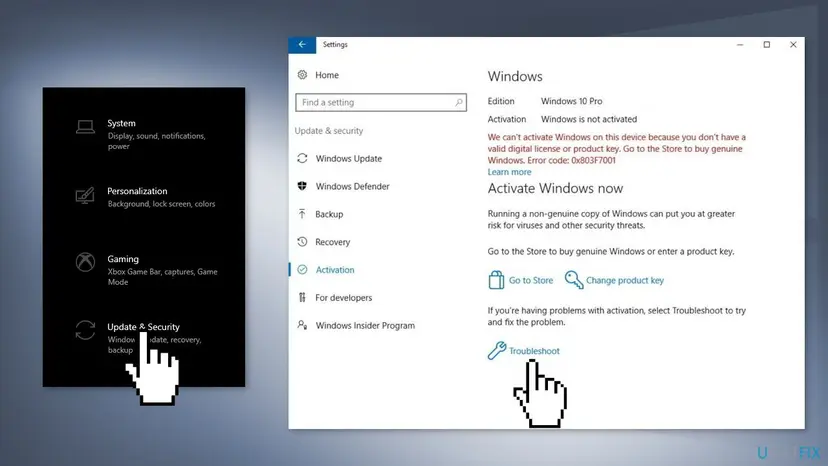
Windows bought in a box, from the Microsoft Store or preinstalled on a new PC activates online with Microsoft, not through KMS. If a home PC shows 0x8007232B, the key now in Windows is a volume key, not the one you bought. Fix 1 shows it in one command.
Why error 0x8007232B appears, from most to least common
The code is about where the PC looks for activation, not about damaged files. Find your row and go to its fix.
| Cause | How often | How to tell | Fix |
|---|---|---|---|
| Windows was installed from Enterprise or volume media, or an Enterprise key was entered on Home or Pro. | Most often on home PCs | slmgr /dli shows VOLUME_KMSCLIENT, and Settings > System > About may show Enterprise or Education. | Fix 2, Fix 3 |
| A work or school PC is used at home without the company network or VPN. | Often | The PC was set up by an IT team and activated before. | Fix 4 |
| A KMS client key was left by a company image, a second-hand PC or an unofficial activator tool. | Sometimes | The PC came from a refurbisher, or a free activation tool was used on it once. | Fix 2, Fix 3 |
| The client points to a wrong KMS host name, or a firewall blocks DNS or port 1688. | In companies | Some PCs activate and others do not, or one PC was set by hand. | Fix 5 |
| The KMS host does not publish its SRV record, or the DNS server cannot reach it. | In companies | Every new PC fails, and nslookup finds no _vlmcs._tcp record. | Fix 6 |
| There is no KMS host at all, for example on downloaded volume media. | In small organisations | Nobody runs a KMS host, but the PCs hold KMS client keys. | Fix 7 |
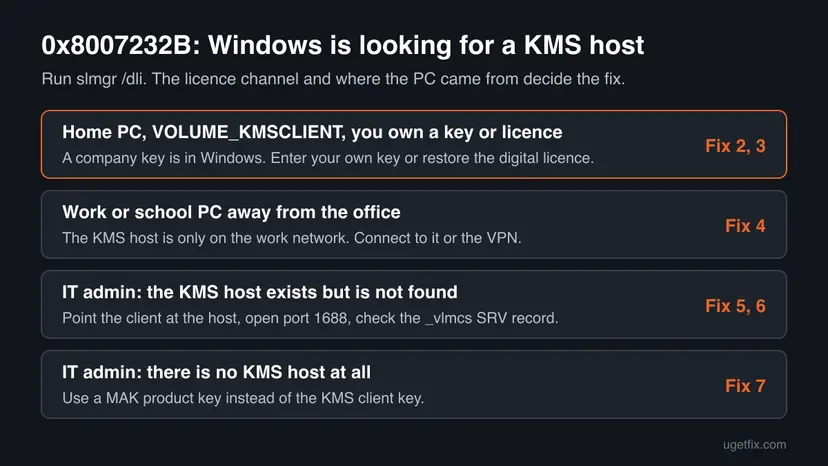
Older guides said the code means the KMS server is down. That is only one of the company causes. On a home PC there is no KMS server to be down, and the fix is a key that activates online.
How to fix Windows activation error 0x8007232B
Fix 1 shows which licence Windows holds, in one command. Fixes 2 and 3 are for home PCs. Fix 4 is for work and school PCs. Fixes 5 to 7 are for the IT admin who runs the KMS host, and follow Microsoft's own order. Fix 8 is for a genuine purchase that still fails. Repair tools do not change the key or DNS, so they are left out.
| What you see or have | Start with |
|---|---|
| You do not know which key Windows holds. | Fix 1 |
| Home PC and you have a product key: a box card, a Store email or a COA sticker. | Fix 2 |
| Home PC, Windows was activated before, and you have no key to type. | Fix 3 |
| A work or school PC, used at home or on the road. | Fix 4 |
| IT admin: the KMS host exists, but some clients cannot find it. | Fix 5, then Fix 6 |
| IT admin: there is no KMS host in your organisation. | Fix 7 |
| The purchase is genuine and every fix above failed. | Fix 8 |
Fix 1. Check which licence Windows holds with slmgr /dli
2 minutesNo riskEveryone, before anything else. It takes one minute and tells you which fix is yours.
0x8007232B appears only when Windows tries KMS activation, so the licence channel shows at once whether a KMS client key is in place. The edition in the same box shows whether an Enterprise install is the reason.
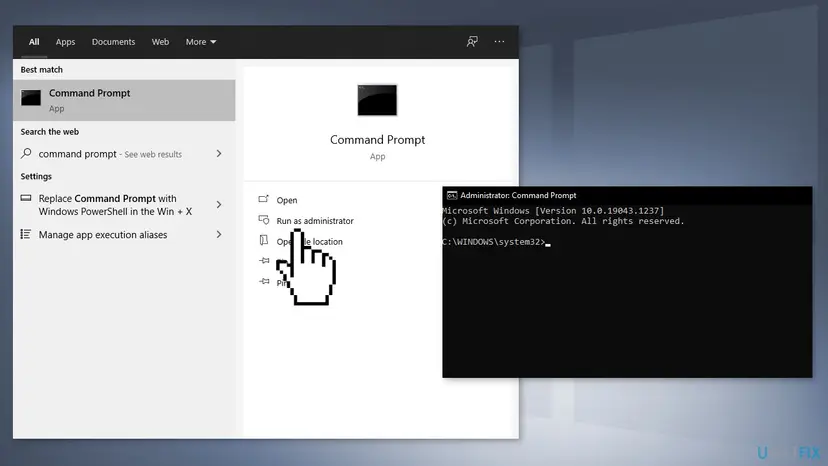
- Open Start, type cmd, right-click Command Prompt and select Run as administrator.
- Select Yes in the User Account Control window.
- Type
slmgr /dliand press Enter. - Wait for the Windows Script Host box and read the Name and Description lines.
- Select OK to close the box.
| The Description line contains | What it means | Go to |
|---|---|---|
| VOLUME_KMSCLIENT channel | A KMS client key is installed. Windows looks for a KMS host, which is what this error is about. | Home PC: Fix 2 or 3. Work PC: Fix 4. IT admin: Fix 5 |
| RETAIL channel or OEM channel | Your own licence is installed. Read the code on the Activation page again: it may be another error. | Fix 3, then Fix 8 |
| VOLUME_MAK channel | A volume key that activates online. It does not use KMS. | Run slmgr /ato and read the new code |
If the Name line says Enterprise or Education and you bought Home or Pro, the install media was the wrong edition. Your own key will not fit until the edition matches.
It worked if: The Windows Script Host box shows the edition, the licence channel and the last five characters of the key.
If not: If slmgr gives an error instead of the box, check that Command Prompt was opened as administrator and run it again.
Fix 2. Replace the KMS client key with your own product key for the same edition
3 to 5 minutesNo riskHome PC with VOLUME_KMSCLIENT in Fix 1, and you have a genuine key: a box card, a Store email or a COA sticker on a PC that came with Windows.
Microsoft's page for this code says to enter a product key that matches the edition of Windows on your device. A retail or OEM key overwrites the KMS client key, and Windows then activates online with Microsoft instead of looking for a KMS host.
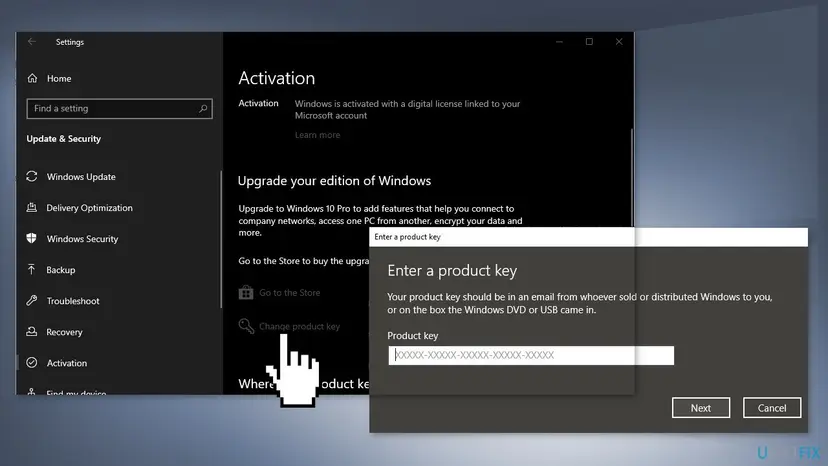
- Open Settings > System > Activation (Windows 10: Settings > Update & Security > Activation).
- Select Change product key. Windows may ask for an administrator password.
- Type your 25-character key and select Next.
- Select Activate and wait for the page to update.
- Run
slmgr /dliagain: the channel should now say RETAIL or OEM.
From Command Prompt as administrator, the same takes two commands and gives a clearer message when it fails.
Install your key and activate online
slmgr /ipk XXXXX-XXXXX-XXXXX-XXXXX-XXXXX
slmgr /atoMicrosoft names an Enterprise key used on Windows 11 Home or Pro as a cause of this code. The reverse also fails: a Home or Pro key does not activate an Enterprise install. If Fix 1 showed Enterprise or Education and you own Home or Pro, reinstall Windows from Microsoft's own media and choose your edition.
It worked if: The Activation page says Windows is activated, and slmgr /dli shows RETAIL or OEM.
If not: If you have no key to type, go to Fix 3. If your key is refused with another code, look that code up, for example 0xC004F215.
Fix 3. Restore your digital licence with the Activation troubleshooter
5 to 10 minutesNo riskHome PC that was activated before, from a free upgrade, a Microsoft Store purchase or a preinstalled licence, and you have no key to type.
A digital licence is tied to the PC's hardware and often to your Microsoft account. While a KMS client key is installed, Windows keeps looking for a KMS host instead. The troubleshooter looks up the licence for this device and can put it back.
- Check that the PC is online, because activation needs a working connection: How to check your internet connection in Windows
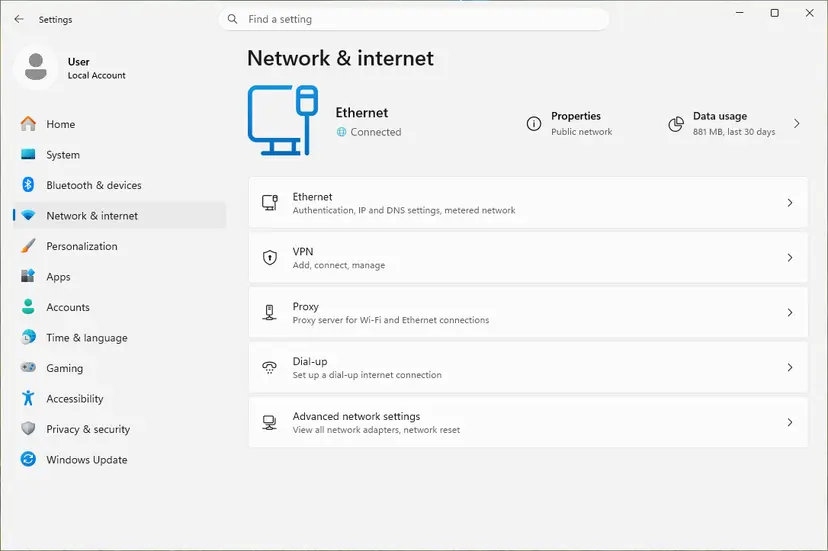
- On Windows 11, Microsoft's first advice is the automated Windows Activation troubleshooter in the Get Help app. You can also open Settings > System > Activation and select Troubleshoot.
- On Windows 10, open Settings > Update & Security > Activation and select Troubleshoot.
- If it offers to sign in, use the Microsoft account you used on this PC before.
- If it finds the licence, follow its prompt to activate.
A Pro digital licence does not activate an Enterprise install. If Fix 1 showed Enterprise, the troubleshooter cannot help until Windows is reinstalled as the edition you own.
It worked if: The Activation page says Windows is activated with a digital license or linked to your Microsoft account.
If not: If the troubleshooter finds no licence, use the key from your order (Fix 2) or contact Microsoft with the purchase details (Fix 8).
Fix 4. Work or school PC: connect to the work network or VPN, then activate
5 minutesNo riskThe PC belongs to an employer or school, shows VOLUME_KMSCLIENT, and is used at home or on the road.
Microsoft says this error appears when you try to activate a work device that is not connected to your workplace's network. The KMS host and its DNS record live inside that network, so the PC can find them only from there or through the company VPN.
- Connect the PC to the office network, or start the company VPN.
- Open Command Prompt as administrator (Fix 1).
- Type
slmgr /atoand press Enter. - If the same code comes back, take a screenshot and send it to your IT team with the PC name from Settings > System > About.
Try activation again once you are on the work network
slmgr /atoA KMS client must reach the host again to renew its activation, so a work laptop that stays off the company network for a long time can show this error later. Connect to the VPN now and then.
Microsoft adds that if you are on the work network and still see the error, the network settings may need a change, and your organisation's support person should check them. If your organisation has no support person, Microsoft says you may need to enter your product key again (Fix 2).
It worked if: slmgr /ato reports that the product activated successfully, and the Activation page says Windows is activated.
If not: If you are the IT admin and the error remains on the work network, go to Fix 5.
Fix 5. IT admin: point the client to the KMS host and open port 1688
10 minutesLow riskYou run the KMS host. Some clients activate and others show 0x8007232B, or a client was once set to a host name by hand.
Microsoft lists a wrong or invalid KMS host name and firewall rules that block DNS as common causes. Clearing the old setting and naming the host directly skips the DNS search, and a port test shows whether traffic gets through.
- On the client, open Command Prompt as administrator.
- Run
cscript c:\windows\system32\slmgr.vbs /dlvand check that a correct KMS client setup key for this edition is installed. - Run
cscript c:\windows\system32\slmgr.vbs /ckmsto clear any old KMS host setting. - Run
cscript c:\windows\system32\slmgr.vbs /skmswith your KMS host's full name and port, as below. - Run
cscript c:\windows\system32\slmgr.vbs /atoto activate. - If it still fails, test the port from the client with PsPing from Microsoft Sysinternals, and allow TCP and UDP port 1688 in every firewall between client and host, Windows Firewall included.
Clear the old host, set the right one and activate
cscript c:\windows\system32\slmgr.vbs /ckms
cscript c:\windows\system32\slmgr.vbs /skms kms01.example.local:1688
cscript c:\windows\system32\slmgr.vbs /ato
psping <KMS host IP>:1688For an Azure VM using the Azure KMS service, Microsoft gives azkms.core.windows.net as the host and 1688 as the port. Network security groups must allow DNS on port 53 between the VM and its DNS server.
It worked if: slmgr /ato reports success. To go back to automatic discovery later, run slmgr /ckms once DNS is fixed.
If not: If naming the host works but automatic discovery does not, the DNS record is the problem: Fix 6. If PsPing fails, a firewall is still blocking port 1688.
Fix 6. IT admin: check that the KMS host publishes its _vlmcs SRV record in DNS
15 to 30 minutesRead the warningEvery new client fails with 0x8007232B, and naming the host by hand in Fix 5 works.
Microsoft's cause for this error is that the KMS client cannot find the SRV resource records for the KMS host in DNS. A KMS host registers that record every 24 hours unless DNS publishing is turned off or the client's DNS server cannot see it.
- On a client, run
nslookup -type=all _vlmcs._tcp>kms.txtand open kms.txt. - A working record looks like
_vlmcs._tcp.contoso.com SRV service location, with port = 1688 and the host name. No such entry means DNS has no record. - On the KMS host, run
ipconfig /alland check that every DNS Servers address is correct. - Back up the registry first: Back up the registry before editing it
- On the KMS host, open regedit and go to
HKEY_LOCAL_MACHINE\SOFTWARE\Microsoft\Windows NT\CurrentVersion\SoftwareProtectionPlatform. - Check DisableDnsPublishing.
0or missing means the host publishes the record every 24 hours;1means it does not. - If you change anything, restart the KMS host, run
ipconfig /flushdns, then runslmgr /atoon the client.
Look for the KMS record from a client
nslookup -type=all _vlmcs._tcp>kms.txt
notepad kms.txtA wrong value in the registry can break activation for every client. Export the key before you edit it. If your DNS does not accept dynamic updates, Microsoft's advice is to create the SRV record by hand: service _VLMCS, protocol _TCP, port 1688 and the host's full name.
It worked if: nslookup returns a _vlmcs._tcp record with port 1688, and clients activate without a host set by hand.
If not: If the record exists but some clients cannot see it, their DNS server has no forwarding or recursion path to the zone that holds it. Fix that, or use Fix 5 on those clients.
Fix 7. IT admin with no KMS host: activate with a MAK key instead
5 minutes per PCNo riskYour organisation installed volume media but runs no KMS host and cannot use the Azure KMS service.
Microsoft's first step for this error is to make sure a KMS host exists. Its alternative, when one cannot be installed, is a Multiple Activation Key (MAK), which activates each PC online with Microsoft and needs no KMS host.
- Get the MAK for the right edition from your organisation's volume licensing account.
- Open Command Prompt as administrator on the PC.
- Install the MAK with
slmgr /ipk, as below. - Activate with
cscript c:\windows\system32\slmgr.vbs /ato.
Install the MAK and activate
slmgr /ipk XXXXX-XXXXX-XXXXX-XXXXX-XXXXX
cscript c:\windows\system32\slmgr.vbs /atoEach PC uses one activation of the MAK. When the count runs out, Windows shows another error, explained in our guide to Windows activation error 0xC004C020. For a large fleet, setting up a KMS host is Microsoft's other option.
It worked if: slmgr /ato reports success, and slmgr /dli shows VOLUME_MAK and License Status: Licensed.
If not: If the MAK is refused, check that it matches the installed edition, then contact the Microsoft Licensing Activation Centers.
Fix 8. Contact Microsoft support with proof of a genuine purchase
15 to 30 minutesNo riskYou bought Windows from Microsoft or an authorised retailer, and Fixes 2 and 3 did not activate it.
Microsoft's IT page ends with this step when every check fails, and its home page sends codes it cannot solve to customer support. Support can look up a purchase and the state of a key, which nothing on the PC can do.
- Collect the proof: the order number or email, the account used to buy, and a photo of any key card.
- Take a screenshot of the Activation page and of the
slmgr /dlibox. - Check the PC's date, time and time zone: How to fix the date and time in Windows
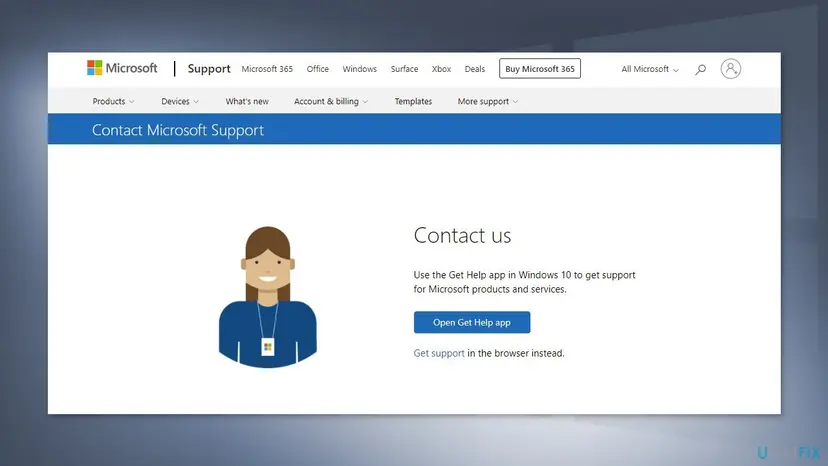
- Open support.microsoft.com/contactus in a browser and choose Windows activation.
- Say in one message that the error is 0x8007232B and which channel
slmgr /dlishowed.
It worked if: Support activates the licence you bought, or tells you which key to use.
If not: If support says your key is a volume key that is not yours, ask the seller for a refund and buy a genuine licence.
If error 0x8007232B is still there
When none of the fixes worked, collect these facts before you ask your IT team or Microsoft. They show at once whether the problem is the key, the network or DNS.
| What to check | Where | What it tells you |
|---|---|---|
| Which licence Windows uses | slmgr /dli in Command Prompt as administrator | VOLUME_KMSCLIENT means Windows still looks for a KMS host. |
| Full licence details and the KMS host in use | slmgr /dlv | The key, the KMS host name the client tried, and the activation interval. |
| The installed edition | Settings > System > About | Enterprise or Education on a home PC points to the wrong install media. |
| The background activation attempts | Event Viewer > Windows Logs > Application | Entries with hr=0x8007232B show when Windows tried and failed in the background. |
| The DNS record | nslookup -type=all _vlmcs._tcp | No record means clients cannot find the host by themselves. |
System file checks, Windows Update and the phone activation window do not remove a KMS client key or create a DNS record. They are left out for that reason. We could not confirm the exact Event Viewer event ID for the slui.exe message, so look for the text and the code.
How to avoid error 0x8007232B next time
On a home PC, the error starts with volume media or a volume key that should never have been there. On a company network, it starts with DNS or a firewall.
- Install Windows from Microsoft's own media and pick the edition your licence is for.
- Link your digital licence to your Microsoft account, so a clean install activates by itself.
- Keep the order email or key card, so you can enter the key again after a reinstall.
- IT admins: keep DNS publishing on for the KMS host and allow port 1688 between clients and host.
- Use a company or school install image on a personal PC.
- Type a generic or KMS client key you found online into a home PC.
- Run activator tools that promise free activation: they set KMS client keys and change system files.
- Leave a work laptop off the VPN for months.
Frequently asked questions
What does error code 0x8007232B mean?
It means Windows tried to activate through a Key Management Service (KMS) host and could not find one. Microsoft's message is "DNS name does not exist." The PC asks DNS for the KMS host's service record and gets no answer. Nothing on the PC is damaged. On a home PC it means a KMS client key or an Enterprise edition is installed; on a work PC it means the KMS host cannot be reached.
How do I fix 0x8007232B on Windows 11?
Run slmgr /dli in Command Prompt as administrator. If it shows VOLUME_KMSCLIENT on a home PC, open Settings > System > Activation > Change product key and enter your own key for the same edition, or run the Activation troubleshooter in the Get Help app to restore your digital licence. On a work PC, connect to the work network or VPN and run slmgr /ato. These are Fix 1 to Fix 4.
Is 0x8007232B different on Windows 10?
No. The code, its meaning and the fixes are the same on Windows 10 22H2. Only the menu path differs: Settings > Update & Security > Activation instead of Settings > System > Activation. Windows 10 left support on 14 October 2025, so it gets no more security fixes, but activation with a valid key still works the same way.
Why do I get 0x8007232B after a clean install?
Most often because the install media was an Enterprise or volume edition, or no key was asked for during setup and a KMS client key was used instead. Microsoft names an Enterprise key on Windows 11 Home or Pro as a cause of this code. Check the edition in Settings > System > About. If it is not the one you bought, reinstall from Microsoft's own media, pick your edition, and activate with your key.
What is a KMS host and do I need one?
A KMS host is a server inside a company, school or cloud network that activates many Windows PCs for that organisation. Clients find it through a DNS record on port 1688. A home user never needs one and cannot use one legally without a volume licence. If your PC asks for a KMS host, it needs your own retail or OEM key or digital licence instead.
What does "License Activation (slui.exe) failed with the following error code: hr=0x8007232B" mean?
It is the same error written to the Application log in Event Viewer. slui.exe is the Windows activation client, and it tried to activate in the background and could not find a KMS host. The fixes are the same as for the message on the Activation page. We could not confirm the exact event ID from Microsoft's documentation, so search the log for the text and the code.
Can I use a generic or default product key to fix 0x8007232B?
No. Microsoft's public KMS client setup keys only activate against a KMS host, so on a home PC they cause this very error. Older guides suggested a default key, and this page no longer does. Use the key you bought or your digital licence, as in Fix 2 and 3.
I used a free activator before and now see 0x8007232B. What now?
Activator tools usually install a KMS client key and point Windows to an unofficial host. When that host is gone or blocked, Windows shows this error. Such tools change system files and run with full rights, so this page does not link to any. Remove the tool, run a full Microsoft Defender scan, then enter a genuine key or buy a licence from Settings > System > Activation.
Is 0x8007232B the same as 0xC004F074?
They are related. Microsoft lists 0x8007232B together with 0xC004F074, 0xC004F038 and 0x8007007B on its activation errors page. The advice is the same for all four: a key that matches the edition, or a connection to the work network. 0x8007232B has its own meaning on Microsoft's IT page: no KMS host was found in DNS. If your screen shows 0xC004F074 instead, start with the same Fix 1 and read that code's own guide.
Some messages say "The file name, directory name, or volume label syntax is incorrect". Is that this error?
Older reports show 0x8007232B with that text, but Microsoft's current documentation gives the message as "DNS name does not exist." We could not confirm the other wording in Microsoft's pages. If the code on your screen is 0x8007232B, the meaning and the fixes on this page apply whatever text appears next to it.
Sources
- Microsoft Learn: Error 0x8007232B "DNS name does not exist" when activating Windows (learn.microsoft.com)
- Microsoft Support: Get help with Windows activation errors (support.microsoft.com)
- Microsoft Learn: Guidelines for troubleshooting DNS-related activation issues (learn.microsoft.com)
Did this fix work?
One click, no account. It tells the next reader which guides are worth their time.
Questions and experiences: fix Windows activation error 0x8007232B
Still broken, or found a fix we did not cover? Ask here: members and our editors answer. Reading is open; writing needs a free account.
…