How to fix
Microsoft Edge high CPU usage
on Windows
Resolve Microsoft Edge's high CPU usage on Windows 10/11 efficiently. Get expert-tested solutions to optimize performance and enjoy smooth browsing.


What causes How to fix Microsoft Edge high CPU usage in Windows?
- System file corruption
- Full caches
- Outdated hardware
- Multiple browser tabs open
- Confusing settings menu
Repairs Windows system files, removes malware, and restores a clean OS state — without reinstalling.
Hello. I have recently noticed that whenever I use the web on Microsoft Edge, my computer becomes slower. I have opened the Task Manager and saw that Microsoft Edge is using a lot of CPU power. Memory usage is also extremely high, which makes my overall usage of resources spike up to 80-99% at times. Please help me, how do I fix this?
The original Microsoft Edge was launched along with Windows 10 release back in 2015. While it was miles ahead of the terrible Internet Explorer, it received a mixed reception from users over the years. Microsoft was eager to get back into the browser market and did not give up, so a new, Chromium-based Edge was delivered in early 2020.
Overall, the browser was met with positive feedback from users and was praised by many outlets for its privacy-focused and lightweight nature.[ref en-2] Since the Edge is Chromium-based, it definitely feels and operates similarly to Chrome, hence many people decided to swap.[ref en-1] Unfortunately, the innovative browser does not avoid issues, as we previously talked about the confusing nature of the settings' menu and dark mode, broken notifications, and similar problems.
MS Edge's high CPU and memory usage is another issue that users have reported they have to deal with. According to users, the issue persists across various Windows versions, including the latest Windows 11. While browsers do hog quite a bit of resource, especially when many browser tabs are open, it should never be the case that it reaches maximum capacity, endless the hardware is particularly outdated.
Therefore, there must be some underlying issues related to high CPU and memory usage in Microsoft Edge. Just like with other similar problems, there could be several problems related to this, so there is obviously no single solution for everyone. In most cases, the reason for the high resource usage is related to system file corruption, full caches, and other problems.
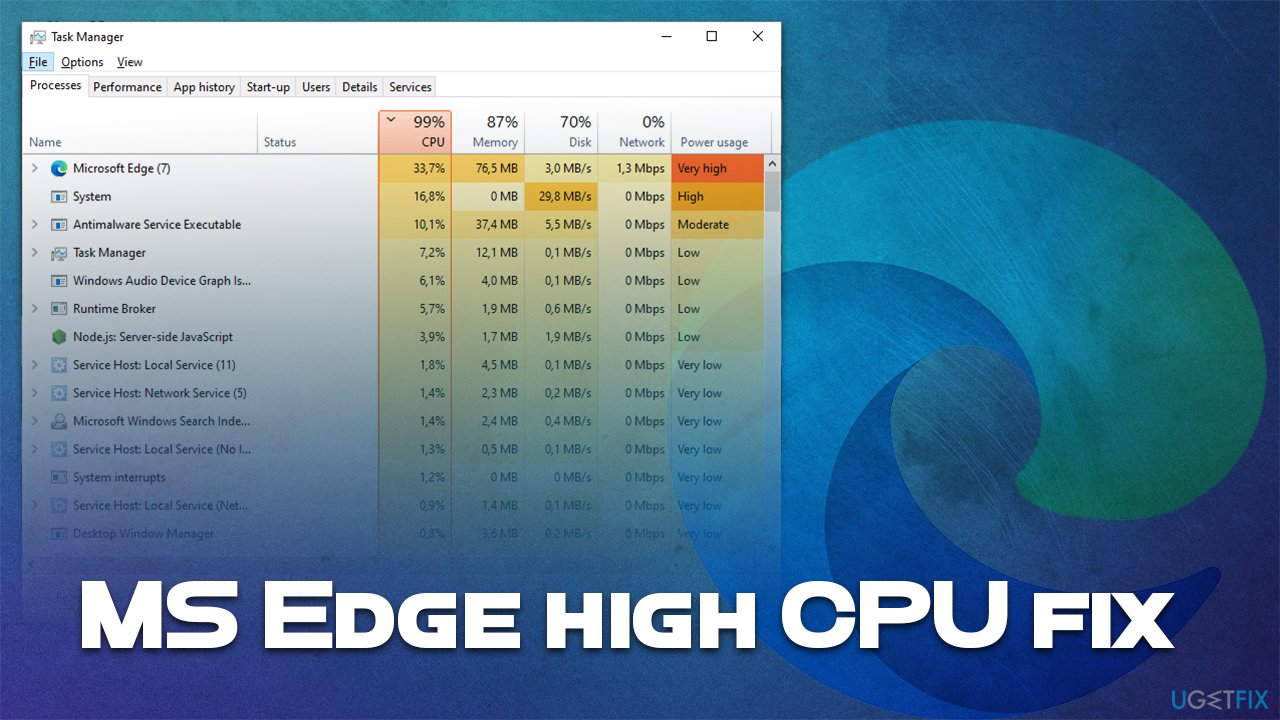
There is no doubt that high resource usage can soil the day of many users. High CPU and memory were previously observed with not only Edge but also many other built-in components, such as Windows Explorer, Antimalware Service Executable, IP Helper, and many others.
In this article, we will provide steps that should help you fix high CPU and memory usage in the Edge browser. Before you proceed, we strongly recommend you try running a scan with the [d1] PC repair app, as it can automatically fix issues related to high resource usage, BSOD crashes, registry corruption, and much more.
Fix 1. Run Windows Apps Troubleshooter
Troubleshooters are a great way to determine whether there's something wrong with a particular system element. Windows can run diagnostics for non-third-party apps and fix their issues automatically in some cases.
- Type troubleshoot in Windows search and press Enter
- On the right side of the window, click Additional troubleshooters
- Scroll down to find the Windows Store Apps entry
- Click it once and then select Run the troubleshooter
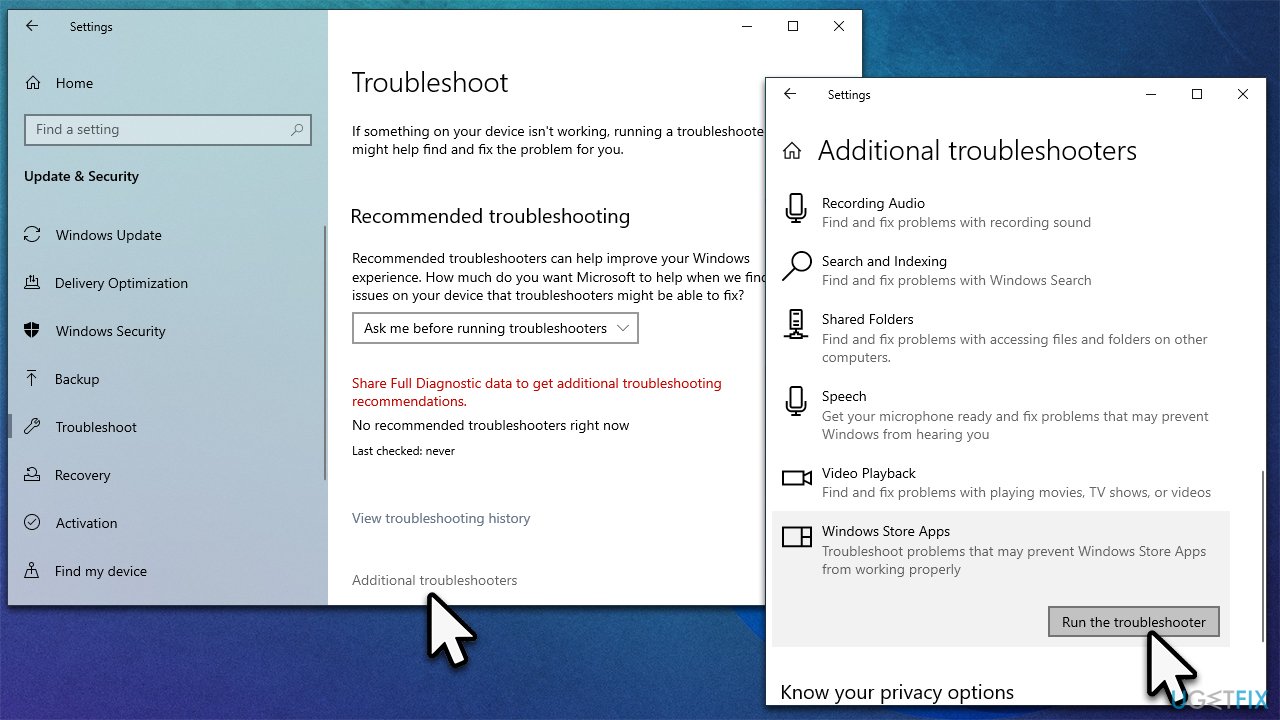
How to fix microsoft edge high cpu usage in windows run troubleshooter - Wait till the scan is finished and then apply the suggested fixes.
Fix 2. Clean browser cache
Buggy browser cache can cause numerous issues, including high CPU usage of the browser and errors such as INET_E_DOWNLOAD_FAILURE. Thus, you should clean your browser cache and see if that would change anything:
- Click on three horizontal dots (Settings) located in the top-right corner
- Select Settings
- Go to the Privacy, search, and services section
- Under Clear browsing data, pick Choose what to clear
- Under Time range, pick All time
- Select everything and pick Clear now.
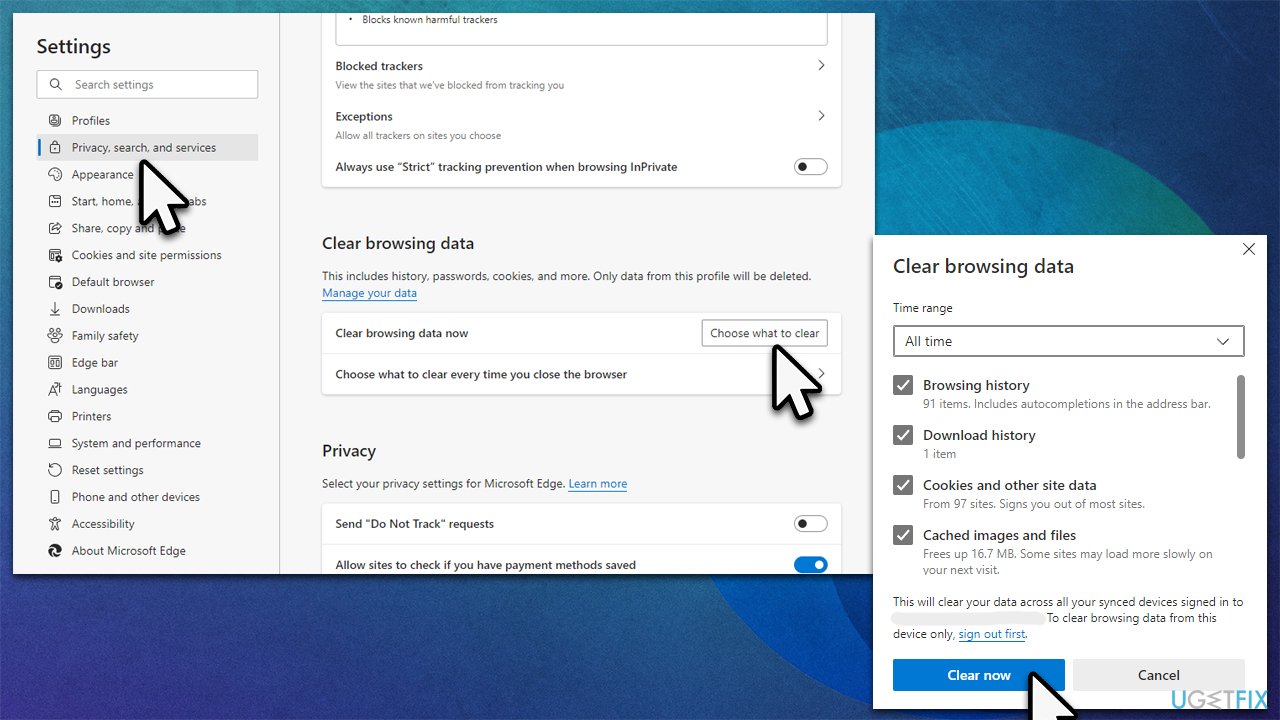
How to fix microsoft edge high cpu usage in windows clean browsing data
Fix 3. Repair the installation
You can try repairing the installation of MS Edge when trying to fix high CPU and memory usage.
- Make sure MS Edge is not running in the background
- Right-click on Start and select Apps and Features
- Scroll down to find Microsoft Edge entry
- Select it and click Modify
- In the new window, pick Repair and proceed with on-screen instructions.
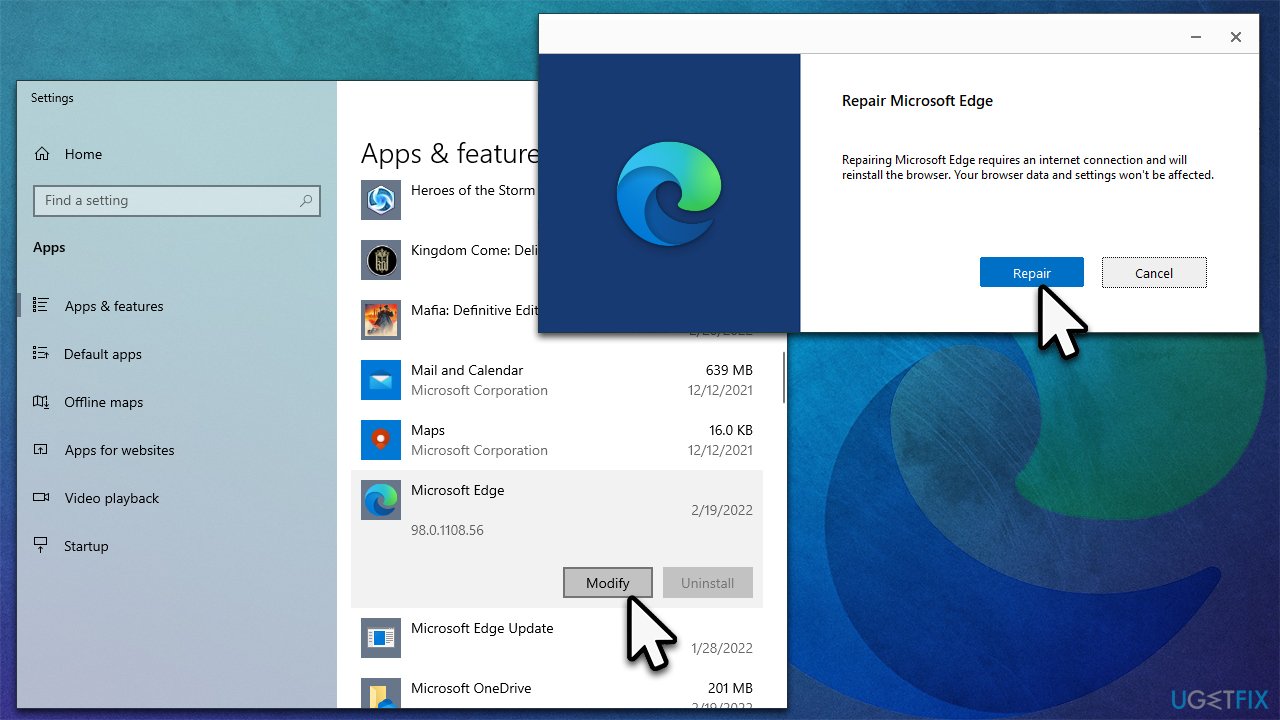
How to fix microsoft edge high cpu usage in windows repair installation
Fix 4. Run SFC
System File Checker can find and fix system integrity violations. For that, you need to call up elevated Command Prompt:
- Type cmd in Windows search and press Run as administrator
- When the User Account Control window pops up, click Yes
- Next, copy and paste the following command into Command Prompt:
sfc /scannow - Press Enter and wait for the process to complete
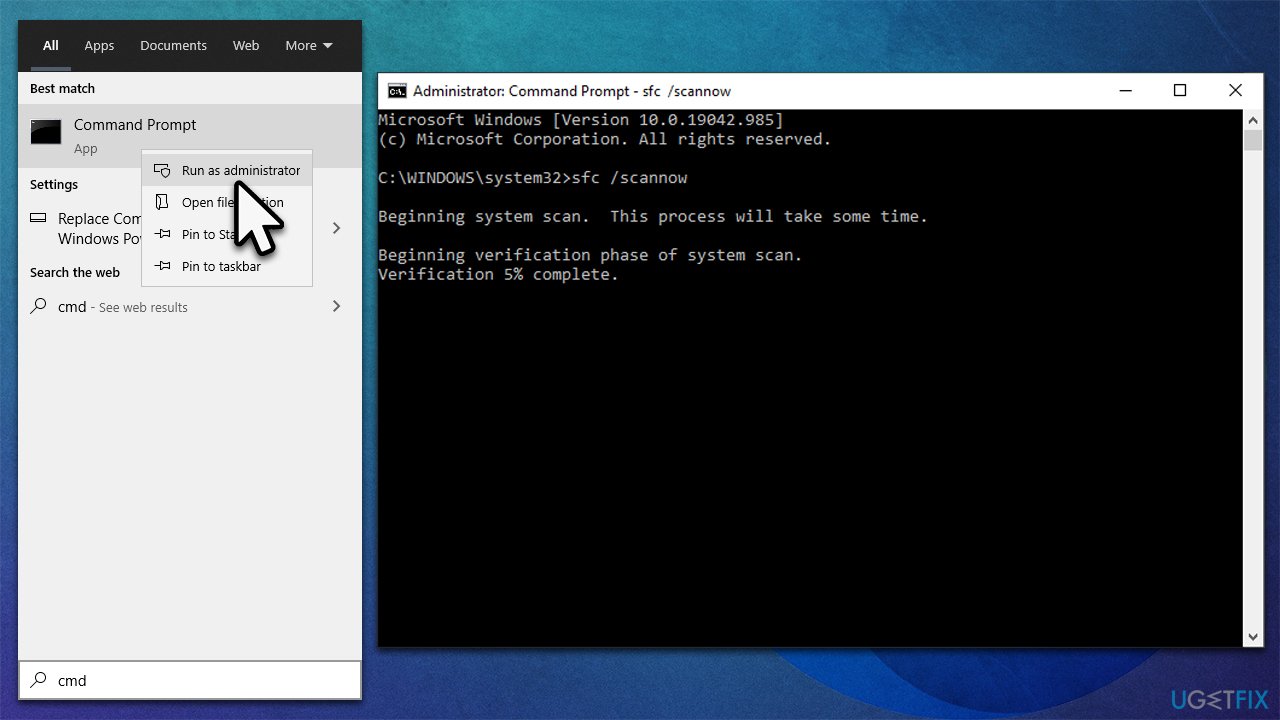
How to fix microsoft edge high cpu usage in windows run sfc - Once done, restart your system.
Fix 5. Reset Edge
You can also try testing the browser as follows:
- Click on Menu and select Settings
- On the left side, pick Reset settings
- Select Restore settings to their default values
- Confirm with Reset.
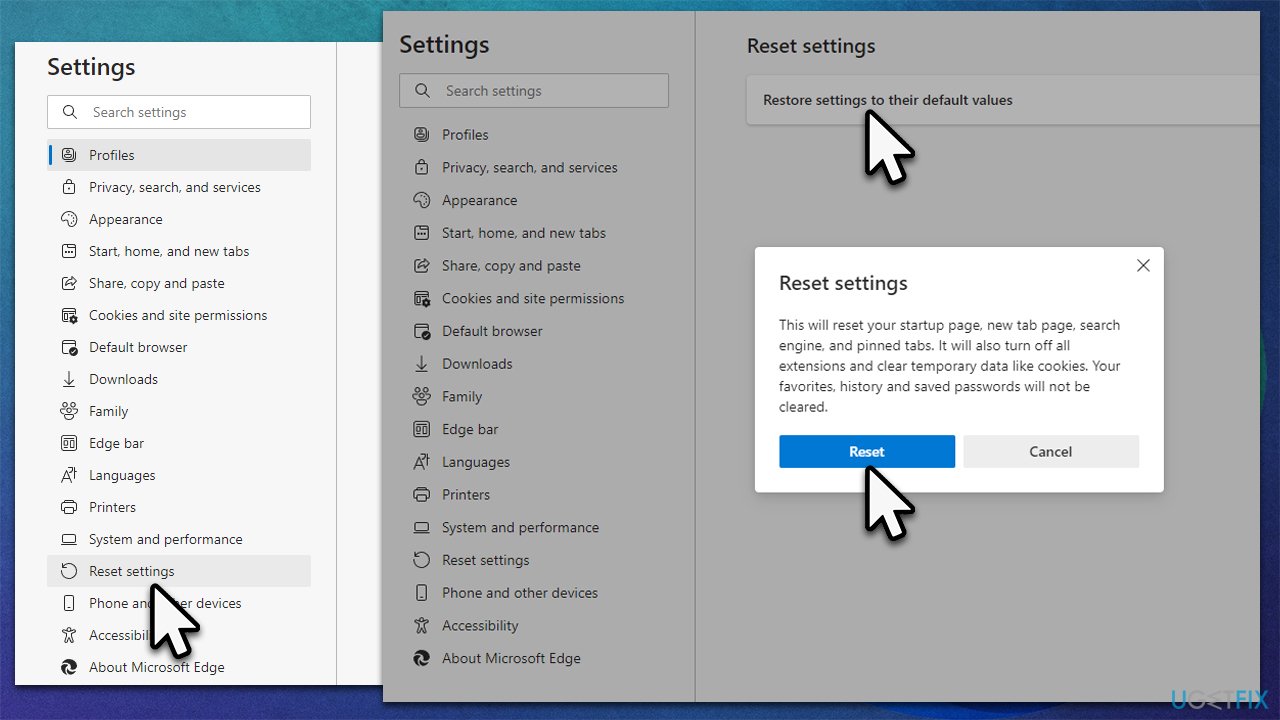
How to fix microsoft edge high cpu usage in windows reset browser
Other solutions that might help:
Bottom line
To fix high CPU and memory usage in Microsoft Edge, consider clearing your cache, checking for system file corruption, and managing your browser tabs. If these solutions do not resolve the issue, further investigation into your system's performance may be necessary.
Frequently asked questions
Common causes include too many open tabs, extensions running in the background, or a memory leak in the browser. Consider closing unnecessary tabs and disabling unused extensions to reduce CPU load.
To reset Microsoft Edge, go to Settings > Reset settings > Restore settings to their default values. This can help eliminate issues causing high CPU usage.
Yes, you can open the Task Manager in Edge by pressing Shift + Esc to see which tabs or extensions are consuming the most CPU resources.




Report an issue
What's wrong with this guide? We review every report and update or remove content.
Report received — thank you. We'll review and fix it.
You need a free account to submit a report.
Be the first to comment