
How to re-register Microsoft Store apps with PowerShell
Every Store app is registered to your user account. When that registration is damaged, the app is still on the disk but will not open or is missing from Start. Re-registering reads the app's manifest again and repairs the link without downloading anything.
- Time
- A few minutes
- Level
- Advanced
- You need
- Windows PowerShell. Use the account that has the problem.
Before you start
- Try the easier fix first: How to repair or reset an app in Windows.
- Close the app you want to re-register. A running app cannot be registered again.
- Install pending updates in Settings > Windows Update and restart the PC.
Windows 11 and 10
Steps written for Windows 11 25H2 and 26H2, Windows 10 22H2.
Open PowerShell
Select Start, type PowerShell and select Windows PowerShell. Open it the normal way, not as administrator: in an administrator window the app is registered to the administrator account instead of yours.
Find the app's package
Type the command below with a part of the app's name between the asterisks and press Enter. If the app is installed, PowerShell prints its details, including Name and InstallLocation. If nothing is printed, the app is not installed for your account: see the section below.
Get-AppxPackage -Name '*WindowsCalculator*'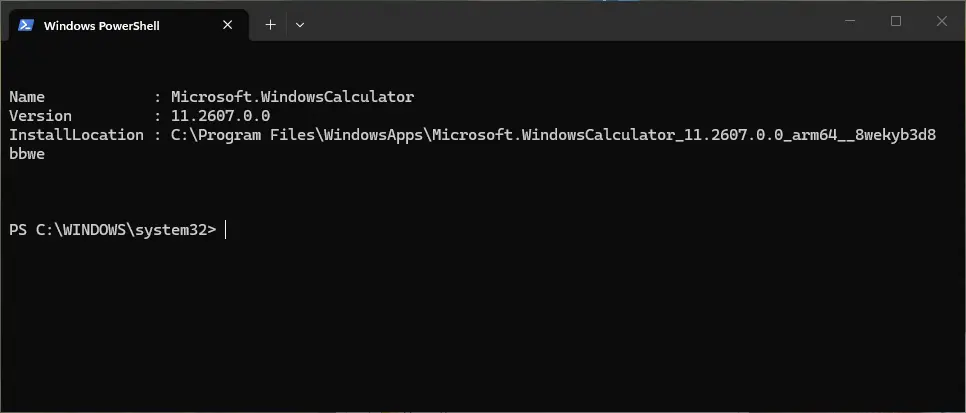
Get-AppxPackage shows the package name and where it is installed. Screenshot: Windows 11 26H2 Re-register the app
Paste the three commands below, with the same name between the asterisks, and press Enter. They read the folder the app is installed in and register its manifest again. If no red text appears, it worked.
$InstallLocation = Get-AppxPackage -Name '*WindowsCalculator*' | Select-Object -ExpandProperty InstallLocation $ManifestPath = $InstallLocation + '\Appxmanifest.xml' Add-AppxPackage -Path $ManifestPath -Register -DisableDevelopmentModeOpen the app
Close PowerShell and start the app from Start. If it still fails, restart the PC and try once more.
Re-register all apps of your account
When many apps fail at once (Start, Settings, Calculator, Photos), register every package of your account in one go. Close all apps first and run this in the same normal PowerShell window:
Get-AppxPackage | ForEach-Object { Add-AppxPackage -Path "$($_.InstallLocation)\AppxManifest.xml" -Register -DisableDevelopmentMode }
Wait until the prompt returns, then restart the PC.
Red errors that are normal
With the command for all apps, some packages always print red text. Two errors mean only that the package was left as it is:
| Error | Meaning |
|---|---|
| 0x80073D02 | The package could not be installed because resources it modifies are currently in use. The app or a part of Windows that uses it is running. Close the app and run the command again, or ignore it for apps that work. |
| 0x80073D06 | The package could not be installed because a higher version of this package is already installed. A newer copy is registered already. Ignore it. |
Other errors, for example 0x80073CF6 (the package cannot be registered) or 0x80073CF9 (install failed), point to a real problem with that package. Note the package name in the red text, repair system files with Run DISM and SFC to repair Windows system files and run the command for that one app again.
When not to do it
- The app is not on the PC. If
Get-AppxPackageprints nothing for the app, there is nothing to register. Install it from Microsoft Store, or see Reset the Microsoft Store when the Store itself is broken. - One app misbehaves. Repair or reset it first: How to repair or reset an app in Windows. Use the command for all apps only when several fail together.
- The Start menu package is missing for every user. Microsoft does not support installing the Start menu files by hand and calls the results unreliable. Go back to a working state with Undo recent changes with System Restore or Reinstall Windows without losing files.
- A work or school PC. Apps there are often managed by the organization. Ask your administrator.
How to undo it
There is nothing to undo. The commands do not download, remove or reset anything: they register again the packages that are already on the disk. Apps you removed earlier do not come back.
Used in 69 guides
How to fix 0x80070102 error when playing games on Windows?
How to fix Clock app not working in Windows?
How to fix File System Error (-2147219195) in Windows?
How to fix Microsoft Store error 0x803F800B?
How to fix Microsoft Store error 0x800700B7
How to fix error 0x80240013 in Microsoft Store (Windows Store)
How to fix Xbox app error 0x87e0000f in Windows?
How to fix Xbox app error code 0x87e00004 in Windows?
How to fix Game Bar recording error 0x82323619 in Windows?
How to fix WindowsPackageManagerServer.exe application error in Windows?
How to fix "This application requires Windows App Runtime" error in Windows?
How to fix error 0x80240004 in Microsoft Store and Windows Update
How to fix Hanging or crashing apps in Windows Store Apps troubleshooter?
How to fix Microsoft Store error 0x80048839?
How to fix missing currency in Calculator app on Windows?
How to fix Xbox app error 0x80073CF9 in Windows?
How to fix webcam error code 0xA00F4243(0xC00D3704) on Windows?
How to fix backgroundTaskHost.exe System Error in Windows?
How to fix Snipping Tool opening automatically in Windows?
How to fix "No applicable app licenses found" error in Minecraft?
How to fix File system error (-2147163901) in Windows?
How to fix State Repository Service high CPU usage in Windows?
How to fix Microsoft Store error 0x8007000A?
How to fix Microsoft Store error 0x800704C6
How to fix Microsoft Store error 0x800713AB?
Fix "This app can't open. Check the Store for more info about Realtek Audio Console"
How to fix ms-settings:personalization-background error?
How to fix "Microsoft Windows App Runtime DynamicDependency LifetimeManager" error in Windows?
How to fix Microsoft Store error 0x8D050003 in Windows
How to fix 0x87e00005 Xbox app error in Windows?
How to fix 0xA00F429F camera error in Windows?
How to fix File System error (-2144927439) in Windows?
How to fix "The group or resource is not in the correct state" error on Windows
How to fix File System Error (-2018374635) in Windows?
How to fix Microsoft Store error 0x87E00198?
How to fix "Photos can't open this file because the format is currently unsupported"?
How to fix Xbox app error 0x80131522 in Windows?
How to fix Microsoft Store error 0x80248014
How to fix Windows update error 0x80073D02?
How to fix error 0x80240037 in Microsoft Store and Windows Update
How to fix Camera app error 0xA00F4240 in Windows?
How to fix File System error (-2144926975) in Windows?
How to fix "Unable to save" Photos app error in Windows?
How to fix "Can't start your camera" error 0xA00F429E in Windows?
How to fix File System Error (-2147416359) in Windows?
How to fix Exception error code 0xc000027b in Windows?
How to fix Microsoft Store error 0x80070483?
How to fix Windows Security shows blank screen?
How to fix webcam error code 0xA00F4271 (0x80070001) on Windows?
How to fix Xbox app is stuck at "Launching Xbox App" in Windows?
How to fix MS Paint not working in Windows 11?
How to fix "The specified user does not have a valid profile" error in Windows?
How to fix AppX Deployment Service (AppXSVC) and wsappx high CPU usage?
How to fix 0x80073cfd error in Windows?
How to fix Xbox app error 0x87e50029 in Windows?
How to fix Microsoft Store error "Pardon the interruption" in Windows?
How to fix "The data area passed to a system call is too small" error in Windows?
How to fix Event ID 10010 DistributedCOM error in Windows?
How to fix File System error (-2015294522) in Windows?
How to fix StartMenuExperienceHost.exe error in Windows?
How to fix Microsoft Store error 0x80073CF1 on Windows
How to fix Teams error code 2148073494 in Windows?
How to fix Camera app error 0xA00F4293 in Windows?
How to fix Microsoft Store error 0x80073CF8 on Windows
Error code 2148073520: how to fix sign in error 2148073520 (tag 657rx) in Windows?
How to fix PhoneExperienceHost.exe error in Windows?
How to fix Microsoft Office error code 5fcl8 in Windows?
How to fix error code 0x80073CF6 in Windows 10?
How to fix "Package Failed updates, dependency or conflict validation" error in Windows?
Sources
- Microsoft Learn: Add-AppxPackage (Example 3, -Register, -DisableDevelopmentMode) (read Oct 11, 2026)
- Microsoft Learn: Start menu troubleshooting guidance (Get-AppxPackage, register from a non-elevated prompt) (read Oct 11, 2026)
- Microsoft Learn: Troubleshooting packaging, deployment, and query of Windows apps (error codes) (read Oct 11, 2026)
- Microsoft Q&A: Reinstalling and Re-registering apps (the command for all packages) (read Oct 11, 2026)